



Skip to content
View in the app

A better way to browse. Learn more.

iniBuilds Forum

A full-screen app on your home screen with push notifications, badges and more.

To install this app on iOS and iPadOS
  1. Tap the Share icon in Safari
  2. Scroll the menu and tap Add to Home Screen.
  3. Tap Add in the top-right corner.
To install this app on Android
  1. Tap the 3-dot menu (⋮) in the top-right corner of the browser.
  2. Tap Add to Home screen or Install app.
  3. Confirm by tapping Install.

richboy2307

Staff
  • Joined

  • Last visited

Everything posted by richboy2307

  1. Have you tried after the latest SU15B update? There was a fix pushed out regarding this. Thanks!
  2. Sounds like an instance of the partial WASM crash in SU15beta, as reported in the FAQ section. But in any case, thanks for your reports. We'll look into it!
  3. Hi, you can reach out to support directly at https://inibuilds.com/pages/contact (Direct support) section. However I'm afraid iniBuilds does not control the card/payment verification process so your bank/card provider would be more suited to handle this. Also please confirm you tried to purchase via the webstore, and not the iniManager? The iniManager is having some difficulties regarding checkout currently. The team is looking into this however the webstore is working fine in the meanwhile. Thanks!
  4. richboy2307 replied to kaese5128's topic in Systems
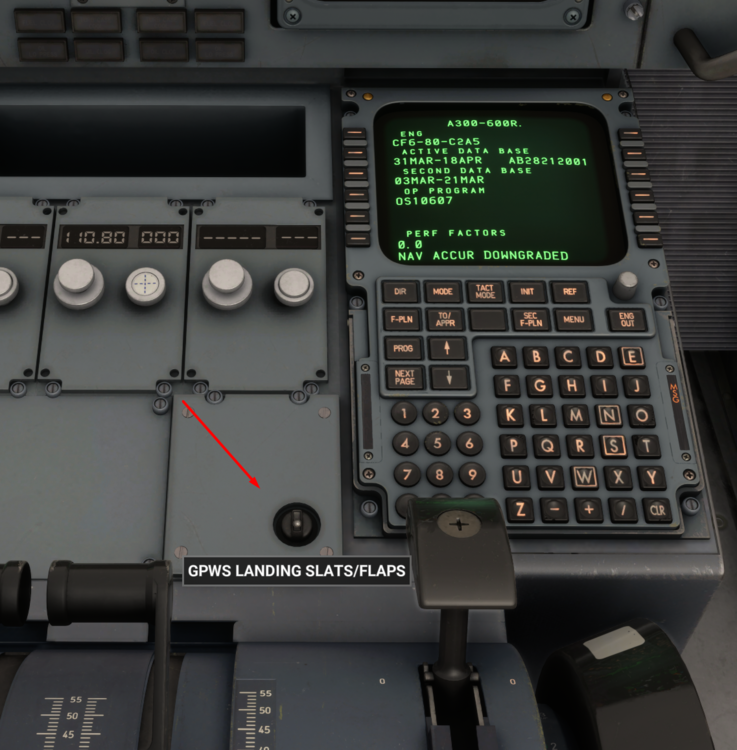
    The texture for it went missing in the latest update it seems. Flagged for a fix, however the switch is this one marked and how it should look like.
  5. Thanks, noted and reported the issue.
  6. Hi please try again in the latest update (v1.1.0) and let us know if this is still an issue. Thanks!
  7. Hi, please try again after downloading the latest 1.1.0 update released today. If that doesn't work, you could also try deleting your "work folder" to in essence reset the aircraft. Note: That will also reset any maintenance data, throttle calibration configs and custom settings for the aircraft. You can safely delete all the contents of this folder. It will recreate these files on next launch: Steam Version: %APPDATA%\Microsoft Flight Simulator\Packages\inibuilds-aircraft-a300-600 MS Store Version: %LOCALAPPDATA%\Packages\Microsoft.FlightSimulator_8wekyb3d8bbwe\LocalState\Packages\inibuilds-aircraft-a300-600
  8. Thanks, reported. 👍
  9. Wrong weights imported on EFB by autofill/sync. Reported, thanks!
  10. Hi thanks for your report. Please try again now and let us know in case it is not working. Simbrief had temporary server issues on their end. Thanks!
  11. Hmm, I've tried at all of those gates without any issues. Unable to reproduce.
  12. richboy2307 replied to Daniel's topic in Sounds
    Hi Daniel, Thanks for your feedback! We do have some sound fixes in the pipeline currently to help improve that aspect of the product. Please do let us know what you think whenever that update is out 🙂
  13. richboy2307 replied to LNOSS's topic in Systems
    Thanks, reported. In case you come across same situation again, please also attach here a screenshot, **during the wrong turn** of the following: PFD/ND MCDU FPLN page It will help to narrow down any specific issues. Thanks!
  14. richboy2307 replied to rlw9sr's topic in Other
    So using the [600RF GE Freighter] profile provided above, I was able to come up with the following simbrief OFP (attached) PANC/07L N0445F320 DCT NODLE R220 NOLTI/N0454F330 R220 NATES/N0441F340 R220 NOGAL/N0452F350 R220 NODAN/N0451F360 R220 NANAC Y810 OLDIV Y809 SUPOK SUPOKT RJAA/34L CI 15, 3334nm air distance, 31kt headwind along the way (250/36 avg wind) I am able to get perf calculations for 15/15 config, for the shortest runway (7L) even for the following conditions (see screenshot 2): max TOW (170.5T kg) max fuel (54.5T kg) no wind (irl metar PANC 260653Z 00000KT 10SM -RA FEW050 OVC065 03/M01 A2953 RMK AO2 RAB47 SLP003 P0000 T00331006) For above conditions, config 15/0 does not work, and it warns me rightfully (see screenshot 3) So you may need to try various runway & configs (different flaps, aircon OFF, anti-ice off, or force toga ON) to eventually get a valid result. Anyways, try to use the linked profiles. Should work 🙂 PANCRJAA_PDF_1711438172.pdf
  15. richboy2307 replied to rlw9sr's topic in Other
    Hi, These are the recommended profiles. I shall test out with the [600RF GE Freighter] profile and report back. Thanks!
  16. Ah ok thanks for the details. Noted, will report for further investigation! 🙏
  17. Glad to hear that. Thanks for the update! 🙏
  18. Hi, Both A300/310 modelled in the sim currently can only do basic LNAV/VNAV coupled RNAV approaches. It is also not capable of flying any RF legs. As such they're not LPV capable. That being said, IRL UPS A306 with the Honeywell EPIC avionics suite are capable of LPV approaches. So that may be possible in future builds 😉 Thanks!
  19. Hi, Can I confirm when you resumed the flight (presumable by loading a saved .flt file?) did the simulator time change to match the current time? Or was it still showing the time at which you saved the flight before exiting? Thanks!
  20. Hi, I just tested via [TOGGLE LANDING GEAR] and also [GEAR UP] / [GEAR DOWN] commands assigned to my Xbox Controller and also BravoTQ and it was working as intended. Can you please confirm you did the testing whilst in the air? By default the controls do not work when you're on the ground, as a safety mechanism to prevent gear retraction on the ground. Thanks!
  21. Hi, sorry not planned.
  22. Hi, reported. Thanks!
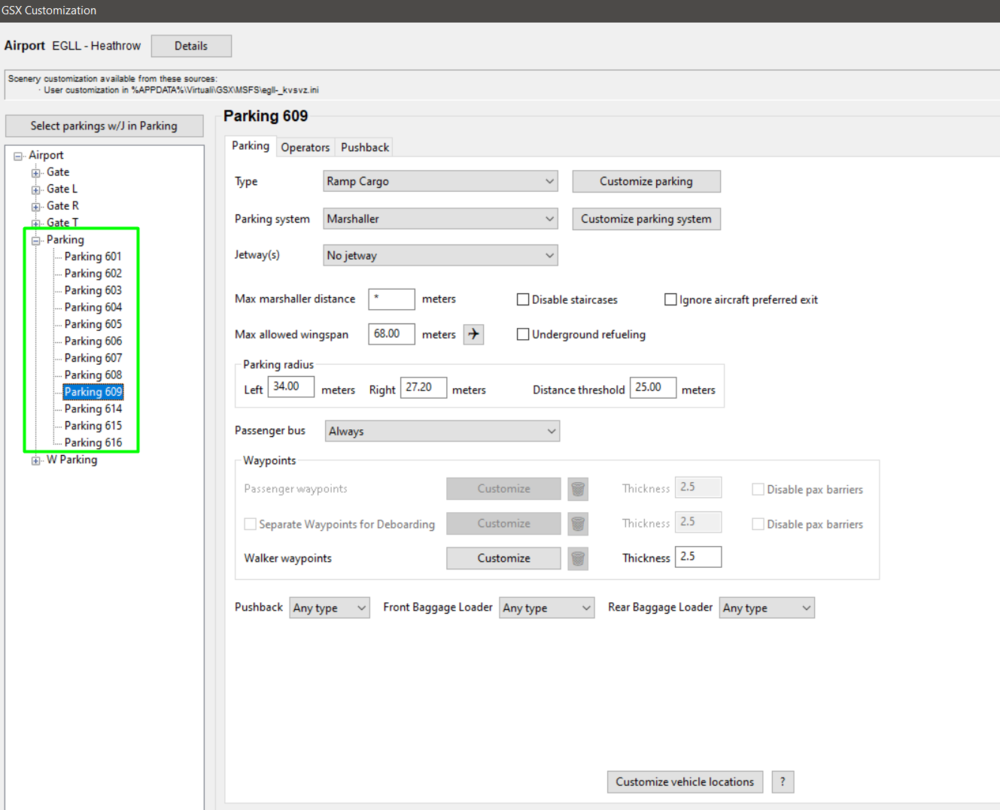
  23. Hi Was this at a specific gate or location? Are you using any GSX profile for EGLL? Also ensure no duplicate config files for EGLL [%APPDATA%\Virtuali\GSX\MSFS] folder. I tried at a few locations by selecting [Customize Airport Positions] > [Customize Parking] to enter the 3D editor, did not receive any such warnings. Tried via both LITE and normal RW GSX profiles available on iniManager. Thanks!

Account

Navigation

Configure browser push notifications

Chrome (Android)
  1. Tap the lock icon next to the address bar.
  2. Tap Permissions → Notifications.
  3. Adjust your preference.
Chrome (Desktop)
  1. Click the padlock icon in the address bar.
  2. Select Site settings.
  3. Find Notifications and adjust your preference.