




richboy2307
Staff
-
Joined
-
Last visited
Everything posted by richboy2307
-
Can I just check if you have installed the World Updates, specifically the free "World Update 3 | United Kingdom" from the in-game marketplace? Also check your content manager for any marketplace addons that may be affecting this?
-
Hi, This unfortunately is by design, as we ship custom photogrammetry ground poly which overwrites the buildings. No way to define it separately for the world map vs. when loaded in. Scenery should still work as intended. Thanks!
-
Thanks, yes this bug is logged for fix. Apologies for inconvenience!
-
Hi, The engines take time to spool up, they're not instantaneous. Typically they need to respond within 8-seconds from idle to full power, which it seems to comply with in the videos.
-
Thanks for your posts guys. It has been logged. 👍
-
Ok thanks. Could you try steps 3 & 4 specifically from this post? Also make sure to run the sim with only iniBuilds EGGW initially. Report back if you still notice these issues. At the moment I'm unable to reproduce any such terrain issues *unless* switching to offline mode. Thanks!
-
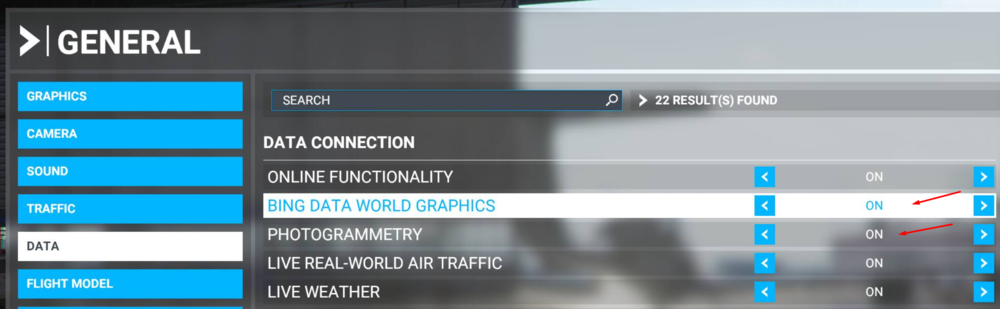
Hi, can you confirm you have BING DATA WORLD GRAPHICS and PHOTOGRAMMETRY enabled in the settings? Offline mode is not supported by this scenery as significant terrain elevation data is missing for this area with those options disabled. Thanks!
-
Some more specifics with examples (vid clips) would be useful. Thanks!
-
No there is no product manual for our sceneries. What issues are you having? You should try these steps, especially step 4 after installing.
-
Hi, Thanks for your report. Yes the team is aware of the layout.json issue and is testing a fix already. Thanks!
-
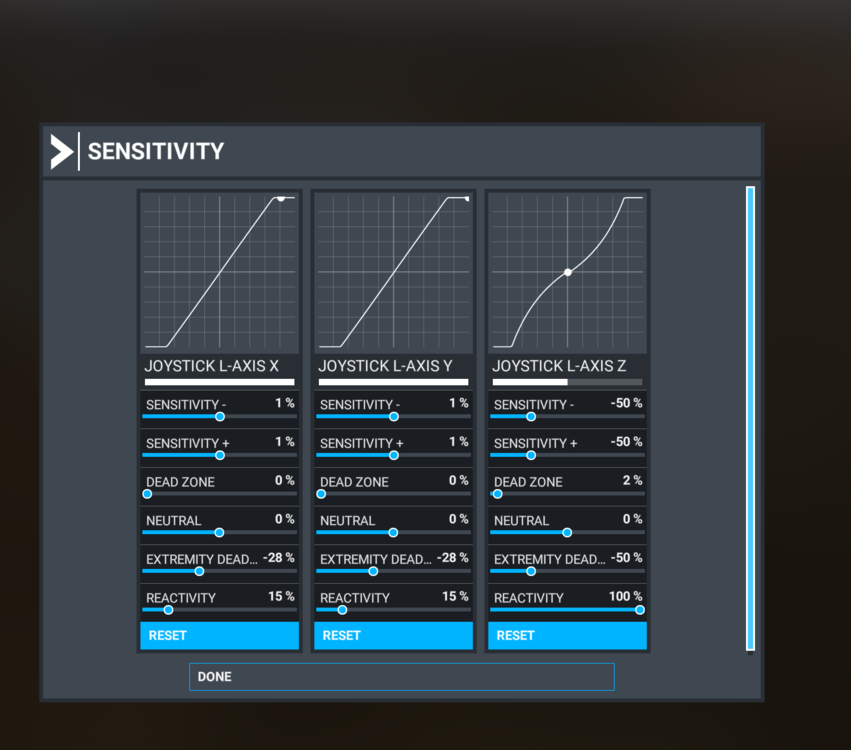
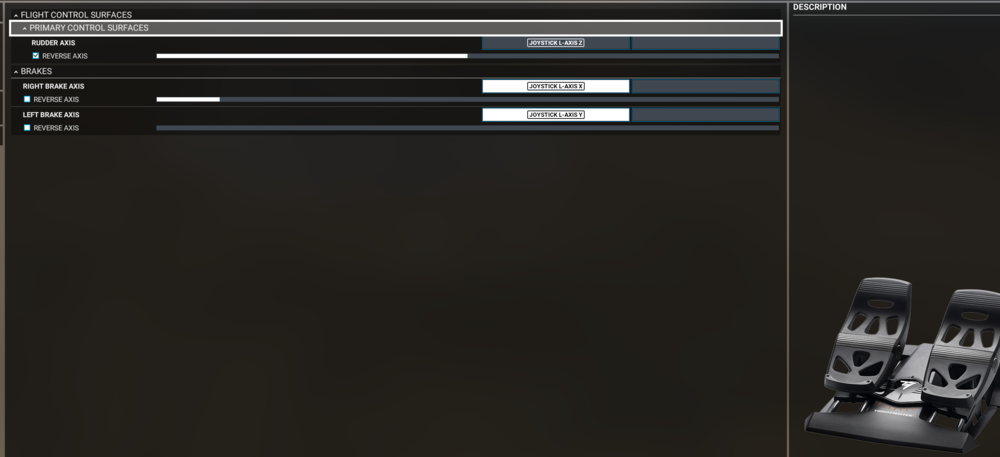
Hi, I am using TFRP as well with the A306 and do not notice any such issues. My configuration options are as follows. Can you double check that your TFRP are also set to FLIGHT mode (towards airplane), instead of DRIVE mode (as shown in the screenshot below)?
-
Thanks I'll add it to the suggestions!
-
Thanks, reported!
-
Yes thats is noted thanks.
-
Answered here, hope that helps!
-
Time acceleration is not supported currently, but something we may look into the future. Your suggestion is noted, thanks!
-
Hi, are you facing this problem on every flight/every time you load in? Please also try to empty the contents of this folder (delete the files inside, not the folder itself) and relaunch the sim. Steam version: %APPDATA%\Microsoft Flight Simulator\Packages\inibuilds-aircraft-a300-600 MS Store version: %LOCALAPPDATA%\Packages\Microsoft.FlightSimulator_8wekyb3d8bbwe\LocalState\Packages\inibuilds-aircraft-a300-600 This will reset all the generated files & config of the A300 to default. Just to ensure there wasn't some issue on the initial load where it didn't compile properly. Thanks!
-
Yes, we're looking into these WASM soft-crashes. Thanks!
-
DME readout is on the gauge left of the ND.

-
Yes we're looking into these WASM soft-crashes. Thanks!
-
Yes its logged. Thanks!
-
Thanks, we're looking in this.
-
Logged, thanks!
-
Reported, thanks!
-
Hi, are you using any tools like MSFS Addon Linker to link the plane into your community folder from some external location? If yes, please move the [inibuilds-aircraft-a300-600] folder to the community folder directly, then re-install. If not, then please ensure you are running the latest version of iniManager (v2.3.3). Uninstall the A300-600 from the iniManager, and check your community folder there is no [inibuilds-aircraft-a300-600] folder inside. Then reinstall the aircraft. Thanks!


