



Skip to content
View in the app

A better way to browse. Learn more.

iniBuilds Forum

A full-screen app on your home screen with push notifications, badges and more.

To install this app on iOS and iPadOS
  1. Tap the Share icon in Safari
  2. Scroll the menu and tap Add to Home Screen.
  3. Tap Add in the top-right corner.
To install this app on Android
  1. Tap the 3-dot menu (⋮) in the top-right corner of the browser.
  2. Tap Add to Home screen or Install app.
  3. Confirm by tapping Install.

AFR7545

Member
  • Joined

  • Last visited

  1. beg your pardon? but yes IRL it does:
  2. and also since the update the printer won't work
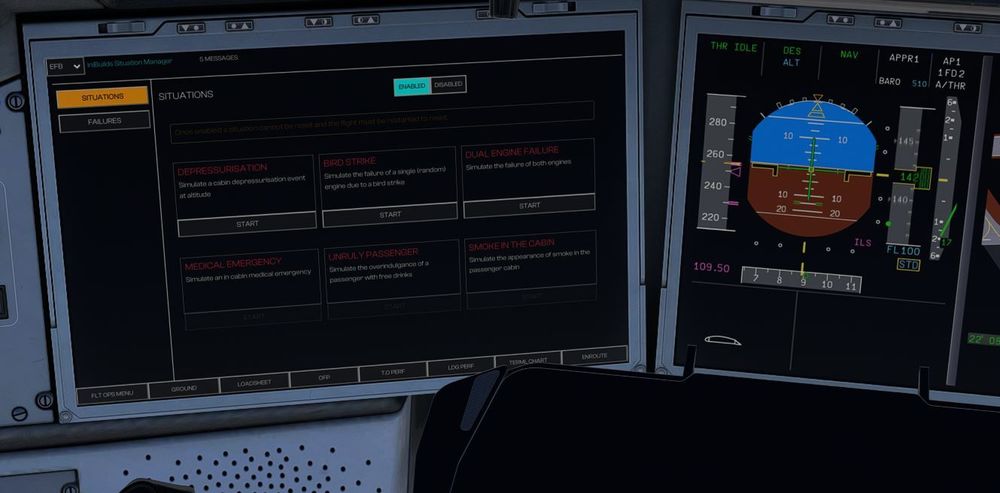
  3. Hi have juste update the aicraft and noticed that: airport mooving map when just touchdown on land doesn't turn it self on (so i have to do it myself) missing autobrake off annoucement when start to manual brake when making runway vacation concerning the immersives scenarios, i simply just can't have the passengers scenarios (look at the photo from preverious flight) for information i was in flight
  4. AFR7545 posted a topic in Systems
    Hello. i've making test flight with the updated version of the plane (with the enhanced one) but when i'm entering the flight plan on the aircraft, no airways route are valid for the plane and when i want to put all the waypoint manually, the FMGC don't want to take all the waypoint at the same time: i'm force to entered one waypoint then to validate the ambered flight plan (wich is normal after any change on the flight plan) then i can put another waypoint, instead of simply put all the waypoint and valide only one time after entered the whole route and also did the enhanced version that we have is the expected one or there is another enhanced version for latter?
  5. AFR7545 replied to Kumpelblase's topic in Systems
    EFB still don't work with me: to use it i need to use the right button of the mouse (normaly used for view) and trying to point the thinks you want to select on the EFB. for information when i use the one on the A300 it works find as it should normaly do
  6. AFR7545 replied to Kumpelblase's topic in Systems
    confirm it's not working
  7. AFR7545 replied to Kumpelblase's topic in Systems
    rename what? the community folder?
  8. AFR7545 replied to Kumpelblase's topic in Systems
    having the same issue. So why on the youtube video it's working and when we wana try it our computer it's nor working at all?

Account

Navigation

Configure browser push notifications

Chrome (Android)
  1. Tap the lock icon next to the address bar.
  2. Tap Permissions → Notifications.
  3. Adjust your preference.
Chrome (Desktop)
  1. Click the padlock icon in the address bar.
  2. Select Site settings.
  3. Find Notifications and adjust your preference.