




richboy2307
Staff
-
Joined
-
Last visited
Everything posted by richboy2307
-
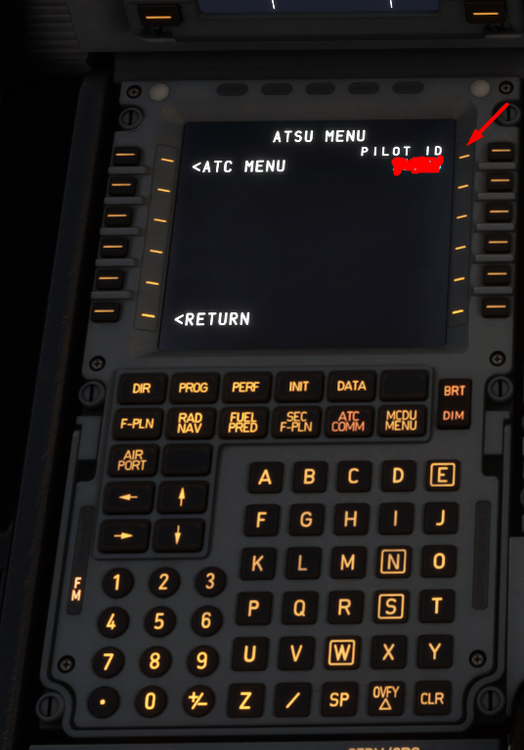
Hi @Danidan Firstly, we only offer support in English currently so please make any future posts in English as it is most useful for majority of our customers. However, to answer your question, please ensure you use your Simbrief Pilot ID (Numbers only) on the EFB settings page, and also on the MCDU (MCDU Menu > ATSU > Pilot ID)
-
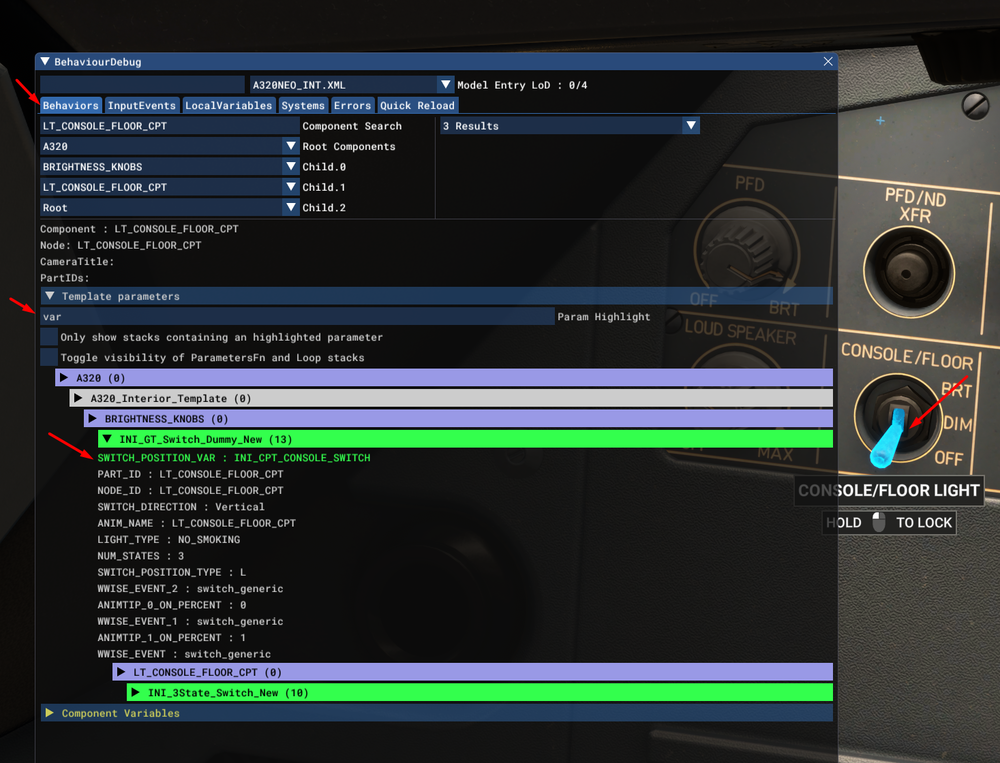
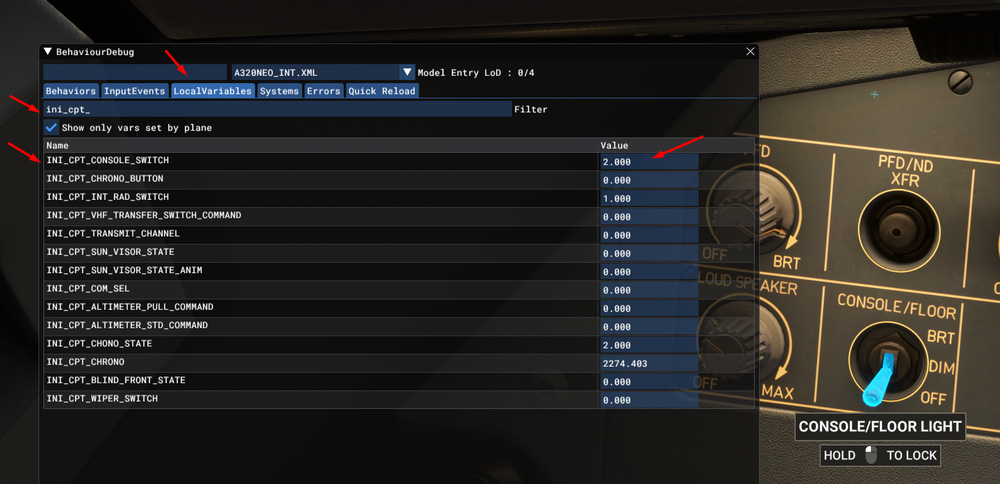
I know this is not a list, and perhaps a bit more advanced but it is not that complicated after you've done it a few times. If you want to check on your own for this or any aircraft, you can see currently active LVARs in the sim using Developer Mode, specifically via the 'BehaviourDebug' window . Load a flight in the simulator with desired aircraft, and in your options enable Developer Mode. Once enabled, you'll have a toolbar on the top, from which you can select 'Tools > Behaviours'. This will open the 'BehaviourDebug' window, on which you need to select 'LocalVariables' tab. In the filter you can enter a prefix for your aircraft for example (A320) or the dev (INI) to see a list of the active variables. You may also use other keywords to find the ones you may be looking for, and interact with relevant items to verify value changes. Additionally, you can also use the 'Behaviors' tab to find possible variables for a given interactable switch/button. With the 'BehaviourDebug' window open, on the 'Behaviors Tab', simply hover your mouse over the desired interactable (i.e. a button/switch/lever) for which you want more information and press 'Cntrl + G'. This will open a list of the parameters associated with this interactable, but what you are looking for is something like INPUTEVENT_VAR_NAME or KNOB_POSITION_VAR or SWITCH_POSITION_VAR that will have the name of the desired LVAR. For ease of viewing, in the Param Highlight field, type in 'VAR' so it will highlight only items with VAR in them. It may seem complicated, and will involve a bit more trial and error on your part but you will usually find what you're looking for this way. Hope it helps. Thanks!

-
Hi @DroneSim This issue is not specific to the A320neo, and will unfortunately affect all aircraft without custom nav-databases as the runways at EDDK have been renumbered as of the latest AIRAC cycle. As such, there needs to be an update from MS to the base scenery data itself to update runway numbers in order for their corresponding procedures to appear as well. What is happening currently is that its showing you the Runways and ILS approaches available for the old runways, but the SID/STAR in the nav-database are tied to new runway numbers, and because there is a mismatch, it is not showing you those procedures as they are not valid for the selected (old) runway number. In the meanwhile, there is a temporary fix made available by VatGER that you could try: https://knowledgebase.vatsim-germany.org/books/airports-langen-fir-edgg/page/charts-scenery-5wT Thanks!
-
Hi @poganets76, maybe check if your Virpil Throttle control panel has some bindings for battery, alternator or avionics master switches that could be causing a conflict? You could test this by creating a new blank profile for the controls, and see if you still face the issue. To do this navigate to Options > Control Options > Select your throttle from the top bar > Open Preset Manager > Click the "+" icon to create a new controller profile where you can delete all bindings to test. Alternatively do your Virpil controls come with their own external software? If yes, then it could be causing some conflict/issues instead and I'd recommend contacting Virpil support to see if they have any suggestions. Thanks!
-
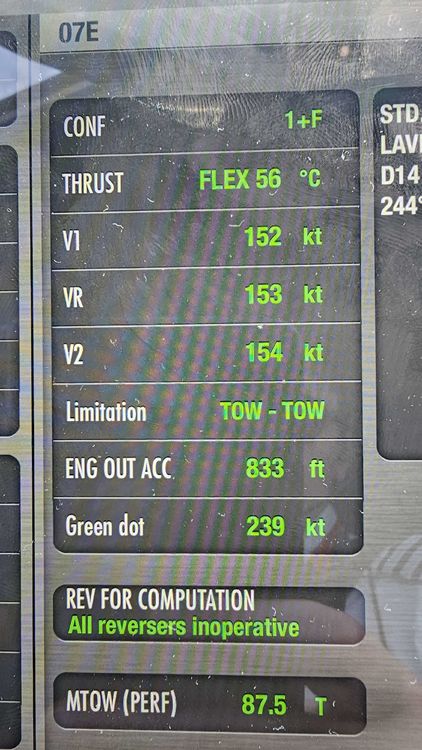
Performance calculations are a complex subject, with a lot of variables at play, but comparing performance numbers of a CFM LEAP powered A320NEO to CFM56/IAE V2500 powered A320 is not very valid or useful. The takeoff speeds are optimised for maximum flex for the given restriction, meaning on a dry runway 50ft elevation at the end of it, and 35ft for a wet one. Most of the time on the line you are not taking the full length you use an intersection a few up and then if you take full length you have more margin. But as said before it's aiming to flex as much as possible while giving as much climb gradient for the 2nd segment which is often why you see 2nd segment limited message, and it will try to use up as much runway as it can if it means it can flex the engines more. Just for illustrative purposes, this is below from a real perf calculator for this type. Between this and 56,000kgs speed changes 3kts less. So it's more than normal to see these higher speeds too.
-
Hi, can you please share a quick video clip of the issue you're facing? Also how have you configured your Logitech multiplanel? As for the com radios, you will need to use a 3rd-party program (e.g. Axis and Ohs or SPAD.next) that allows you to set LVARs as we use custom radio panel that allows up more configuration options than the default. Thanks!
-
Hi @Suyrant, Thanks for your post. Can you confirm if the enclosed reference video is from an A320neo using CFM LEAP engines?
-
For the rudder trim to work there needs to be hydraulic power available (either yellow ELEC PUMP ON or engines running). I checked by clicking on the switches and in the latest version these seem to be working. However I do see what that using the RUDDER TRIM LEFT/RIGHT commands only changes the value, but does not animate the switch. Will pass that on to the team, Thanks! Speed brakes have been adjusted as of the 1.0.17 update that is currently live, please check if this is still the case. From the test / data we have, the implemented drag profile is very close and remember if you need full speed brakes on the A320neo you can always disable AP and it will double the amount as with the AP on you only get 1/2 speed brakes. The flare should be really quite small at 30ft closing the thrust at the same time. The currently simulated flight model is based on real-world references and feedback so it's landing as expected and as shown in the videos: https://youtu.be/Z8TpeMqhEyY?t=1412 discussion on the landing behaviour and landing itself https://youtu.be/Z8TpeMqhEyY?t=1412 This is really dependent on a multitude of factors, most importantly the weight of your aircraft. The LEAPs produce a fair amount of idle thrust and at lighter weights it will accelerate fairly easily per feedback/data we have available currently. This is normal, as you need to use the brake fans to help cool your brakes. This was all taken from real timings / data on the 320. Carbon brakes on the 320 are expected to only start to show a large temp rise about 5/6 mins after landing and you will expect them to reach peak temps when you are on stand with engines off even. We have accurately simulated this. If you have no REV which might be the case at the moment more energy will go into the brakes as well. Temps are based on how many applications you do and how much energy was lost during the slow down so even a longer landing with many applications can get the brakes hot. The PACKS sound is separate, and what you're hearing in the cockpit is the avionics and equipment fans, which can be fairly loud. You can verify this by loading up the ON APU state via the EFB, then enable the APU BLEED and PACKS. You will hear a sound difference. Specifically for PACK2 in the cabin (if you have the enhance edition from marketplace). This is more often than not a function of the navdata and scenery used than the plane itself. I checked on my end and can see the SID/STARS/APPROACHES for both airfields. Can you please confirm if you are using Navigraph navdata, and any scenery for the airports where you notice missing procedures? Thanks! 2024-05-28 16-47-17.mp4

-
Hi @Straka77may I know what navdata are you using? Also do you have any scenery installed for EDDS? Thanks!
-
Hi, I am not noticing this in flight. Could you confirm your turned off ignition after engine start?

-
Hi, There have been WASM issues caused by the frequent changes of the GDK and WASM Compiler in SU15b. Please try again in the latest release version and let us know if you are still facing such issues. Some of the features you have stated are related to different engine version, as well as different software version of the aircraft. This is unfortunately out of our control, as it is to do with the scenery itself and the data stored in its files. Certain sceneries will be missing the ILS data (can confirm on the VFR Map by clicking the airport), as such the plane cannot automatically pick it up. You can in those circumstances manually input the ILS frequency and course into the RADNAV page of the MCDU. Thanks!
-
Hi, As there have been a fair few WASM and GDK changes to Xbox version of MSFS specifically since, there were some instabilities noted. However please try again now with full release version and advise if you are still facing such issues of crashing. Yes I recommend watching the newly released video that goes over this and other features of the aircraft. However this is part of the engine cooling period that motors the engine at a low N1 % for a while before actually engaging fuel. Thanks!
-
Hi thanks for the post @Nimrod Yes that is correct, you need to define a separate position for each detent. If you do not have reverse on your axis, select the NO option on the EFB. The calibration is done 100% on the EFB itself, using either the actual throttle axis on your hardware, or via buttons if you're using a controller. This controls the green bar. The "SET XXX" buttons on the EFB define the detent position. The green vertical bars indicate the current position of the axis (0 to 100%). The white horizontal bars with IDLE, CLB, FLX/MCT, TOGA written on them show the currently configured position of that detent on the throttle lever. To calibrate (NO reverse on axis) you want to: 1. Click 'BEGIN CALIBRATION' 2. Keep the green bar at the very bottom (close to 0%) and click SET IDLE (it will replace the BEGIN CALIBRATION button) 3. Move the green bar to where you want the next detent (normally ~70%) and click SET CLB 4. Move the green bar to where you want the next detent (normally ~80%) and click SET FLX/MCT 5. Move the green bar to where you want the next detent (normally ~100%) and click SET TOGA If you have a reverse on axis the process is similar except you'd also define MAX REV and IDLE REV first before IDLE. Below is a an example of a calibrated page. Thanks!
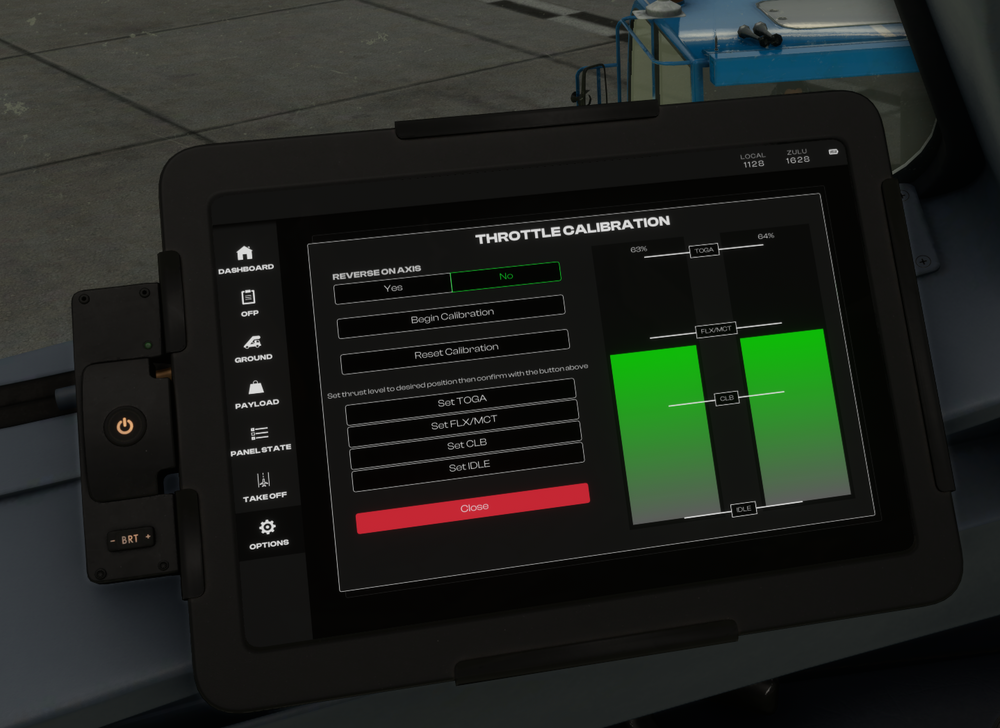
-
Hi, This is intentional and correct per Airbus logic. You need to disconnect it from the sidestick, or press the button again to silence the alert. If you disconnect it from the sidestick with the correct keybind set, or via clicking the red button; you will get one loop CRC and a master warning on the ECAM. If you disconnect via the FCU - as you did above - you will get a non-stop loop of the CRC until you re-engage, or acknowledge the master warning. Thanks!
-
Hi @ipa some other users who reported such issues on discord were able to resolve when running with an empty community folder. While we're not certain as yet, it may be a possible conflict with another addon, as such please try this and see if you are still having this issue. You do not need to delete or reinstall your addons, you can simply rename your existing Community folder (E.g. rename to ``_Community``) and on next launch the sim will create a new empty community folder. When you are done with testing, you can delete the new empty community folder and rename your old one back to ``Community`` and continue as normal. Thanks!
-
-
Hi @mrmike1979 You can go to the EFB and disable the automatic door arming features. (Settings > Real Door Arming - OFF) Also once deployed, you can reset it via the maintenance menu ( EFB > Aircraft Maintenance > Reset Slides) If none of those work, you can also try to delete the contents of this folder. Next time you restart the sim and load into the A300 it will recompile the WASM module, just in case it was not properly compiled on initial load. Steam: %APPDATA%\Microsoft Flight Simulator\Packages\inibuilds-aircraft-a300-600 MS Store: %LOCALAPPDATA%\Packages\Microsoft.FlightSimulator_8wekyb3d8bbwe\LocalState\Packages\inibuilds-aircraft-a300-600 Thanks!
-
Hi @B747-8f both work, as we monitor support tickets and these forums to look for reported issues. Just post them in the appropriate category (Systems / Model & Texturing / Sounds / Other) here: https://forum.inibuilds.com/forum/391-support/ Thanks!
-
Hi @Geno63can't say i've noticed this. Is this happening only in the A300 for you? Also are you using any additional addons that may affect ATC services?
-
Thanks, i'll pass your feedback onto the team.
-
Hi @MitchellAA300Can you confirm you're having this issue on v1.1.1 of the A300 as well? There was previously an issue where the lights could not be seen on certain LOD levels, but a fix was pushed for this in that version. Please let us know, thanks!
-
Thanks for the report, this is noted.
-
Hi, thanks for the feedback. I'll pass it on to the team.
-
Hi @mjc2407 sorry can you please provide a screenshot or video of the issue? I'm not quite sure I understand what you're seeing. Thanks!
-
Hi thanks for the report, needs further investigation but we'll look into it.


