Alexair
Member
-
Joined
-
Last visited
Everything posted by Alexair
-
Absolutely. However they look like to be inoperent though.
-
When I started MSFS yesterday, it run an update including an update for the A310 with description of the A310 update (removing sound sliders, implementing METAR and auto-weather filling in the EFB, and bunch of other things on systems, FMS, etc... (I forgot the details but the list was long). None of those update/bug correction had been applied to my A310 though...
-
Well, I don't know why I had an update installed yesterday then. Anyway, none of the update description has been applied to my A310.
-
Hi y'all, Just fired up MSFS and saw that there is an update including a major update of the A310. I was so happy, however it didn't last long. In the sim, the EFB still display version 1.1.6, the one that came couple of weeks ago. And I don't see any change in the sim, for exemple there is still the sound volume sliders, no METAR and the other update, etc. I've checked the folders in content manager and the regular A310 is 1.1.6 and the enhanced is 1.1.7 I've tried both with stock liveries and add-on liveries with the same result. Could you be kind to tell me what's wrong?
-
Thanks for your reply, OK, I understand. However I think you should consider 2 options: 1) Re-implementing sound sliders in the EFB. OR 2) Decrease the global sounds of the A310 (by around 25-30 % I think). Cheers,
-
Hi guys, Look like the A310 has been updated in my MSFS (don't have beta). And since then, I cannot longer change sounds parameter within the EFB. Is it normal ? If yes, then I'm disappointed as the A310 sounds (all sounds) are 33% louder than the rest of all aircraft I have. All my sounds are 100% in the sim and I setup my sound at 30% in my Acer monitor. This is giving me a perfect volume for all aircraft except the A310 which I have to put the sound down at least at 20% in my monitor, thus all sounds (environment, FsRealistic, GSX, radio, IVAO, etc..) are way too low. Cheers,
-
Yep, it's a known bug. They are working on it.
-
Well, everybody is able to start those engines but you. Something telling me that it's not the A310 the problem. Again, verify the starting procedure, this is not an A320 neither a 737. Also, check your joystick/yoke//throttle assignments for mixture, throttle etc. Any binding that might cause this issue. SOme people had various issues because of that. I have Logitech HOTAS X56 and Honeycomb Alpha/Bravo, both are fine with the A310. I have a low end PC and it is starting just fine, either with APU or the ASU.
-
Did you modify the SENSITIVITY option in MSFS? I tried that and it resulted the same problem. I had to modify the sensitivity again to match the A310 pitch trim data.
-
I believe they are working on all the lighting.
-
-
-
Yep, same problem on my side. Impossible to identify any navaid (ILS, VOR, ADF) on both captain and F/O side. Tried with all knobs up, down and turned both ways.
-
I'm maybe wrong but I doesn't seems that opening engine and wing anti-ice have any effect on engines/performance. When you open those anti-icing system you are taking very hot air from some turbine stages, thus loosing thrust. Would be great to have that simulated as well...
-
Sorry, just meant to reply to the post that was closed before I was able to reply. Well, it is quite important. In the real world, on some airliners, if you don't verify that ground air conditionning is disconnected (or at least shut down) then you might end up blowing some hoses or even packs if you open the APU bleed air. Too much pressure and you're screwed. In my plane, you will blow air hose at the packs for sure... Would be cool to simulate that (ground air and blowing hose/pack) 🙂 Just my 2 cents
-
Just gave it a try, on my side both ADF are working fine. Be sure to check that the light toward the ADF frequencey is light (I mean check that you switch the freq. side to the correct ADF). Then below the EVSI the needles are working just fine.
-
-
-
I confirm too. Increasing the dead zone just postponed the problem, but it still occur...
-
Hey y'all, We have the ASU which is a great option when we have the APU MEL. However, it would be great to have ground air for air conditionning as well. In real life, airliners are connected to ground air cond very often (actually ASU start doesn't happen very often, only when we cannot use APU).
-
My 2 cents, For the DME issue: not all ILS/VOR are DME equipped, that's maybe why. On my side not DME problem at all. As for the 1000ft descent: if you arm P.DES (pushing ALT knob down) it will arm the descent profile and should start descending as expected at TOD. Also, if too low on profile somewhere in the descent (due to constraint or else), it will change to a 1000ft ROD until it capture the normal profile. Work fine on my side too.
-
Do you have the ASU connected? GPU is only for electricity ASU is only for bleed air for engine start APU provide both + bleed air for air conditionning (ASU does not) I just gave it a try and ground bleed air start work fine on my side (either starting N°1 or N°2 first, both are fine).
-
-
Happened to me as well depsarting Rovaniemi EFRO. It is ice clogged pitot tubes. Shouldn't happened when all pitot heaters ON. It's a bug and I believe they are investigating. One thing interesting though, on my Honeycomb throttle quadrant I have always the ANTI-ICE warning ON (which is linked to pitot heat). Even with all pitot heaters ON in A310. However, if I'm switching my physical switch on my quadrant to turn pitot heater ON on my Honeycomb, the warning light extinguish and no more pitot icing. That make me think that pitot heater is not properly link to the switches in the panel.
-
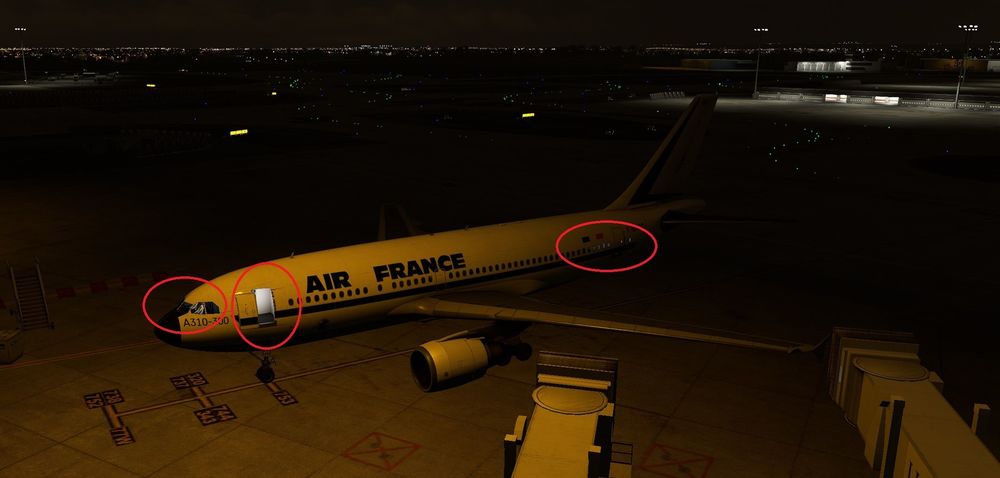
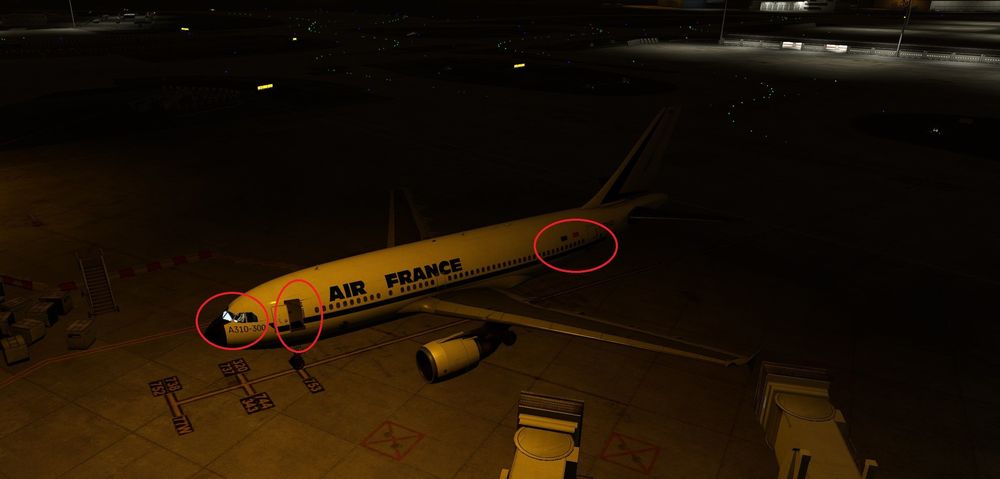
Hey y'all, I have a small issue with texture lighting (nothing that can stop me using this wonderful add-on though). Depending my external camera location around the aircraft I have those bug (in this exemple I just moved my camera a couple of feet up) :