RedBenny
Member
-
Joined
-
Last visited
-
I’ve also tried flying direct to next waypoint and still no change! 😞
-
I’m having similar issues with the autopilot on Xbox. I’ve had issues such as speed accelerating straight through to overspeed, AP1 + 2 randomly disconnecting during cruise, unable to switch between modes for speed and altitude and VNAV not working at all. I’ve been unable to complete a single flight. I’ve calibrated throttles multiple times and doesn’t seem to fix any of the problems. Any suggestions?
-
Hi, I’ve been attempting to fly the A320 v2 on Xbox, however every flight I’m experiencing major issues with the autopilot. Either at the top of climb or even just randomly in cruise, autopilot disconnects and throttle locks in TOGA. I use an Xbox controller and I’ve tried recalibrating the throttle, and I’ve also tried using AP2 instead of AP1 however still no hope. Anyone have any suggestions?
-
Is it possible to perform a step climb and/or enter this on the fmc in the a310 on msfs?
-
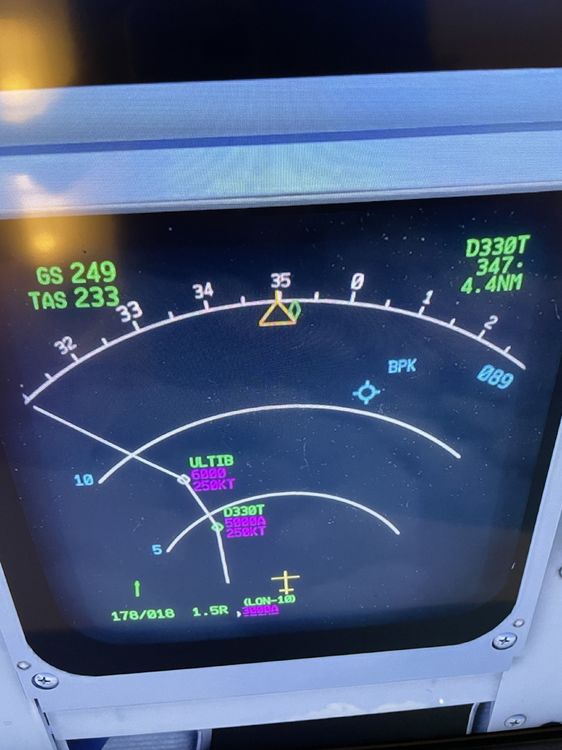
Ah I see. It may be a coincidence however the aircraft does seem to head towards the vor after veering off my flight plan.
-
I’m also experiencing this issue on Xbox and have noticed that a blue “BPK” and “089” appear just before the aircraft goes off course. This happens at second waypoint on SID.