





IniJamir
Staff
-
Joined
-
Last visited
Everything posted by IniJamir
-
Hello, I've loaded into the sim and do not see issues of this caliber, do you have any terrain mods, world mods, default scenery from the base game installed. You can try to clear the scenery index after uninstalling the airport; Microsoft Store/Xbox App: %LOCALAPPDATA%\Packages\Microsoft.FlightSimulator_8wekyb3d8bbwe\LocalCache Steam: %APPDATA%\Microsoft Flight Simulator and delete all the files inside of SceneryIndexes, then relaunch the sim after reinstalling the scenery
-
Yes, the build for Xbox is still in works, hoping to have it submitted Monday
-
Noted, thank you
-
Hi, Are you using any sort of mods, cabin packs which are depreciated, and have updated A350 to the current version released today as well as cleared the WASM folder and updated any liveries?
-
Good eye, we have indeed submitted the new liveries and even though it says Xbox, these are for PC as well
-
Globally in Sim, via the Settings and Controls menus, then click the gear icons on the hardware you want to adjust
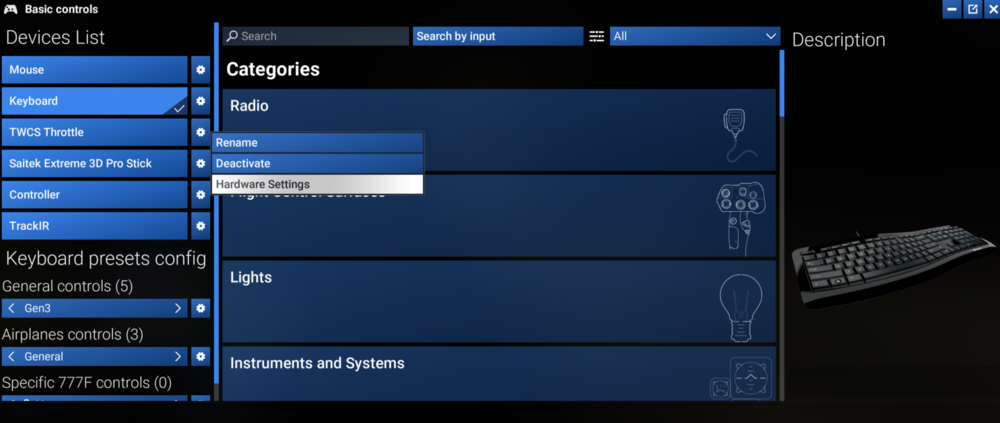
-
Hello, Thank you for this feedback and supporting imagery, I shall pass it along to the team.
-
Hello. glad you are enjoying the new performance in A300, she's a favorite of mine too and always happy to see other A300 enjoyers. The issue you mentioned with the click spots on the overhead has been noted already as well as the need for more liveries for Xbox which was raised last week, hope this helps and thank you 🙂
-
You'd have to adjust your sensitivity in the controller-axis settings, as well as making minimal inputs on the roll. I use my stick as tiller and rudder so it takes some adjusting to.
-
Currently in the works 🙂
-
Can you try loading the A350 with just the aircraft in community folder, no other addons. You can do so by renaming your community folder "zCommunity" in the File Explorer, and then create a second folder as Community (just like the original was named) and install the A350 into that location, then load up the sim and see if that works. Make sure you properly uninstall A350 via IniManager and then reinstall after making those file explore changes. When you spawn in, go to airport GVAC, it's an island in the middle of nowhere so this should reduce resource usage to the point where you are only really loading the aircraft, the tiny island and nothing more. Let me know if this helps
-
-
Appreciate it, I'll pass it along, thanks!
-
Hello, Ultimately it is up to Dzrweicki to provide those files and options to us, here is a link to their forum. https://drzewiecki-design.net/forum/index.php Thank you for understanding.
-
Glad you're enjoying it so much, it is definitely a result of the hard work from our team truly expanding and exploring the options that the FS2024 SDK has to offer. Thank you for the kind words and enjoy 🙂
-
Hi, We just released an update, if you can do me a favor and just reconfirm that these are still occurring in the new build, thank you 🙂
-
Do you have that page of the FCOM so I can send it along to our team alongside media of the aircraft in sim, failing to do so, if not no worries, I just have to find time to grab it
-
My apologies I meant a video in the simulator
-
Hi, are you using Chaseplane by chance?
-
Are you able to get media of this happening in the mean time, if not I'll try to get around to it, thank you 🙂
-
-
I will ask the team, thank you.
-
-
Hi, In cases like this I am gonna go ahead and point you to our Direct Support Team as they are more versed in issues like this as well the knowledge to explore more options, sorry for this inconvenience, I'll pass this info along to our team in the meantime. Thank you. https://inibuilds.com/pages/contact
-
I'll pass it along to the team.



