





IniJamir
Staff
-
Joined
-
Last visited
Everything posted by IniJamir
-
-
I'll pass this along to the team.
-
Hi, Thank you for the feedback, I'll pass it along to the team. Thank you
-
-
For the FMS users have only been reporting this issue with LIMC and default NAVDATA as the runways have changed, I can't find that discussion from our discord but that's where I had seen that being listed for Default NAVDATA users EFB Map Flickering known issue that I'll kick back around myself. Thank you.
-
Anti-piracy reasons, it will be available on the IniManager at a later date, thank you for understanding
-
Hi, another user mentioned that they have an addon regarding lights enabled, do you happen to have any Lighting Enhancements for Xbox installed and active?
-
Thank you for the feedback on this, I'll pass it along to the team 🙂
-
Below is the listed reason which Steven gave.
-
How long were you waiting for, there is a setting in the OIS once it turns on that allows users to change this setting
-
Noted and will pass along to the team, I have noticed this issue happening for me in Aerostar so it is possibly a sim issue, I will check with the team
-
Hello, Compatibility with sceneries is managed through SamScene3D, when we release a product with our own POIs, it is up to any independent developers to determine whether they will provide compatibility. Hopefully this helps clarify any misgivings on the whole situation.
-
My apologies, I mean the BlackSquare Signs Pack, does it work properly without that pack disabled, we don't build our products with pre-emptive compatibility, 3rd Party Signage Addons would have to ensure that they have compatibility for their product.
-
Will pass this along to the team, thanks.
-
You can transfer the aircraft here, as for the later, I haven't had that issue but users have reported it. https://forms.inibuilds.com/order-transfer
-
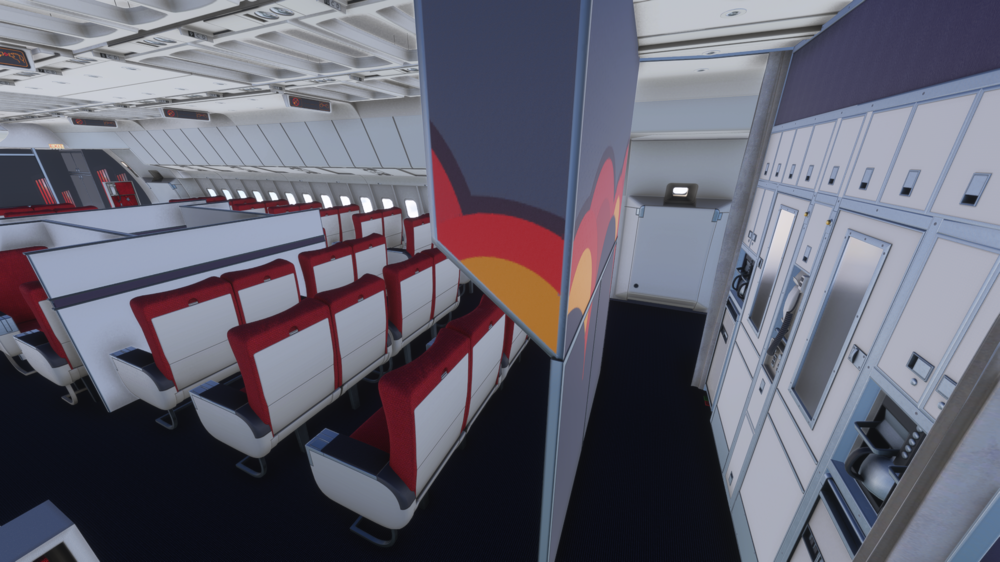
Galley Elevators to the right 🙂
-
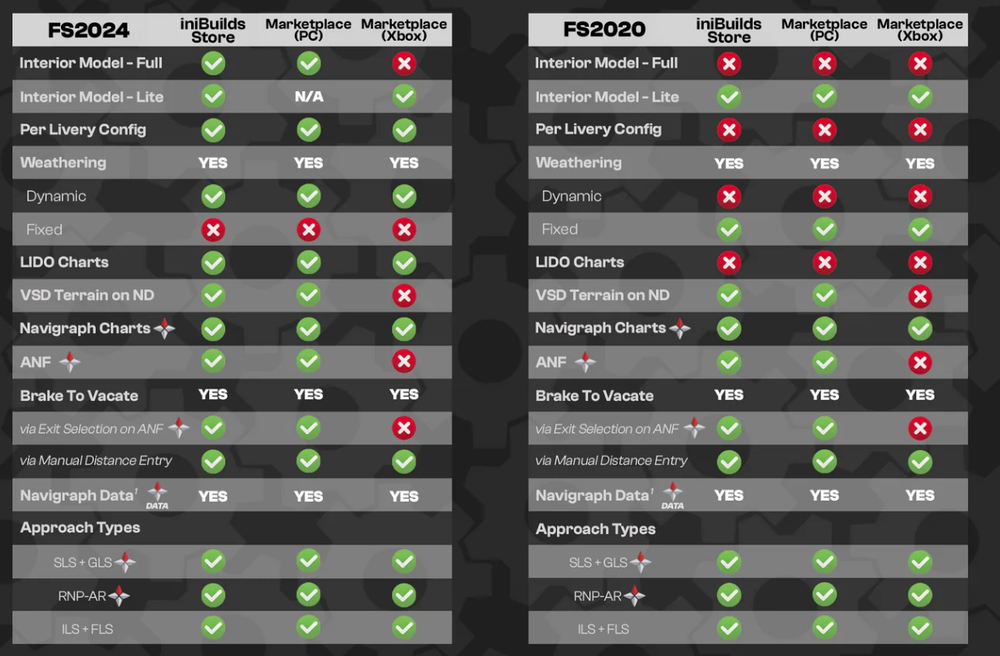
Hi, This is on the page regarding the A350 and all of it's features between FS2020/FS2024 and Xbox/PC https://inibuilds.com/products/inibuilds-a350-airliner-msfs-2024 The EFB option to download the terrain exists there because it's unable to be removed from the Xbox version. Thank you.
-
I'll pass it along to the team, thank you.
-
-
Hi, Double check that you have no conflicting bindings as well check if you have the aircraft from the Marketplace and then transferred it to the IniManager; that the Marketplace version is disabled, let me know if this helps. Thanks.
-
Does this issue occur with the signs disabled? I don't have it on my end.
-
Feedback noted and will be passed along to the team, thank you again for the kind words 🙂
-
I'll pass it along to the team and get back to you soon.
-
I'll pass it along to the team, thanks.
-



