




JetNoise
Member
-
Joined
-
Last visited
Everything posted by JetNoise
-
-
This is a fantastic explanation and most probably the solution too. I'll setup accordingly and try. Thank you so much for taking the time !!
-
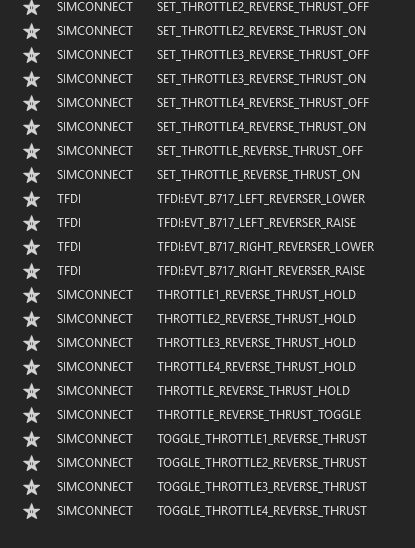
That basically works BUT Owners of throttle quadrants (HC Bravo etc) probably like to have toggles for each engine and applying (reverse-) thrust with each lever separately. Should not be a biggy, since the commands are already there ...
-
Its seems to be still an issue in v 1.0.4 @richboy2307
-
-
in 2024 Beta
-
Same ...
-
-
-
-
@Nico - Gumby pls have a look at ... cheers Oliver
-
Now, thats the 3rd post regarding the same one issue ... Pls read first - think first - post. Otherwise it makes following the forums a p i t a. Thank you Oliver
-
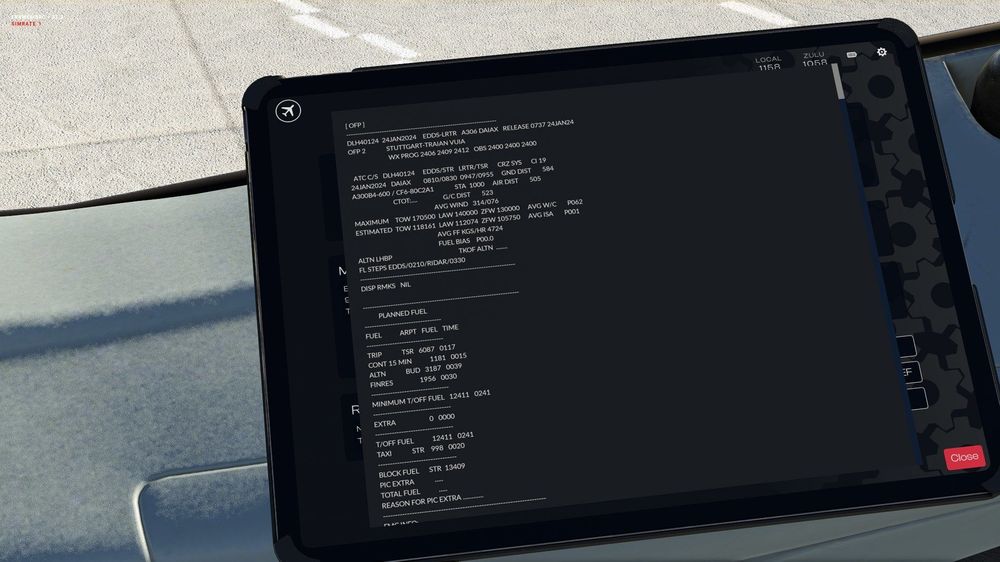
Hmm, maybe there is a misunderstanding. See attached image. First time i am seeing it that misaligned. Are you guys using a specific font to display the import from simbrief? Maybe thats causing the issue of the misaligned presentation. A character-set with fixed letter size and spacing would fix it then ... , idk, just a guess...
-
On the above mentioned panel (pedestal ) The SYS switch does not play a sound when toggled from OFF to 2 and back ... Oliver
-
This is indeed a very strange bug for you guys. Nevertheless, it cannot be stressed enough, that you all check your Hardware controllers for ANY key binds that may conflict. Important ! Some binds are set AUTOMATICALLY for your attached hardware inside MSFS. HC Alpha and Bravos especially. Since i am using SPAD.Next, I've cleared out ANY of them and kept only the Nosewheel steering assignment, since that is common for most of my aircraft. NEXT: Whenever i update an aircraft or 3rd party tool, i am also clearing the "m-files" which are compiled by some of them. They will be (automatically) recompiled on the next load of the addon. No harm is done by deleting these files.! You can find them here for the respective addon: C:\Users\YOURUSERNAME\AppData\Local\Packages\Microsoft.FlightSimulator_8wekyb3d8bbwe\LocalState\packages DO NOT TOUCH the "work" folder, unless you want to loose your settings for that addon and start setting up from scratch. Important !: Once you have loaded into the addon, bail out of MSFS again and reload for your flight - DONE. It has become a habit and so far i have not had any issues. Especially now with the ini A300. Next thing i noticed: If you leave MSFS via //42 FLOW Pro - EXIT, the A300 (only one i noticed that) may CTD. If MSFS is exited the normal way via its Menus - no CTD. Maybe this helps ... Oliver
-
Ignition Selector off ?
-
Hi, i am pretty happy about some new features and bug fixes in this version. For a future release, can you please have the OFP being displayed in a more formatted way. Its really hard to read, the way it is now ... Thank you, keep it up Three greens Oliver
-
Completely wrong, it runs perfectly fine on a WIN11 8600k, 2080ti, 770GB in Community. No stutters, (almost) no lags ... Its just a well maintained install ...
-
The most realistic answer to an unnecessary question ... Idk whats wrong with THAT ...
-
The easiest way is to rename your "Community" folder. Create a new one (MSFS is even creating that for you on start..) and COPY the stuff over you want to test. Once finished RENAME the folders back. You can LEAVE the folder, created for testing where it is. (PROVIDED it is not called "Community" anymore. NO deleting or moving of stuff required !! Pls spread the word ... Oliver
-
Add, i have the MSFS Aircraft Stress Damage OFF, i had a weather change knock out a different ac a while ago ... Maybe it was even the A310 ... Oliver
-
If that helps for the time being ... It should work without going through that hassle, tho. Same as "Crabby" reported here: Haven't had a single CTD with the A300 since release. Community folder has a 766 GB of content now, carefully tested and using only a few Mods. WIN11 debloated, latest NVIDIA drv, DX12, DLSS swapped to the latest dll, TAA, NVidia 2080Ti, Intel i7-8700K , 5Ghz pretested. Running with a locked 30FPS ...
-
You didn't get the point ;-) In general, the airplane is not falling out of the sky. Now the goal is to find out why it is doing this for others. Without good testing and writing good reports, it will be hard to replicate for the Devs. Did you report something in that regard somewhere ? Did you test with an emptied Community folder ? (with the A300 installed oc ) (RENAME !! the existing one, create a new one, COPY the A300 over and START the Sim.) RENAME the community folders back afterwards. ) Blue skies, Oliver
-
I used these as a starter https://www.flightsimulator.blog/2023/12/04/best-graphics-settings-guide/ It gets updated regulary, too Don't miss the link to "PERFORMANCE BOOST TRICKS" at the end of that page ... Key (for me at least) is, don't get triggered by FPS hunting. SIM is not a shooter game. I go mine locked to 30FPS, no lags, no stutters, no greaf ;-) Oliver
-
10+ flights, each of a minimum of 2hrs airborne. Not a single hickup ...


