





IniSteve
Staff
-
Joined
-
Last visited
Everything posted by IniSteve
-
All of us at IniBuilds have looked forward to Microsoft Flight Simulator 2024 with excitement and anticipation. With its enhanced visual fidelity, improved aerodynamic simulation, and the promise of an immersive flying experience supplemented by an unprecedented level of detail, the sim represents a significant leap forward in the world of flight simulation. While the title is jam-packed with countless new and improved features, we also want to keep you informed about some current issues that may affect your experience. The below is a non-exhaustive list of things to look out for while the platform grows and evolves to full maturity. Known Issues and Important Considerations with Flight Simulator 2024 User Interface: There may be some inconsistencies on the UI with products transferred from the previous sim. This can manifest as incorrect or missing thumbnails, liveries appearing out of order, and statistics displaying inaccurate or no data at all. External Lighting: Light sources and their associated effects may look over exposed under some circumstances. While we have made some edits to the default values to mitigate this effect in certain environmental conditions the "splash" of the light may appear very intense. Aircraft Registration: These may not display correctly on cockpit placards and may show the incorrect registration for custom liveries. This is a limitation of the simulator where a random registration is assigned to the aircraft at the start of every flight and the user cannot remove that registration entirely. Bright Displays & Lighting: Some emissive textures in the cockpit (Digital Displays, Annunciators, Panel lighting etc) can appear excessively bright due to the 'Eye Adaption' of the new simulator. This may be particularly notable around dawn and dusk, which is when automatic light shift will occur in the cockpit. While this is a neat effect it can cause an abrupt change in the brightness of the aforementioned items around those times. Daytime Lighting Visibility: Exterior and interior lights may seem too dim during daylight hours even though the emissive textures themselves are operational. This is a current sim limitation as tuning them for daytime visibility can lead to overexposure at night so a balance has to be struck. Enroute Map Flicker: Currently, there is a known core bug with the way js maps are read by the sim. The mapping client we and many other developers use (leaflet) is not currently compatible with the sim sdk. While we and Asobo work towards a solution, it's best to either avoid using the enroute map or understand it will flicker at times. (We have found the flickering does begin to subside after a few minutes over the duration of a flight) Disappearing Sounds: Occasionally, the simulator may eliminate certain sounds to conserve memory and enhance performance. This can lead to situations where sounds that were functioning correctly at the beginning of a flight then suddenly disappear until the scenario is exited. We have observed this in the A300, particularly with regards to the sounds of overhead switches and ambient bleed. Our team is actively working on this issue, and an update will be provided once we are confident a solution has been achieved System & Video Memory Usage: Overall RAM and VRAM consumption tends to be higher in the simulator compared to MSFS 2020. While we have made every effort to optimize VRAM usage, you may experience stutters or low frame rates, particularly when the system is unable to allocate the desired capacity. Computers with higher amounts of RAM and VRAM may mitigate some of these issues, but instances may still randomly occur. Low Resolution Textures: When switching views there may be instances where you briefly encounter lower than expected texture resolution on displays or surfaces. The sim appears to have a buffer when it comes to loading these back, where it doesn't reload full quality texture detail levels all at once. This will cause the textures to appear low-res for approximately 2-3 seconds (or more, when you have lower-end specs) to load back in the full-resolution textures. Display Clocks: We have identified various time-related issues within the simulator that can lead to inconsistencies with the clock. It’s possible that the UTC time shown on the aircraft's clock reflects your local PC time instead of the simulator's time. This can also result in discrepancies during scenarios that involve time acceleration. TCAS Alerts: Users may receive false Traffic Advisory alerts in some instances due to a sim issue that leads to erroneous targets being shown of the user aircraft. Users may change the TCAS mode to TA or STBY to silence the alerts for the moment. 3D Model Level Of Detail (LOD): The implementation of the LOD system in FS2024 can sometimes lead to unexpectedly low LODs being called at the wrong time or objects being culled at short distances. While this does not happen frequently, it's key to ensure you can reproduce the issue you're encountering, as it could be a once-off encounter as a result of this.
-
Hi all. FS2024 has brought with it new and better engine and fuel management simulation which requires a more thought into how one operates their aircraft. For the T-33 ensure when you are advancing the throttle, it's being done in a slow and controlled manner. If you move it too quickly, the engine will surge and stall as per the real thing.
-
Hi WW! We've outlines the plan of attack for our catalogue here - Hope that clears up any confusion. Thanks.
-
The lack of RMI coupling is due to a sim limitation with the TACAN system. The Nav 2 unit is in the rear cockpit. Our products are designed to the official sdk which mandates use of the modern/lock control system but we’ll see if we can revise the legacy tooltips.
-
Hi Dudley. Thanks for the insight. We are currently working on the to/from flags on the OBS unit but they are proving quite the challenge to get correct. Without promising a timeline, you should expect that functionality in another forthcoming update soon.
-
The RMI is tied only to the NAV radio so you wont get bearing information in TACAN Mode. The tooltip for the smaller digits is integrated into the main one. If you grab and rotate, it will change as you move into the 3-digit channels.

-
Hi. Rest assured, we are present and read these posts as well as take all points of view into consideration. With respect to the instant crashes, that's not something experienced over hundreds of hours of testing by a very varied group so there is likely something conflicting in your setup causing this. Regardless, I'd love to help get to the bottom of that so you can enjoy the aircraft. Regarding repainting, we have moved to a decal-focused template to better conform to the SDK but agree the mirrored placards present a challenge. Our art team will look into this deeper and try to find a solution that makes it easier for 3rd-party creators to easily bring their ideas to the sim.
-
HI. Can you detail what steps you're taking and if you're in lock or legacy mode? In legacy the clickspot is small but functions normally. Here is a video showing the FD switch functioning as expected in the latest build- Microsoft Flight Simulator 2024-08-14 07-54-53.mp4
-
Very observant. I'll pass this along. 🙂
-
Hi Bob, These add-on loaders come from a 3rd party program called GSX.
-
Hi Keith. Appreciate the feedback and thoughts. As we're solely the distributor, we can't directly make any changes, to the scenery. Despite that, we'll alert the dev to these ideas. Thanks!
-
Hi. Thanks for this candid feedback. Can you provide a reference as to what you expect the sound to mirror?
-
Can you try to clear your index for OMDB to rule out any errant file. I'm not seeing this issue in the release build with GSX on or off. https://discord.com/channels/535246634448191499/1217941160421625967/1217941160421625967 Give this a try and reload at the H gates.
-
Is photogrammetry on? Additionally, do you have any additional 3rd party scenery add-ons in the Dubai area such as Orbx Dubai Landmarks or the like?
-
Hi. Can you confirm you're on the latest GSX profile version and not a 3rd party one?
-
Hi Toto, I am the resident VR advocate on our team 🙂 Seating position and camera POV has always been a divisive point between VR and pancake simmers. The sim by default caters to the non VR user so when you setup in VR properly there is a bit of override and things tend to get obscured. I have found the A300 to be mostly ok but I can see where personal preference or equipment setup can come into play. I use a Reverb G2 paired with OpenXR Toolkit with default scaling. Here is my current seating position looking straight ahead that matches as close to IRL based on cockpit tours and discussion with active line pilots As you can see the alignment balls are lined up and the top of the glareshield is level with the top limit of the PFD/MFD. The FMA is just in view but can become obscured if I glance down with just my eyes. When I tilt my eyes down, the FMA comes fully into view as expected. I have found setting the seat position like this allows for good results when switching back to 2D (I tend to do flights in both 3D/2D as longer cruise segments can get uncomfortable in the goggles) Below are the lateral right and left eyeline references I use with the seat fully forward- (Placing the seatbelt where it would be on my waist when looking directly down) Much like in reality, POV is very user specific but I have found this vantage point to provide the best experience without compromising usability across all modes. Let me know if you have similar results or if trying his alleviates the issues you've found.


-
A lot to unpack here. Lets start with- 1. Are you on xbox or PC. 2. Are you on the latest update for either platform 3. what is the specific issue?
-
Hi Christian, Currently, Quickviews 6 & 7 are bound to look directly left and right. I will checkif we can alter the main view positions so Ctrl-L & R mirror those povs. Thanks!
-
Hi Erik. We'll take a look and see what can be done.
-
In the menus under Assistance Options scroll down to "User Experience" and turn Aerodynamic Visualization to off.
-
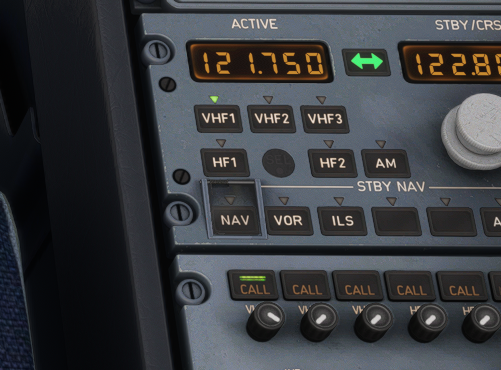
HI Angel. Make sure all the radio is on (call button on VHF1 lit up) as shown in this pic. That should enable the tower menu to fully display.
-
A fully modelled passenger cabin and some texture enhancements
-
An update has been released that corrects this issue. Can everyone confirm you've updated and it's resolved?
-
-
Thanks. We will take a look at this.


