IniSteve
-
Posts
357 -
Joined
-
Last visited
-
Days Won
28
Content Type
Profiles
Forums
Downloads
Everything posted by IniSteve
-
Very observant. I'll pass this along. 🙂
- 1 reply
-
- 1
-

-
Hi Bob, These add-on loaders come from a 3rd party program called GSX.
-
Hi Keith. Appreciate the feedback and thoughts. As we're solely the distributor, we can't directly make any changes, to the scenery. Despite that, we'll alert the dev to these ideas. Thanks!
-
Hi. Thanks for this candid feedback. Can you provide a reference as to what you expect the sound to mirror?
-
Can you try to clear your index for OMDB to rule out any errant file. I'm not seeing this issue in the release build with GSX on or off. https://discord.com/channels/535246634448191499/1217941160421625967/1217941160421625967 Give this a try and reload at the H gates.
-
Is photogrammetry on? Additionally, do you have any additional 3rd party scenery add-ons in the Dubai area such as Orbx Dubai Landmarks or the like?
-
Hi. Can you confirm you're on the latest GSX profile version and not a 3rd party one?
-
Hi Toto, I am the resident VR advocate on our team 🙂 Seating position and camera POV has always been a divisive point between VR and pancake simmers. The sim by default caters to the non VR user so when you setup in VR properly there is a bit of override and things tend to get obscured. I have found the A300 to be mostly ok but I can see where personal preference or equipment setup can come into play. I use a Reverb G2 paired with OpenXR Toolkit with default scaling. Here is my current seating position looking straight ahead that matches as close to IRL based on cockpit tours and discussion with active line pilots As you can see the alignment balls are lined up and the top of the glareshield is level with the top limit of the PFD/MFD. The FMA is just in view but can become obscured if I glance down with just my eyes. When I tilt my eyes down, the FMA comes fully into view as expected. I have found setting the seat position like this allows for good results when switching back to 2D (I tend to do flights in both 3D/2D as longer cruise segments can get uncomfortable in the goggles) Below are the lateral right and left eyeline references I use with the seat fully forward- (Placing the seatbelt where it would be on my waist when looking directly down) Much like in reality, POV is very user specific but I have found this vantage point to provide the best experience without compromising usability across all modes. Let me know if you have similar results or if trying his alleviates the issues you've found.

-

For god's sake fix your landing gear.
IniSteve replied to Jacky55456's topic in Modelling & Texturing
A lot to unpack here. Lets start with- 1. Are you on xbox or PC. 2. Are you on the latest update for either platform 3. what is the specific issue? -
Hi Christian, Currently, Quickviews 6 & 7 are bound to look directly left and right. I will checkif we can alter the main view positions so Ctrl-L & R mirror those povs. Thanks!
-
Hi Erik. We'll take a look and see what can be done.
-
In the menus under Assistance Options scroll down to "User Experience" and turn Aerodynamic Visualization to off.
-
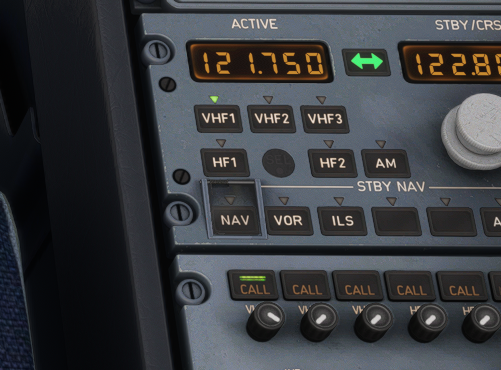
HI Angel. Make sure all the radio is on (call button on VHF1 lit up) as shown in this pic. That should enable the tower menu to fully display.
-
A fully modelled passenger cabin and some texture enhancements
-
An update has been released that corrects this issue. Can everyone confirm you've updated and it's resolved?
-
Hi Doug, We're excited to see your repaints as well as others from the larger userbase. As mentioned on the dev stream, the model has gone through some refinement so it would be wise to wait until it's released to ensure full compatibility.
-
Thanks. We will take a look at this.
-
Hi. Are you still having this issue post-update?
-
PHNL Update sill not available for Marketplace purchase
IniSteve replied to Patrick C.'s topic in Support
The update has been sent to MS. Sadly, we can't control the timing of the marketplace releases. -
Hi. We'll note this and see if it can be added to an update in the future.
-
We sometimes see an issue with the MSFS cache not clearing itself after installing third party scenery. A good way to manually refresh the sim cache is by clearing your Scenery Indexes - To do that locate your folder by following the path below: MSFS 2020 MSFS 2024 Then delete the contents inside but leave the folder intact. The indexes will rebuild on next load of FS. This should solve the issue.
-
- 1
-
-
- scenery support
- msfs
- (and 1 more)
-
Hi. We'll take another look and see if this is reproducible. Thanks.
-
Hi. A few questions - Are you on navigraph or default data? Are you selecting a runway first or SID/STAR? (The correct proc is to start with the runway, then select sid then transition (if avail) then *insert) Our testing team has flown well over 100 flights on the current build and have not seen this issue so I'd like to figure out why it's not working for you. Thanks!
-
Hi. I've logged this and will pass it on to the team. Thanks.
- 1 reply
-
- 1
-
-
Hi. Under "User Experience" in the ASSISTANCE OPTIONS section of the settings, ensure "Aerodynamic Visualization (CFD)" is ticked off -