



Skip to content
View in the app

A better way to browse. Learn more.

iniBuilds Forum

A full-screen app on your home screen with push notifications, badges and more.

To install this app on iOS and iPadOS
  1. Tap the Share icon in Safari
  2. Scroll the menu and tap Add to Home Screen.
  3. Tap Add in the top-right corner.
To install this app on Android
  1. Tap the 3-dot menu (⋮) in the top-right corner of the browser.
  2. Tap Add to Home screen or Install app.
  3. Confirm by tapping Install.

gongo

Member
  • Joined

  • Last visited

  1. okay thank you so mach you are the best
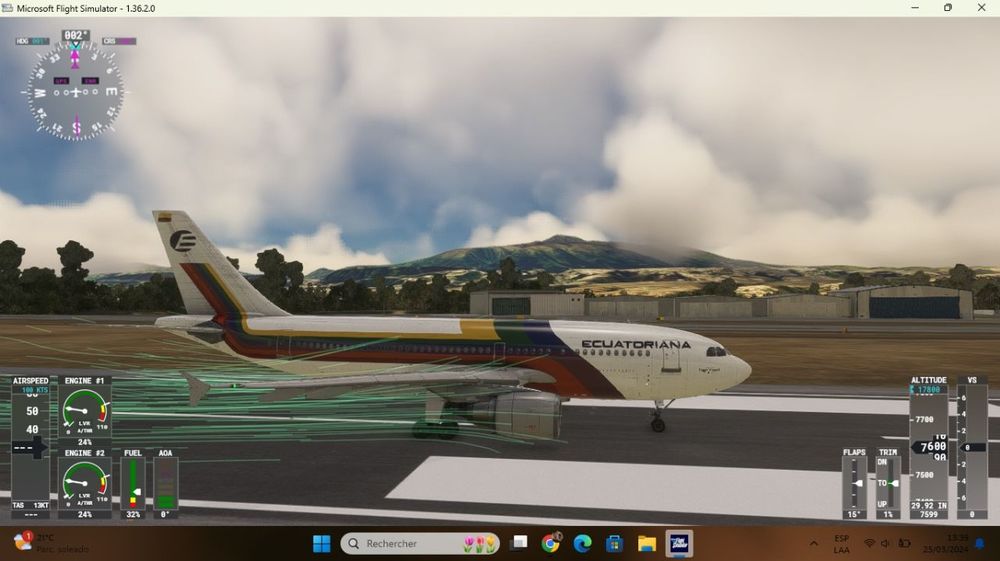
  2. Hey to everyone this is the first time I write here in Inibuilds cuz I need some help to know what in the hell is going on with this airplane, so Yesterday I dediced to use the a310 but textures are acting weird I have those blue lines behind the plane.. Does anyone can help me? I reviced all my up to dates of msfs and are ok. same for inibuilds... thank you y´all
Account

Navigation

Configure browser push notifications

Chrome (Android)
  1. Tap the lock icon next to the address bar.
  2. Tap Permissions → Notifications.
  3. Adjust your preference.
Chrome (Desktop)
  1. Click the padlock icon in the address bar.
  2. Select Site settings.
  3. Find Notifications and adjust your preference.