




MarcusVT
Member
-
Joined
-
Last visited
Everything posted by MarcusVT
-
I saw this topic before and the given solution was bad contact with USB port. But I had these issues in flight and taxing right after moving spoilers.
-
I can't silence the MRK when at G intersection near rwy 10L. It's annoying listening to the beep while waiting your turn to go, when the airport is packed.
-
...removed the post because I realized it was the wrong plane thread....
-
You probabaly has been a victim of the called Ghost WASM (GWSM), when the simulation seems to be running but the is frozen. Buttons may move but they don't change the state of the plane. The clue you got into this problem is the slow deviation from the flight plane. My AUTOSAVE is set for 15 minutes and if I don't notice the (GWSM) the autosave runs out of slots and I can't recover the flight at failure point. I remember having one or two red screens WASM before, but after last update the GWSM has been a constant. Unfortunatly I don't know the solution for this problem but I'm posting here to give the thread some life and monitor it for possible useful answears.
-
I know it's an old thread, but is the one that better fit my problem. I've been flying A350 for a while with an eventual WASM ( with the red screens) but never the ghost WASM (simulation runs but plane doesn't respond). I belive after last update, I am having a lot of ghost WASM, even on taxi. I noticed there is an official WASM thread with 2 reports of red screen WASM. Does anybody know if cleaning WASM directory is actually an effective way to try to reduce it or not? I'll keep searching the forum and discord for answears... The plane is just amazing but it's becomming unpratical to do what it's built to: Long Hauls. Making matters worse, the AUTOSAVE runs out of WASM free states if you don't noticed right away if the ghost WASM happened.
-
Everything is working fine with GSX until it comes time to push. When the operator asks to release break the plane run into the terminal. I usually pump the parking break until it stops. When it happens in the beginning of the push it's certain it will happend at the end, when I pause the sim and restart coault. At GSX they say it's from IniBuild side!
-
-
I have the same problem with steering after a long period off A306. Last 4 days I've been flying and finally noticed the light veer to the right. I brought up the debug aircraft data and there was a slight input to the rudder to the right. The rudder compensator at main panel was reset. I did maintenance at break and tires, noticed that throttle calibration was off, so I recalibrated. Starting a new flight the inputs were centered. Before hydralic systems no input was translated into rudder movement. Then pushback, start up and right after the tug disconnect, the slight input in the rudder was there, but I moved the rudder all the way left and right and it returned back to the center. During taxi there was a little deviation to the right but the side wind was strong. Took off from 09R doing a big compensation due to wind but all looked fine. Decided to land the the 27L and all compensation turned to the other side. Taxi to parking was eventless. I beleive the update messed up calibration because the throttle was off. From the flights before I noticed that tires were not degrading as quick as before, so changed them and reset maintenance to realisc. I'll keep an eye on this issue for the next flights to see how tire and break degradation goes and the rudder.
-
Same thing happened to me today. All light switches were on and TCAS FAIL showing up. Rolling cache is disabled for me, I've deleted the file, anyways, and still flying with it.... I hope it get fixed after landing.
-
I`m just happy there is a right way to get it working. I find it hard to do visual approach without it.
-
Yep, draging the switch up works, but it used to work rolling the wheel... thank you.
-
I've just noticed it was a video and not a photo. I should probably click at the top of switch. I've always used the mouse wheel. I'll try clicking instead of rolling.
-
I am interacting with the FD/FPV switch using the mouse wheel. How did you interact?
-
On this matter I'm actually glad that now we can mute the radios using the audio switches.
-
Wasn´t the waypoint inserted twice at the flight plan? Eventhough I've never seen a banking so high.
-
Reading this post I'm glad the VOR is working at all..... I'll try some manual VOR approach right away!
-
And after update ypu need to set hoppie id again...
-
I had the same issue because the tiller control by rudder disabled after update. All well now.
-
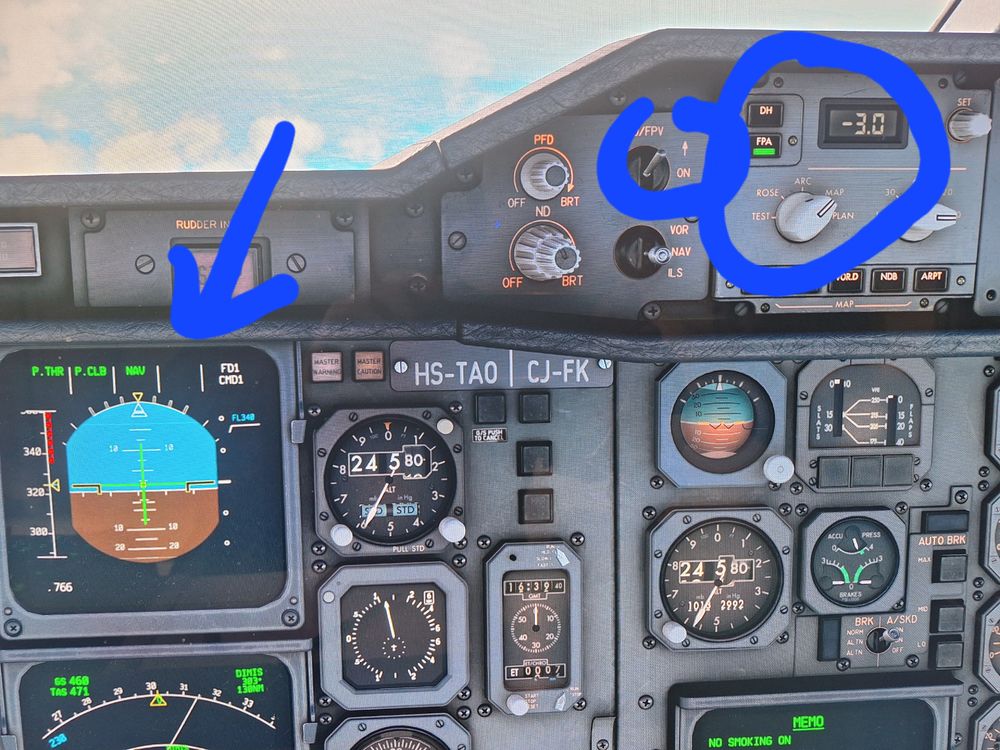
I was happy with all updates but when I was setting upbto land the speed vector indicator was not showing at PFD. Now the FD/FPV switch doesn't move back to ON position, but the speed vector doesn't show. Unless I am doing something wrong.
-
I am not having any issue with Flight Plan, but I'm getting the Download Error message...
-
Yesterday, July 3rd, I did a BGSF-CYDF route. It's not the first time I fly a route involving coordinate waypoint, but it's been a while. When preparing for this route I recevied an "DOWNLOAD ERROR" error from ACARS menu after requesting Simbrief data. Despite the error, the flight plane was ok with one waypoint shown as the usual 55N054W and the other one as a FIX3 with the proper coordinate. I did the flight without any problems. Today I tried CYHX to KJFK with the same Simbrief download error, but this time there was no Flight plan to be flown. In both situations I could download the flight plan at EFB. I don´t have any FSPUIC here, as far as I am aware (never installed). I've restarted MSFS after removing and reinstalling AIRAC 2406 rev. 2 data using NAVIGRAPH HUB. At first, the aircraft loaded but it wasn't respoding to battery or ext power. The EXT power button light would be on but not system was responding. Restarted the flight and all seems fine now.
-
No wonder I could not guess what was the circle for... 😄
-
I'm also waiting for it. Definetly I feel there should be improvements in FPS, VOR navigation and VNAV. It would also be nice to have a failure mod to make things more interesting, with random failures and correct procedure to recover from it.
-
It's the first time I noticed a small green circle around one of the tire numbers at WHEEL page. I pushed the break a little harder to leave runway at a certain intersection and the breaks got very hot, peaking 500+. ires

-
Max break is only for emergency. The rising of temperature despite the break release is normal. Break pads generate the heat but some are not good heat conductors. So the heat is there and it starts propageting out eventhou there is no more extra heat source. Have you seen tires blowing in break tests? Basically the heat produced comes out to the tires. The temperature sensor is not located at the pads, so...


