




OxkyGThaib
Member
-
Joined
-
Last visited
Everything posted by OxkyGThaib
-
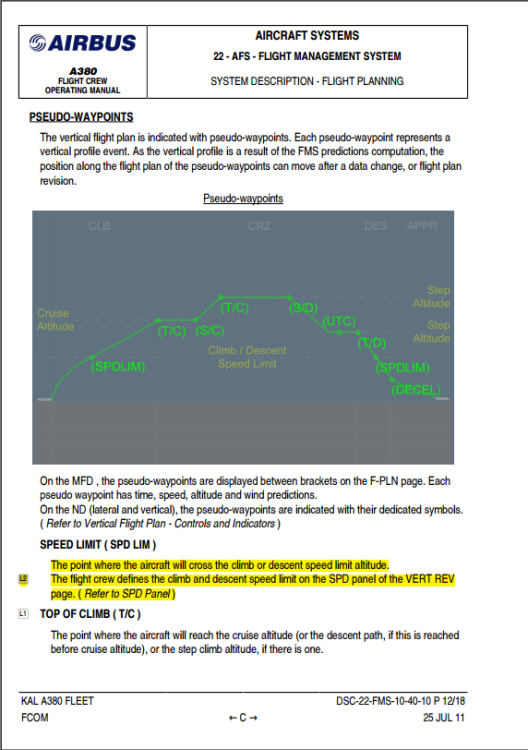
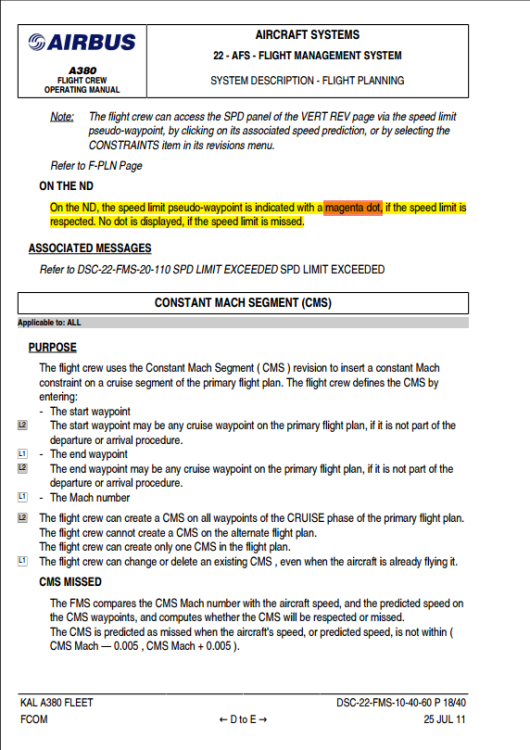
Nope, @spottersim Magenta Dot is the Target-of-Speed-Limit (SPD-LIM on FMC), either: Target-of-Deceleration for Descend Phase,OR Target-of-Acceleration for Climb Phase, Both implies for the Target Speed from speed 251 knots and above. Please refer to the highlighted area: So depending on your phase of flight, it marks the precise spatial point where that speed constraint or limit becomes active. Hope that is helping you to understand the situation. Cheers!
-
It is the same, @AvGeekStuff . You're not alone here about this 😁 My assumption because everyone is occupied with the FSimUK Event, so no one is replying from Ini Side 🤷♂️ There's a lot work to do 🤷♂️ But for now, use TOGA reference from SimBrief, but if you use OIS, reduced the calculated FLEX by 15-25 degrees. Atleast it works temporarily 🤷♂️
-
Same happened with us in this T/O Calculator - Systems - iniBuilds Forum topic Don't worry 🤣
-
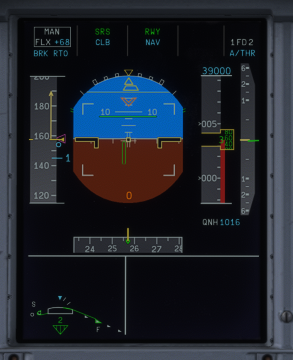
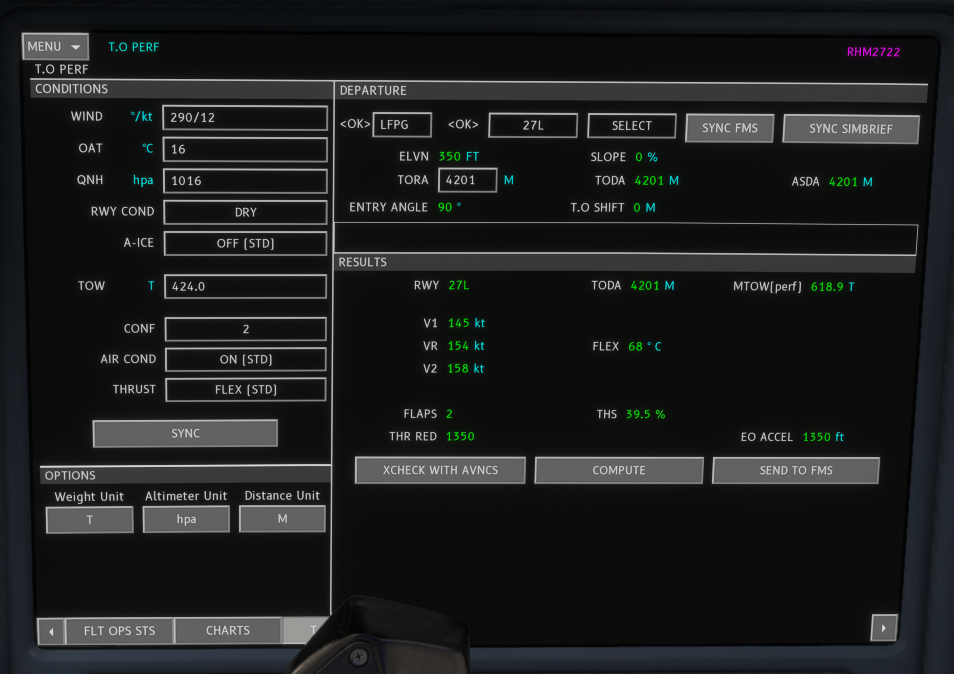
Dear @iniKyle and team, I think I caught the culprit! 🤣 See the details and screenshots below. Here is the takeoff configuration I used: Everything sounds having a normal takeoff, until this happened: During the initial takeoff roll up to V1, the speed trend vector shoots well past the top of the speed tape scale. However, right after passing V1, the speed trend suddenly drops off significantly. It ends up taking another 700m to 1,200m of runway just to accelerate from V1 to Vr—especially noticeable when V1 and Vr are above 150 knots. Can you please adjust the dynamic? Many Thanks Cheers!
-
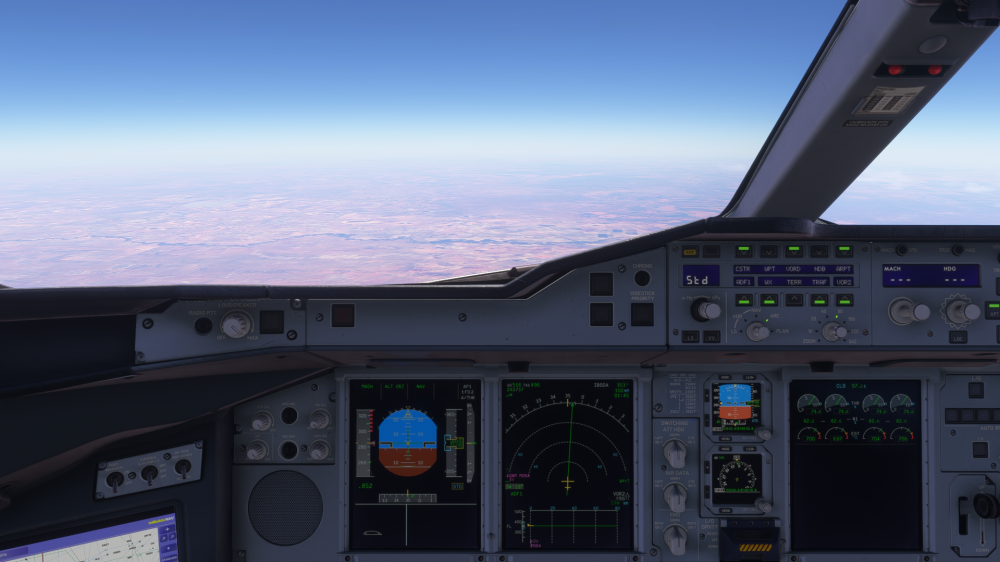
So, this is my set-up for Gaming, @iniKyle . here is my setup for reference—I'm using an HP Victus 16 display with these settings: Here is how it looks normally: However, as soon as DLSS Super Resolution is enabled, it looks like this: As you can see, the display quality actually gets noticeably worsen. I agree with the others here—please adjust the Flight Director to improve this. Just to clarify, I'm running a clean setup with no external shaders or third-party add-ons installed. Cheers!!
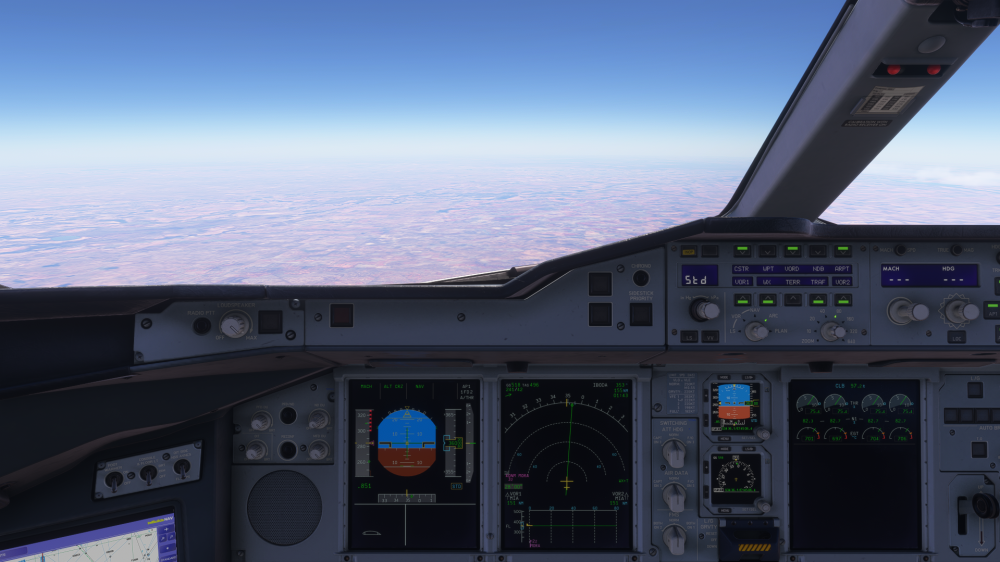
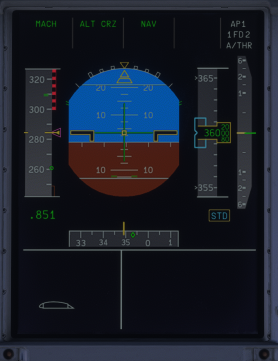
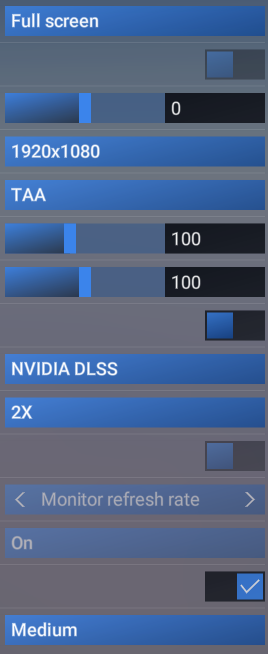
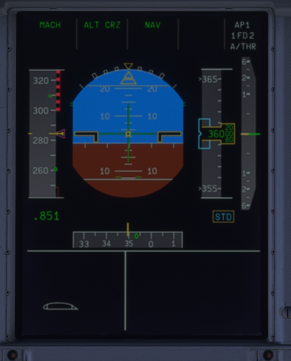
-
Dear @iniKyle @FlyingYellowFox , Just had this exact same thing happen to me! I loaded up a flight to see if I could replicate your issue, and sure enough, I ran into it too. Mine overshot into the grass, but as soon as I slewed it back onto the pavement, I was able to taxi out normally again 🤣 Must be some weird bug. Cheers!
-
Streamed Aircraft is unable to be uninstalled, try disabling then re-enable it, @Sweet19blue hope that works, Cheers!
-
Are you streamed version or downloaded version? For Streamed, somehow still v1.0.1, but already v1.0.3 if you downloaded it, and restart Sim. I dunno why 🤷
-
Couldn't agree more, mate. Just because they are paying a few bucks apparently gives people the illusion of total ownership. I believe that half of them are likely just rushing the devs so they can grab the pirated copy anyway. 😂 ......... since that there's no way to check that they actually buy it or not unless we are the devs team 🤣
-
-
wow, the audacity coming from you guys is amazing 😂
-
Greetings, teams I have been testing the A380 across various gross weights on both v1.0.0 and v1.0.1 (streamed and downloaded versions) and both RR and EA Versions. I’m experiencing consistent pitch and rate-of-descent issues specifically during Flaps 3 landings with All Engines Operating (AEO), occurring on both manual and automatic approaches (single or dual AP). Observed Behavior: Pitch Oscillation (Flaps 3 AEO): Passing 800 ft AGL: The aircraft begins oscillating ~0.5° (ANU/AND). Passing 500 ft AGL: Oscillation increases to ~1.0°. Passing 300 ft AGL: Oscillation worsens to ~2.0°–2.5°. VSI/Pitch Discrepancy Below 1,000 ft: Hand-flying (having Manual Approaches) below 1,000 ft at a constant 2.5° ANU initially gives a normal 700–800 fpm descent. Upon passing 400 ft, without any pitch input change, the rate of descent unexpectedly spikes to 1,000–1,200 fpm (triggering GPWS sink rate alerts 😂). Passing 250 ft, the VSI drops back to 900 fpm, and stabilizes back around 700–800 fpm below 100 ft—all while holding the exact same pitch attitude. Note: This behavior does not occur in Flaps FULL under identical conditions (manual or autoland). Could you please look into the pitch stability and ground effect/flight dynamics modeling for Flaps 3 approaches? Many Thanks, Cheers! ~HaveASafeFlight!
-
Dear @iniKyle, this also happens with me, trying to play downloaded version, trying to update 5 times. Also try to delete on WASM folder, but still not working. Once the download started, but stopped at 42% and tried 3 times with failed update. Anything to help, please? Many Thanks. HaveASafeFlight!
-
Hi Team, I would like to submit a few feature requests and bug reports for the EFB: Feature Requests: Default Fuel on Initial Startup: Is it possible to disable loading the last saved fuel state on initial startup? Having fuel persist from a previous flight can be frustrating, especially after a CTD, Forced Shutdown, or connection drop (but sometimes starting with arbitrary amounts like 20,000 kg after finishing the previous flight and exiting MSFS). So it will be "revert" to defaulted amount every time starting new flight. Turnaround Fuel Logic: Selecting the "Turnaround" option currently resets all tank fuel to 0 kg, which causes an APU shutdown due to fuel starvation. Could turnaround mode default to a minimum fuel level (e.g., 15,000 kg or something) instead? Instant Loading Override: Can we allow the "Instant Loading" option to override an ongoing "Real Time" or "Fast Loading" process to save time? Bug Reports: ZFW Entry & Pax/Cargo Split: Entering a custom ZFW for a fully loaded aircraft sets Planned Pax to 388 while allocating an abnormally high weight to cargo. Especially after loading from SimBrief. MACGW Shift on Instant Load: Importing from SimBrief using Real Time or Fast Loading sets a specific MACGW. However, immediately selecting Instant Loading after finished loading via Real Time or Instant shifts the MACGW noticeably rearward. Fuel Edit Lock: After loading completes, the Planned Fuel Amount field occasionally becomes uneditable, preventing fuel adjustments up or down. Thanks! HaveASafeFlight!
-
That is IniBuilds Newsletter from Friday, 25 September 2026, mas @Rezab See the picture below: Are you subscribing to IniBuilds News letter by any means? thanks

-
Dear, @iniKyle , I happen to cross checked some videos like: (426) A380 TAKEOFF MIAMI 4K - YouTube - You can see it on 1:49 that the CLB power doesn increase to MaxClimb Fantastic Cockpit Views AIRBUS A380 Takeoff | 8 Cameras - In 8:58 when Transitioning to CLB Power, it stays on DCLB3 which is 74% PARIS | A380 TAKEOFF 4K - At 4:49 also doesn't increase to Max Climb Thrust ETIHAD AIRBUS A380 Takeoff Abu Dhabi | Flight Deck GoPro View - Check 13:43, also not climb with MaxClimb A380 Flight Deck to Singapore with Etihad! - On 5:37 also have DCLB3 which NOT on Max Climb Thrust I don't know which one is correct, but can you ask them again about this? Because it is clearly they aren't doing Max Climb Thrust directly after takeoff FLEX Power. Cheers! HaveASafeFlight!
-
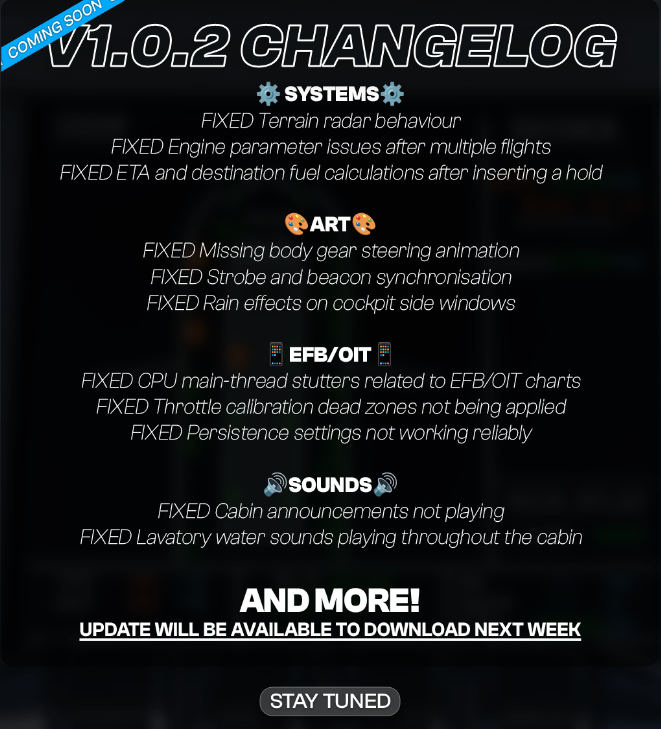
They said it will be fixed by V1.0.2, guys.
-
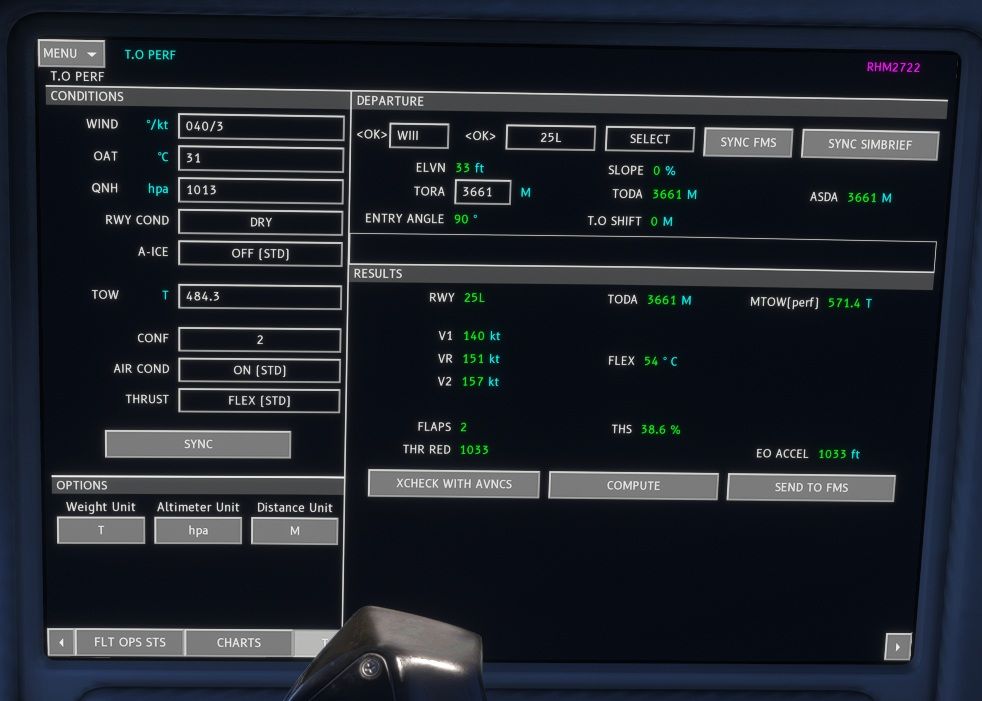
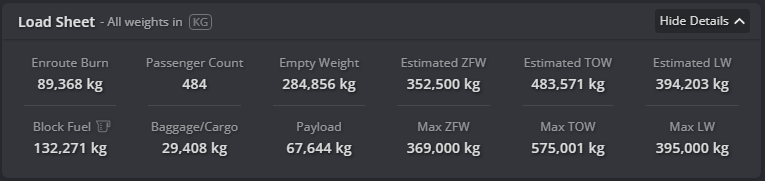
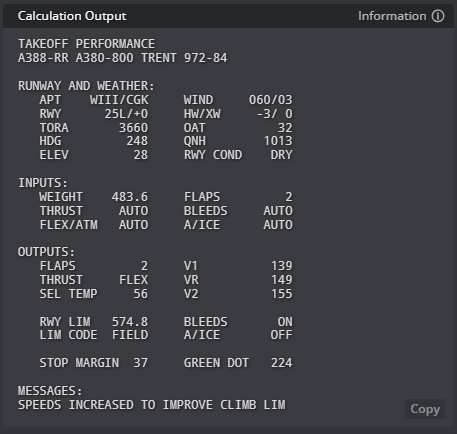
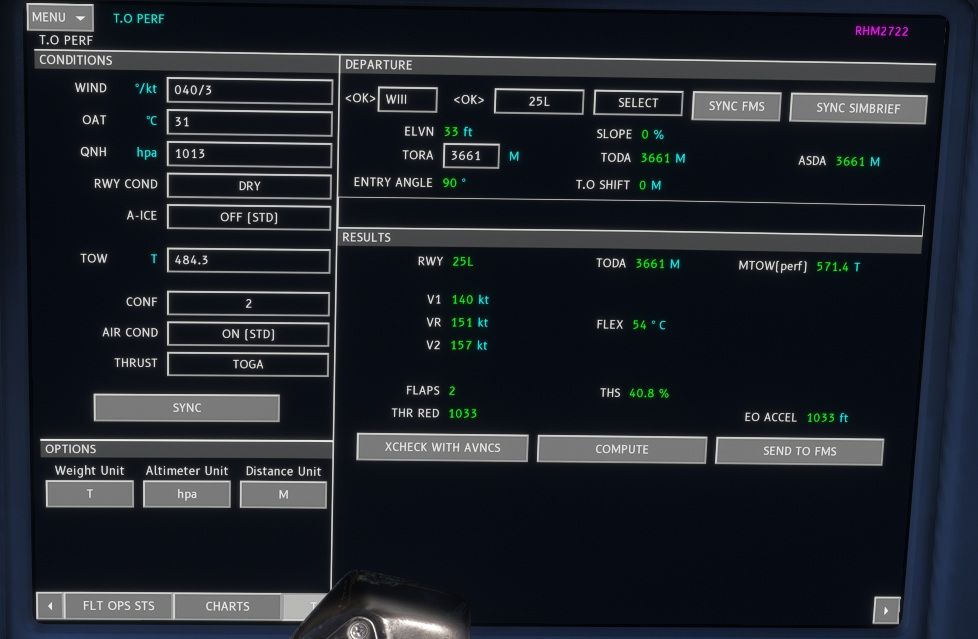
So, I play with this weight: By Simbrief Calculator, it showing this: But somehow, based on OIS is having difference on the speed: With FLEX / With TOGA There's literally NO DIFFERENCES on the speed between both of them. I tried 3 of them, still the aircraft reached Vr AT THE LAST 1.000 feet. 🤭 For comparison, in another runway, almost the same weight, 4.000m of the runway, FLEX showing at 67 Degrees then I compare with TOGA. But still, both reached Vr at the last 1.000feet with EXACTLY HAVING SAME SPEED. 🤣 I think @iniKyle and team required to adjust Thrust Vector Geometry for this. Cheers! HaveASafeFlight!
-
-
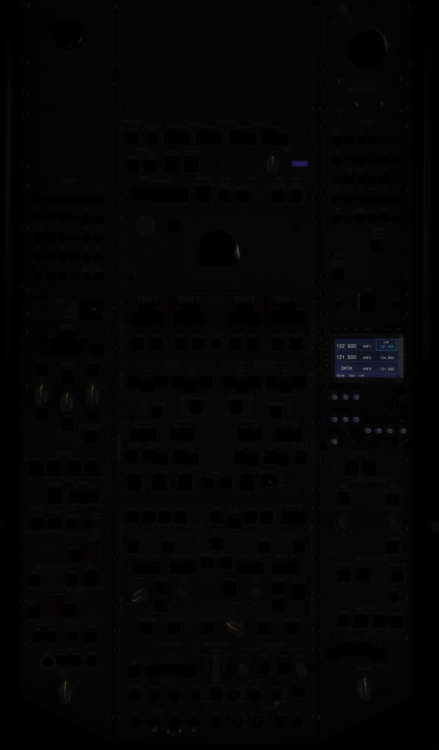
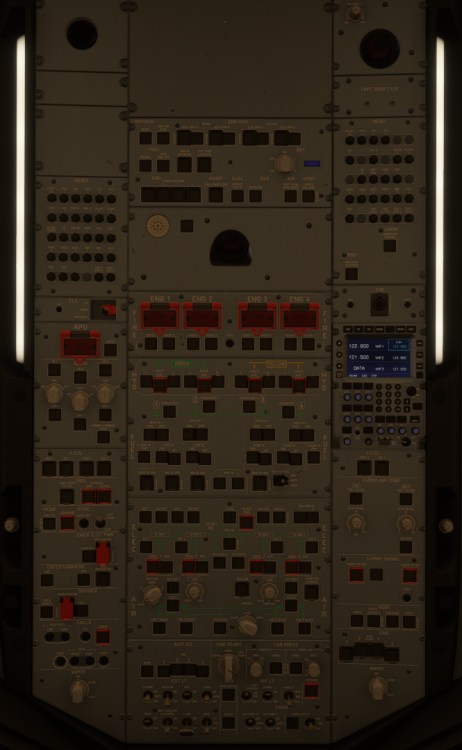
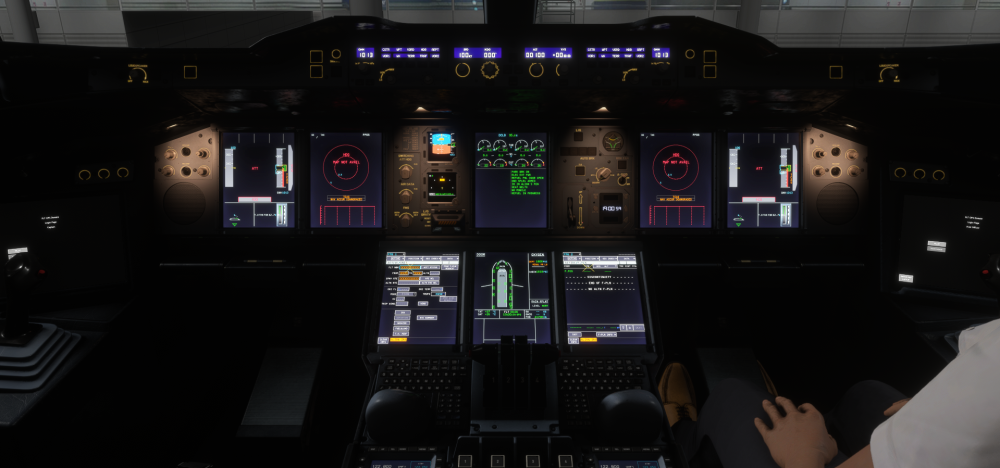
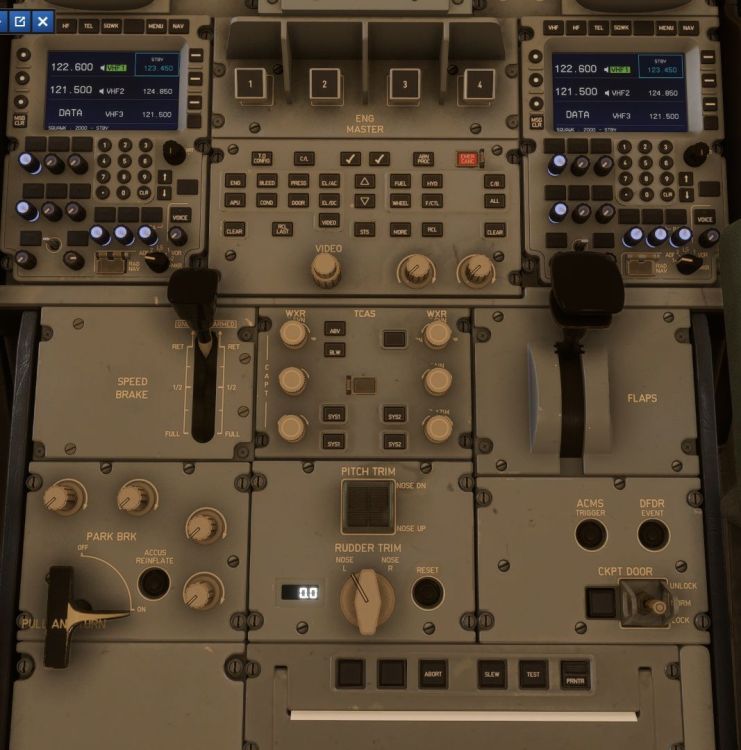
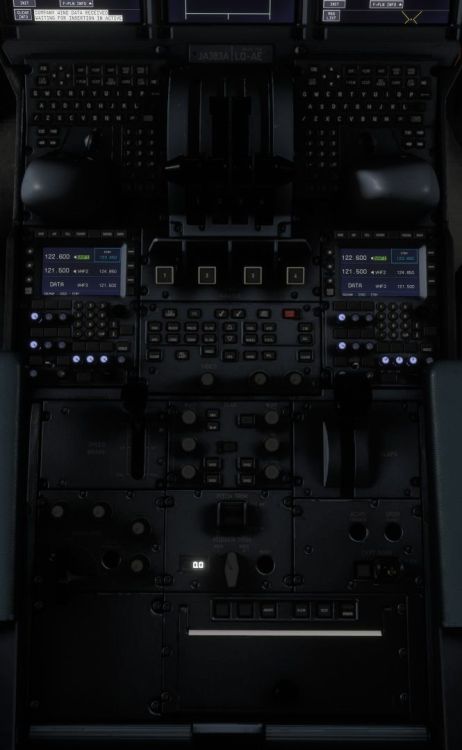
issue with @SebSch also happening with me, @iniKyle , see the picture below: ALL the Overhead Panel with some Knob placed incorrectly, and also with this Glareshield Panel below: This condition with ELECTRICAL ON (Either on GPU or APU), EFIS CPs (both) with CSTR, VOR1, VOR2, ARPT, TRAF and VORD actively pushed, FCU's FD ON, and Integral Light AT 100%. this is on pedestal: Differences between versions on initial loading (with good connection speed): Version 1.0.0: Exist for the first 30 seconds (sometimes less, on Downloaded Version), Version 1.0.1: Exist for the first 1-2 minutes (on Streamed Version with high bandwidth, low bandwidth may having prolonged time). BUT, since this streamed version, this is also happening during Inflight ONLY when the connection is poor, when transitioning from the external view to cockpit view, but the light resumed normal when the connection is resuming normal bandwidth. So by my experience, whenever the connection speed is drop below certain speed, this will be happening. --ADDITIONAL EDIT-- As for momentarily ALL P/B LIGHTS ON, because of sudden change from external view to Cockpit View, there's momentarily bandwidth spike happens when switching. This only happening on downloaded version, while streamed version is ONLY lost of Integral Light because of low bandwidth. I hope it helps to understand the situation. Cheers! HaveASafeFlight!
-
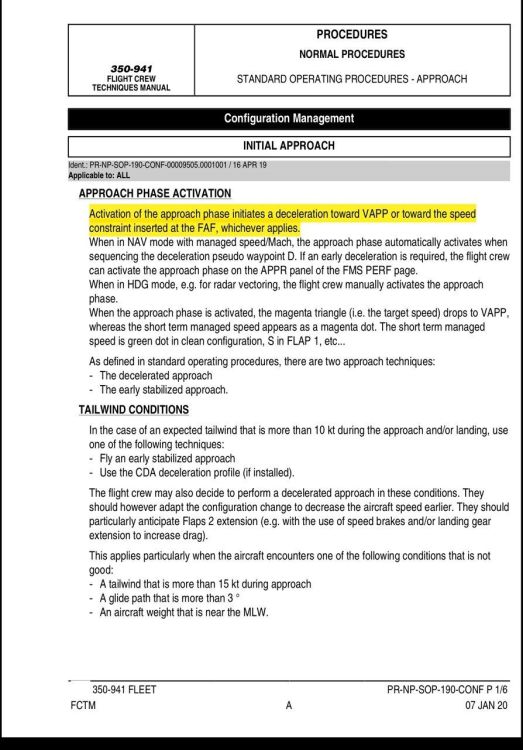
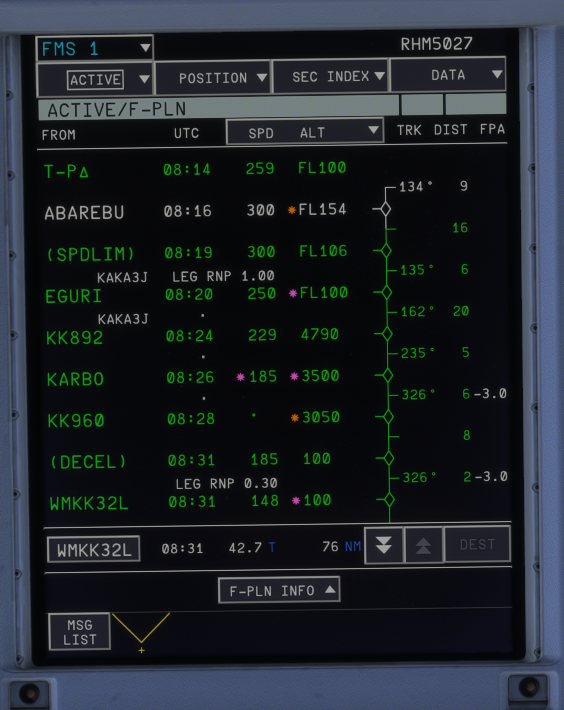
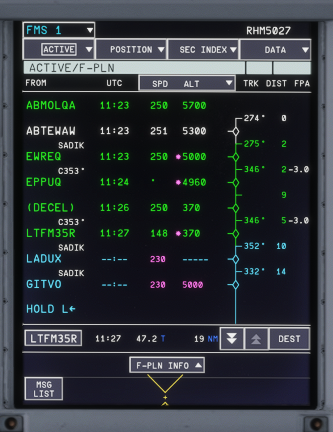
Just small information, @iniKyle , the FCTM said (see the highlighted): So there's 2 condition where DECEL P/W (or the beginning of Approach Phase): Automatic Activation, or Manual Activation by Pilots. This consist of 2 type of deceleration: Passing SPEED LIMIT Altitude (250kt/FL100 and/or 220kt/FL060, incase of highspeed descend, identified by Magenta Dot) -> Passing DECEL P/W -> decelerating to GDot -> further decelerating to VApp at FAF/P, OR Passing SPEED LIMIT Altitude (250kt/FL100 and/or 220kt/FL060, incase of highspeed descend, identified by Magenta Dot) -> Passing DECEL P/W -> decelerating to GDot -> Reduced to selected Speed Constraint (Either on IAF/P, IF/P, and/or FAF/P) -> further decelerating to VApp and to be established at VApp at FL010 AGL (IF there's a Speed Constraint on FAF/P). Example 1: As you can see the picture below, the DECEL P/W becoming JUST BEFORE the runway: As you can see the DECEL P/W just before the Runway because of there's speed constraint at point KARBO, while actual DECEL P/W SHOULD be between point EGURI to KKK892 Example 2: Although there's no speed constraint, because of Glideslope capturing from High Altitude, the DECEL P/W become AFTER the FAF/P and start at Ground Level. (which should be before EWREQ point). I know there's a misunderstanding because on FCTM/FCOM mentioning DECEL P/W targeting VApp AT the runway, but actually combined with the FCTM above, it should be AT VApp just before passing 1,000 feet AGL to satisfy the Stabilized Approach Criteria for Instrument Approach. And FYI, this structure is applied to ALL AIRBUS Aircraft, from A300-600 through A380. And therefore, it required ALL Airbuses by Inibuilds to be total makeover for DECEL P/W. I hope this can be implemented on future update on every aircraft by IniBuilds. It's sad as an ex-A330F Driver to face this inaccurate modelling. And I also hope this explanation will help. Cheers! HaveASafeFlight!
-
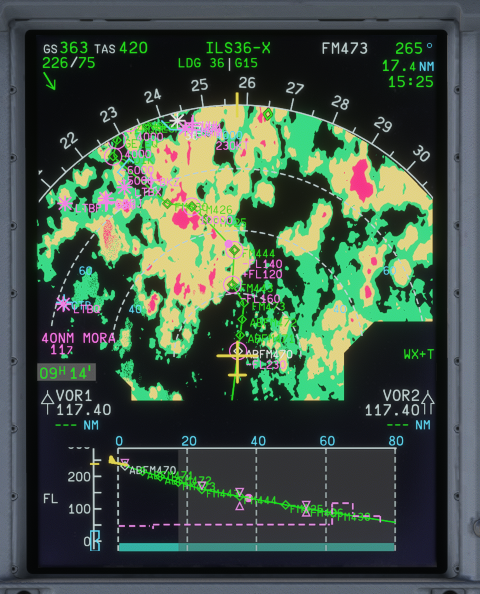
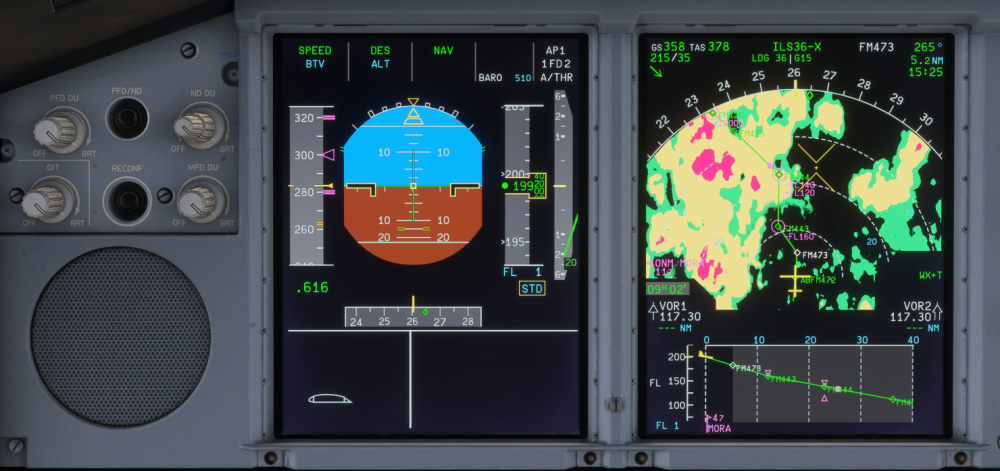
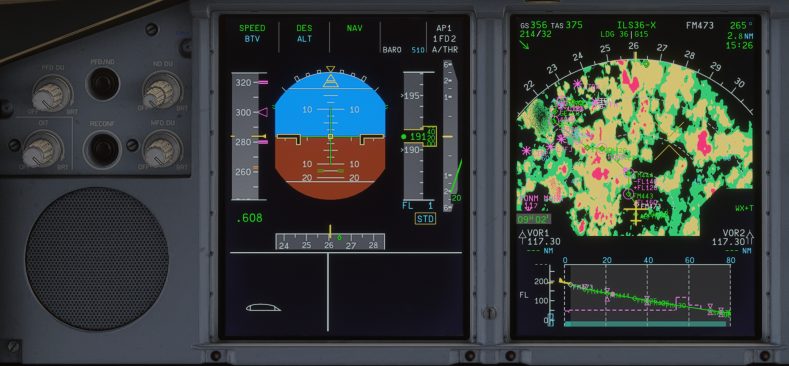
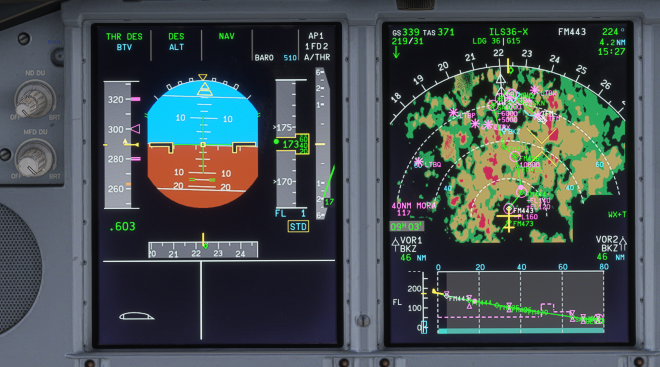
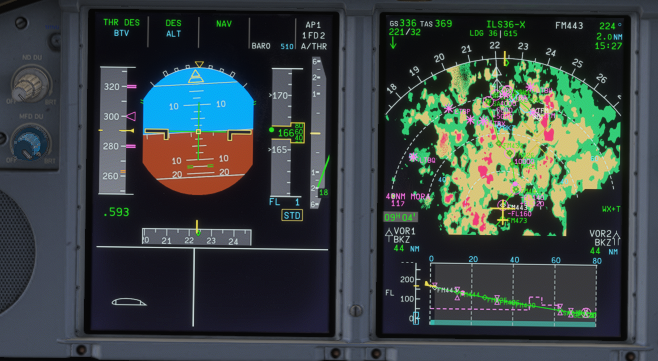
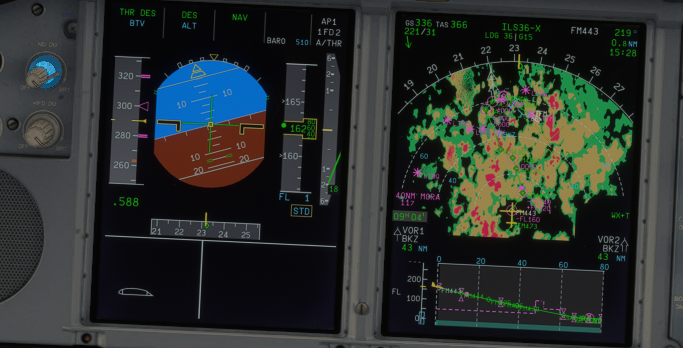
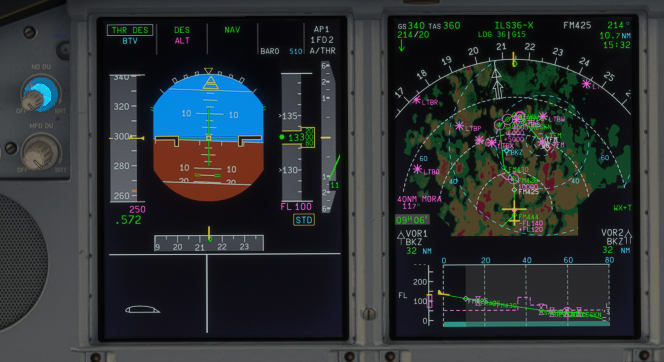
As for me, @iniKyle , the Weather Radar is too bright, it is blended with the route and waypoint. See below: Unless you zoom it, then you can start to distinguish between green of the weather and the green of the route. This is when you put 100% of the weather brightness: This is when you put 50% Brightness: This is when you put 75% Brightness This is when you put 40% Brightness Actual Weather Radar Brightness is slightly lower even in 100% Brightness, so, a bit reduced, maybe? And also in conjuction with @tturbo180 , the FD is need a bit bright to distinguish between Lateral FD and White Horizon References, and also required a bit thicker. HaveASafeFlight!
-
So this is normal? ok, maybe I will restart MSFS next time before I am about to use A380 then. Thank you very much, Kyle 👍
-
Greetings, Team. Another day flying the beautiful A380 v1.0.0. Today, I decided to play with Time Compression about 2x Compression. I made Step Descend by myself because it seems the pre-program Step Climb was unable to be executed due to Max Cruise Level. Previously, I flown FL400 and planned to FL410. Because of the simulated Max Cruise Level unable to be reached at that point, "Step Climb Cancelled" and decided to descend to FL390. Suddenly, the aircraft went to FL413 and flying below GDot, I tried to descend using Managed-Descend trying to achive FL390 as I pre-program FL390 on FMGCS. The Aircraft maintained at FL390, full thrust (even TOGA was applied to increase the speed), still flying 30 kt below GDot without any increament on the speed. Then I decide to descend to FL370 using Managed-Descend but still descending with full thrust and 30 kt below GDot. Tried to Open-Descend then the aircraft start to gain speed to the target Mach Number. Is this normal behaviour or a bug? Thank you for your attention, cheers HaveASafeFlight!
-
This is also happening to me, every time I download the V1.01, it was finished around 38%, and prompting to install. try installing what available, just to received the aircraft disabled. Tried to re-download it but still stopped at 38% with another prompting to install. Tried to re-load MSFS, re-load XBOX user name, but still stuck at 38% with prompting to install. maybe I will be waiting a few days before decide to re-download the v.1.0.1.


