




LukeFF
Member
-
Joined
-
Last visited
Everything posted by LukeFF
-
@Eddie, I can 100% confirm this is an issue after today's hotfix update. I closed Axis and Ohs to make sure that wasn't causing a conflict, and I ensured within MSFS 24 that those keybinds aren't assigned to anything else. "Wing Lights On" turns the lights off, and "Wing Lights Off" turns them on.
-
Still an issue after today's update, FYI.
-
The default "wing lights on" and "wing lights off" commands are inverted, i.e., On turns them off and vice versa.
-
@richboy2307, this is still an issue after today's update.
-
Bump! @richboy2307
-
Yes, until the WASM crashes are addressed, I'm not going near this plane. I already have a limited amount of time to fly in the evening, and I don't want to waste my time with having to restart because of some stupid crash.
-
Gate 46C, there is a piece of equipment sticking out through the wall.
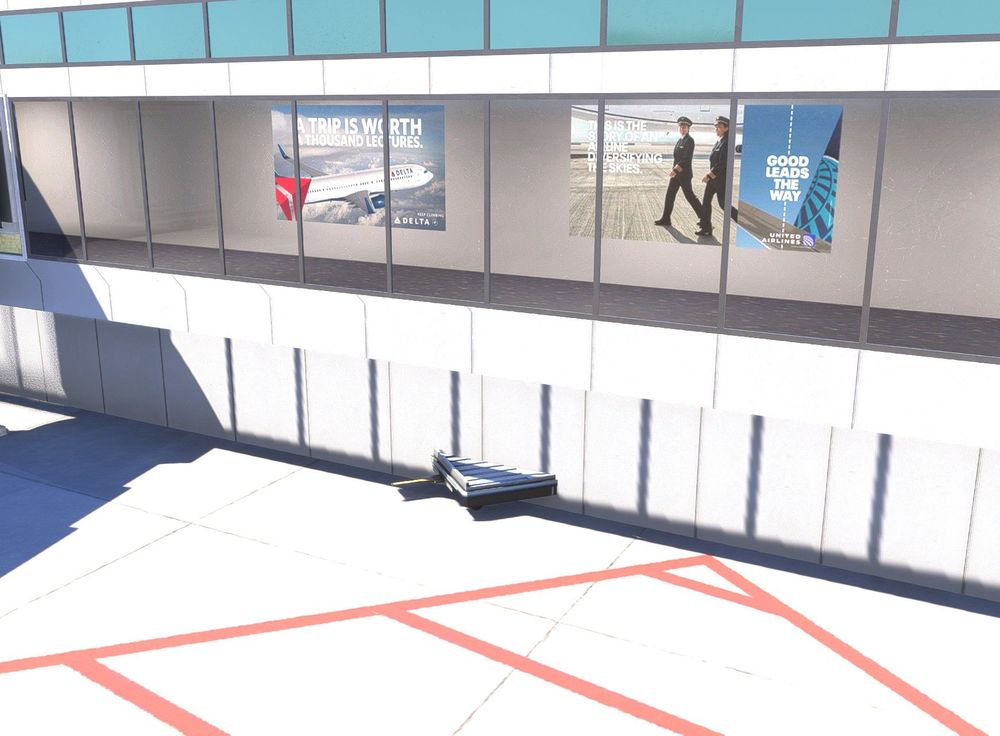
-
It finally loaded for me, but that was after I had left my computer and returned to it about 2 hours later, so I'm not sure how long it actually ended up taking for it to load.
-
Yes
-
Same issue here - the spinning circle at lower right just spins and spins with no resolution.
-
? It works in 2024 just fine.
-
So busy you guys can't respond to the majority of questions and complaints people have had here? The plane was last updated on December 20 and as of today still has a lot of issues. For a so-called "Premium" plane, it sure doesn't feel like it.
-
This isn't the 320neo section.
-
I think I see the issue: once it's enabled in Addons Linker, only two detail options show. Disable it in the linker, and all options show up.
-
Had to do a reinstall of this scenery and when I did, there were only 2 detail configuration options. Reinstalling the scenery again didn't do anything.
-
Then you're out of luck.
-
Yes, all the hype has been for the A350. This is a shameful way to support a product marketed as Premium. It isn't.
-
BATC has a new update where the aircraft's radio is controlled by the COM1, 2, etc volume and reception /transmission knobs. This does not work correct with either radio stack right now.
-
I'm going to be as civil as I can here, but still, I feel the need to say it: the Premium version of the A300 as it is marketed right now doesn't deserve the tag of being called a "Premium" plane at all. I originally bought the A300 for 2020 not long after it was released, and so I went through all the hassles of the random crashes on loading, issues with sound, etc., etc. On the eve of 2024 releasing last year, though, it was a reasonably stable plane, with WASM crashes being mostly eliminated. Enter the 2024 "Premium" version. It has been plagued with issues since day 1, such as: WASM crashes are more frequent than the last version I played on 2020 Freezes on exiting every single flight Has major reflection issues with the windscreen, especially at night. Has various audio issues, like missing sounds from the landing gear when taking off, engine fan blade spinning sound playing with the covers on, missing AP disconnect switch sounds, etc. An issue with importing wind speeds that was originally reported in 2020 is still present in the 2024 version. And so that all leads me to tonight. As for a lot of people I'm sure, it's a work night, but hey, I had enough time to get in a short flight. So I go through the normal startup routine, get to the Progress page, start to type in my airport information and...WASM crash. Exit out (but first, of course, having to force-close the sim because it freezes up), restart my flight, make sure to avoid the Progress page and we're looking good. We complete the engine start, I shut off the starter switch and..."Low Yellow Hydraulic Pressure." Eww, okay, never seen this one before. Bunch of error messages but the plane's still controllable on the ground, we got this. Take off no issues, go to engage autopilot and...oh, that's wonderful - low yellow hydraulic pressure means the autopilot won't engage, i.e., this plane would have never even left the ground in reality. At this point I've had enough and punch out (after, of course, force-closing MSFS 24 once again). So, that was about an hour and a half of my time wasted tonight with a WASM crash and a borked hydraulic bug that I see was reported long ago but still hasn't been fixed. I'm not going to go back in now and try again, as it's less than an hour til midnight and it's just about time to head off to bed. iniBuilds, you have some major quality control issues you need to fix with your planes if you expect me to buy any more aircraft from you in the future. It bugs me to no end that things like this persist after this long, even though they are marketed as these wonderful things with tags like "Premium". They aren't. The A300 right now I would call an early-mid beta plane with issues that still are in urgent need of attention. Fix your stuff already so we can enjoy them like they are meant to be.
-
Oh, and this is wonderful as well: when this issue pops up, the autopilot is INOP, i.e., the plane wouldn't be able to be dispatched in reality. Wow, just wow.
-
I encountered this same issue tonight. GE freighter version.
-
A300 GE freighter, Memphis, attempting to enter airport information on the progress page. This is really getting old for a plane being sold as "Premium."
-
The captain's DH button has to be pressed several times before it will turn green and the player can enter a decision height value.
-
Cheers, thank you!
-
Per the title, the APU can run with the required fuel pump shut off.


