LukeFF
Member
-
Joined
-
Last visited
Everything posted by LukeFF
-
Nope, didn't work - did a full uninstall and reinstall and deleted the work folder, but the same problem is still there.
-
I've not tried that yet, no. Guess I'll give that a try next...
-
I dunno what to think, then. I'm not running any sort of sound or other enhancement mods that would cause an issue.
-
Addendum to the above: it still only chimes once.
-
Wait, now it's working again... 🤪
-
Alright, I cleared it out (second time I've done this) and...no dice - except now the chime doesn't play at all and the autopilot disconnect button sound on the stick only plays once.
-
I attempted today to map the FCU knobs for altitude and heading to a couple of encoder knobs on my controller, with the Axis and Ohs scripts I downloaded from flightsim.to a while ago and work fine for some other commands I have mapped. However, for these two FCU knobs, the increase and decrease buttons do not work at all. I thought maybe it was because they are encoders, but trying to map them to momentary switches didn't produce any solution - the knobs just sit there idle. There are two different AAO scripts out there for the A300 on flightsim.to and I tried both sets of scripts, but neither of them would work.
-
Got it. 👍🏻 BTW, this is yet another reason why we need better documentation with these planes that explains these sorts of things. I've been landing the A300 this way since day 1 because nothing in the print documentation or official videos anywhere makes mention of this (that ATHR should remain on only for auto-landings). It would save a lot of time and frustration on the player's part if these sorts of things were explained in better detail.
-
EDIT: the system as I understand, will start to move the throttles to idle at about 30 ft AGL and then disengage when the wheels hit the ground, when LAND mode is engaged.
-
Thanks, and yes what I'm doing is keeping the autopilot on til about 500 feet, then clicking off the autopilot and guiding the plane down with ATHR still engaged. From what I understand, the ATHR system will disengage at about 30 feet AGL when LAND is engaged.
-
Sorry, double-post.
-
Yes, both LAND mode and the ATHR system was engaged at the point of touchdown, as this was an ILS landing. I was also in selected speed mode. Speedbrakes and autobrakes were also armed. I can't recall any other details. If if happens again I'll try to take screenshots, but that can be tricky when trying to figure out what's going on (also of course the frustration, since it was a good landing, right down the centerline with no bounces). Otherwise, the only consistent detail in both these incidents is that both were landings at KMEM (BM-AmSim). In between I landed without incident at FlyTampa KBOS on an ILS in the rain with zero problems.
-
And it happened again - same conditions as before, landed normally, speed brakes armed, auto brakes Low, etc, etc. Plane just went full bore down the runway and had no intention of slowing down. There is some sort of problem here.
-
Yes, I'm thinking it was some weird one-off bug, because I've not had a problem since with my two ILS landings. Auto throttles were definitely on. Anyhow, will keep an eye out to see if it happens again.
-
Yes it's definitely disabled. The only culprit I can think of is Beyond ATC, but the app doesn't have any interaction with the plane at that point. Nevertheless, I will bring it up in their Discord.
-
Alright, I'll look at it again when I get the chance.
-
I had something happen to me today that I've never experienced before. Landed normally, 1.3 G landing rate, no bounces. Speedbrakes were armed and autobrakes were set to low, LAND mode engaged. When I went to engage the reversers as I always do, though, nothing happened. We just kept going down the runway, throttles stuck in the full forward position. Moving the throttle lever on my controller did nothing, trying to engage the reversers did nothing. Eventually the plane, with warning lights going off everywhere, careened and bounced back into the sky. I loaded up a new flight to see if I could reproduce the problem, but of course, it landed just fine, reversers engaged normally, etc. Totally bizarre.
-
Alright, I finally got around to checking this and there is definitely a bug with it. It also happens when using the red AP disconnect button on the yoke - the sound will play the first time but not any more after that.
-
With the modern radio stack, if you enter a frequency into COM1 in the active slot, it will change on its own after engine startup. Happens every time regardless of airport.
-
Alright, all is good now, thanks. I dunno if it was a server issue, but that profile attached here is/was definitely not what the iniManager downloaded.
-
Got it, and thank you for clarifying this. That was in contradiction to what I heard before.
-
Thank you, will try again when I have the chance.
-
I will have another look when I can, but I do know that already I have the sliders set the maximum level.
-
After updating to the latest version, clearing my scenery indexes, redownloading the GSX profile, and ensuring everything was configured correctly in GSX, I spawned into a freight position and went into the GSX options. Once there I was told there are "10 parkings not found in navdata."
-
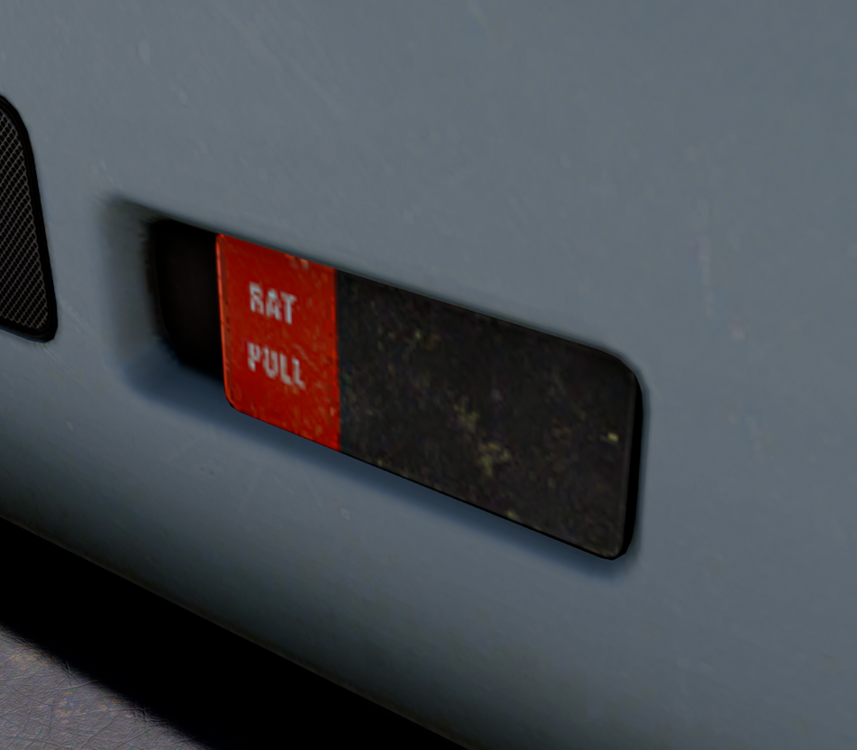
The texture for the RAT turbine lever is quite low-res: