




richboy2307
Staff
-
Joined
-
Last visited
Everything posted by richboy2307
-
Hi @Bald kelp There is no such issue on the plane currently, nor been reported by anyone else before. After landing, you need to tap on your brakes to disabled the AUTOBRAKE. Please confirm you have disabled all AI Assists (Options > Assistance Options > Piloting). Also ensure you do not have any conflicting keybinds for parking brake/brake that may be causing issues. Additionally, ensure the chocks are not enabled from the EFB. If you are still having issues, please share a short video clip/screenshot of when you have the problem showing your entire cockpit (Overhead, Front Panel, Center Pedestal) Thanks!
-
Hi @rem31, English only please on the forums here. You simple hover your cursor over the SPEED SELECTOR or HDG SELECTOR knob, and press A button to interact with it. Then follow the on-screen instructions to adjust, and finally press B to quit. Also as mentioned above, you must have filled in the require information on the MCDU for MANAGED mode to work. Otherwise the AP will only work in SELECTED mode. Thanks!


-
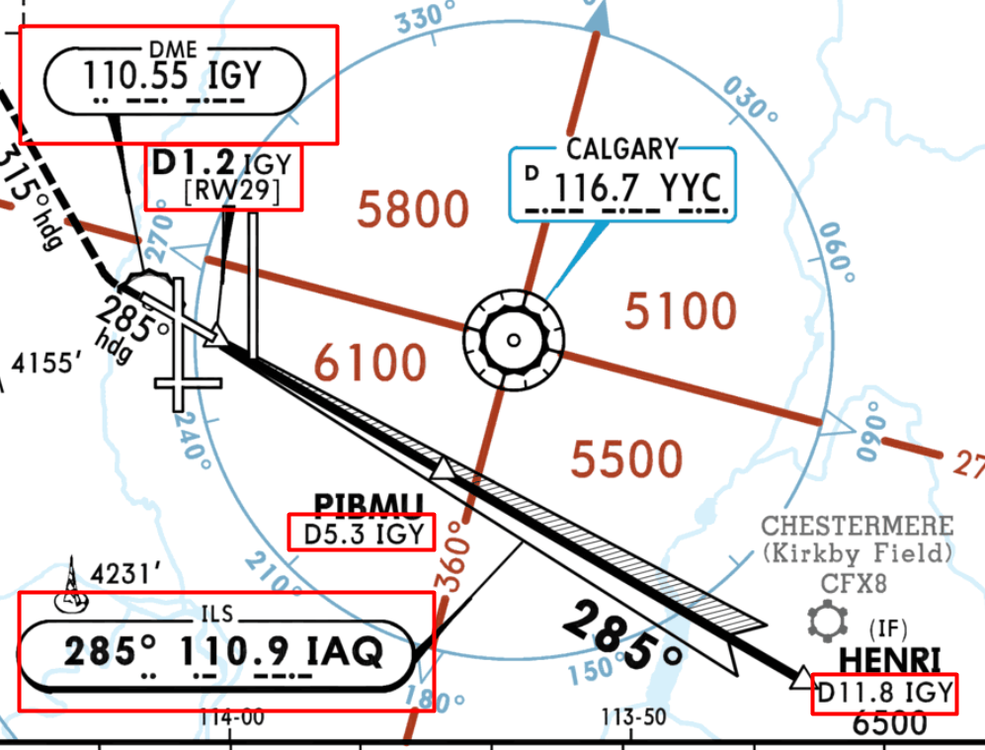
Hi @Trane For your example of Runway29 at CYYC, if you look at the approach plate you'll note that ILS (IAQ 110.9) does not have any DME associated with it. This is why you see 0.0 on your PFD. Instead the approach uses a separate source for DME (IGY 110.55), and you can see that mentioned as the distance read-out for all the corresponding waypoints as well. So in this scenario, you'd tune the RADNAV page on the MCDU as follows: - IAQ/110.90 in the ILS/FREQ section - IGY/110.55 (enter it as /110.55) in either VOR1/VOR2 section on the top (as you prefer) Once you see that, enable VOR on the Glareshield and you will use that DME on the bottom left/right of your ND instead. I am not noticing this issue, just tested at CYYC RWY 29. Please ensure your RADNAV page is setup properly, that you arm APPR and intercept the glide from below the glideslope (it won't capture if you're already above it). Are you using Default or Navigraph Navdata? Also are you using any sceneries for the airports where you notice this issue? Also ensure your sceneries are up to date and do not have any add-on affecting all the airports, that may be causing conflicts. Thanks!


-
Hi @danlee957 Try again with the latest update. In case you see this again, please share a screenshot of it, along with where it happened (which gate number/Terminal) Thanks!
-
Noted. Thanks for the suggestion.
-
Hi, Are you using any addons like FSRealistic? That is known to cause issues for manual entry sometimes, the only fix being to exit to main menu and restart the flight. If you are having this issue on every flight, then please try with an empty community folder: rename your existing one to '_Community' whilst testing. When finished testing, delete the new 'Community' folder and rename your old one back to 'Community' If you do not have this issue with an empty community folder, then it is likely some addon that is causing conflict. Most likely culprits are outdated liveries or outdated version of Horizon Simulations 787 addon. Thanks!
-
Hi @BillM Are you using Navigraph or default navdata? Also can you specify which Airport + Runway + SID/STAR/APPROACH combination you had problems with? It is the correct behaviour to receive a NOT ALLOWED warning when trying to remove a F=PLN DISCONTUNUITY which has MANUAL entry above it. So you need to erase the MANUAL entry first . Once you have CLR on your scratchpad, clicking the L LSK next to the MANUAL waypoint should get rid of it. I'm not noticing any such issues on my end. Below is a video of KJFK DEEZZ5 SID out of RWY 04R with Navigraph Navdata: 2024-07-09 22-43-06(1).mp4 Also if you're on PC, please ensure your A320Neo V2 is updated to the latest version (1.0.17) in the Content Manager: Also lastly, if that doesn't work. Please try to delete the contents of this folder, as that will force the plane to re-compile the WASM next time you load it. Just to ensure it wasn't corrupted on initial launch: Steam Version %APPDATA%\Microsoft Flight Simulator\Packages\microsoft-aircraft-a320neo MS Store Version %LOCALAPPDATA%\Packages\Microsoft.FlightSimulator_8wekyb3d8bbwe\LocalState\Packages\microsoft-aircraft-a320neo Thanks!

-
Ensure all the AI Assists are disabled (Options > Assistance Options > Piloting) as they will affect the AP functions. Also do note that the A320neo V2 uses the new Computational Fluid Dynamics (CFD) aerodynamics model in MSFS, so it generally will be less "stable" compared to other planes as it interacts with the environment better and takes lot more factors into account. You may also want to reduce the Turbulence to MEDIUM or LOW if you feel it is too much for your liking. Me and countless other users are using this plane with the Thrustmaster Airbus Stick and Throttle Quadrant without any such issues. Please ensure again your AI assist are disabled as shown above. Also please ensure you have calibrated your throttles properly in the EFB Options page using this guide: This is normal for a de-rated take-off, as our EFB Take-off Calculator is designed to calculate for a greater second-segment climb rate, rather then get off the runway as quickly as possible. Thanks!

-
Yes they are factored into VNAV and EFOB/ETA calculations.
-
Hi @Green97 Not supported currently. Under consideration, but no timeline/guarantee of this. Known bug. Already fixed for next update. Also already addressed. Improvements to this coming in the next update. Thanks!
-
Yeah that is just a WebASsembly Module (WASM) crash on load. When the WASM crashes, all code that uses it will basically stop working - end result being that systems freeze/stop responding. Anything NOT using WASM will still continue to function. This was designed by MS/Asobo such that if the code crashes, it will only be contained to things within the WASM, and not CTD the whole sim itself (like in previous simulators). However not all WASM crashes are due to the aircraft's code itself, as sometimes its to do with how the sim interacts with WASM, and where it stores that data specifically on memory. These are hardest to fix as they are difficult to reproduce, and are specific to each client's memory. Anyways, based on testing so far, next A300 update should have some workarounds/fixes that improve WASM stability. However, whenever a WASM Crash happens, only way to resolve is to restart the flight as that resets the WASM. Thanks!
-
SAT is the Static Air Temperature, OAT is the Outside Air Temperature, and both are basically the same thing. This is the temp that will be shown on your OFP's WIND INFORMATION section, and also what you enter into the MCDU. So using the same example from above: If I was entering the info for waypoint TUDEP, and cruising at FL330, I'd input -50c as temp, and winds 218/80 as shown in red. Thanks!

-
Have you tried with an empty community folder (nothing but the A300 in it)? Just to rule out some conflict with another add-on or lighting mod? Also perhaps try to use this lighting mod? https://flightsim.to/file/66466/inibuilds-a300-external-lighting-fix
-
-
INIT B page is only accessible when engines are off. It is important as that is where you set the information about your Weights and Fuel Onboard. So I would try starting from an ON APU panel state, fill in the information, then start your engines.
-
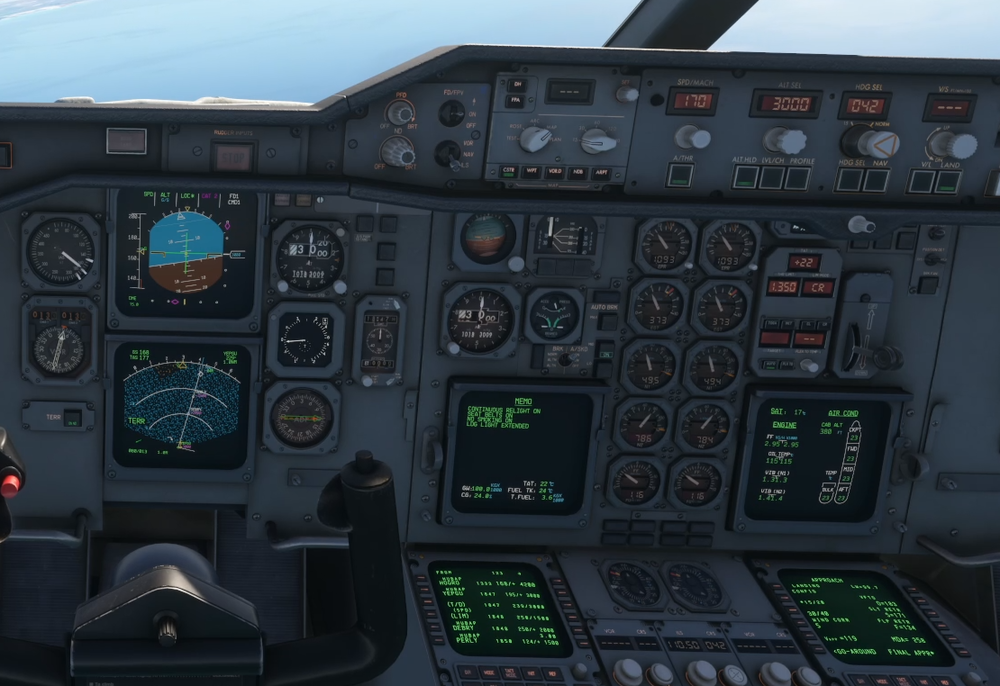
Its hard to say what happened without actually seeing a video, as it may have been the right mode wasn't armed, or the intercept angle was too much etc. The proper way to Go Around is to hit the TOGA button, which would kick off LAND on the FCU. So if your LAND mode remained engaged, thats probably where the problem happened. Only A/THR should remain when you hit TOGA or executing a go-around: On the FMA you would see is: On the MCDU, it remains in APPROACH mode, and remains so for the rest of the attempt: Here is me re-establishing, still on APPROACH mode on MCDU, and LAND re-armed: Thanks!


-
The TOGGLE PUSHBACK button only calls for the default MSFS tug, same as you would through the ATC menu. It may take some time for the pushback to spawn (though sometimes it may not show up at all visually.) Make sure chocks are removed, and parking brake is released. To actually start the pushback you need select AFT, LEFT or RIGHT buttons on the EFB. This will then connect the tug to your wheels and begin pushback in the desired direction. When you are finished with the pushback, click the STOP button. Thanks!
-
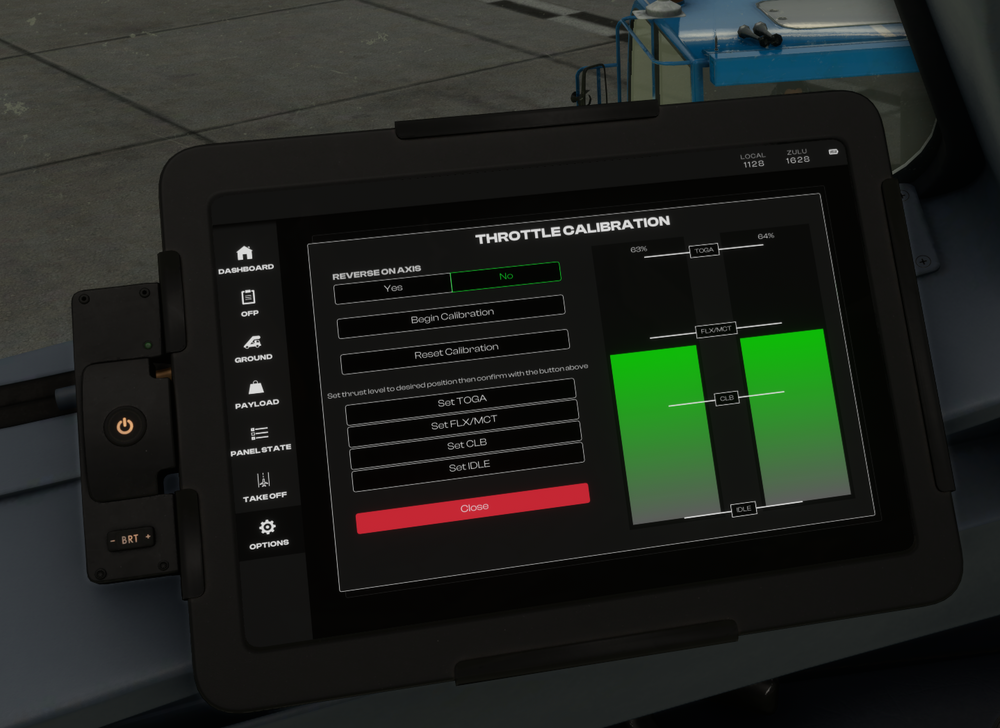
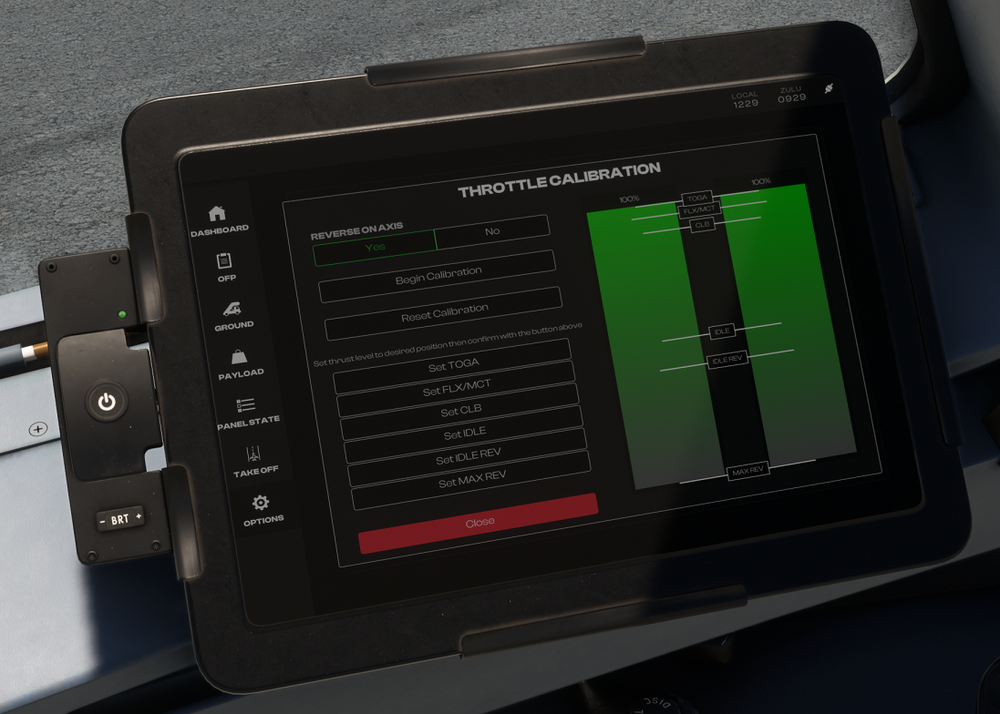
The calibration is done entirely on the EFB itself, using either the actual throttle axis on your hardware, or via buttons if you're using a controller. You move the position of the green vertical bars using this hardware. Some things to note: The "SET XXX" buttons on the EFB define the detent position. The green vertical bars indicate the current position of the axis (0 to 100%). The white horizontal bars with IDLE, CLB, FLX/MCT, TOGA written on them show the currently configured position of that detent on the throttle lever. To calibrate hardware without a reverse axis (e.g. Xbox Controller* or Honeycomb Bravo TQ): Select REVERSE ON AXIS = NO Click 'BEGIN CALIBRATION' Keep the green bar at the very bottom (close to 0%) and click SET IDLE (it will replace the BEGIN CALIBRATION button) Move the green bar to where you want the next detent (normally ~70%) and click SET CLB Move the green bar to where you want the next detent (normally ~80%) and click SET FLX/MCT Move the green bar to where you want the next detent (normally ~100%) and click SET TOGA *Note: For XBOX users, some users have reported that you may need to restart your sim after the calibration is done in order for it to take effect. To calibrate hardware with a reverse axis (e.g. TCA Quadrant): Select REVERSE ON AXIS = YES Click 'BEGIN CALIBRATION' Keep the green bar at the very bottom (normally ~0%) and click SET MAX REV (it will replace the BEGIN CALIBRATION button) Move the green bar to where you want the next detent (normally ~40%) and click SET IDLE REV Move the green bar to where you want the next detent (normally ~50%) and click SET IDLE Move the green bar to where you want the next detent (normally ~90%) and click SET CLB Move the green bar to where you want the next detent (normally ~95%) and click SET FLX/MCT Move the green bar to where you want the next detent (normally ~100%) and click SET TOGA Thanks!
-
Hi @Мартыненко Борис Always glad to help! If you are only using your Rudders to steer and do not have an axis assigned to the Tiller function, then please select YES for RUDDER CONTROLS TILLER option on the EFB > OPTIONS page : Thanks!
-
This is normally done using the tiller located on the side console. The tiller can be controlled via the 'NOSE WHEEL STEERING AXIS' binding. For simulation purposes, this can also be linked to the rudder pedals for easier use. To do this, go to the aircraft EFB 'Options' tab, then select 'YES' for the 'RUDDER CONTROLS TILLER' option.

-
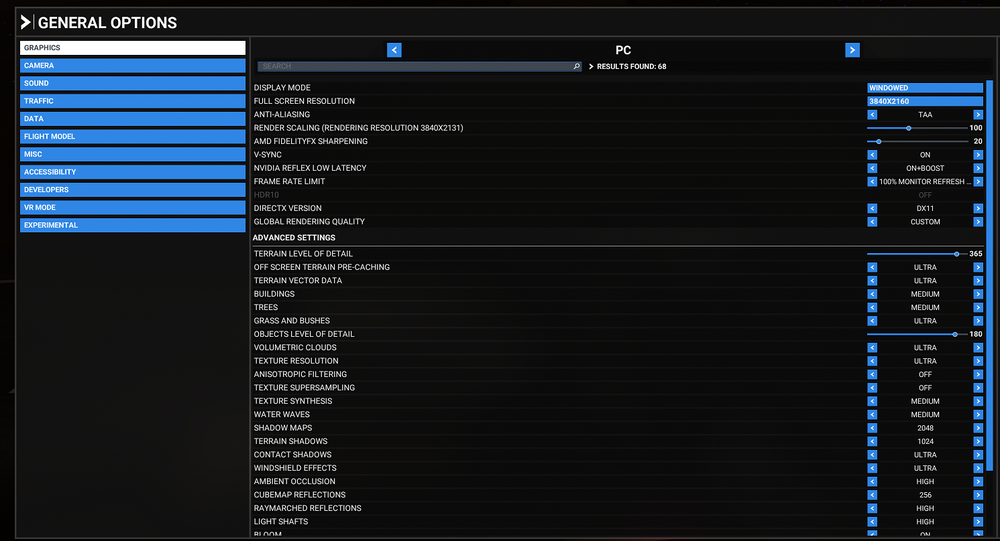
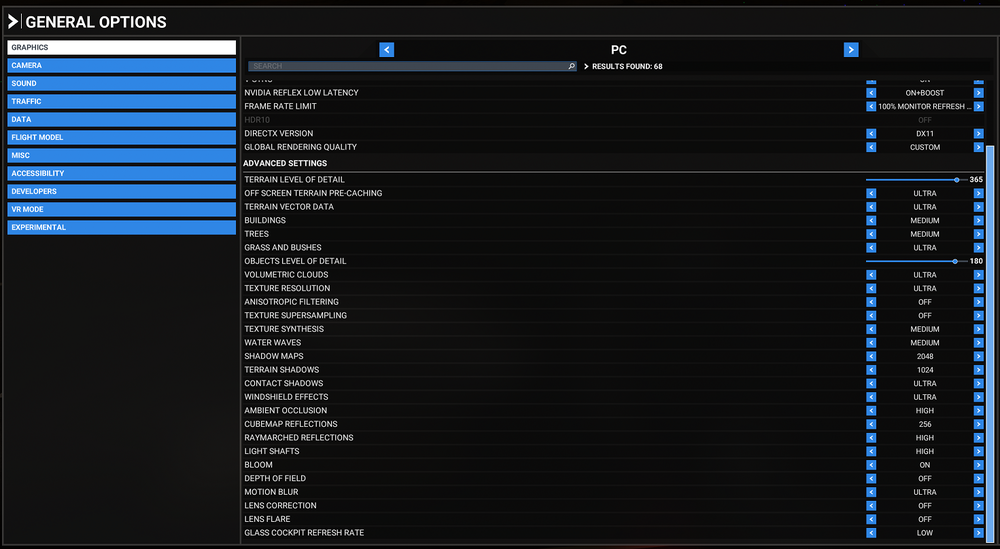
Hi @Felipe Lobo What display settings are you using? Can you try changing your Antialiasing settings? Also DX11 vs DX12 to see if theres any such setting causing conflict? I'm not seeing such issues on the A300 with DX11: Here are my settings: Also try with an empty community folder, to rule out any conflict with another addon. To run with a blank community folder without losing your addons: Rename your existing community folder to ``_Community`` Create a new ``Community`` folder in its place. Copy only the ``inibuilds-aircraft-a300-600`` folder inside it. Run the sim and see if same problem persists. If yes, then you can close the sim, and restore your original folder as follows: Copy the ``inibuilds-aircraft-a300-600`` folder back to ``_Community`` Delete the new ``Community`` folder you made Rename the ``_Community`` folder to ``Community`` If no, then that means there is some other addon conflicting with the ini A300. Usual suspect is bad liveries, so you could try by adding only some of the other a300 liveries in until you can reproduce the problem. Same process for other addons till you find the culprit. Thanks!
-
Hi @DutyDollar Hmm. Not seen that personally or reported by anyone else before. Could you please record a short video clip of it happening, also please include screenshots of your control setup for the rudders & tiller, as well as EFB settings page? Personally I use TF Rudder Pedals + Bravo TQ + Logitech Yoke + TCA Airbus Stick (for tiller), also configured to not link up in the EFB, without issues on the A300 so far. Thanks!
-
Hi @Bazz The plane used the default sim navdatabase, unless you install navigraph on top (for the whole sim, not any addon-specific one), in which case it will use that instead. That being said, as for NZQN, the issue is with the way in which the code is implemented. Ours uses the internal MSFS WASM API, which has been known to skip some data. I'll share this quote from one of my colleagues that was posted on discord, discussing a similar issue: So that is something for MS/Asobo to resolve. Other addons get around this by using their own custom navdatabase set compiled by Navigraph. However with this being a Microsoft product, that is not possible. Thanks!
-
Should be resolved in the next update already as I'm not able to reproduce that in the testing build. Thanks!
-
When you're in cruise, on the MCDU hit MODE button, then you'll find DES FORECAST> on LSK 5R. Click it to go to the DES FORECAST page where you can enter the winds at desired altitudes, and also the destination. As for this data, you'll find it from your OFP's WIND INFORMATION section: Please checkout this helpful interactive guide to the OFP for more information: https://dispatch.simbrief.com/guide#interactive-ofp-sample Thanks!


