




BourneY
Member
-
Joined
-
Last visited
Everything posted by BourneY
-
Hey Kyle, got an update in Marketplace today for 1.0.7 and an update to the livery pack, downloaded both, installed, all good. However, the RR logos still don't appear on the QF livery... is that expected?
-
-
Hey mate; try these steps first go to free flight, select any other plane, no need to start a flight. Uninstall current a380 Uninstall livery pack (if applicable) Re-download a380 and once complete install Do same for liveries Should then be able to select it all fine
-
-
Thanks mate! Question, is there any chance of additional QF rego’s being made available? Selfishly, I’ve sat on the flight deck of OQD and would love to have that in sim, but being on Xbox I realise I’m severely limited to what liveries will ever be available
-
One for @iniKyle downloaded 1.0.4 and the livery pack then installed them all successfully. Loaded up to YSSY to let things initialise etc but noticed I still don’t see the RR logos on the QTS livery .. am I missing any step?
-
-
Thankfully, and you'll hear this a million times - the SU7 update has resolved it :) Fired her up, no orange, happy days. Question - I was under the impression the updated liveries had the RR logo on the QTS livery, but mine still doesn't. Will the new updates be pushed separately to market place?
-
Could be that they’re at an expo so are tied up. Also I’ve heard anecdotally that apparently if you enrol in the SU7 beta that the issue isn’t present, which feels as though it could have been an Asobo issue rather than inibuilds, but they may not have enough info to say that out loud. Obviously that’s just me speculating
-
-
-
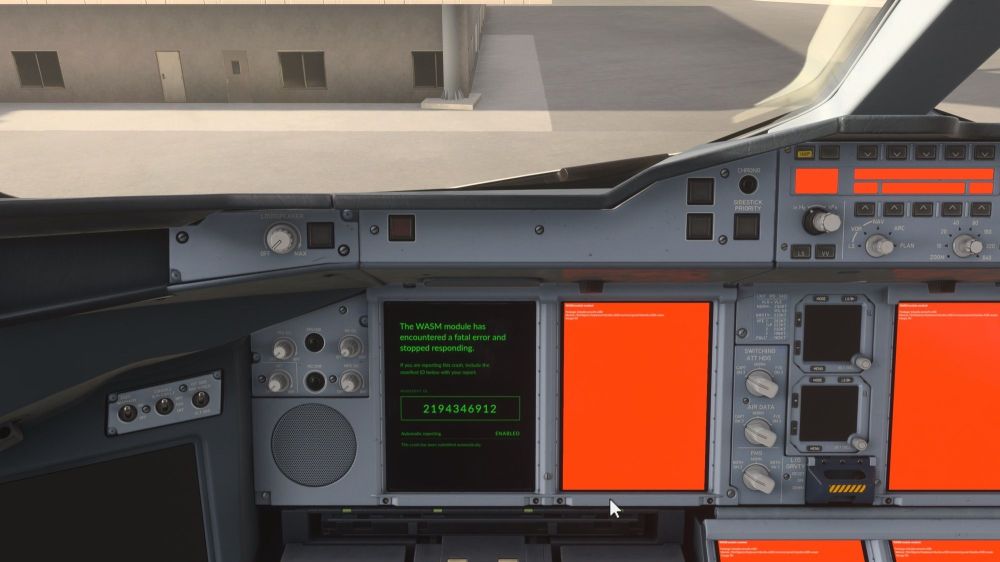
Hi all, Upon updating the a380 to 1.0.3 and following these steps: Uninstall the plane Uninstall the liveries Go to free flight and select any plane that isn't the A380 (no need to then go into a flight or anything, but just have selected another plane and then clicked save & back) Go to settings > online > set rolling cache to 1GB (results in the game prompting you that it will clear the cache) Once done, reset the cache to your chosen amount (I've done 64GB - no science behind that choice) Install the plane Install the liveries I now have instant WASM orange screens when loading into the sim. I've tried exiting the game, power-cycling the xbox (including leaving unplugged for 2+minutes) and same behaviour... Edit: have tried uninstalling the plane/liveries and tried to stream it, same result :(
-
-
Are you using a mouse or an xbox controller to interact?
-
-
Can you confirm how you're starting the engines? Are you using the mouse to click the master switch forward, or are you using a key binding? Would recommend double checking that there isn't a binding that is set to cut fuel to engine 2, or a switch for engine 2 off. This is all assuming you've left the engine mode selector to ign/start and bleeds are still on from engine 1 being done first. Interestingly, what happens if you try to start engine 2 first? Same behaviour?
-
-
Assuming you know that unlike Boeing logic where the plane will automatically begin to descend once it reaches TOD (assuming you’ve selected a lower altitude than you’re cruising at) with airbus you have to select a lower altitude and then either engage managed descent (push) or open descent (pull) once you get to TOD to begin descent.
-
-
Fellow Xbox X user here, this was the method I followed to update the aircraft and liveries so may help out. Uninstall the plane Uninstall the liveries Go to free flight and select any plane that isn't the A380 (no need to then go into a flight or anything, but just have selected another plane and then clicked save & back) Go to settings > online > set rolling cache to 1GB (results in the game prompting you that it will clear the cache) Once done, reset the cache to your chosen amount (I've done 64GB - no science behind that choice) Install the plane Install the liveries After that go back and select the A380 and your chosen livery and all things being equal it should show fine, without any pink textures etc. Load the plane into an airport gate, give it a few minutes to settle Turn on batteries and ground power and align IRS and then just let it sit for a few min End flight, go back to main menu, close the MSFS2024 game, and reboot your xbox Now go back into the sim and enjoy the plane as normal


