




Everything posted by zbrainlezz
-
That must be close to the only 707 in the world that has the windows configured like that. I haven't seen another one, and I've been looking for a good bit.
-
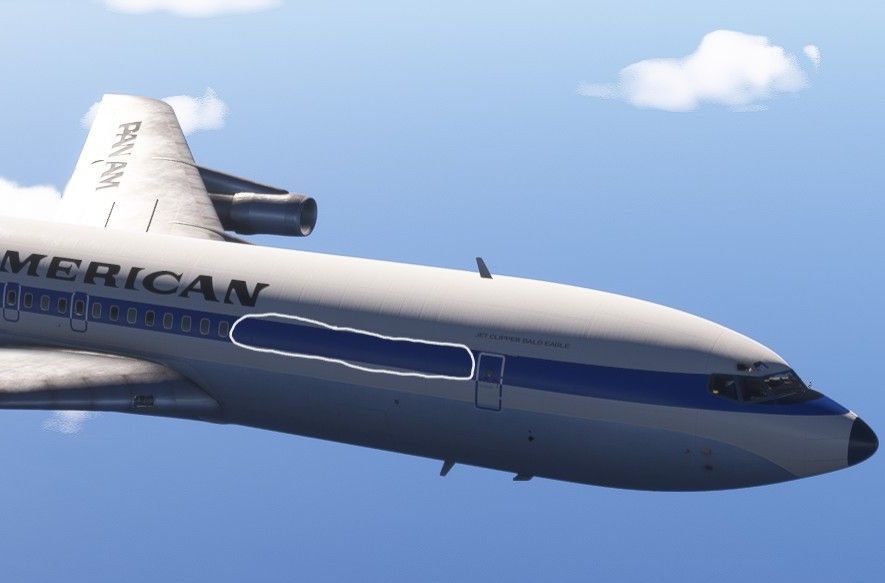
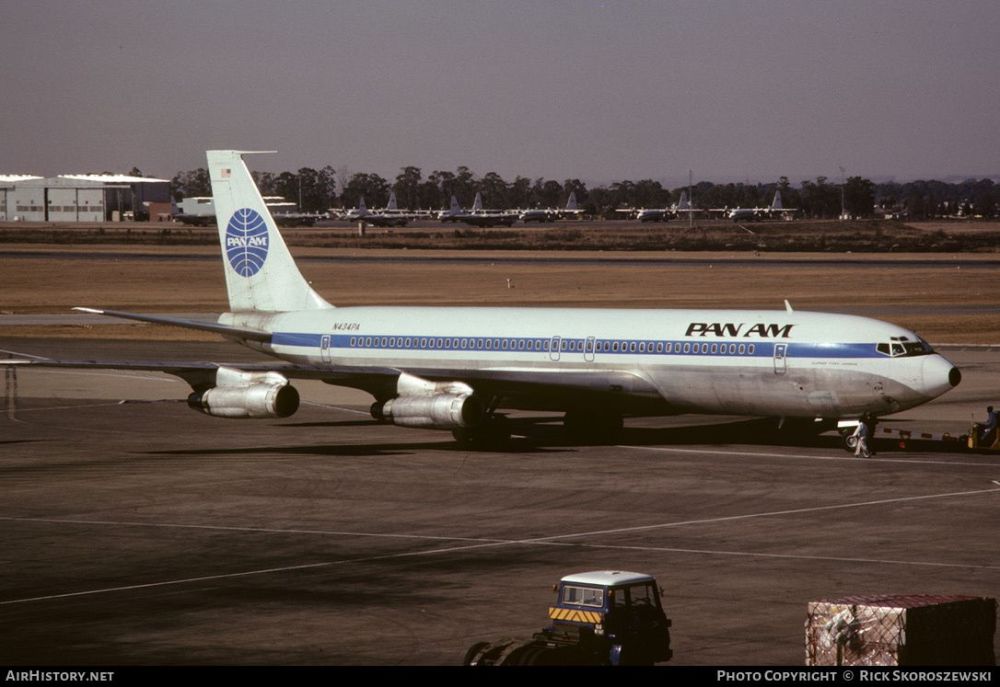
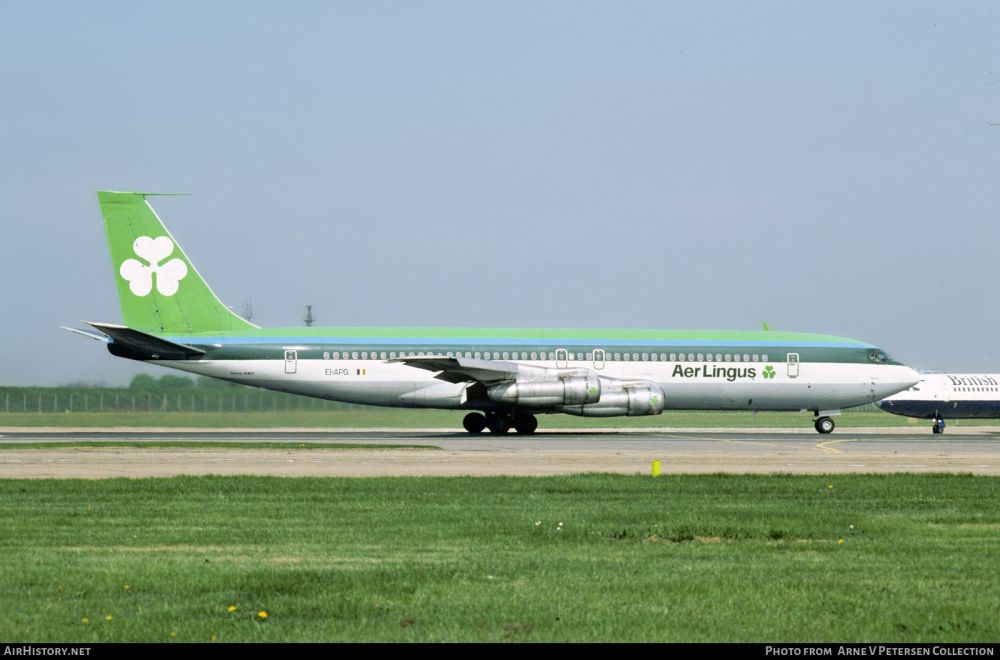
I've been flying the new WT/iniBuilds Boeing 707 a lot lately, and I like it a lot. One big issue, though: there are a bunch of missing windows on the starboard-side fuselage, behind the R1 door. I'm not sure where the team got their references for this, but I haven't been able to find any real-world pictures of any 707s that have the windows configured this way, not even Combis - they either have all of the windows, or they're mostly plugged. Screenshot (the area in the white circle is roughly where there should be windows): A couple of real-world images to compare to (Pan Am is a -320B, Aer Lingus is a -320C):
-
-
Thanks very much, Jamir. I've just been getting frustrated because, at this point, the flight model is the biggest reason why I don't fly the TriStar regularly. Your words give me hope, though.
-
Just going to give this topic a bump because I'm not willing to let it go completely unanswered. This plane has needed fixes for this stuff for three months, but has received fixes for other aspects instead. In my opinion, very few issues are more basic and fundamental than an unrealistic flight model, and many people expect payware to be better than this, myself included.
-
After nearly three months, the TriStar still has flight model and autopilot issues that make it unrealistic at best, and less than flyable at worst. The issue of the GPS turn commands coming in late at higher speeds annoys me to the point where I use the INS for everything, including SIDs and STARs. The issues of unrealistic vertical speed in the climb, unrealistic deck angle during cruise and approach, and autopilot VNAV pitch commands coming in late during the climb annoy me to the point where I don't even want to fly the aircraft until they're fixed. To expand: The GPS seems to issue turn commands too late at higher airspeeds, which causes the aircraft to consistently overshoot turns when using the GPS - I've seen this at any airspeed above ~180-190 knots. The vertical speed in the climb seems to be nearly constant above ~10,000ft, suddenly drops off when the PMS switches from CLB1 to CLB2 around 20,000ft, then stays almost constant again until the switch to Mach hold. Vertical speed should simply gradually decrease with altitude. This has been reported previously by others. The aircraft's deck angle should be a couple of degrees lower during cruise and at least a couple of degrees higher during approach. This was also reported previously. In VNAV mode, the autopilot commands pitch increases too late and too gradually during the acceleration phases of the climb, which results in the aircraft overshooting the set speeds by a minimum of 10-20 knots, and consistently ending up breaking the 250-knots-below-10,000-ft speed limit by at least 20 knots. The autopilot seems to currently be commanding the pitch increases just as the aircraft reaches the set speed - it should start commanding the increases sometime before reaching the set speed - and the pitch increase is also far too gradual to successfully capture the set speed. My question to the iniBuilds team: is it unreasonable to request that solutions to these issues be prioritized over everything else with this aircraft at this time? The visual and systems fixes you've made so far are much appreciated, and overall, I like the TriStar, and I want to be able to fly this rendition of it realistically... but I don't feel I can fly it realistically as long as such fundamental issues as these exist - hence, I don't fly it at all except to test fixes released in updates. Thank you for reading.
-
To my eye, this actually appears to showcase two problems with the aircraft systems that I've previously noticed. (1) Either the stabilizer trim is too slow to respond to necessary inputs commanded by the autopilot, the autopilot simply commands these inputs too gradually, or the autopilot starts commanding these inputs too late; it might be a combination of all three. This also results in, for example, the aircraft overshooting the 250-knots-below-10,000-ft limit by 10 knots or more in the acceleration phase of climbout, just after takeoff. (2) When using the GPS for navigation, the GPS commands turns too late, and the autopilot usually doesn't seem to command enough bank angle at speeds of more than ~200 knots to make said turns. These issues combined result in the aircraft overshooting the turns, as seen in your screenshot above (note the right bank the aircraft is making in an attempt to get back on the GPS track). The sharper the turn and the higher the speed, the worse this problem appears to be. The descent here is not something I've seen before, but it could be due to problems with the flight model, which I seem to recall the iniBuilds team is in the process of adjusting based on previous feedback from other forum users. Figuring out how to change the flight model in ways that make it realistic in all phases of flight is quite difficult though; I've previously made a flight model mod for another aircraft, so I know how tedious and time-consuming it can be to figure out what to change and by how much. In my case, it involved a lot of trial and error. So I hope iniBuilds will have those changes made and released soon, but I'm not counting on it.
-
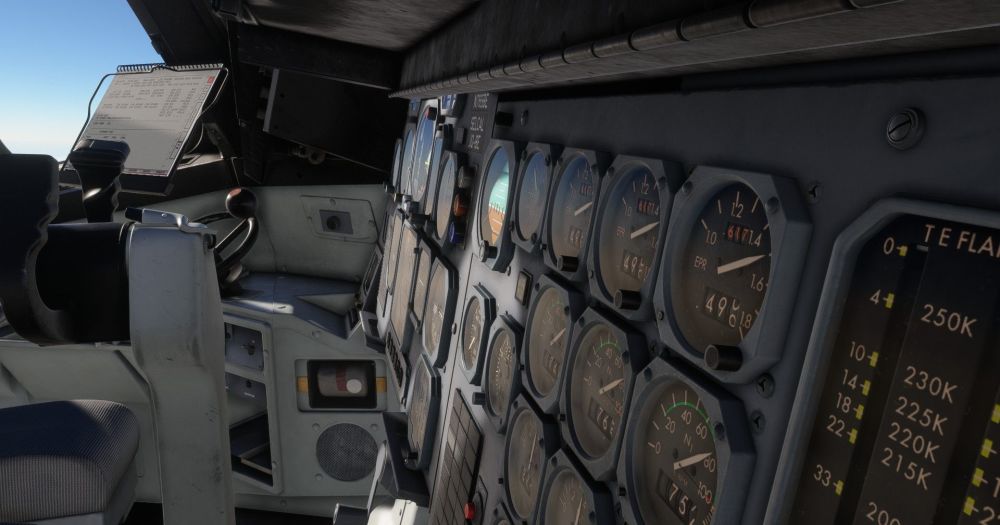
Figured I'd poke my head in here and say that, per this screenshot I just took, the main panel instruments do have glass, so the devs probably just need to tweak the reflectivity.
-
Just got a marketing email that included v1.0.8 of the TriStar having been submitted to the Marketplace, and I figured I'd ask one question: when will the flight model be among the fixes? I've been waiting for certain aspects of the flight model to be made more realistic for a couple of months. I've seen posts saying that, among other things, it shouldn't be able to climb at 1,500fpm above FL300 and the deck angle on approach is several degrees too low, and those things now greatly annoy me every time I try to fly it, to the point where the only times I've flown the aircraft have been to test it after an update. So with every update since probably v1.0.3, I've been hoping to see those aspects of the flight model be modified based on that feedback, and I've been sorely disappointed each time so far. I still hold out hope that v1.0.9 will include this, but I'm starting to really wonder. To be clear, I think I speak for everyone when I say I very much appreciate all of the systems fixes that have been done so far, but I just really hope the team doesn't neglect other important areas such as this.
-
Very strange. I haven't had any problems in that regard.
-
I do all the aircraft setup myself, and turning these to Auto is part of my routine. If you turn them to Auto and this issue doesn't continue to happen, there's your answer.
-
Thanks. Shame that's my only recourse, but I guess it'll have to do for now.
-
I don't have any other device/axis bound to the throttles as far as I know, but I'll double-check. What's even more odd is, if I bind the throttles in the sim instead of in SPAD, they work fine. Edit: Just checked and nope, no conflicting bindings.
-
I decided to try setting up controls for the TriStar using my Honeycomb Bravo in SPAD.neXt instead of using the sim's built-in bindings, and I've run into a bit of a problem: the throttle lever in the TriStar's cockpit resets to zero (idle thrust) when the physical lever on my Bravo isn't actively moving. See this video: https://drive.google.com/file/d/1U7UFaQO1-VXJzfFhl_SA5pK43_ZUKs3R/view?usp=drive_link This is basically the last obstacle I have to cross in order to have all my controls for this aircraft in SPAD instead of the sim settings (I don't like needing to have settings for the same thing in two different places at the same time). I don't know if this is an aircraft bug or a skill issue on my part, but I'm leaning toward the former, as I've tried all the SPAD thrust lever bindings I can find, and they either don't work at all or exhibit the above behavior. If there's any other information I'd need to provide in order to troubleshoot this, please let me know.
-
I have a Honeycomb Bravo, and I do prefer to be able to have independent reverse thrust settings for each lever. Unfortunately, as of yet, I haven't been able to find a way to set up a reverse thrust toggle input that works at all in SPAD.next, even for all three levers at once. The bindings that usually work with other aircraft simply don't work with the TriStar. I've had similar problems with a couple of other iniBuilds aircraft, where the thrust reversers and a few other controls only work using MSFS' built-in bindings and can't be made to work using any of the common bindings in SPAD.next. Super annoying, because I'd love to be able to make all the controls work exclusively through SPAD, but iniBuilds apparently doesn't allow that at the moment.
-
Have you turned on the tank 2L and/or 2R fuel pumps? If I'm remembering correctly, that's a required step to start the APU.
-
Any further progress update on fixing the flight model issues mentioned briefly in the original post of this thread and in at least one other post? (Deck angle on approach several degrees too low, achievable vertical speed in the climb above ~FL280 much too high) Or should I create another thread about this? On an unrelated note, why does there appear to be no way to delete posts if a user wants to?
-
I can confirm this issue is finally fixed in 1.0.5. To the dev team: thank you very much. One more major issue fixed.
-
-
-
This issue is still present in 1.0.4. It's seriously beginning to get on my nerves, especially since the IAS and MACH modes also still don't work properly.
-
This issue (VNAV mode transitioning from IAS to Mach too early in the climb, and vice versa too late in the descent) is unfortunately still present in 1.0.3. Another issue that has still not been corrected is that the autopilot's actuation of the stabilizer trim is too slow when in IAS and MACH vertical modes, causing constantly alternating overshoot and undershoot of the target speeds and therefore slow vertical oscillations. This means I have to use VS mode to correct when the aforementioned VNAV problem occurs. I hope these issues will be fixed in 1.0.4, as again, they are the last major problems that prevent me from fully enjoying the plane.
-
Interesting. I wonder why I've not been able to get some SPAD bindings to work with any of iniBuilds' aircraft then... At this point, though, I'm tired of messing with different bindings trying to get them all working in SPAD, so I'm going to stick with what I've found that works, which in this case is a mix of SPAD and MSFS bindings.
-
I've found that using only SPAD control bindings doesn't work with any of the three iniBuilds aircraft in my library (A300-600R, A340-300, TriStar). There are some controls, such as thrust, spoiler, and flap levers, that either only work with MSFS' built-in bindings, or I somehow haven't found the correct bindings in SPAD (I've tried several possibilities for each, none worked). My best guess at the moment is that iniBuilds just hasn't built proper support into any of their aircraft for any control binding system other than MSFS' built-in one. Because of this, I've had to use some SPAD bindings and some of MSFS' built-in bindings with all these aircraft.
-
The problem I've had with IAS and MACH modes so far is that the autopilot doesn't change the stabilizer trim quickly enough in those modes, so the aircraft can't hold a speed or Mach reliably. There was a similar issue with VNAV mode when the plane first released, but that's since been mostly fixed. Apart from that and a couple of other known issues, the other vertical modes, such as ALT capture, are working decently now on my end.


