mburkhard
Member
-
Joined
-
Last visited
Everything posted by mburkhard
-
So the ORBX city scenery is compatible with V2 OMDB? No duplicated buildings and such? The Product page didn't say...
-
I'm with ini on this one to be honest. If we can't have a simulator view as the camera view on the screen, then it's not worth doing. Because sim scenery will always have differences compared to whatever imagery is used on Aerosoft's camera view, and if it's just the centreline not matching by a metre or two, or you can't see a vehicle in your way and such, nah it would be kind of pointless. I'm afraid you'll have to take this one up with Asobo. Camera views has been requested forever, but Asobo doesn't see the need for it unfortunately.
-
Uh... I think I'll wait buying this 😵💫 Thanks for the warning guys!
-
Absolutely agree with the Dingli radar request, it needs to be there as it is used as a VFR reporting point when flying into and out of LMML.
-
FYI, I installed Liverpool on my 2nd PC which I use as a testing & development system. Same issue as on my main FS machine. Just so that you know this is not isolated to one PC in my case.
-
I'm afraid you got that wrong. That lever is never moved by itself and is supposed to stay in the armed position during landing.
-
Hey Kyle, that suggestion to delete all data in %localappdata% killed my iniManager as the .exe was in there too. And I don't think that was your intention :) In any case, I re-installed the manager but the problem with Liverpool persists. However, installing the new Malta release, I can see its scenery config options just fine. So the issue is indeed affecting Liverpool only.
-
Bought the scenery yesterday and for me the config options didn't show. I know that this sometimes happens after installation, in which case it is like you say, a refresh and all is well. However, this time the box did not just not show up. It was there but the box was empty. And a restart of the ini Manager didn't help.
-
Hi ini, is there any update on this? I'd love to buy the scenery but can't do that if you are unwilling to fix it. I mean I could buy it and then use the scenery editor to fix it myself. But that would be a rather bad deal for me. Please fix the vegetation, it was reported broken 3 months ago. Thank you!
-
Sounds as if you're running into similar issues with the terrain like some others have mentioned in this forum section. The developers have chosen to model the airport on custom 3D model terrain instead of default MSFS terrain. They stated that it was easier for them to model the airport well, but it is evident that there are many side effects that the competition does not have. Unfortunately, ini has not indicated whether they intend to correct the situation by remodelling their ground with proper MSFS2024 terrain. It's quite a shame, I would love to buy their EGLC, but won't be doing so when so many people see issues with ini's terrain techniques.
-
Hi @IniJamir , has there been any decision as to fixing this omission? I must admit I'm being hesitant to buy your VHHH, since I think this issue is rather important to be fixed for a true feel of this large airport. Without this additional detail the apron looks rather "boring" and low fidelity.
-
Great to hear, I'd love to buy this, just waiting for the scenery to get fixed.
-
Here you go. Thanks for passing this along.
-
Thanks for the explanation. It seems to me that circumventing default PG terrain has quite a lot of drawbacks in the case of EGLC. I know default terrain wouldn't be perfect, but at least we'd have proper ground texture detail, grass and GSX compatibility. It somehow worked for the other EGLC sceneries, but those obviously have other issues so I'd still prefer ini if it weren't for the terrain. I'll keep the scenery on my shopping list for now and hope for future improvements.
-
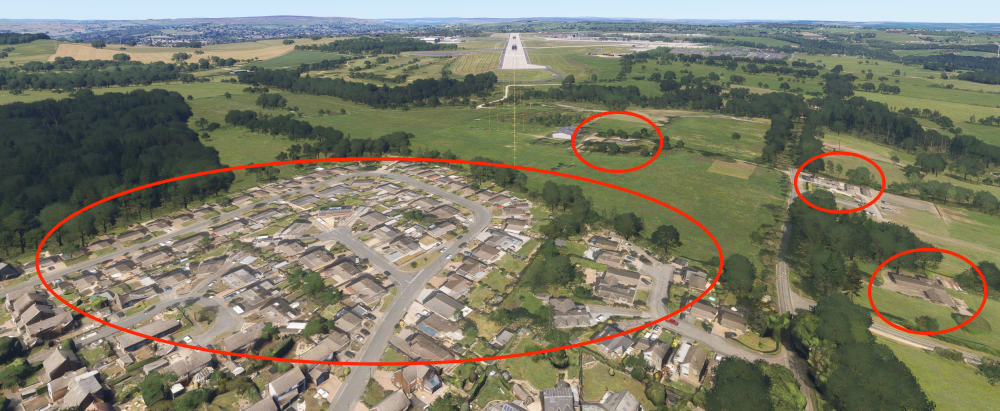
I agree, it's quite immersion breaking for an entire section of the village on short final to be completely flat. If ini could fill it with some low-fidelity UK houses, that would look so much better.
-
Thank you for your reply and explanations. I was not aware of this artificial turf, it has been quite a while since I last saw the airport from a pilot POV where one can see both sides at once to notice the colour difference. So that answers the shades of green then, thanks! As for the non-default terrain, perhaps the visual deficiencies of this can be lessened a bit by 2 measures: Increase the resolution of your grass textures? Close to the grass (say during taxiing) the blurry texture is very well visible beneath your custom grass models. If it were a bit more crisp, then it might blend better with your 3D grass. The stark contrast between blurred grass patches on the textures and the sharp edges of the grass models is what is throwing me off. Match the colour of the grass texture with the colour of the 3D grass? Especially on the patches of turf, the colour/brightness does not match. So we see these very bright green patches covered with grass that has a very dark green colour, which then also enhances the visibility of the rough edges of your low-fidelity 3D grass. If the colours were the same, then the ground texture and the 3D models would blend so much better I think. And since you hand-place the grass, it should be possible to have that grass in two different shades of green depending on the texture below it? Combine these two ideas and then the result might look a lot better? Would be wonderful if you could give your grass another go! Thanks
-
Dear ini, I was happy to learn about a new EGLC being in development, but now that I see your product screenshots I'm hesitant to buy it. My main concern is your terrain/grass work. Whatever you did with the grass around the runway does not look good at all. I see a blurry partially overexposed grass texture with crude grass 3D models placed on top, and that looks so much worse than default MSFS2024 terrain. That grass reminds me of old FSX times. Whereas default MSFS2024 looks rather amazing, a seamless transition between the terrain texture and the grass 3D models, and extends naturally into the distance. Also, I see that the grass texture you chose is not only blurry and overexposed on one side (south), it is also different types of green on either side of the runway, which does not seem very realistic. So I wonder, why was the terrain done that way? Why can't we have MSFS terrain tech with all its nice grass rendering and detail layer on top of the texture? Your competitor is doing THAT part quite well. Could you improve the terrain in an update? Thanks for listening.
-
@iniBuilds Can this be moved to the new OTHH forum section please? Thanks!
-
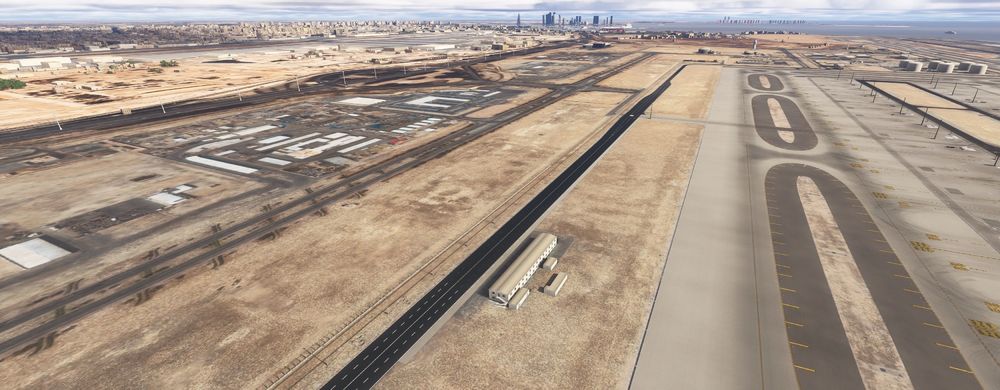
Hi ini, thank you for providing us with a high fidelity Doha airport, it's very well done and I like seeing how the Middle East is getting populated more and more with quality products. I hope Abu Dhabi (OMAA) will get the same quality treatment for 2024 eventually! One thing that needs a fix in my opinion is the western airport boundary, where everything is completely flat. No buildings, no road lights, no bushes, all just flat. Now I know this is a remote part of the airport. But it IS right next to parking stand and a taxiway, and what we see now doesn't feel very "Premium". I don't expect to see very detailed modelling, not at all. But at the very least some Autogen buildings and the odd library object here and there should be placed in this area, just so that it won't be all flat around you when taxiing or parking in that area. So I hope you can fix this area, it is a rather large patch of land after all, and right now it doesn't match the high visual standard of the rest of the airport and its premium price tag.
-
Well there's nothing you can do really. In theory you could disable the GSE in the ini configurator and then use MSFS' Scenery Editor to place GSE with better LOD properties from other sceneries you have installed. But that would be an enormous task for such a large airport.
-
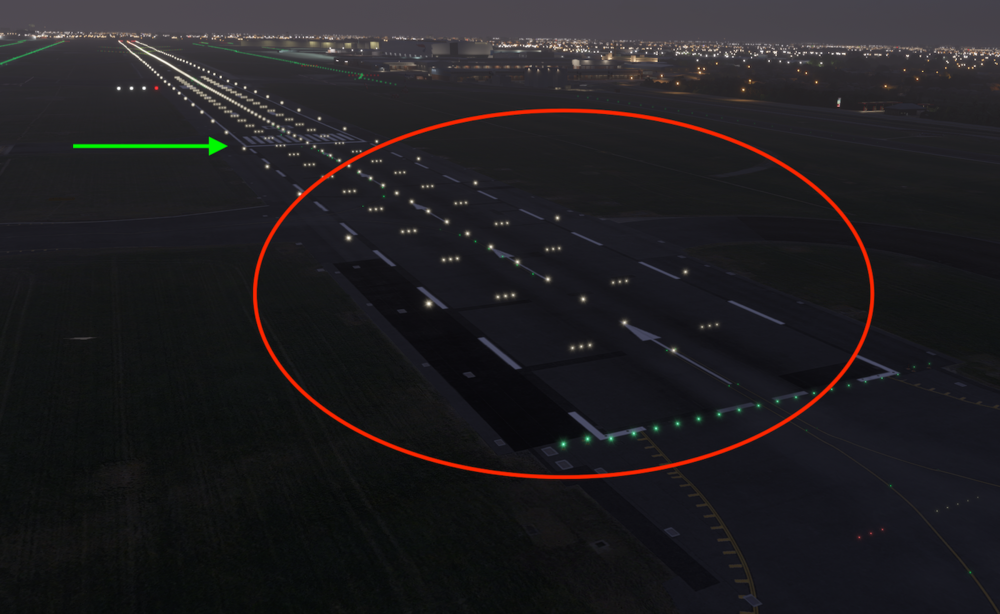
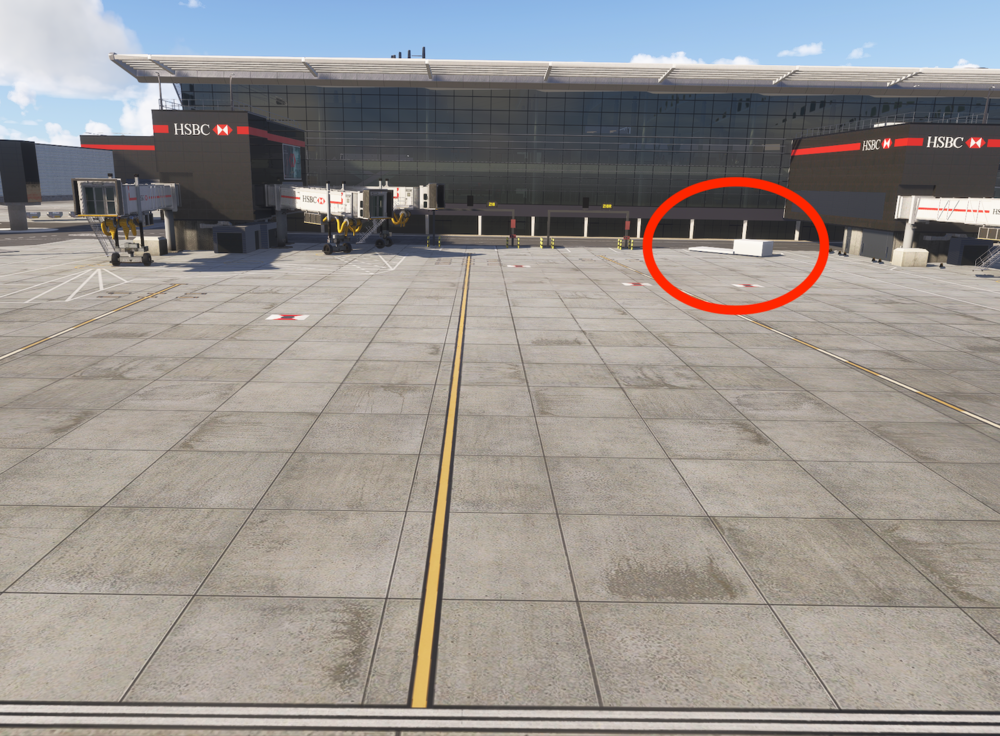
Hello ini, thanks for updating Heathrow, one can see a nice step up from your previous iteration! One thing that doesn't feel so "Premium" is the very aggressive LOD-ing you do. The LOD transitions are far more visible than on competing large airports, for example when compared to Aerosoft Frankfurt. Same size airport, far smoother LOD transitions with more detail visible earlier on the German counterpart. Perhaps this is something that can be optimised a bit in the near future? Having said that, it's not terrible, with one exception: Your static GSE seem to have only 2 LODs? One is a brick without textures and the other is full detail? The problem is, that texture-less brick is still visible when one has already turned into a stand. Only then the LOD transitions to full detail: I don't mind so much that you have reduced the amount of GSE. But this extremely late transition from brick to normal model is quite the killer for immersion. One can see white bricks everywhere when taxiing around the airport. Can you not at least make the texture appear a bit earlier so that it's already visible when positioned on the taxiway abeam the gate? Also, please fix the runway lights for 09R. You have positioned the touchdown zone lights and the green threshold lights at the wrong position (needs to start at the displaced threshold). It is however correct on 09L. A fix would be greatly appreciated!
-
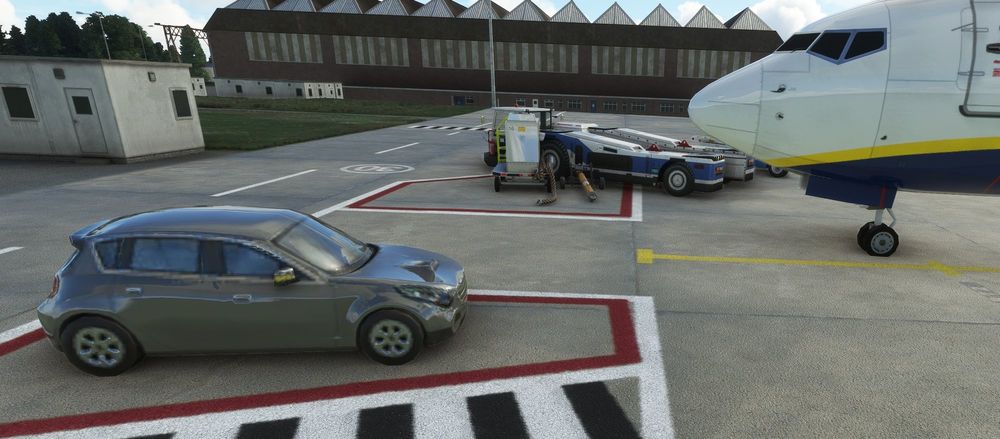
Thank you for addressing ALL my raised items so quickly, superb service, very highly appreciated! One last thing in case you'd be willing to do another update at some point: You have placed a few of the stock asset street cars onto parking stands as ground clutter. The problem with them is, these are not meant to be used as ground support equipment because their texture is of extremely low resolution, I think they're meant to be used on parking lots viewed from a distance. Now seeing these rather ugly car models up close because they're parked next to the cockpit window is a bit unfortunate because the cars do not fit your otherwise very crisp modelling at all. I mean feel free to place these wherever you see them fit, but perhaps just not onto aircraft stands where they are visible very close-up? Oh and as you can see above, the GSE you placed forward-right on most aircraft stands can conflict with dynamic GSE placed around AI aircraft. If it is possible to move these items a bit out of the way, that would be brilliant. Thanks again for that super fast update, I'll make sure to leave you a review!
-
Thank you, very much appreciated! In case you don't have it already, here's the TWY lighting info of the AIP: https://www.aurora.nats.co.uk/htmlAIP/Publications/2023-08-10-AIRAC/html/index-en-GB.html
-
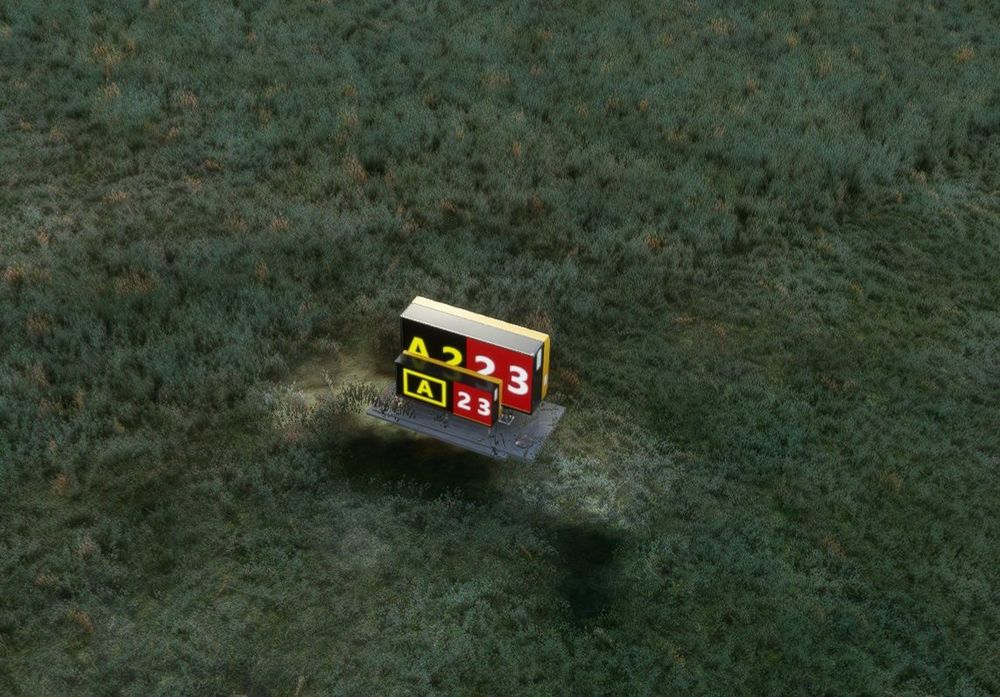
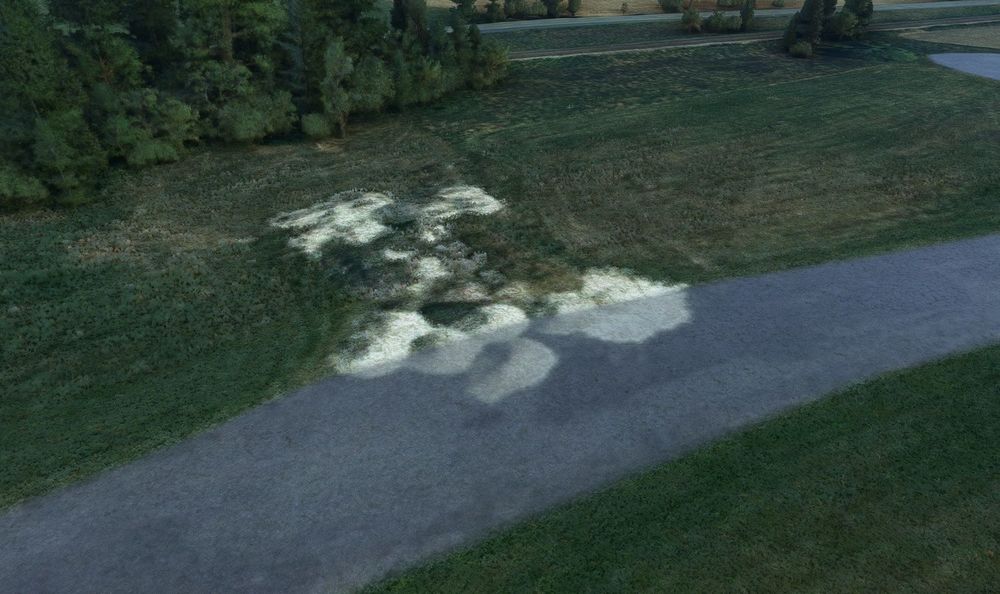
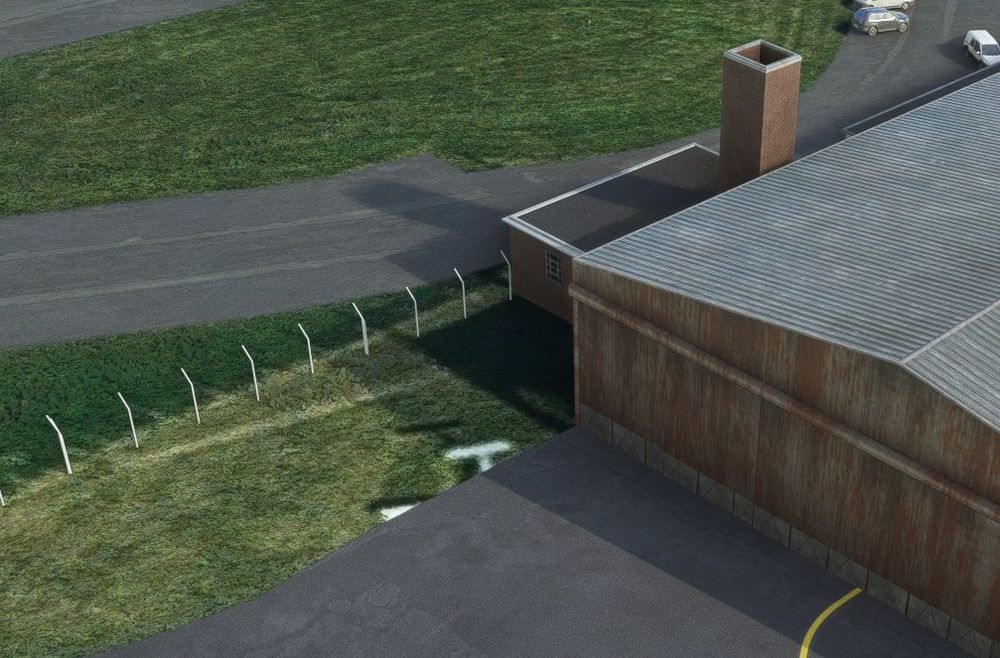
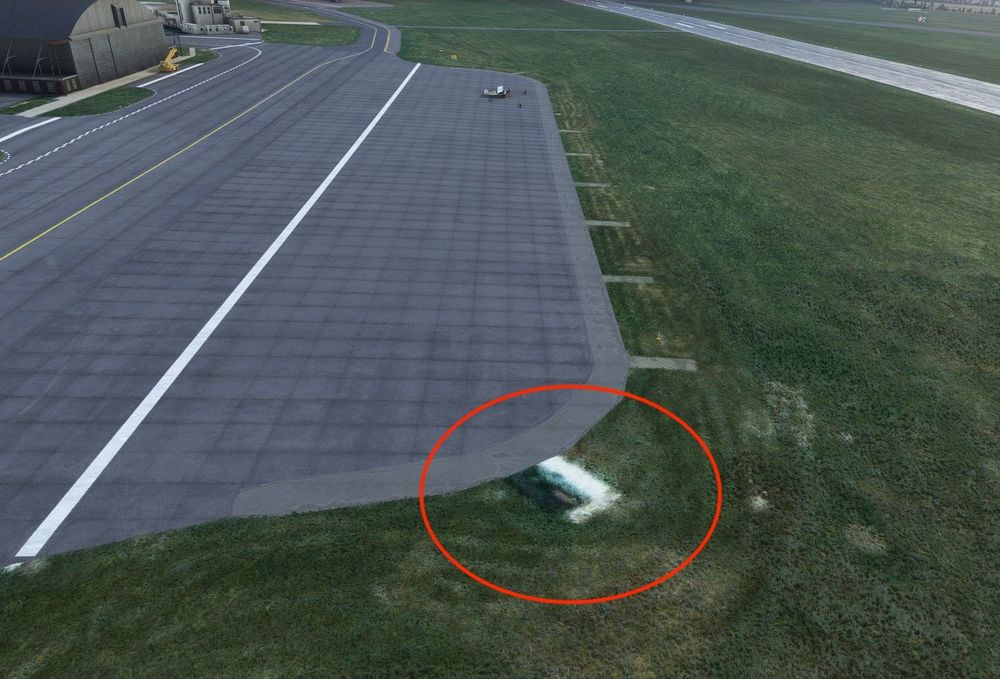
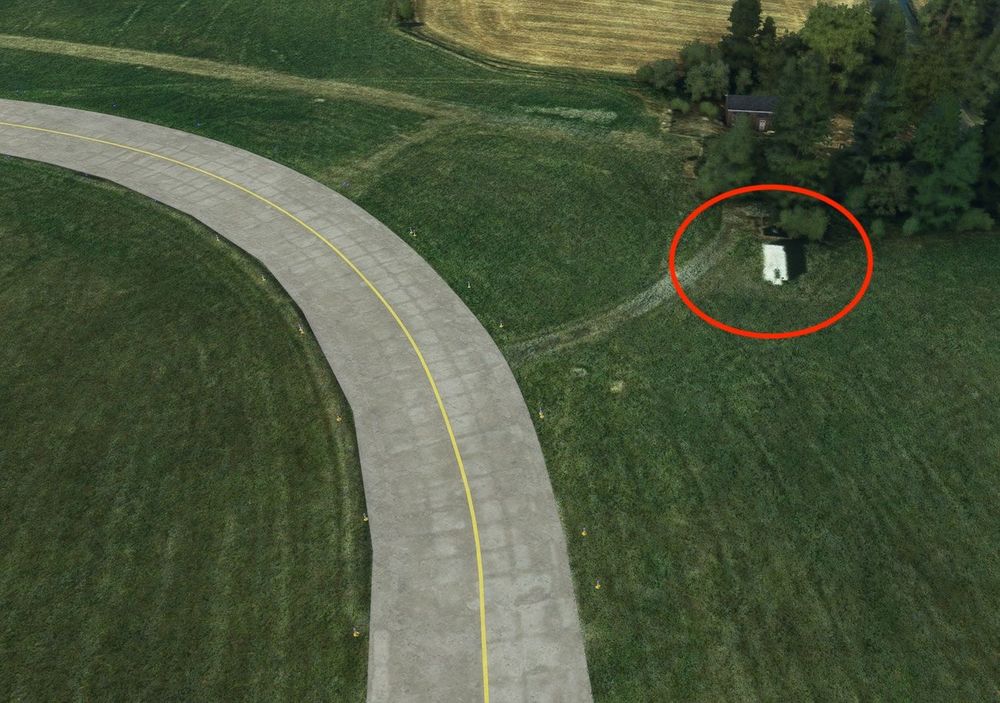
Hi there, congratulations on your MSFS release of EGNV, I was very pleasantly surprised to see this airport done in high detail. Modelling and texturing is superb, it's crisp and the colours feel accurate. Also the ground textures look very life-like and I love how you did some static aircraft for the military area and Draken. I did find an error that requires an urgent fix I'm afraid: All taxiway signs are doubled, usually a smaller one in front of a larger one, and some are not showing the same signage between the two: Flat Objects Also I've found a few spots with flat objects on the aerial imagery that needs some work to not break immersion: Concrete road running over flat mounds of earth/sand Half a vehicle (?) and half an aircraft sticking out under the apron texture. One next to a hangar and the other is right next to aircraft parking spots: I hope you can cover these up with some grass (or concrete) textures? Especially the one next to the parking apron is very noticeable. Another very visible flat bright object right next to the taxiway, which looks rather bad when taxiing by. Maybe you can also just cover it with matching grass textures? Incorrect Taxiway Lighting configuration Checking the UK AIP I would suggest you fix the taxiway lights placement to better correspond to the real airport: The green centre line lighting on taxiway A should stop abeam stand 13, it does not go all the way to the runway Blue edge lighting is ONLY available on taxiway A. Taxiways B, C and D should NOT have any blue edge lighting. And last but not least: Could you add more aircraft spawning points? I see there are none at the military area and none in front of the hangars. Would be fantastic to have more choice of parkings for GA and military flying. The airport fence is missing! 🙂 You can clearly see on the aerial imagery where the fence is running along, would be fantastic if it were present in 3D. Thank you again for your work, I hope you can fix these items and bring the airport closer to perfection!