


richboy2307
-
Posts
1706 -
Joined
-
Last visited
-
Days Won
83
Content Type
Profiles
Forums
Downloads
Posts posted by richboy2307
-
-
Hi,
The reports have been shared with the team. However some points to note:
10 hours ago, S4nt0ss said:DME and TACAN on the PFD shows no range
I am not able to reproduce this issue. It would depend on the VOR/TACAN whether or not it has a DME attached to it within the sim data. If it has it, it will show up. I tested at KTPA by tuning into PIE (VORTACAN w/ DME) vs MCF (TACAN without DME). I was able to receive DME from PIE, but not from MCF as expected. Also tested on LAL (VORTACAN w/ DME) and working as intended.
I did notice a bug with the channel identifier on TACAN always showing as "Y", and will report to team.
 8 hours ago, S4nt0ss said:
Additionally, I've noticed the CDU doesn't seem to accept any Airway input.
This one is a sim issue actually, as the CDU is using the default sim flight-planner (same as can be found in the A320neo v1). It doesn't take airways too well and you have to enter point-by-point instead. The planes that don't have this issue are using a custom flight-planner (like the A320neo v2 or any of the WorkingTitle enhanced avionics). But anyways reported to the team if they can do anything about it.
Thanks!
-
Hi @HMVR
The loudness is intentional per the team, as requested by users. You may turn down the 'Engine' slider from the sound settings to a value that is more comfortable.
Thanks! -
On 11/3/2024 at 2:47 AM, murdock074 said:
the taxiway is now level, but the floating objects are still there
Please ensure photogrammetry is enabled in the settings.
Also try to clear your scenery indexes, it is recommended to do so after you add/remove scenery, especially if you loaded into an airport with 2 sceneries active at the same time.
Instructions on how to clear scenery index:
Thanks!
-
Thanks for updating.
On 11/3/2024 at 3:45 AM, aniiran said:I went to SimMarket because as per usual the iniBuilds store was malfunctioning.
Sorry about the inconvenience. The team is aware about the issues some users face making purchases directly via the iniManager and working on long-term fixes for it.
In the meanwhile, if you have this issue in the future you may try to make the purchase directly through our website (inibuilds.com) and then use the iniManager to install the product from the 'My Products' section.Thanks!
-
@Vick34 @angrydwarf
Update 1.0.1 is out which addresses the issue of inoperative switches and buttons faced by some users when KF Spirit is also installed, along with a few other fixes (such as wing decal on Desert Storm livery).
Full changelog here:Thanks!
-
On 11/3/2024 at 4:02 PM, spider24 said:
Does this scenery have the rabbit lights on approach RW26?
Are also the new "simple touch down zone lights" on each end simulated? ... they marks the ultimate end of the touchdown zone.
Yes both are modelled, along with the new runway exit lights and turnpads post the 2021 expansion/repaving.
-
 1
1
-
-
Hi @Cygnifick
Thanks for your report. Shared with the team.
-
On 10/29/2024 at 10:20 PM, Travon999 said:
I noticed FD1 and pitch trim 1 were both disengaged, and the ENG 1 FU gauge was all messed up. The screenshot below was taken after reengaging the pitch trim and FD, but shows the fuel used bug.
Ok thanks, also added above to the report. To me it is seeming more likely related to the engine tripping momentarily, possibly due to some null fuel value output being provided. But in any case, dev team will look into it and action for next update in case they find something.
Apologies for inconvenience caused. Thanks!-
1
-
-
Hi thanks for getting back.
13 hours ago, Dodo said:There was no mention of WASM errors again.
Yeah this does not sound like a WASM crash either, as in those instances all the systems will stop responding/updating values completely.
Here, as with the screenshots it does appear as if there is some invalid fuel value (particularly burn) being sent that is causing the system to trip. Or there is a very momentary loss of fuel flow which will trip things like the overhead AP switches.
Can you just cross check your bindings and ensure there is nothing that affects fuel by chance (e.g. Mixture, Fuel / Condition Levers). Also anything that could affect electricals (generator/battery etc)?
At the moment, I think the electrical issues are a result of the fuel system fault which is tripping the generators perhaps. But anyways, will add the above info to your report for the team to investigate further.Thanks again!
-
1
-
-
9 hours ago, Dodo said:
However, this bug happened again randomly, approximately 4hrs into a 5.5hr flight, in which case all aforementioned issues happened EXCEPT the standby attitude indicator error. Additionally, though, the ECAM did not display any messages and there were no indications of errors/warnings even when tested (i.e. main landing gear indicator test, fire tests, etc.).
9 hours ago, Dodo said:I was flying a custom livery (for a VA that others report no issues with), with FSUIPC, if that matters.
9 hours ago, Dodo said:Note that the only thing I did differently during this flight was select "Finish Now" when refueling was in-progress.
Hi, thanks for the report.
I'll share the log with the team to see if there's any hints there. However, none of those items you've mentioned should cause such issues. Personally I run with FSUIPC7, SPAD.Next, LittleNavMap, Vpilot and occasionally VA trackers... and unless specifically testing fuelling features, also always use the "Finish Now" button and have yet to encounter such crashes.
Also just additional context/information, there are no known instances of such crashes (i.e. not a WASM Crash) internally or through any beta testers in over 200 hours of collective testing of this particular build. Certainly an odd issue and hopefully we can find its source from this info.
As this bug is also not reliably reproducible by affected users, it is really hart to ascertain the root cause.
Thanks!
-
1
-
-
Hi @MarcusVT,
Can you try to delete the contents of these folders below.
That should re-compile the module files for the A300 (same as on first launch). Also advisable to recalibrate your throttles after in the EFB.
Steam:Quote%APPDATA%\Microsoft Flight Simulator\Packages\inibuilds-aircraft-a300-600
MS Store:
Quote%LOCALAPPDATA%\Packages\Microsoft.FlightSimulator_8wekyb3d8bbwe\LocalState\Packages\inibuilds-aircraft-a300-600
Thanks!
-
Hi @vanislepilot
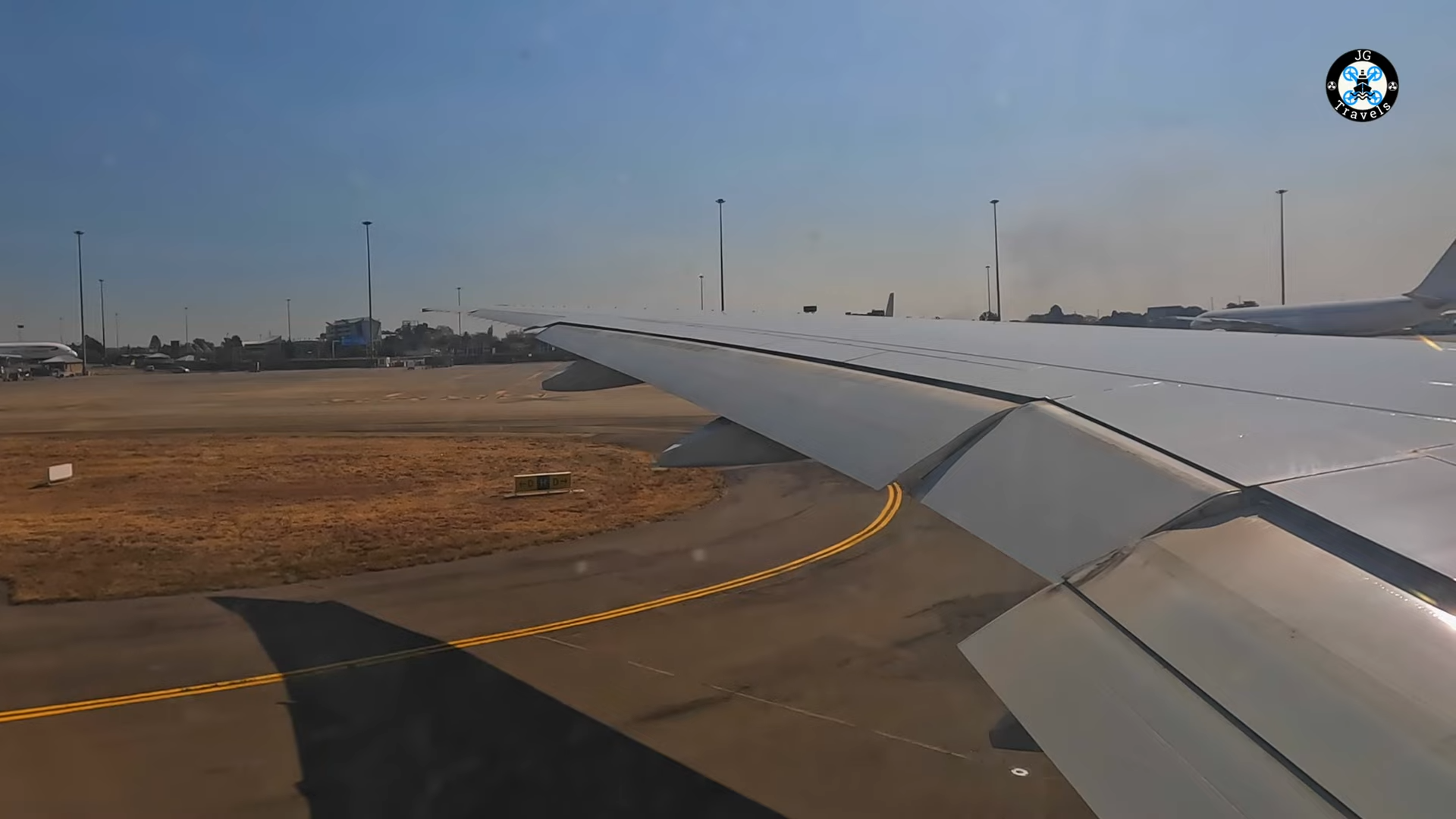
Thanks for your feedback. We're glad you're enjoying the scenery.If you're referring to the sign marked in the image below, that is correct as its indicating D as the next taxiway behind it.
-
Thanks for your suggestion. Firstly, apologies for the delay in response as the community team (me and Eddie) have been busy putting out fires in other parts of the community over the past day or so 😅
4 hours ago, Dudley Henriques said:As I said, I sincerely hope I haven't stepped on any toes by pushing this option to you. I'll leave this at that and post no more suggestions.
No not at all! We welcome all feedback and suggestions and try out best to action whatever is practicable to do. So please do not hesitate to share anymore that you may have. I'd be more than happy to pass it on to the team for further consideration 🙂
On 9/15/2024 at 5:27 AM, Dudley Henriques said:Fortunately the available FREE GTN750 by PMS50 does that nicely without you having to integrate the unit into the panel of the T33. Having this available opens a whole new world of possible cross country flight for the INIBUILD T-Bird pilots. I also have the Shrike F86 and it has the GTN750 unit available as a small open window AS AN OPTION.
I believe all that is needed to do this for everybody is to code for an external navigator in an upcoming update.
I make this suggestion fully aware that the "magic" of the T33 lies in its classic panel and not everybody wants to fly using all that glass on the modern panel.
Using the external GPS window really completes the many options available for the end user when "flying" the T33.
I hope you will consider the inclusion of the code for an external navigator in a future update.
I will tell you that I for one will use that Garmin 750 and deeply appreciate having it available as a new option.
The main point I would make about this is that the GTN750 by PMS50 would be an OPTION. It doesn't detract from the great classic panel you have provided for the T33.Gotcha. Yeah I have used the PMS GTN 750 myself extensively with some of the BlackSquare (Analog King Air) & Carenado (M20) birds and it is certainly a handy unit to have.
We have also had some requests for integration of the TDS GTN 650/750 in the modern cockpit so I think overall support for 3rd Party Avionics is something for the team to consider for a future update.
In any case, I'll pass on your suggestion and hopefully it is feasible to implement it!
Thanks!-
1
-
-
Hi @dkoch
Thanks for your feedback. I'll share with the team.
23 hours ago, dkoch said:-
The ILS yellow light is for the Marker Beacon, right? It should not be on all the time the ILS/VOR/TACAN is active.
Correct, in the real unit it should be for indicating the markers with varying levels of flash. This is already a known item internally, and unfortunately we couldn't get the sim to play nice in providing those indications so opted to make it a signal status light in the meanwhile.
Thanks!
-
-
Hi everyone,
16 hours ago, Tim-HH said:Do you think this is correctly simulated in the iniBuilds T-33? Because what you describe is exactly what I miss in the sim. There is zero lag in the iniBuilds T-33 when you set power from idle to full power. As @richboy2307 says "...[the engine] will spool up from idle within a few seconds". I just tested it again: With the engine at 20% RPM I can accelerate to 50% RPM within a second. Which is contrary to all reports including yours.
Yes, we believe it to be a faithful representation of the expected behaviour, to the extent possible without resorting to custom engine models running externally to the sim. Please see the explanation and video below that elaborates on this further.
14 hours ago, GregP said:Very interesting discussion here and it occurred to me that maybe some of the difference in opinion on how it should operate comes down to the difference between actual power output and RPM?
Ok I think "GregP" above may be on to something here, and I can see where the confusion may be stemming from. The RPM % is not a direct measure of the available usable stable power output in all instances.
21 hours ago, richboy2307 said:Per his guidance, the throttle response should be near instantaneous and it most certainly will spool up from idle within a few seconds. To the extent that the spool up needs to be carefully managed up to 70% RPM to avoid engine surges beyond 100% RPM, which we have modelled.
Per Greg (Ace Maker), there is no discernible delay between throttle input and engine RPM% change. As a result, you need to be careful in your throttle input (upto 70% RPM) to avoid engine surges that do not translate into a direct increase in usable/stable power output.
This is also what is being referred to by the AOPA PIREP that you are quoting:
Quote"Do not advance the throttle too rapidly at the beginning of takeoff. This can destroy the engine because of an inherent limitation of the centrifugal-flow design. It cannot process inlet air fast enough at low airspeed to prevent the excessive exhaust-gas temperatures that can result from rapid throttle advancement."
So what is this engine surge we are referring to?
Here watch this video of our T-33 where throttle is applied rapidly. (Observe the timer on the transponder - I start the timer as I advance the throttles, and stop it when engine RPM% stabilizes. The input viewer window indicates my physical throttle lever input with the white bar and "THR:XX" numeric values shown for reference.)
You'll note that, yes, the RPM% is increasing to beyond 50% within 1s but in fact taking ~4s to stabilize at ~50% RPM, and thereby a state where its providing a reliable increase in power output. This is the engine surging before stabilizing.You'll also note the EGT and fuel flow rise rapidly during this surge. Again, this is what the AOPA PIREP quoted above is advising to avoid. The surge will be more severe if you advanced throttles from idle to full power for example, increasing the risk of RPM% and EGT overlimit events.
This is one of the "delays" you ought to actively manage - i.e. the delay in achieving an increased power output from the engine when advancing throttles from an idle state rapidly. The actual increase in power output does lag behind the surge both in reality and in the sim.
16 hours ago, Tim-HH said:"Because of limited power available at low speed, accelerating out of slow flight using power only (and not diving) is agonizingly slow. You move the throttle fully forward and not much happens. As airspeed builds and additional ram air enters the engine, power and acceleration increase."
"The problem with this is that when the engine is at idle, it can take 15 seconds to spool up to maximum-available power in the event of a go-around"
So how do you ensure a proper increase in power output of the engine without causing a surge? You advance the throttles slowly and that is the other form of "delay" in response that you ought to manage.
If you keep the throttles spooled up, say at 50% RPM as Dudley mentioned, you only have to advance the throttles slowly for a shorter period of time till you reach 70% RPM, than if you were coming up from idle. Per Greg's feedback and data, beyond 70% you do not need to be as careful because the engine is far less likely to surge from rapid throttle advancement.
At the risk of sounding like a broken record, we do appreciate the additional information but as stated above, we're going to stick with the verifiable and direct first hand data and input provided by Greg, over some second hand reports found elsewhere. He is vastly experienced on the type and able to provide direct feedback to our team regarding all aspects of the T33 flight model and handling (including the powerplant) that is available to all within this sim.
His endorsement of the iniBuilds T-33 is a great source of credibility and confidence for us that this product, in its current form, is a faithful representation of its real world counter part.
Thanks!-
4
-
-
On 9/7/2024 at 8:54 PM, andy1252 said:
Yours is not the only installer to do this, but it's not the case with everything I have. Quite a few products are happy to update via junction links and all my addons are in the same set of "offline" folders, so there doesn't seem to be an intrinsic path length issue.
Not a biggie, but just curious again in case this is a known and/or resolvable issue.
Hi, the team is aware of this issue and are working on a iniManager V3 with a system for user-definable custom install locations outside of the community folder.
For now though, as you've correctly identified, it is recommended to move the product directly to community folder in order to effect an update, and then you return back to your intended "linker" method. Thanks!-
1
-
-
On 9/7/2024 at 7:35 AM, FAC257 said:
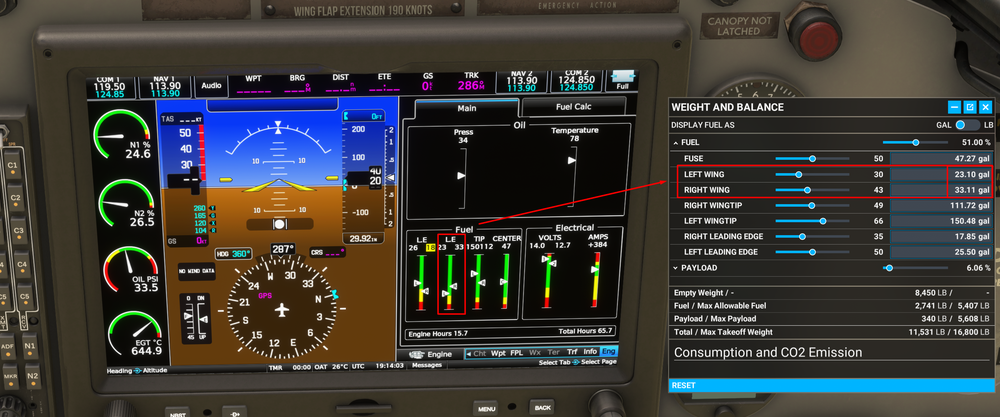
On mine I don't have the duplicated "LE" like in your image. On my Fuel Page the labels are left to right, "Wing, LE, Tip, Center".
Interesting. Can you check again now the v1.0.1 update is out? Apologies, I believe I may have been on that version at the time I took the screenshot. Can you verify that the labels are matching as my screenshot now?
The second meter (yellow arrow in your screenshot) needs to indicate WING instead of L.E. However the first meter (red arrow in your screenshot) is correctly reflecting the L.E fuel now.This is on the list of things to address for next update.
Thanks!
-
Summary of Fuel System
The fuel is normally fed to the engine via the FUSE tank. This tank can be topped up by transferring fuel from any of the 3 types of AUX tanks (TIP, L.E and WING) via their associated fuel tank switches on the left hand side of the cockpit.
The fuel is transferred at an accelerated rate from the AUX tanks to the FUSE tank until it is full, and then the rate of transfer slows down to the rate of burn by the engine. Fuel DOES NOT start to vent simply when the FUSE tank is full.
When does the fuel start to vent?
The fuel begins to vent overboard only when both these conditions are satisfied
- The FUSE tank is full; and
- All AUX tanks (TIP, L.E and WING) are turned ON at the same time.
This will be indicated by a FUEL VENT light on the main panel, just behind the control stick.
These points are also illustrated via the video below:
Thanks!
-
1
-
 1
1
-
Hi @Tim-HH,
Thanks for your feedback.
The throttle response in our T-33 is tweaked exactly to the specification and feedback from Greg (Ace Maker).
Per his guidance, the throttle response should be near instantaneous and it most certainly will spool up from idle within a few seconds. To the extent that the spool up needs to be carefully managed up to 70% RPM to avoid engine surges beyond 100% RPM, which we have modelled.
While we appreciate the additional information and feedback submitted by the community, we stand by the invaluable, verifiable and direct first hand data and input provided by Gregory "Wired" Colyer of AceMaker Aviation when it comes to the flight characteristics and behavioural model of the engine simulated in our rendition.
Thanks!
-
1
-
-
11 hours ago, Dudley Henriques said:
May I suggest you put this up on your website so all can view it?
Thanks. I'll add it to the FAQ:
-
8 hours ago, ericnelson7 said:
The "starting fuel" switch guard should open farther and expose the switch for better control, especially for VR users.
Also note fuel switch lights in reality cannot be tested unless the switch is on, and as usual with press-test lights, a light currently on should go off with press.
Thanks for the feedback, will share with our Team.
Thanks!
-
Hi DH,
14 hours ago, Dudley Henriques said:Assuming a full fuselage tank when starting, did you code to reflect the fuel burn rate even at idle to overcome the fuel transfer rate from the tips so that no overflow will occur out from the Sabre drain?
Thanks for your question. The answer to this is Yes. The fuel won't vent simply when the FUSE tank is full. There is an additional condition that ALL the tanks are also turned ON at the same time for fuel venting to occur.
7 hours ago, Dudley Henriques said:Reason for the question is to deal with any confusion when reading in the manual that any fuel transfer has to be watched so as not to have overflow in the fuselage tank.
In other words the reader might ask after reading the supplied manual and the way it has been written........"will I cause overflow if I open the tip tank transfer pump after engine start if the fuselage tank is already full"?
Just a potential point of confusion that might require some clarification.Allow me to clarify below, and also illustrate via a video that I made for a similar support query submitted on our discord:
QuoteThe plane only burns 0.1 gallons per second at idle. This "rate of burn" remains the same no matter which tank is being used.
The Weight & Balance window will show an "accelerated" rate when any of the AUX tanks are turned on, which is simply the "rate of transfer" and NOT an accelerated "rate of burn". This accelerated "rate of transfer" will be seen only when either...
-
Fuel is being transferred from the selected AUX tank to the FUSE tank, until the point when FUSE tank is full. When the FUSE tank is full, the rate slows down to the "rate of burn" (0.1 gallons per second) from the selected AUX tank, whilst the FUSE tank remains full.
Fuel will not vent in this scenario where only FUSE tank + one of the other AUX tanks are ON. So you can keep the "TIP / WING / L.E." tanks ON together with the FUSE tank without fuel venting happening as soon as the tank fills up.
-
Fuel is being transferred overboard aka "fuel venting" is happening. This ONLY happens when ALL the tank pumps are on at the same time & the fuselage tank is already full. This is when you'll see all the tanks draining at accelerated values, as basically you're dumping fuel. The fuel vent light will also be on in this case.
Thanks!
-
1
-
Fuel is being transferred from the selected AUX tank to the FUSE tank, until the point when FUSE tank is full. When the FUSE tank is full, the rate slows down to the "rate of burn" (0.1 gallons per second) from the selected AUX tank, whilst the FUSE tank remains full.
-
20 hours ago, FAC257 said:
But the labeling on the digital display for those two tanks is backwards.
Hi thanks for your report!
I do see the "L.E." indication is duplicated on the fuel system page. Whereas one of those (the one marked) should be "WING", as seen to match the fuel values of LEFT/RIGHT WING on the Weight & Balance menu.
However, I don't understand your report regarding them being reversed? Could please share a screenshot of where you are noticing that.
Thanks!
-
2 hours ago, ericnelson7 said:
It takes forever to dial the fuel totalizer, and you can't fly accurate approach speeds without knowing quantity remaining. How about auto linking the totalizer gauge to the fuel state at sim start?
Thanks for the suggestions. I'll share with the team to see if we can add some kind of acceleration to the scrolling of the totalizer, and an EFB option for auto sync.
2 hours ago, ericnelson7 said:lso, please allow EFB to control fuel tank status, as seen in the Flysimware Lear 35.
Could you please elaborate on this? Do you mean a fuel and payload manager?
The reason there isn't any is due to the size of this EFB. It being small phone does not leave much room for detailed schematics or or many pages either.
Thanks!




B1 issues
in Support
Posted
Hi
Thanks for report. Will share with KF team.