




Kevin B
Member
-
Joined
-
Last visited
Everything posted by Kevin B
-
Hello, I tried again last night with the update on the marketplace, but I got a WASM error. Today I installed it via the inistore, and everything works fine! The marketplace really needs to be shut down. It's awful and it's ruining everything!
-
No, because it was the cockpit setup on the ground and the save didn't have time to complete. I'll try saving before entering the point. I need to try the latest update, and most importantly, I'm going to remove it from that thing... marketplace! Never again should a product be released on anything other than that awful place, to put it politely!
-
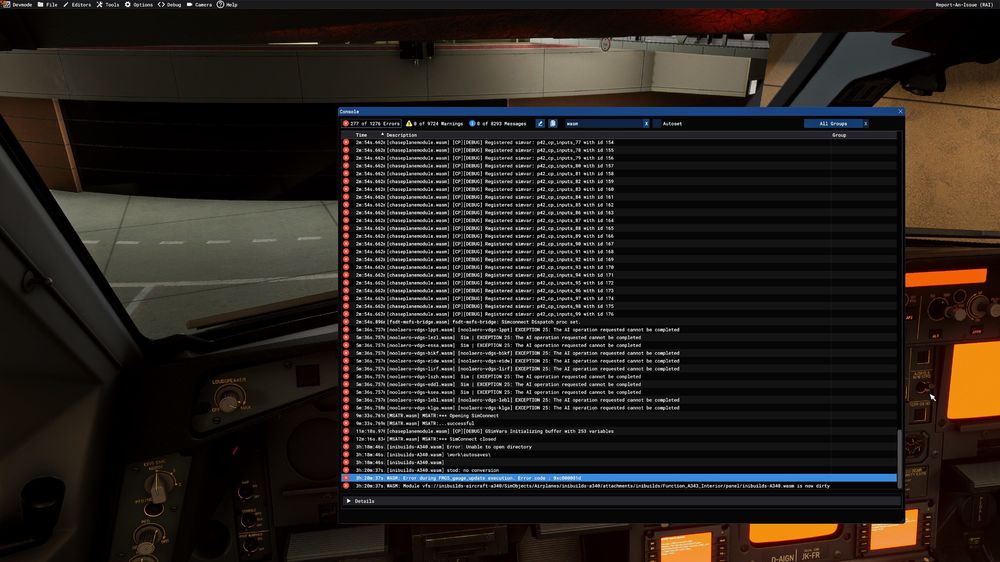
Hello, I'm experiencing a WASM crash whenever I try to enter a new waypoint. I can reproduce it every time, on all A340 variants. I've uninstalled it, deleted the streaming and WASM folders, but the problem persists. I bought it a week ago, and I've always had this issue. Information Aircraft: A340 EIS1 Passenger (all versions) Simulator: FS2024 Navdata Method: NAVIGRAPH OFP: Not required, happens on any route Specs: I9 12900KF, RTX 4080, 96gb RAM DDR5 Autosave: No autosave, I'm at the door and I just installed it WASM: Error during FMGS_gauge_update execution. Error code : 0xc000001d
-
if you read the update changelog carefully, all planes receive fixes, except the ini planes while they are the most buggy ....
-
I have a slightly annoying solution, to do before each launch of msfs24, by doing this I no longer have ctd. delete the streampackage content in AppData\Local\Packages\Microsoft.Limitless_8wekyb3d8bbwe\LocalState\StreamedPackages and delete rollingcache.ccc in AppData\Local\Packages\Microsoft.Limitless_8wekyb3d8bbwe\LocalCache
-
indeed no response. you'd think they didn't care, especially no updates since the release..
-
In the 321 on approach, I adjust the MCDU and freeze .. forced to restart the sim! it's been at least 15 times that I delete all the folders and put my views back, so don't tell me that I have to delete the folders etc. I'm clearly fed up with these inibuilds 330 / 321 planes not working properly. In addition, it was impossible to enter the arrival track, it did not appear in the mcdu, I had to enter everything manually.

-
I want to say that I completely uninstalled MS 24 to reinstall it properly with the latest update
-
Hello, I am currently flying with the A330-200 Paris - Pointe Noire so 8 hours of flight, I am approaching Pointe Noire, I add a Hold in the MCDU and hop! FREEEEEZZEEEEE! Bravo Inibuild! And by the way how do you explain that the airbuses were not corrected in the big update where all the planes received fixes?
-
I tried the method, to delete wasm, as said above, I launch an Orly cancun flight, I enter the route. I move around the plane to adjust my views following the deletion. CTD! I abandon the 330. and to say that fenix is 85% compatible, with a few "bugs" it has no ctd. I really don't know how to test your planes ... incredible
-
-
Please can you do the corsair international livery (only French A330-300) while waiting to have a paintkit for the 330-300RR MSFS 2024? Thanks Kévin,

-
-
Hello, when I enter the star in the mcdu, the msfs 2024 crashes and I have to close it at the end of the task, if you want to reproduce, A330-300RR at LFPO bound for LFRS. I select the departure runway, 06 today, LGL2H. I click on LFRS for arrival, ILS Y runway 03 VALAC1C and it blocks Regards, kevin,
-
ah great, yes no worries I will test and I will keep you informed. Thank you very much
-
Hello, since the SU15 I have taken the A300 but I encounter very poor performance. Low FPS, Stuttering is a shame. Before that it was really efficient. I have an i9 12900KF, RTX 4080. It is the only plane that has such low performance. I saw that other people encounter this same problem, I hope you will quickly find a solution, Thank you Kévin,
-
After a day of several flights from Europe to southern Africa and 13 hours of flight, a night is needed for this beautiful 310

-
I will take it too! 😁
-
I tried adding the MSFS airacs and it works. it doesn't CTD anymore. But what do we do if we don't want this Airacs? I don't want it because it creates double tracks, and conflicts with gsx
-
Hello, I made two superb flights with this A310 plane, without any problem. I am currently at the FSDG Nairobi airport and cannot leave because it crashes every time. I have been trying to fix the problem for over two hours. I deleted the navigraph airacs to reinstall them, I don't use the airacs for MSFS directly, it creates too many problems. I removed the plane from the content and reinstalled, I also have the enhancement version. I restarted my PC and still the same problem.


