





Jamir
Member
-
Joined
-
Last visited
Everything posted by Jamir
-
-
It's something that is known to the team however with all the photogrammetry and terrain to compete with it's possible it might not make it in even if the tracks are there. Thank you for understanding.
-
That's the not fun part, going through and trying to figure out what it could be. I go by things I recently installed usually
-
Go ahead and make a second community folder in your Packages folder, title the original Community folder "zCommunity" and then drag the A350, livery, and the 2 airports you are flying between into this folder. Before doing so go ahead and clear the A350 WASM Folder as well, note that this will cause the reinitialization of the aircraft so it might take 10-15 minutes to load
-
Are you using any 3rd party liveries that need updating, mods, or anything else that could be affecting the aircraft?
-
-
It's possible that you might need to reinstall the Multi-Jetway application, you should be able to use the tool in Sim as well as in pop-out if one were to decide to. I'll take a look into this in the meantime
-
-
Since it's crashed and reinitialized corrupted, do me a favor, reinstall the aircraft, clear the wasm, then launch the sim with 0 liveries and 0 airports, then load into the airport GVAC (super lightweight with not much around it since it's an island), and give it the 10-15 minutes it takes to load. I want to see if it's the aircraft or the sim or one of the airports. Let me know, thanks.
-
-
-
I've logged this for the team, thank you :)
-
-
Logged for the team, thank you
-
Logged for the team. Thank you.
-
It's incorporated into the Default Simulator EFB as there is no way for us to go into other developers aircraft code and manually add this item
-
Hello Bert, This is known and is why the C10 gate is currently not active as a spawnable gate. Thank you
-
-
-
Are you using any mods or liveries that are either out of date or not supported? Any new airports or addons, if you can attempt to fly with only the Departure and Arrival airports as well as the A350 as the only objects in the community folder. You can do so by renaming your current community folder "zCommunity" and then create a new one by hand called "Community and place said airports and aircraft with livery of choice in the new folder, if it doesn't crash it is something in your community folder. Let me know if this helps
-
HI, I'll pass this along to the team, thank you :)
-
Hi, Can do you have other sceneries loaded when you have KORD loaded, if so can you try to make is so only KORD and the destination airport are in the community folder. You can do so by entering into your FS2024 Packages folder, creating a new folder called community with only KORD and ARR airport in the folder, and rename the original community folder "zCommunity" so that way it doesn't load that folder. Let me know what happens, thank you
-
Hello, Thank you for taking the time to break these down into subsections, makes it way easier to log. :)
-
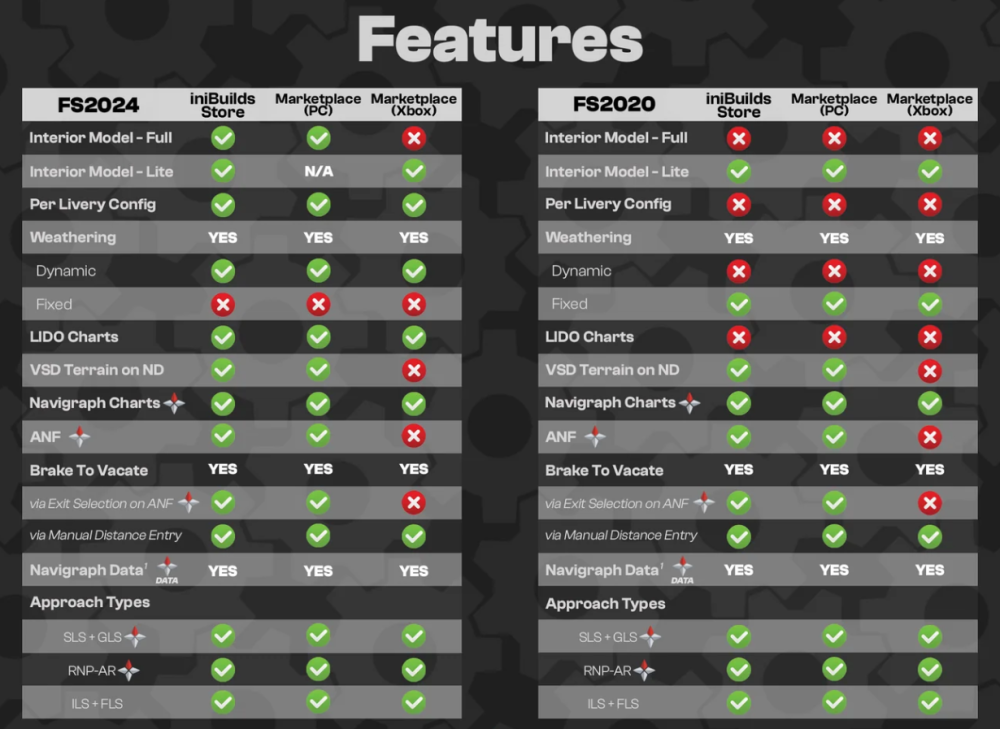
Hello, The Terrain Data is not available on the Xbox Platform however the OIS Option is unable to be removed so it still appears as an option that can be downloaded and installed however is not the case. Below I've attached all the key differences between 2024 PC/Marketplace PC/Xbox
-


