




Sam7x
Member
-
Joined
-
Last visited
-
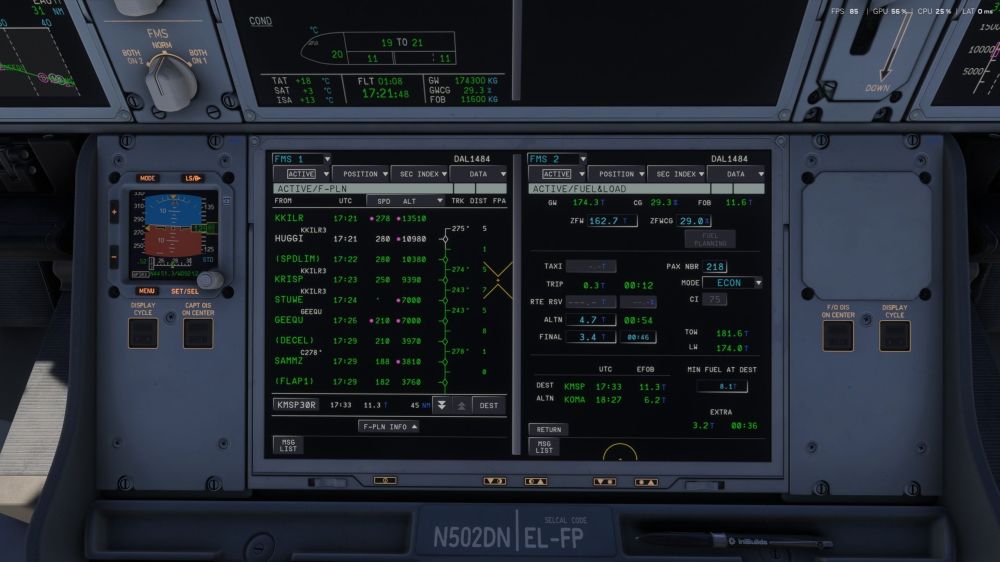
Screenshot from the sim. Fuel at KOMA should show 6.6T instead of 6.2T
-
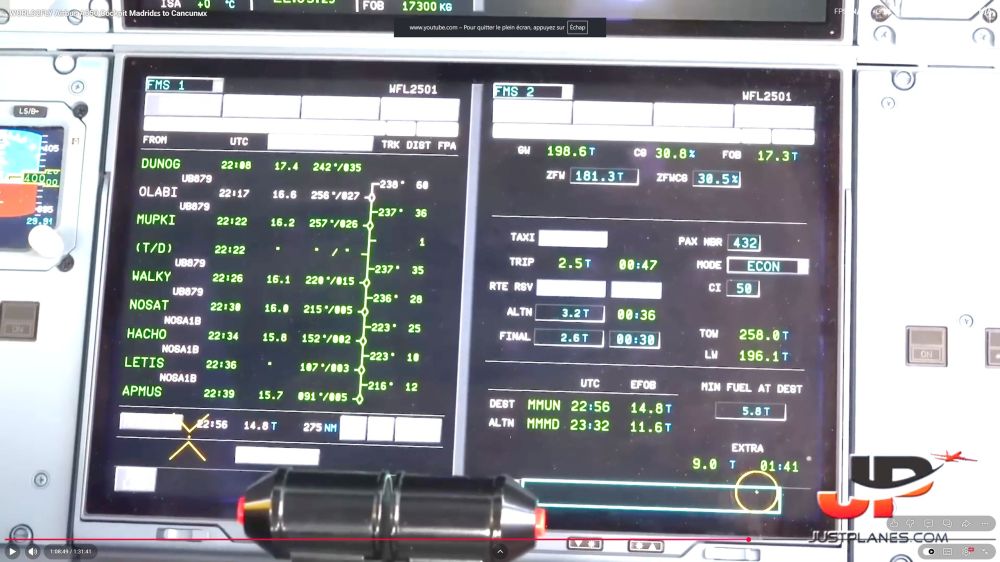
Hi, Please correct me if I'm wrong but I believe that the Ini A350 is inaccurate in calculating the remaining fuel at ALTN on the FUEL & LOAD page. Using the attached screenshot from the Just Pilots Youtube channel showing the real thing, we can see that : Remaining fuel at destination (MMUN) is 14.8T. MIN FUEL AT DEST (FINAL + ALTN) : 2.6 + 3.2 = 5.8T Therefore : 14.8-5.8 = 9.0T of EXTRA. Now let's imagine they shoot the approach, go around and decide to divert. They would arrive at ALTN (MMMD) with 14.8-3.2 = 11.6 which is FINAL (2.6T) + EXTRA (9.0T) and this is what we see on the screenshot. However, in my experience the Inibuilds A350 shows consistently less than that. Apologies if it's not very clear, I promise I did my best 😆
-
Hello iniBuilds, I have noticed a few issues with the A350 that you could hopefully look into : AGOPA6H departure out of LFPG runway 08L, PG088 is a flyover waypoint but the aircraft turns way prior. Despite the flyover symbol showing on the F-PLN page, it seems that the aircraft still considers it a flyby. After making a direct to CRS IN (extending the centerline), if I remain in HDG mode to intercept the ILS the VD is most of the time totally bugged out. I do not encounter that particular issue if I proceed direct to a waypoint on final in NAV mode. Shortly before reaching the top of descent, initiating an early descent in DES mode makes the first altitude constraint along the STAR appear amber on the ND. When the aircraft intercepts the descent profile that same altitude constraint turns back magenta. Flying the missed approach from the ILS runway 26 in PHX (at 2500ft right turn HDG 030 to intercept PXR R-336 to AVENT) : the aircraft made the first turn to the right at 2500ft in NAV mode but on the inside of the line drawn on the ND (therefore not following it). It then never made the left turn to AVENT. I really appreciate all the updates since initial release, I think the A350 is coming along nicely. Please keep up the good work !


