




Airbumps2501
Member
-
Joined
-
Last visited
-
Hello, Just to confirm, you're saying that the traditional way of operating jetways no longer works at your airports that have the multi jetway system? This is prevent GSX operating jetways right? I like the users above cannot get any jetways to operate at EGLL however I have not (nor do i really want to) try using the iniBuilds multi jetway tool. I'd like to continue to use GSX and operate jetways tradtionally... Hope there can be a fix or update soon
-
Thanks for confirming it wasnt just me at C18. Hopefully this gate/jetway can be fixed in a future update.
-
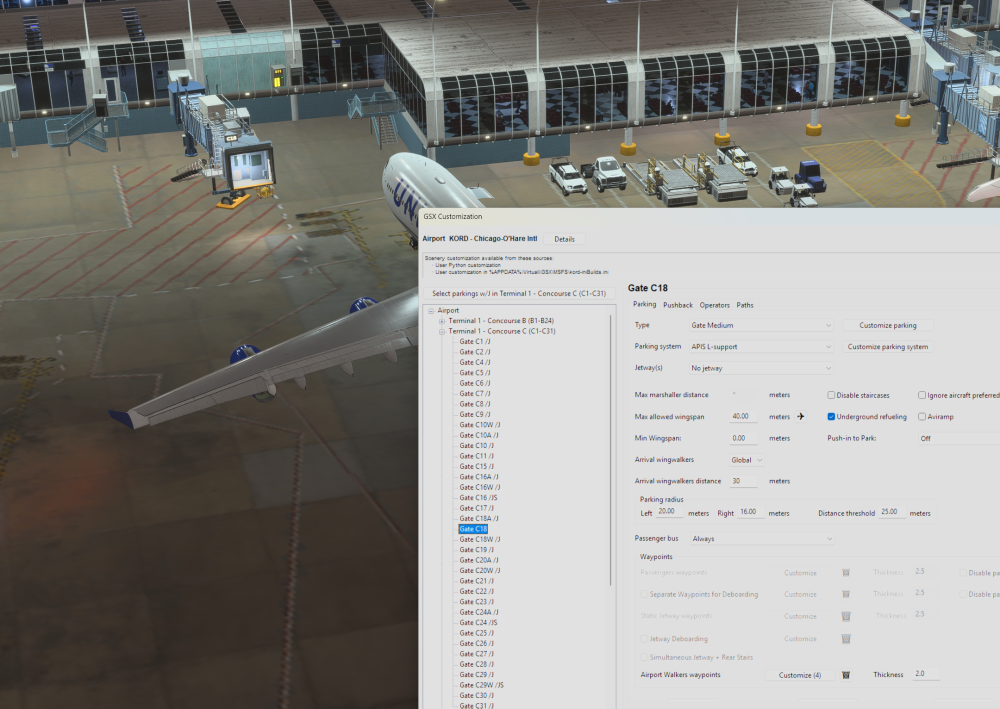
Hi All, Similar sort of issue, but it appears that gate C18 doesn't have a jetway (thats according to/using the iniBuilds GSX Profile). Requesting the jetway via GSX or an aircrafts EFB indicates no jetway present. The GSX profile is also showing no jetway... Anybody else see that? showing
-
Have you made any significant progress?
-
Hi Peter - Do you have a link or quote from where Ubaid claimed they had found a solution? I've seen a couple of interviews with him over the past couple of weeks but don't recall a comment other than "We know its frustrating"
-
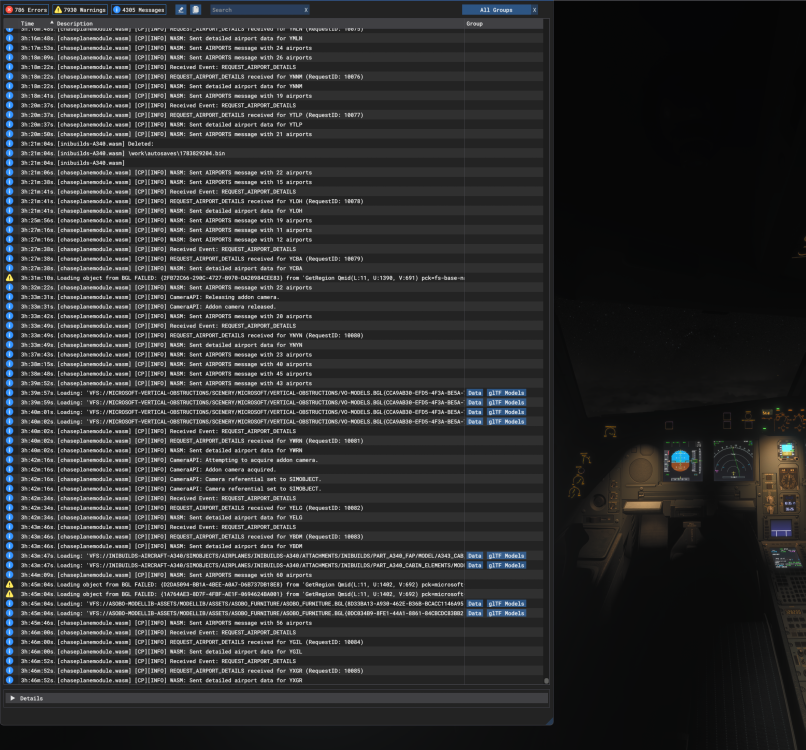
Hi All, I'm at my wits end with this aircraft. On most flights now I'm finding that somewhere in the cruse the aircraft just stops responding. The Sim continues to function normally and I can escape and enter menus etc. I can click buttons in the aircraft but it simply doesn't response. Is this a WASM fault or is it something else? I've read about "Ghost WASM" crashes on the A350...... What can be done about this? I don't see this behaviour with other developer aircraft. Unfortunatly whilst you can click your way around the EFB, you can't actually action any autosaves..... I
-
As I type, I'm enroute from Sydney to Singapore in the A340. The sim is functioning fine but the aircraft isn't responding to any commands or inputs...its flown off track and there's nothing I can do but watch it continue. I can press buttons and the press in the sim..but there is no response from the aircraft. The EFB remains responsive and I can click my way around it, but button presses don't actually do anything. Is there anyway to bring the aircraft back from its ghost state? Or do we just need to accept this is going to happen with the A340? Whilst I understandin programming is complex, watching a recent interview with the CEO I see you've got over 80 people working for the company. These issues don't happen with Fenix or PMDG so I'm a little dubious its a "simconnect" issue... Really would like to hear whats being done behind the scenes to track down and resolve these issues.
-
Just had the same thing - Didn't realise there was such a thing as a "Ghost WASM Crash" but this is exactly what I just encoutered. I haven't touched the A350 in months and after two from four flights ended in this Ghost Crash I'm going to park the A350 back in the hanger and stick with aircraft that don't suffer the issue, i.e Fenix and PMDG.
-
Add me to the list of unhappy customers with the same issue. A 15 hour flight from KLAX to VHHH and at TOD the aircraft just stops responding. Dials spin, buttons press but nothing happens. The sim continues to run just fine but nothing out of the aircraft. WHat a complete bucket of junk.
-
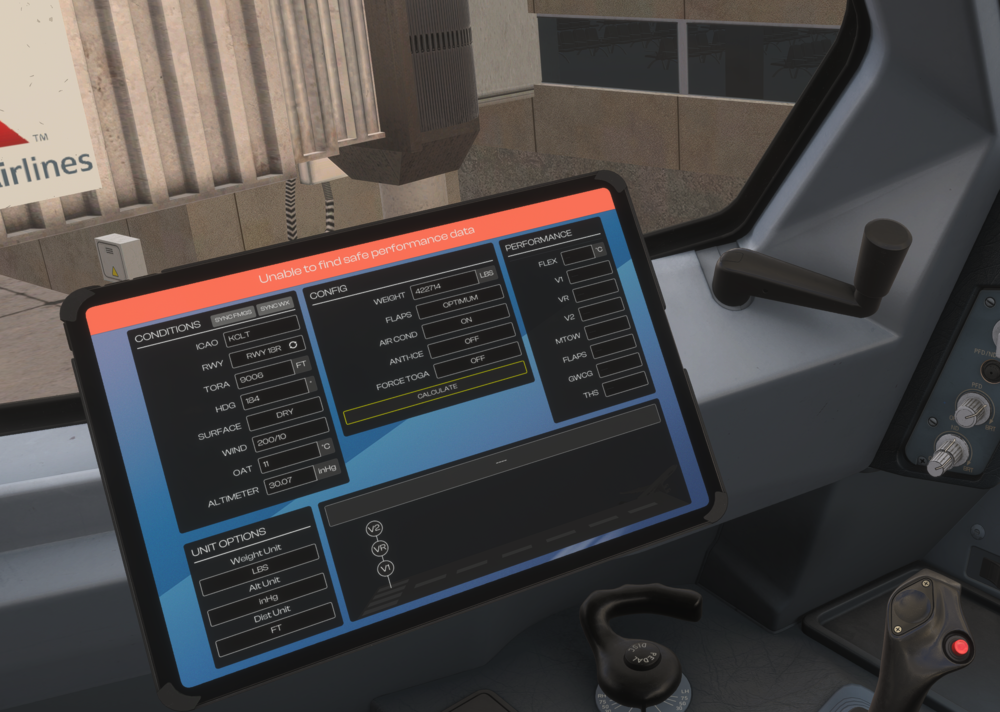
Hi All, I've done four flights in the A340 now and on each occasion the take off calculator has given me the error "UNABLE TO FIND SAFE PERFORMANCE DATA". All takeoffs have been from major airports, EGLL, KCLT, KLAX and EDDM at moderate weights. In this instance, I'm AT KLCT trying to get it to give me take off performance for a flight to EDDM. Using the SimBrief take off calculator works fine - But the EFB one doesn't seem to work. Does anybody have it working or any suggestions?
-
Yeah I just noticed this too. Why would it call boarding / loading first....and then catering and refueling? Never seen an airline load the passengers and then open the doors to load catering!! Can we get this fixed in the next update please IniBuilds?
-
Would be nice to get some kind of comment from @IniSteve, @iniBuilds Team @iniBuilds Pablo or anybody else from inibuilds on this. It is effecting so many of us and there really has been ZERO communications or support offered. There are multiple forum threads abou the issue which has been very well reported for months (since SU4 Beta arrvied). Is this just going to be one of those issues thats easier to ignore than address?
-
Hi Eddie, Hows that closer look going? This is a pretty simple thing to replicate it would seem.
-
-
Steve this was reported by a number of members throughout the SU4 Beta period. The solution (as far as I know) was to always start cold and dark at the gate .. and even it didn't always work.


