




Kirkus
Member
-
Joined
-
Last visited
Everything posted by Kirkus
-
Supposedly fixed in the A380, but no updates for the A350, need to wait for v2 so it seems.
-
CPDLC is broken, messages are send by the aircraft and seen in the Hoppies log, and received by the controller, however the aircraft does not receive messages from the controller, they can be seen in the hoppies log, but never arrive in the aircraft.
-
If it was obvious, people would not need to ask questions.
-
-
Not likley, if they release V2 which fixes all the bugs in V1 and charge everyone for it, then under Australian Consumer Law they would be breaking the law, you simply cannot do this. Also if you think Australian Consumer Law does not apply to inibuilds because they are not Australian, then go and ask how that worked out for Steam.
-
-
Disgusting, they should release a fix as soon as they know about it, not wait till the A380 releases, we are paying customers with a product that does not work, consumer protection would have a field day.
-
Hoppies is very broken, the drop down list never shows the actual staions online, and has not done so for some time, along with the pos rep fucntion being inop for some time also. Further more, per one of my posts here, you can request a PDC, but you never get the response back from ATC to the mailbox. https://forum.inibuilds.com/topic/36226-pdc-not-received-by-aircraft/#comment-88020 To be on the hoppies network, you need to have your flight number in the INIT page of the KCCU. You should be able to see your self on this list https://www.hoppie.nl/acars/system/online.html Messages you send and receive are here https://www.hoppie.nl/acars/system/log.html
-
They call this a ghost WASM crash, and they have no idea how to fix it, and they are putting the blame on Microsoft. However in my research, what is happening is simconnect is getting loaded up to a point where it can no longer cope, and it disconnects from the aircraft. I ran some logging with simconnect logger and found that just before the crash simconnect was getting spammed with requests. This never happnes with the Fenix.
-
Brake** You need to enable push back raise for the towbarless push back tractors in the GSX menu https://forum.inibuilds.com/topic/30447-moving-forwards-upon-gsx-pushback-being-ready/#findComment-89188
-
If the station is not providing an _A or _D ATIS then you need to select none from the drop down menu.
-
You have to output it to a folder that is allowed to write in, for example I put mine in documents/logs The text file goes into LocalState [SimConnect] level=verbose console=1 RedirectConsole=0 OutputDebugString=1 file=C:\Users\(your user name)\Documents\Logs\SimConnect%u.log file_next_index=1
-
-
windows + shift + s to take a sreen shot, or the print screen key.
-
noolaero again, I've deleted every instance of noolaero, but I am yet to do a flight. You can run a simconnect log file, I found in mine that there were too many requests to simconnect just before the crash and it couldn't keep up, this was 6 hours into a 12 hour flight, and again taxiing into the gate after a 6 hour flight, the module ID was related to noolaero. Some airports are shipped with a noolaero wasm file in their scenery packages. SU5 was released overnight let's see if that had any affect on it.
-
You can run a simconect log file. Which is what I have been doing, and then I feed it into AI around the time the crash happens, everytime simmconnect is being spammed by an application, and it cant keep up so it crashes, through my reasearch in the simmconnect log, I did a heap of chasing with chat GPT, and this is what brought me to nooaero VDGS, nooaero is loading WASM files for every airport, even if you are not there.
-
-
Do you use noolaero VDGS?
-
I used to have this, and I solved it, but to be sure, here is a question. When this happens what tow tractor is connected to the plane, conventional (tow bar and tractor) or tobarless? If its the latter, you need to go into the aircraft options for GSX and tick the box that says pushback raise.
-
-
The other issue is here, is that even when saw GSX crashed, but still used SET ZFW in the EFB, then you get this warning only after take off, and they have blocked the ability to adjust the weight of the aircraft once you are airborne. Which means I am now stuck flying an empty Jet. They need to unlock the the adjust ZFW when you are airborne.
-
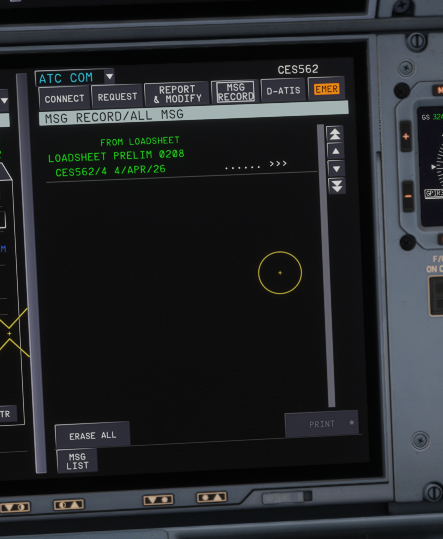
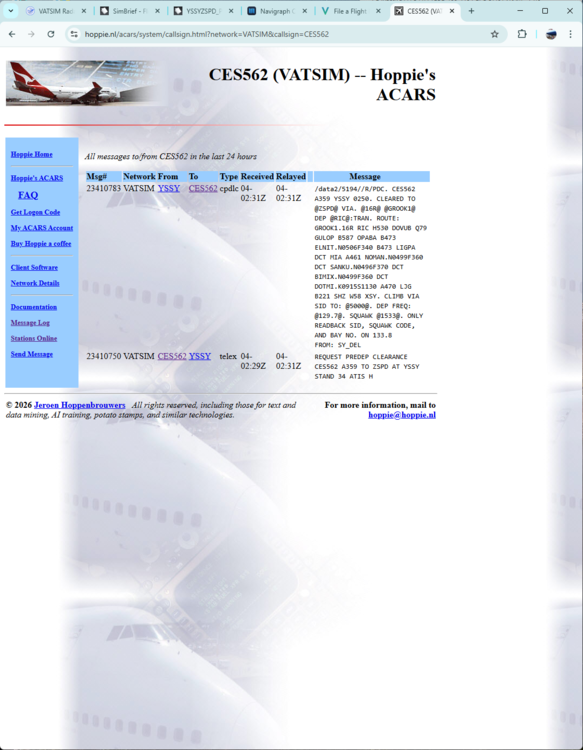
PDC requst was sent and received by ATC PDC was sent by ATC and not received in the aircraft.
-
This seems unnessacery, I refuse to belive that I have to remove other add-ons to repair one add on. All mine have been around the 4-6 hour mark so this doesn't help. I did this and had a Ghost WASM crash 6 hour into a flight.
-
If you look at the PERF page, it also changes to DES mode, even though you just dialed in a new altitude, with out actually pulling descent.
-
Any update on this, my last 3 flights in the A350 have all had my gauges freeze and my plane start doing sprials, This is a new issue for me, and its wearing thin.


