




Hron960
Member
-
Joined
-
Last visited
Everything posted by Hron960
-
-
There are all the problems with throttle calibration that are listed in all the topics and as listed here. Is it unclear why the topic is closed? Many people have the same problems. Synaptic couldn't even make it possible to reset the settings to default. Now this plane is always in the maximum reverse position when loading, and this is not fixed in any way. My advice is that it's better not to touch anything there. It's useless to contact discord, no one there will help you in any way. I've reread a bunch of posts with similar problems and there's no solution anywhere. Maybe someone has found a solution and will share a link. ALL other planes are operating normally. In general, this plane is one big disappointment. I hope that no one will be offended by the criticism. With respect...
-
Hi, The drivers have been updated to the latest. The settings are all at high and medium levels, ultra is not. I think I've found the problem for myself. I have disabled the city of Dubai from inbuilds and enabled the city of Dubai from ORBX. Booted up at the same place and on the same plane. I shot a short video. It shows that fps in the parking lot has increased, albeit slightly. But when you use the Chaseplane to climb up, the shots become what they should be for me. Well, at least you can get out of there. Apparently, the problem is still in the city. Pay attention to him. https://modsfire.com/PK07oa6if7mXLOb With respect...
-
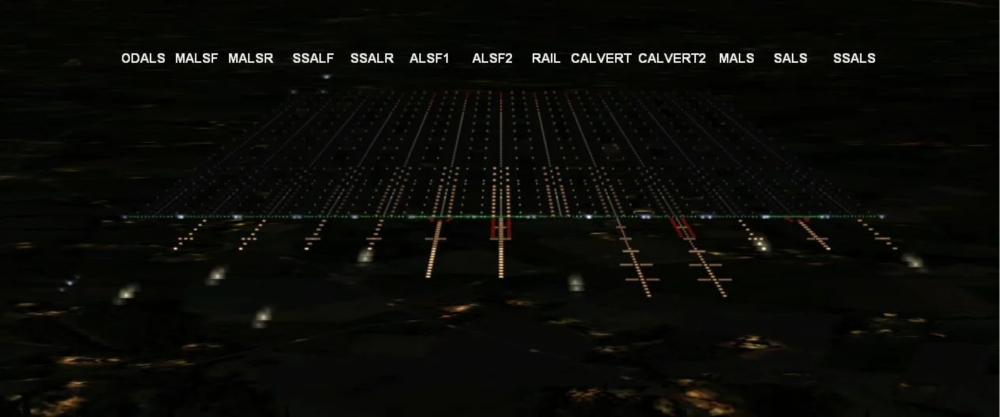
Thank you so much for updating Hamad Airport. However, I would like to note that the approach lights on all runways are made incorrectly again. The same thing has already been written about. https://forum.inibuilds.com/topic/30968-thank-you-for-doha-fix-for-flat-western-boundary-needed/ There's ALSF-2 everywhere, and there should be CALVERT-2. Unfortunately, the developers are reading airport maps incorrectly. I am attaching a visual file for them, which shows the types of approach lights. "CALVERT (High) and CALVERT-2 (High) CAT II & III — Calvert Approach light systems (England). These systems have six light horizons of different lengths. Their size decreases as they approach the lane." With respect...
-
I understand and sympathize with you. Even 5090 won't help you here. Let's be honest, without any compliments. The Dubai scenario is simply impossible to use. I've attached a link to a short 48-second video. It's just terrible. This happens on any plane. It is simply impossible near the terminal. As soon as you enter the taxiway, the friezes stop. https://modsfire.com/a42i9rk12nk3kX3 We were all waiting for the second version, but as it turned out, it is even worse in performance than the first one. I regret that I bought it. All your "turn this off, turn that off" advice doesn't help, just as it didn't help for the first version. But again, to be honest, there is no such thing at other airports from inibuilds. So you can do great scenes. It's just that there's a problem in Dubai that you don't see. I hope that the criticism will be taken well. With great respect
-
This is an old discussion. As is usual between game and add-on developers, iniBuilds does not want to make changes to its product every time the simulator is upgraded to beta. They guarantee that it will work in a stable version, and that's enough for them. The logic seems to be there. Asobo, in turn, replies that there are hundreds and more developers and they do not have the opportunity to test each update for compatibility with other products, and they are also right. Although in this case, I would side with Asobo. The proof of this is that other developers, such as ChasePlane or PMDG (who are also being scolded by everyone), respond promptly to simulator updates and release beta-compatible updates to their products within a few days. This is a decent approach. The fact that iniBuilds does not want to make a correction based on the behavior observed in the beta version, explaining that if the problem is subsequently resolved on the MSFS side, they will have to go back and rework or undo their own changes, this is an untenable statement, since each subsequent beta version of the simulator takes into account past errors and is unlikely whether iniBuilds will have to do this. They just don't want to make corrections. This is my personal opinion. With respect
-
I confirm all the above problems. The aircraft in the beta version is not loaded, only the cargo version. I had to exit the beta version and the plane booted normally. Apparently version 1.0.12 is incompatible with the beta version of MSFS2024. So don't worry in vain. Troubleshooting steps will not help.
-
The iniManager has not started for the second day. After entering your username and password, the download freezes. Deleting and reinstalling do not help. Fix it. With respect.
-
165,000 kilograms is 165 tons. If it's in liters, then that's another matter.
-
A strange profile, don't you think? All the technical specifications of the A350-URL say that it can accommodate more than 300 passengers and 165 tons of fuel, but what about here?
-
-
The approach lights are made incorrectly. According to the diagrams, all runways should have CALVERT2, and here ALSF2. I'm surprised that the developers missed it.


