




pizzamonster
Member
-
Joined
-
Last visited
Everything posted by pizzamonster
-
In my case, the crash happened very early during pre-flight, so it doesn't seem to match the arrival/runway-change scenario you described. I had started the aircraft and GSX. GSX integration was disabled in the A380, and I started GSX separately through the Asobo tablet. I also had my usual external programs running, including FSLTL, FS-ATC-Chatter and CABBY. I had imported the flight plan and completed the basic departure setup, including the FMC performance data, but I hadn't made any subsequent changes to the flight plan. I was simply waiting for GSX passenger boarding to finish when the WASM crash occurred. I did not use the SEC F-PLAN at any point. So unfortunately I can't identify a specific button press or F-PLAN modification that triggered it. In my case it appeared to happen spontaneously during the pre-flight/boarding stage.
-
Hope there will be fix available soon...
-
I’ve recorded a short video showing the issue. It shows the transition from the cockpit to the external view and then back to the cockpit. When returning to the cockpit, all the lights illuminate simultaneously for a few seconds, as if the annunciator light test had been activated, before returning to normal. I can reproduce the same behaviour in both VR and 2D. Video: https://drive.google.com/file/d/1TF8h-q12ZMcS3QW46GFeok2qbgkoMCFM/view?usp=sharing
-
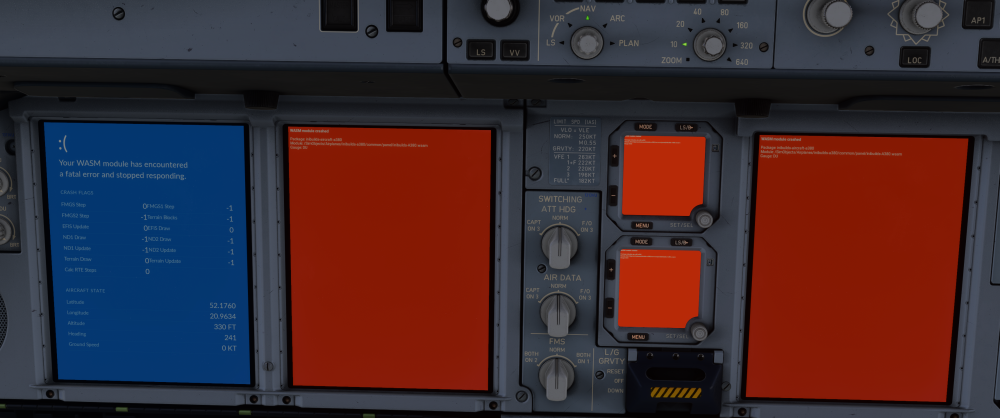
Just adding another WASM crash report here. Rather ironically, about 10 minutes earlier I had just told my friends that after 2–3 flights in the A380 I hadn't experienced a single WASM crash and that the aircraft had been very stable for me so far. Then I loaded another flight and got this almost immediately. 🙂 This happened shortly after loading the A380 at Warsaw (EPWA, Drzewiecki Design) in MSFS 2024. I was still on the ground and had barely started setting up the aircraft when the A380 WASM module crashed and all displays showed the red WASM crash message. Unfortunately I closed the simulator before checking the Developer Console and INI_CRASH variables, so I don't have the complete diagnostic information for this occurrence. I have attached the screenshot showing the actual crash. I was also running several external applications at the time, including FSLTL traffic, Cabby, FS-ATC-Chatter, Landing Rate Monitor and its traffic component, so I can't say whether any of these contributed to it. I had completed my previous A380 flights without a WASM crash. If it happens again, I won't close the simulator and I'll collect the Console error, INI_CRASH variables and the other information requested in the WASM reporting guide.
-
Hello, just to let you know that last EGLL update did not fully fixed this problem. I have unistalled Aosbo EGLL, also cleanred scenery index.
-
-
Ok, update: I delated profiles and reopened sim and everything started working again. Very strange but working now for me. Ale The problem with simbrief just gone also.
-
Ok @Nico - Gumby I have similar problem after last update. Before first update I did not have any problem. Today I trying load DHL version, following your instruction above and using official profile for SimBrief. What I got is info that 'SimBrief aircraft doesn't match MSFS aircraft and more - aircraft profile completely mess up loading like half passenger half cargo option. Any idea?

-
Same 😉
-
-
-
This what I have today: Log Name: Application Source: Application Error Date: 30/12/2023 13:01:11 Event ID: 1000 Task Category: Application Crashing Events Level: Error Keywords: User: ------ Computer: ------ Description: Faulting application name: FlightSimulator.exe, version: 1.35.21.0, time stamp: 0x656896c5 Faulting module name: m44477453e77732a1_0.dll, version: 0.0.0.0, time stamp: 0x658ffb41 Exception code: 0xc0000005 Fault offset: 0x0000000000dd6704 Faulting process ID: 0x0x77B8 Faulting application start time: 0x0x1DA3B1EF5493616 Faulting application path: C:\Program Files (x86)\Steam\steamapps\common\MicrosoftFlightSimulator\FlightSimulator.exe Faulting module path: C:\Users\------\AppData\Roaming\Microsoft Flight Simulator\packages\inibuilds-aircraft-a300-600\m44477453e77732a1_0.dll Report ID: 4b183ff1-a76e-4a60-8245-75aa460908d4 Faulting package full name: Faulting package-relative application ID: Event Xml: <Event xmlns="http://schemas.microsoft.com/win/2004/08/events/event"> <System> <Provider Name="Application Error" Guid="{a0e9b465-b939-57d7-b27d-95d8e925ff57}" /> <EventID>1000</EventID> <Version>0</Version> <Level>2</Level> <Task>100</Task> <Opcode>0</Opcode> <Keywords>0x8000000000000000</Keywords> <TimeCreated SystemTime="2023-12-30T13:01:11.6795671Z" /> <EventRecordID>118354</EventRecordID> <Correlation /> <Execution ProcessID="28344" ThreadID="12564" /> <Channel>Application</Channel> <Computer>------</Computer> <Security UserID="S-1-5-21-191062279-3466083606-1090172664-1002" /> </System> <EventData> <Data Name="AppName">FlightSimulator.exe</Data> <Data Name="AppVersion">1.35.21.0</Data> <Data Name="AppTimeStamp">656896c5</Data> <Data Name="ModuleName">m44477453e77732a1_0.dll</Data> <Data Name="ModuleVersion">0.0.0.0</Data> <Data Name="ModuleTimeStamp">658ffb41</Data> <Data Name="ExceptionCode">c0000005</Data> <Data Name="FaultingOffset">0000000000dd6704</Data> <Data Name="ProcessId">0x77b8</Data> <Data Name="ProcessCreationTime">0x1da3b1ef5493616</Data> <Data Name="AppPath">C:\Program Files (x86)\Steam\steamapps\common\MicrosoftFlightSimulator\FlightSimulator.exe</Data> <Data Name="ModulePath">C:\Users\--------\AppData\Roaming\Microsoft Flight Simulator\packages\inibuilds-aircraft-a300-600\m44477453e77732a1_0.dll</Data> <Data Name="IntegratorReportId">4b183ff1-a76e-4a60-8245-75aa460908d4</Data> <Data Name="PackageFullName"> </Data> <Data Name="PackageRelativeAppId"> </Data> </EventData> </Event>


