




Wise87
Member
-
Joined
-
Last visited
Everything posted by Wise87
-
-
-
Good to here. I'll check it out when it's updated. I'm aware that it doesn't effect the brightness within the cockpit. My main concern was being able to see outside, especially at night or darker situations.
-
What MSFS2024 command can we use for the Auto throttle disconnect switches for the L-1011? I tried the AUTOTHROTTLE DISCONNECT in 2024 but it doesn't work.
-
I've completed 2 flights now in the L-1011 and I find the tint still needs to be toned down.
-
iniBuilds, I noticed by several of the streams that the flightdeck glass has a heavy tint applied making the outside view darker them normal. The passengers windows do not have this heavy tint when looking out them. Will there be a way to lighten the tint or an update so the flightdeck is not so dark. I looked at other MSFS aircraft and the L-1011 is the darkest of all. I have included a few pictures that show no tint, tint line as you pass through the glass and the inside tint view. Please consider lighting them up some. Example in this link from Kenco's flight. Thank you and I can't wait to purchase the aircraft.
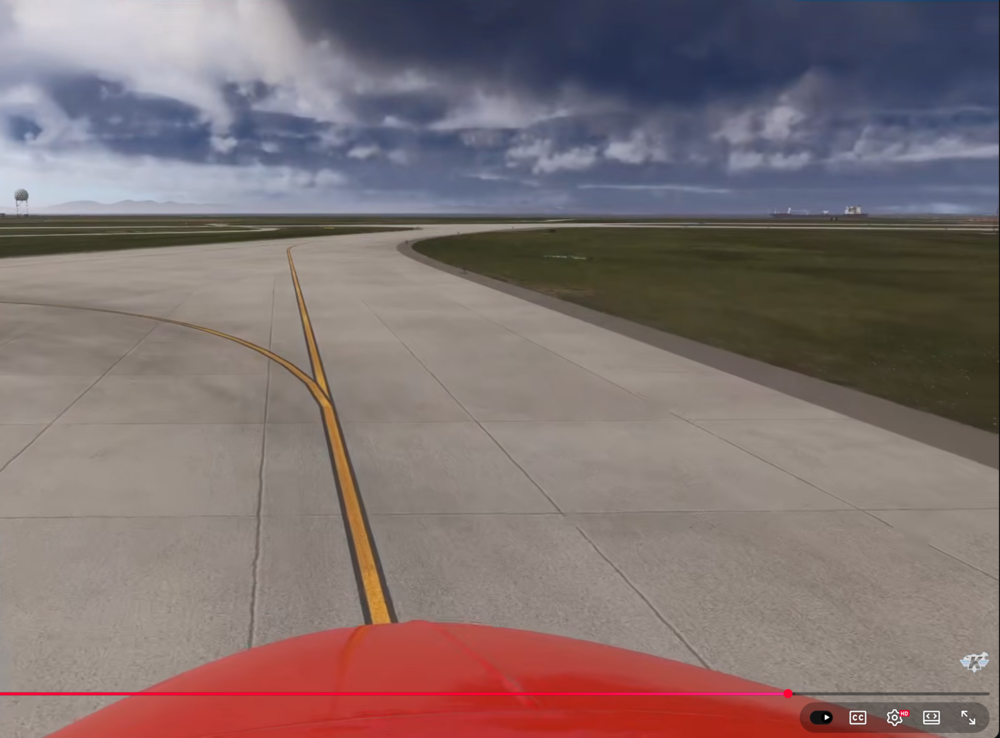
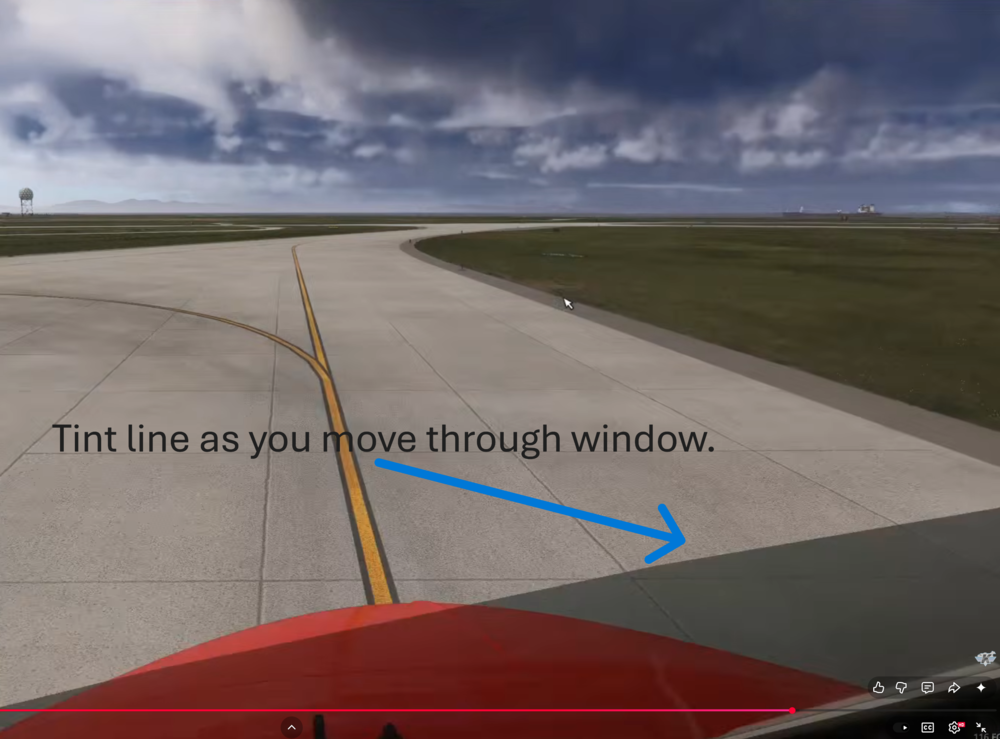
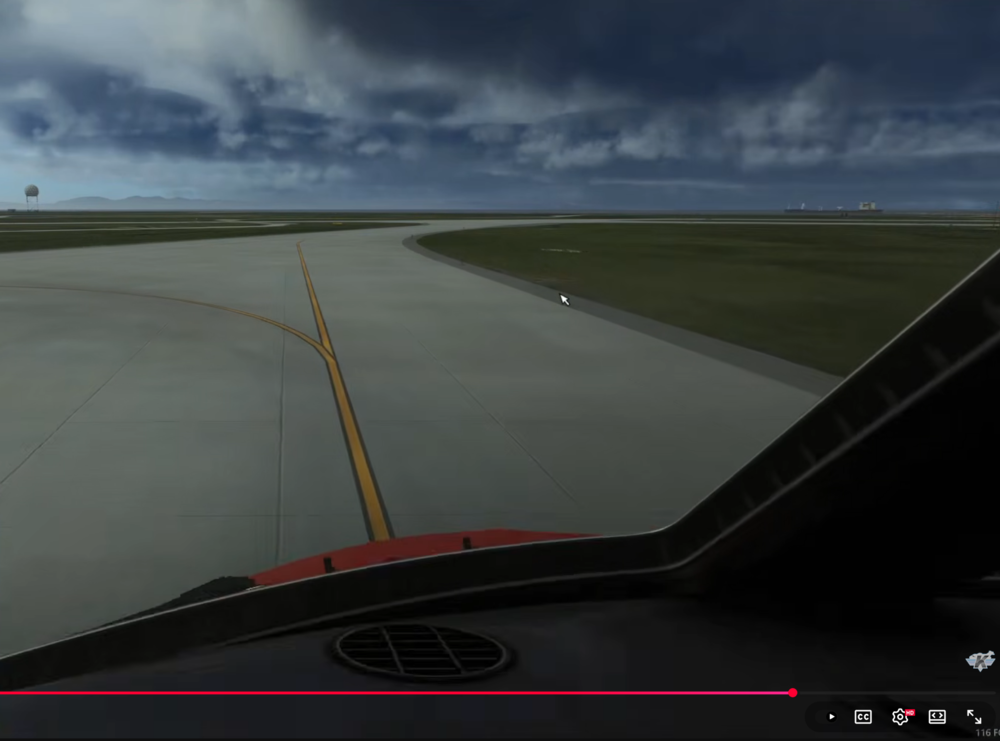
-
Got answer on Discord, thanks.
-
I noticed today on the Air Canada L-1011 on Kenco's stream that he was flying the L-1011 without the lower lounge. I also saw that the mid uppder deck was missing the lift/elevators galley area. https://prnt.sc/1qAr7ZO8HSsK
-
Hopefully there will be enough interest to have more accurate interiors when and if the other models are made. If I researched correctly, only the PSA two L-1011's have the lower lounge. I get why you decided on a hybrid but I hope the other models will be more representative of the actual models, displays, gauges, MCP, interior, wings, etc. I'm a long time L-1011 fan who's been waiting decades for a model like your about to release for flight simulator.
-
I think this iniBuilds L-1011 is a mixture of all the models combined even though there calling it the -500 based on wing and fusalage design of the -500. Some of the liveries shown in the trailer video were not even painted on -500 models, TWA, Cathy Pacific, Eastern to name a few as they did not operate the -500. None of the larger carriers had the lower lounge. I believe PSA and LTU were the only ones to have the lower lounge. I get why iniBuilds incorporated the liveries and some of the features currently in their -500. I just hope there is a strong interest to make the other models, (-1, -100, -250) at a later time so we can see more accurate interiors, tape gauges, lighting options, etc. I'm still super excited and can't wait for the release.
-
Just wanted to make sure we don't have to mess with it or do we need to disable it?
-
Any news on this update?
-
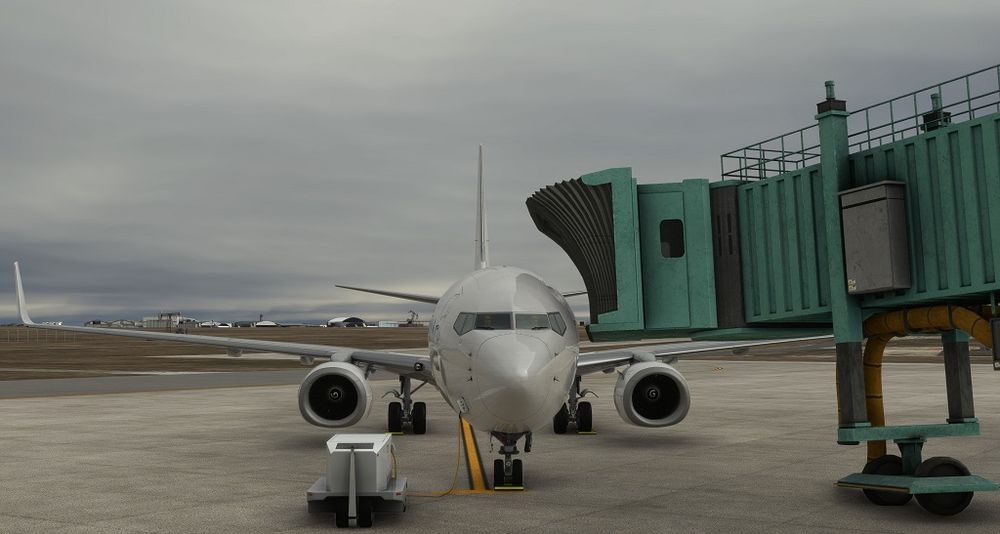
I noticed that both jetways are too high at the Federal Facility. They don't seem to lower correctly.
-
Thanks for the suggestion. I was getting an error when trying to update. So much for using the update option.

-
@iniBuildsIs the A300-600F still going to happen? Have't seen any updated news on it since it was announced.
-
I think I see where my user error was with the MCDU but you you are correct, even if I enter the incorrect information into the MCDU, it should say NOT ALLOWED and not crash the MCDU. I'm use to other FMC/MCDU to where I simply enter a speed/altitude and just select the RIGHT LSK next to that point. My error on the A310 was entering 250/130 and hitting the RIGHT LSK and when the direct entry didn't work I selected the LEFT LSK next to ONDRE when I should have hit the RIGHT LSK first. I'm glad this will be addressed in a future update.
-
Sure, I can duplicate it each time. I was flying from KDTW to KATL in the Delta A310. I was about to start my arrival into Atlanta on the ONDRE1.HAINZ arrival. I was programing the MCDU to cross ONDRE at 250/130. Being a FMC guy I used the RIGHT LSK on ONDRE to ENTER 250/130 but nothing changed. Then I used the LEFT LSK on ONDRE and the next window open. I see VIA GOTO [ ]/[ ]. I enter 250/130 in the keypad and select the LSK. Noting populated in the [ ]/[ ] window and this is when everything stops working. I can repeat this every time. I did it two more times just to confirm but I did not take off from KDTW. I simply loaded the plane ready for takeoff, imported my flight plan, added my SID and STAR and then went directly to ONDRE to add my crossing restriction as if I was in flight. As soon as I did all the buttons stopped working. The flight controls still worked but the instruments were reading funny and buttons stopped responding. When this happens in flight and I push the yoke down to descend, again only the flight controls work, the long needle will move but the small needle on the altitude guage stays frozen. Hope this helps.
-
Just had the system freeze where nothing would work when I was entering a crossing restriction into the MCDU on the A310. I'm on the latest update.
-
Has the aircraft.cfg been added yet so external programs can use it. Right now programs like AivlaSoft EFB cant read the A310.
-
I've been waiting for the Cargo version for P3D and now MSGS2020 since you initially released the Airbus. Please bring over the A300-600F over to 2020.
-
I'm trying to build a AviaSoft EFB profile for the A310 but I need to point the profile to the A310 AIR file. Is there one and if so what location?
-
Doesn't work. I even reinstalled the iniManager earlier just incase it was that. I made sure the iniManager folder was also removed before the reinstall.
-
Sounds like it's on the iniBuilds server side.
-
Here is a video. 2022-10-06 19-24-52.mp4
-
The path were it is installed? "C:\Users\Dan M\AppData\Local\iniManager\iniManager.exe" My MSFS2020 directory in the manager is correct. D:\MSFS2020\Community\ Nothing has changed when I installed KLAX on release day.


