




C. Schaffhausen
Member
-
Joined
-
Last visited
Everything posted by C. Schaffhausen
-
Turns out, just don't use chocks at all, even removing chocks last doesn't work
-
I tried but didn't work, there was a discord post and I think they are working in a fix right now
-
I have experienced this and I can recreate this reliably. Make sure you have chocks on and parking brake on Initiate GSX pushback When GSX ask you to release parking brakes, remove chocks, the aircraft slide forward When you release parking brake, the aircraft stop sliding forward. A temporary workaround that worked for me is: It doesn't matter if you have chocks on or off Initiate GSX pushback When GSX asks you to release the parking brakes, release the parking brakes first. If you have chocks on, make sure the chocks are the last thing you remove. Viola, no sliding forward
-
Solution found: I was using the Improved Engine and Spinner mod on flightsim.to, I need to update to the latest version
-
As titled. I had issues with flap stuck on 1.1.1, not fixed as well.
-
Reinstalled the IniManager and the A350 with wasm folder cleared, issue still present on both -1000/-900. No issues on the MSFS 2024 version.
-
Turns out I can change the unit manually in the ISIS, resolved
-
I ran into an issue where the flap indication says it's at Flaps 2, but the flaps are stuck in the external model. Slats work fine. I rolled back to 1.1.0 which I backed up, no issues on previous version. Aircraft: A350-1000 Simulator: FS2020 1.39.6.0 Navdata Method: In-sim OFP: N/A WASM Error: N/A Specs: 9800X3D, RTX 3070 8G, 64G RAM Autosave File: N/A
-
Similar issue here, haven't tested 1.1.1 but it does happen for me in 1.1.0. Will avoid flying eastbound from Japan for now. Funny thing, I had a similar path, and the WASM crash occurs when crossing around 164E from west to east for both of my flights.

-
Update: I've just had a wasm crash too with in-sim navdata, same issue. Happens when the aircraft is step climbing and when ALT CRZ engages. Autosave: 1752099963.bin

-
As titled. No input at the time of screenshot. Aircraft: A350-900 Simulator: FS2020 1.39.5.0 Navdata Method: In-sim OFP: N/A WASM Error: N/A Specs: 9800X3D, RTX 3070 8G, 64G RAM Autosave File: N/A

-
I've switched to in-sim navdata and I can fly for longer periods without WASM crash.
-
WASM crash in latest 1.1.0, screens all frozen but the sim kept running. Aircraft: A350-900 Simulator: FS2020 1.39.5.0 Navdata Method: Navigraph OFP: RJTT/16L ROVER2B INUBO Y808 NOLAX Y812 ADNAP DCT KALNA DCT 44N164E 46N171E 49N176E DCT EYWAK DCT CURVS DCT CHUUK R341 ODK DCT 58N150W 58N140W 58N130W DCT IKPAM DCT KAVDA DCT MEETO DCT DUKPO DCT IKLUG DCT 48N095W DCT KP15G DCT TVC DCT JHW J70 LVZ LENDY8 KJFK/22R WASM Error: WASM: Exception c000001d in gauge EFIS in module vfs://inibuilds-aircraft-a350/SimObjects/Airplanes/inibuilds-aircraft-a350-1000/panel/inibuilds-A350.wasm Specs: 9800X3D, RTX 3070 8G, 64G RAM Autosave File: 1751312369.bin


-
Found the issue, I had connection problem with MSFS and I changed my DNS server to make the sim work again. Once I did that the FPLN data import works again.
-
I encountered a problem which I consistently get a sim freeze every time I import and load a simbrief FPLN. I've cleared WASM folder and tried different plans, long-haul and short-haul. All resulted in a sim freeze which I have to close forcefully. The issue was not present on 22 Jun 2025. Aircraft: A350-900 Simulator: FS2020 Stable Release Navdata Method: Navigraph OFP: Not related WASM Error: Unsure Specs: 9800X3D, RTX 3070 8G, 64G RAM Autosave File: N/A
-
Thank you Eddie, can you please take a look at this too? I had a video attached in the latest reply. https://forum.inibuilds.com/topic/30682-spoiler-seem-opened-while-mid-flight/#comment-73136
-
Agreed, bug 2 was reported since initial release, it's been a dozen versions and still not fixed.
-
When changing the altimeter unit between hPa and mmHg, the ISIS unit remains unchanged. The only way for ISIS to follow the altimeter unit selected is to sync all 3 altimeters in options. Aircraft: A350-900 / -1000 Version: 1.0.12 Simulator: FS2020 Navdata Method: NAVIGRAPH OFP: Not related WASM Error: Not related Specs: 9800X3D, RTX 3070 8G, 64G RAM Autosave File: Not related
-
Happys for sure in the A35K, saw the same behavior with the A35K boarding at LFPG
-
Yes, not really sure if there are any changes to the gsx profile for the 350, but now it's like this. I had no GSX program updates for the past two weeks
-
As titled. Aircraft: A350-900 Version: 1.0.10 Simulator: FS2020 Navdata Method: NAVIGRAPH OFP: Not related WASM Error: Not related Specs: 9800X3D, RTX 3070 8G, 64G RAM Autosave File: Not related
-
-
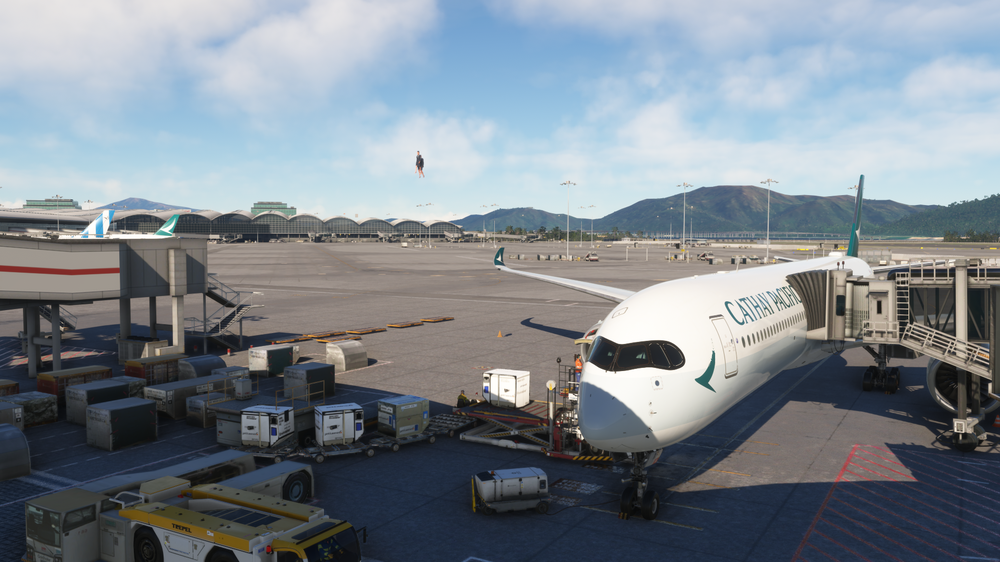
Some say a picture says a thousand words.................... happens when I board with GSX
-
-


