




Jacknix
Member
-
Joined
-
Last visited
Everything posted by Jacknix
-
In the beginning I thought is was a bug, as it doesn't make sense for 99% of the users. But no bug (unfortunately), obviously. Can it be fixed to the normal "common sense" popout window agin? Would be great.
-
Tried to activate the popouts for the PFD and ND. I only get the one window including 2PFDs,2 NDs and ECAM. Is this a bug or what is the intention? It doesn't make sense to me.....
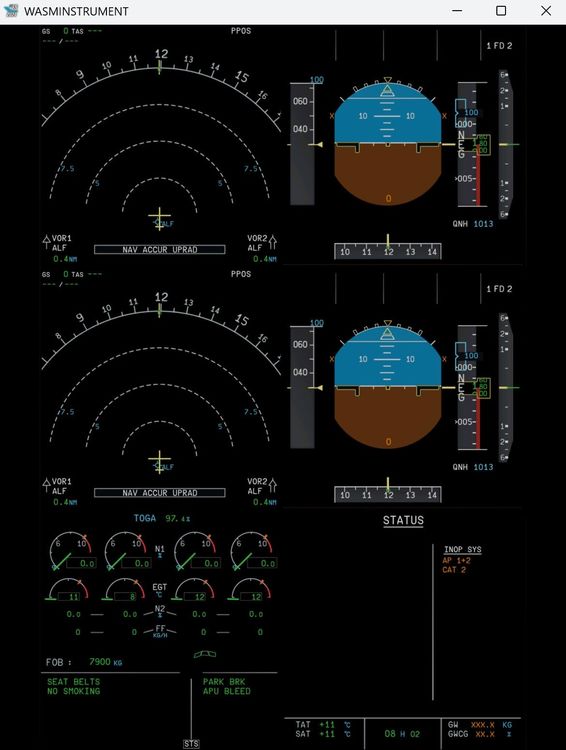
-
I just installed EGLL for the MSFS 2024. It takes a very long loading time (10 min and longer), before the airport is available. I do not understand why this is happening again and again and not just a single event during first startup. Is there anything I could do? Regards, J.
-
I guess I found the solution. In my case, I had the automatic update in the IniManager "on". So it was already updated when I looked at the screen, wich looked identical to the above screenshot. Just open the inibuilds-aircraft-a350-folder in the MSFS 2020 community folder and look into the Manifest.json file with the editor. There you'll find the actual version no. in other words, it looks as if you have alreday updated the product (as it was in my case).
-
Same with me? Where is the Update button?

