




Top27
Member
-
Joined
-
Last visited
Everything posted by Top27
-
Is there any progress happening?
-
Ok, thank you in advance! :)
-
Still no success. As I said, I was disregarding inimanager for the antivirus, but I get always the message as in previous post
-
I was alread checking my antivirus for the issue. Even ticked Inimanager as trustworthy. Here is the message coming

-
Did all that, still the same with the short message of heavy traffic
-
The same on the second attempt. There came a short message that it would be heavy traffic or slt...so I wait?
-
How long does it take? I am still in the "Enter Login Details"-section and have entered my resetted password. The loading bar stucks just in the middle...
-
So to clarify the matter: the developers try to find the right code for rudder- aileron- and elevator-steering. For now it is only the rudder working. So we keyboard-users have to wait.
-
Nope, nothing happens. At least I have tried to set classic num bloc 8 and 2 for the elevator up and down. I use an own profile for this and entered the 2 lines in control input, nothing happens. Is there no way to get the same default steerings as in all other planes for MSFS? The first time that it needs a complete key-configuration, little frusting.
-
I had the same issue with no reaction on batteries-switches and external power, although the taxilamps and all other exterior lights were illuminated. After cleaning the wasm-folder I could start everything (unfortunately I have to clean it every time I want to use the A220). The only problem I have now I don't get the A220 to steer, just using keyboard for steering instead of sidestick
-
Hard to steer, now I am steering like a tail dragger ( left for right vice versa), and the elevator for takeoff gives no sign of life
-
Hi, just have a question for the nosewheel steering for keyboard use (0 and enter). I tried several settings for the tiller in cockpit ("pedall disc") and the "nose steer " button but no reaction for my steering inputs. Couldn't find any setting in the EFB aswell. What should I look for? I don't use any physical sticks pedals etc.
-
-
-
Hi, brandnew to the A220. Somehow I have lost the connection to the GPU. I have considered all points in the EFB in ground handling and settings but the green light on the EXT PWR-switch won't go on. Even the lights/beacons and strobes are on though the Bat-switches are off? Can I get back to the initial settings somehow?
-
Is there a specific date or how long does it usually take when the files are also available at inibuilds?
-
Will the Synaptic A220 only be available in marketplace or will it also be in Ini-Manager / Inibuilds-site? Because for safety reasons I use my FS offline, cannot load any aircraft from marketplace.
-
Since the last two load ups and most since the last flight the displays and even the waterdisplay works again. Somehow it solved itself. But - I always get problems with the cockpit lights. One time it works, now I get no lightbeams along the panel for flood-lights (only the lamp itself illuminates). Somehow disturbing because I use the red button on sidestick in panel for landing because I use mouse and keyboard for flying. For nightflights which are not rare that season I have to switch everytime to daylight.
-
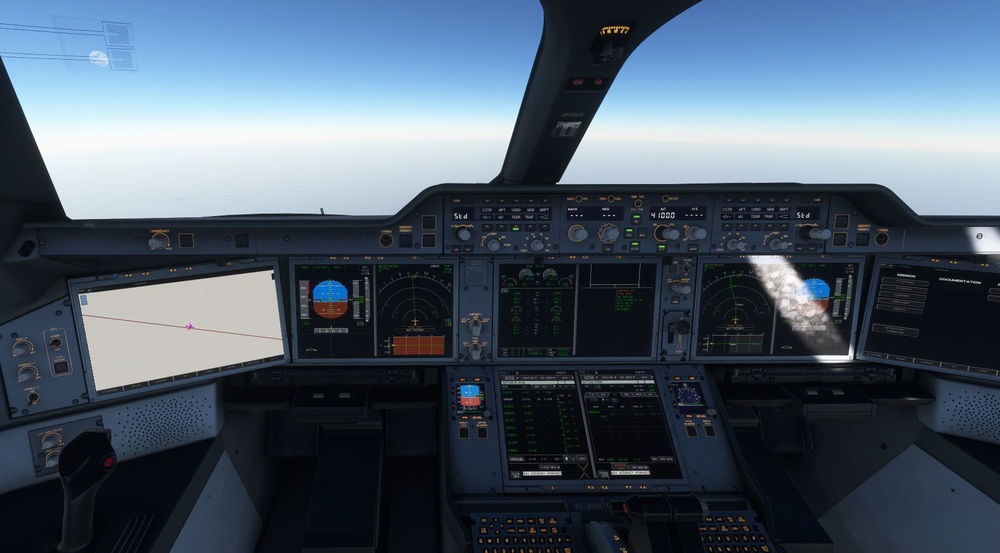
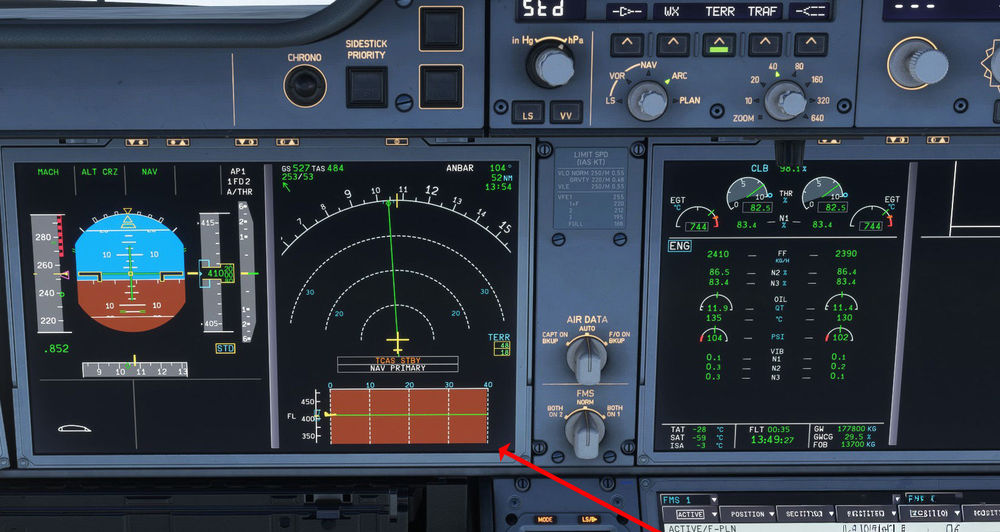
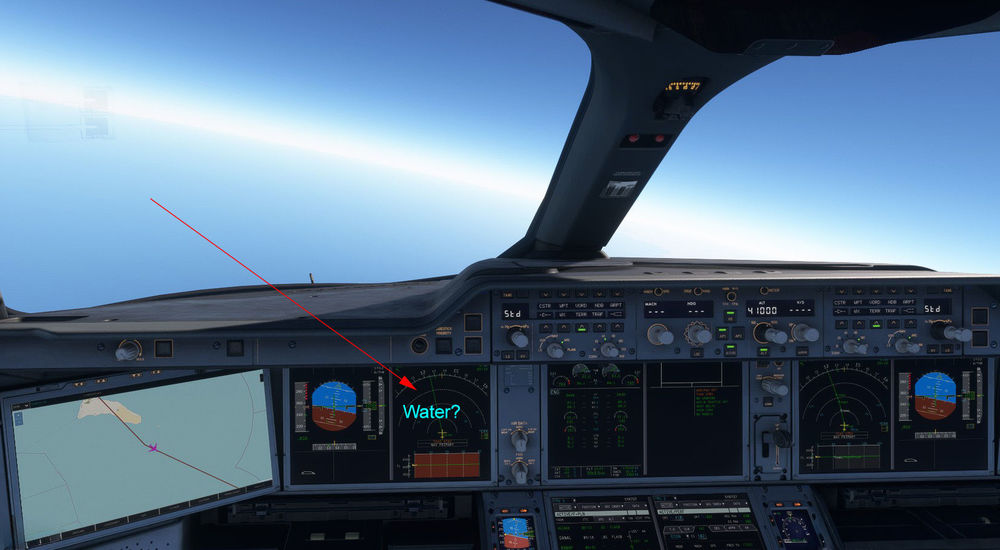
So here we go: as I told you before the vertical profile shows a ground color (now it was red/brown earth, not blue water). As further the ND map doesn't show any water areas in blue. I made some marks in the screens.
-
Thanks for te quick response! Will do a short flight and make some screens there...send it up then. Thanks
-
First I wanted to ask if there are display issues with the vertical profile in the ND of the A350 (v 1.1.6) for FS2020 ? I get a blue background on vertical profile and if I switch on TERR no blue water (sea) is displayed on the map. And second: are there any news on the Synaptic A220 for possible release? Q4 25 or Q1 26 ?
-
Sorry, wrong plane... please delete this post mods! thx
-
I don' t really know, but I guess there is no option right now to unscratch the windscreen for the A350 now? I checked the used mode, which is more for the complete aircraft but not the screen.
-
I just had the similar problem today, loading for a flightplan from OKKK (Kuwait) to LTBJ. Because Kuwait had changed their ICAO from OKBK to OKKK I had some trouble getting together an original fp and could not enter anything from Simbrief, just at the FLT OPS STS and the LOAD SHEET. In the INIT it showed me not "FROM"TO", more like "CPNY RTE" both ICAOs side by side, nothing more, no flight nr. Even the datas on the other pages were not loadable.
-
I have the same issue, on one model they are in, on the other not... For me it dos not matter that much, I rather like to fly the plane correctly.


