




Rooster
Member
-
Joined
-
Last visited
Everything posted by Rooster
-
Hi boozysheep. Just to confirm this worked for me too. Many thanks.
-
Thanks for your reply. I will give it a try and report back.
-
Hi boozysheep. Could you please tell us what you did to resolve your problem as I have the same issue as you had. Thanks.
-
-
-
-
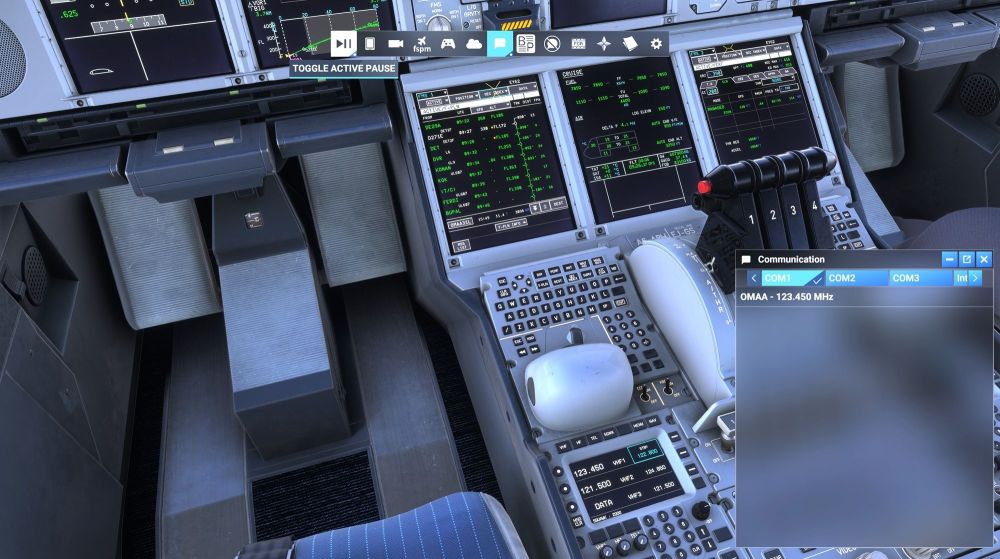
Hi. The title really tells you my problem. When I select to fly the A380 and set up a flight with simbrief and start at the gate, I open the default ATC panel and I hear no atc chatter and the atc panel is blank even though I'm on the right frequency. I am unable to do anything about this. I only get something in the atc panel if I jump ahead then I can continue with a fresh request for IFR clearence. I must point out that this is only happening with your A380 and no other aircraft in my fleet inc your A350. I have attached a pic to hopefully show you what I mean, but please be aware, in this shot I've only just taken off from EGLL and it's showing a frequency for my destination OMAA. Thank you in advance for your kind help.
-
So can you tell us what the issue was and how you fixed it please.
-
Hello. I don't know if I'm posting this in the right place but here goes. I am aware that Air Calin are taking delivery of a A350-900. I was wondering if any kind and talented painter out there would consider doing this beautiful livery for the Inibuilds A350-900 for msfs2024. Many thanks in advance.
-
Ok so I've had a closer look and Kyle you are correct they are there. However. I have the slider up to max and the lights seem to dim by far in the external view I think, (no disrespect intended by the way, I am loving this aircraft). Because I don't use fancy camera mods I just don't know how to access the FAP in the cabin and I do feel I'm probably missing out here regarding mood lighting etc. Thank you again for a great aircraft.
-
The above is with the cabin light slider fully to the right in the efb. Thanks for your help.
-
Ok I found the cabin adjustment as per your suggestion and moved it to full on but all the cabin windows in the external view remain black. Any other thoughts please.Sorry for the late reply, I've actually been flying! thank you for your reply, I will give it a try and come back.Would you be kind enough to tell me how please, because I can't see it. Thanks.Could we please implement an option to adjust the cabin lights brightness from the flightdeck EFB. I don't generally go back into cabins, (I don't even know how to)! I understand I can only adjust from the FAP at the moment and I just cant get back there. My first flight was a night flight from EGLL to OMDB and I could not see any cabin lights in the external view, other than that I'm loving this plane just as I do the A350. thank you so much for both. Best regards. Malcolm Hancock.Hello. I have been looking everywhere for a decent afcad for egll with no joy. I have installed AIG aircraft and it seems the current afcad is way off with airlines all over the place where they should not be, the same applies to egkk. Have I missed something somewhere? I have seen this raised in the forum several times but with no resolution. If there is something would you be so kind as to point me in the right direction. It really spoils the immersion in otherwise great products. Thank you for your kind help. Best regards. Malcolm.


