




Rooster
Member
-
Joined
-
Last visited
-
Agreed, I do hope they're listening, or someone is 😄!
-
Thanks again for your input ROSSI ERIC, I'm sure this will help with an even more accurate paint. All we need now is that gifted and kind painter 🙏😁!
-
Hi ROSSI ERIC. Thank you so nuch for these pic's, I think they will be invaluable in producing this repaint. I just wish I had the skills and knowledge to do it myself but I'm just an old duffer! So here is a repeat of my plea, if there is any kind and talented artist out there who could do this most beautiful of paint's, it would be great. I am sure there are a lot of people out there who would love it also as well as myself. Thanks and best regards.
-
Hi boozysheep. Just to confirm this worked for me too. Many thanks.
-
Thanks for your reply. I will give it a try and report back.
-
Hi boozysheep. Could you please tell us what you did to resolve your problem as I have the same issue as you had. Thanks.
-
-
-
-
Hi. The title really tells you my problem. When I select to fly the A380 and set up a flight with simbrief and start at the gate, I open the default ATC panel and I hear no atc chatter and the atc panel is blank even though I'm on the right frequency. I am unable to do anything about this. I only get something in the atc panel if I jump ahead then I can continue with a fresh request for IFR clearence. I must point out that this is only happening with your A380 and no other aircraft in my fleet inc your A350. I have attached a pic to hopefully show you what I mean, but please be aware, in this shot I've only just taken off from EGLL and it's showing a frequency for my destination OMAA. Thank you in advance for your kind help.
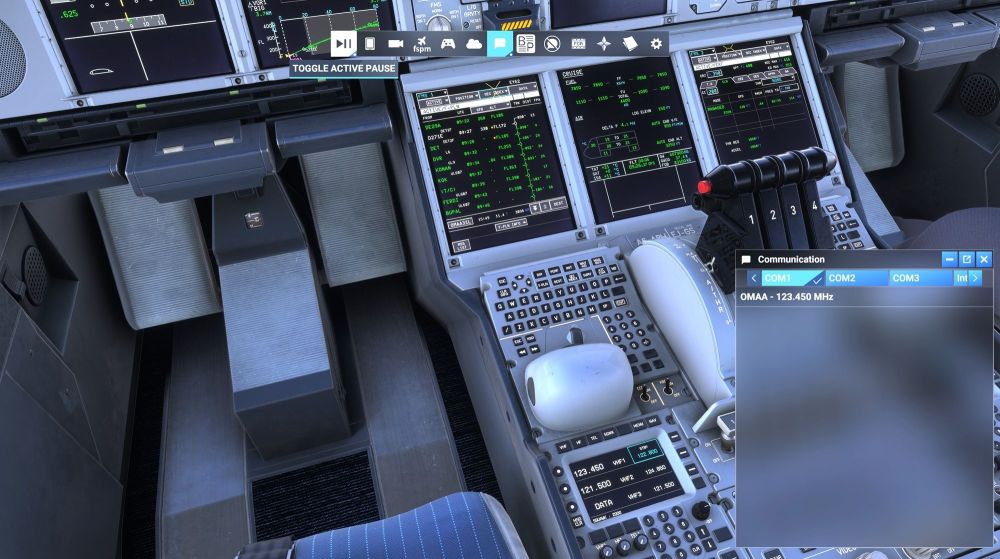
-
So can you tell us what the issue was and how you fixed it please.
-
Hello. I don't know if I'm posting this in the right place but here goes. I am aware that Air Calin are taking delivery of a A350-900. I was wondering if any kind and talented painter out there would consider doing this beautiful livery for the Inibuilds A350-900 for msfs2024. Many thanks in advance.
-
Ok so I've had a closer look and Kyle you are correct they are there. However. I have the slider up to max and the lights seem to dim by far in the external view I think, (no disrespect intended by the way, I am loving this aircraft). Because I don't use fancy camera mods I just don't know how to access the FAP in the cabin and I do feel I'm probably missing out here regarding mood lighting etc. Thank you again for a great aircraft.
-
The above is with the cabin light slider fully to the right in the efb. Thanks for your help.
-


