




Caribflyer
Member
-
Joined
-
Last visited
-
I hope iniBuilds hasn’t abandoned the A300-600. It’s currently the only A300-600 available for MSFS, and while the aircraft remains enjoyable, the model could definitely benefit from some visual improvements. Another developer currently has the classic A300 in development, and from the previews, both the exterior model and virtual cockpit look outstanding. It would be great to see that same level of visual refinement brought to the iniBuilds A300-600, particularly in keeping with the standard they have now set with the A380.
-
Any news at all on the future of the A340?
-
Same issue here, but it resolved after running the update on the EFB and restarting the sim. The new cycle showed up as ready to update.
-
Hopefully the A300 will receive the same treatment as the A350 with a v2 sometime in the future. It's a great product, hopefully it isn't abandoned.
-
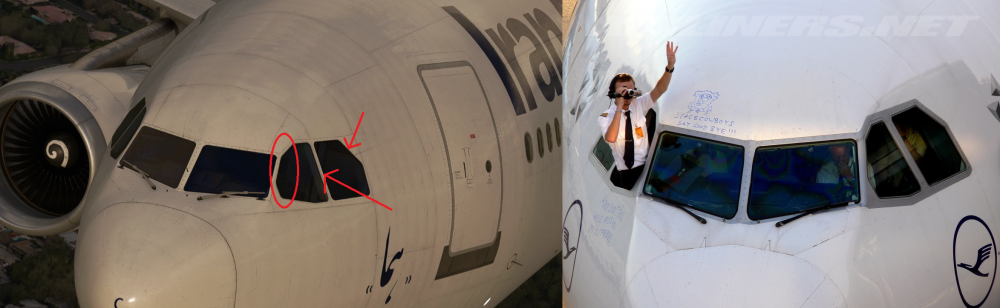
Perhaps this image will provide a better comparison. The dimensions seem to be off in various areas. The difference can also be seen when you compare the inibuilds model to images of a yet to be released A300B4
-
Apparently there is a topic on this on the microsoft flightsimulator forum since Oct 2025.
-
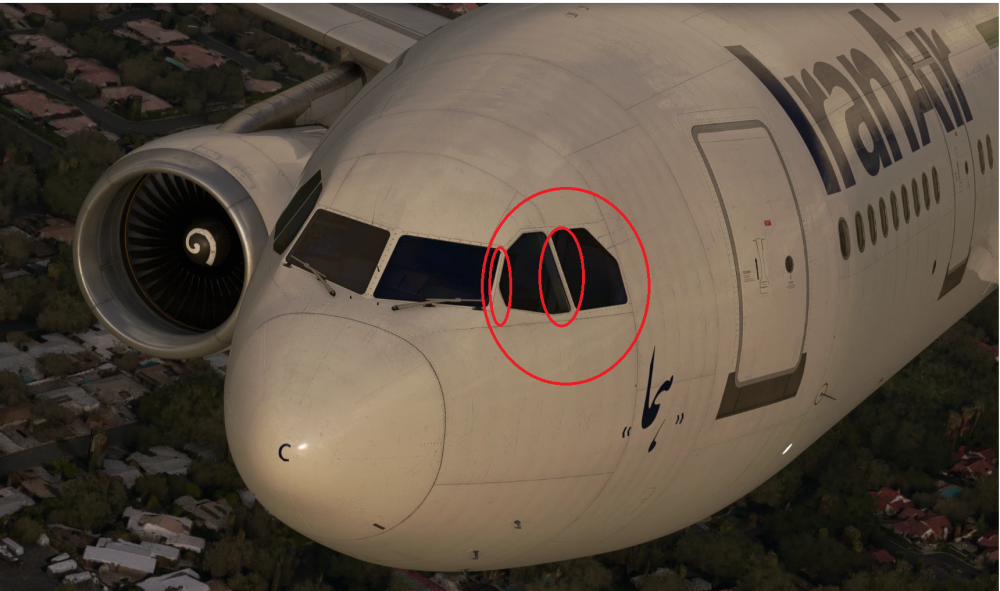
I could be wrong, but it seems like some parts of the cockpit windows are incorrectly modelled (size and dimensions). some parts seem larger or thinner when compared to the real aircraft. I've attached an image of the area in question. The window pillars also seem to be too thin in the virtual cockpit as well. Here is a real photo for comparison. https://airplane-pictures.net/photo/336458/ep-ibc-iran-air-airbus-a300/
-
I firmly agree with this suggestion. This is a significant airline option that should included for better immersion when flying with different operators.
-
Will the new generation Electronic Flight Bag be added to the A340 in the future?
-
In addition to the current Autopilot/Flight Director Panel, I would like to suggest an option to use the analog version as seen in this photo. It was very common to see this panel on the L1011.
-
I am also curious about this. Is the cockpit (EPIC Mod) upgrade still planned as originally stated? There has been very little news on this.
-
Thanks for the consideration. I'm only assuming that the DCDU deletion might be a less complicated option, but it would really be nice to have the "original" cockpit layout which didn't account for a DCDU at all.
-
To capture the full range of A340-300 cockpits, I would like to suggest an optional feature that will allow for the removal of the Datalink Control and Display Unit (DCDU). Here are two examples of what this option can look like. Both would be great if possible, and it would basically allow for any A340-300 livery to have the correct cockpit layout. https://www.jetphotos.com/photo/7287899 https://www.jetphotos.com/photo/6708699 and https://www.airliners.net/photo/Lufthansa/Airbus-A340-311/536415
-
I noted that this suggestion was originally posted in 2025. However, in light of the high quality of the iniBuilds A340-300, I would like to suggest that iniBuilds consider developing an enhancement package for the default A330, similar to the A310 Enhanced. Such an update could bring the A330’s systems depth, flight model, and overall level of refinement up to, or potentially beyond, the standard currently achieved by the A340-300. It is my view that the one aircraft missing from MSFS with in-depth systems and airline specific options is the A330 series.
-
After updating to 1.1.9, the pilots are still not visible....... They were visible in previous versions.


