




Transair
Member
-
Joined
-
Last visited
Everything posted by Transair
-
That’s interesting. Not sure how as I don’t have 2020 on this computer. I’ll check that. Thanks Frank.
-
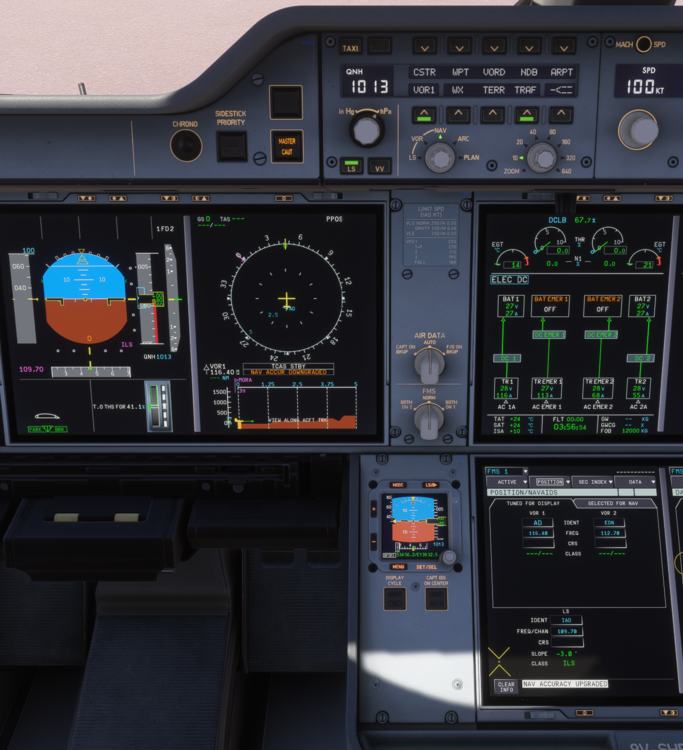
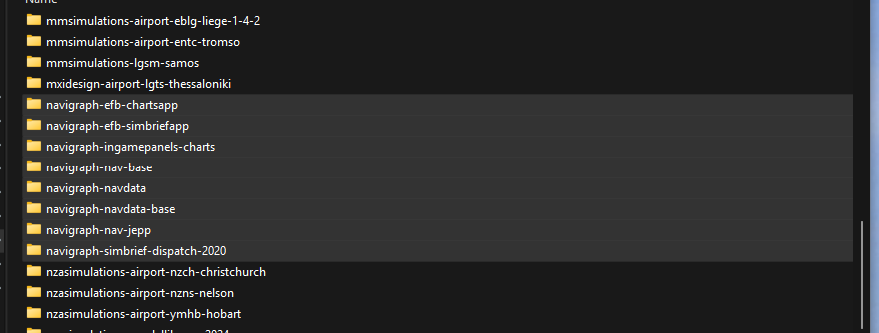
Hi Eddie.....maybe a breakthrough here. After several reintroductions of files, I have determined that Navigraph files are the problem. First, AIRAC 2510r2 was updated and displaying correctly in the OIS, although the Default/Navigraph/AIRAC bar was flickering when that page opened. Note with Navigraph files installed in CF, no VOR CDI, FREQ or DME on ND, or ILS freq/DME on PFD were showing - see 1st pic below With Files (see pic 2 below) removed from CF - all normal - see 3rd pic below Is Navigraph an issue with the A350? How is that fixed? I'm also thinking that my issue MAY have been caused by updating Navigraph more than once. Could this create a problem? SUGGESTION: In the 3rd Party tab in the OIS, could there be a comparison tab for AIRAC, comparing loaded version with latest available so we'd know whether to update Navigraph for instance
.thumb.png.0d40ba881d64fffd7655be154208fb90.png)
-
Eddie, I am investigating this and I can test by inserting NAV ILS/VOR data into the FMS. For info, I cleared WASM, and actually uninstalled/reinstalled the 350 - to no avail. What I have found though, is if I remove all but the 350 base product from Community Folder, I get ILS and VOR indications as normal. So I think I have some corrupted add-on (scenery or utility perhaps) causing this problem. I am now adding product back into Community folder in batches so I can test which is possibly causing the problem.
-
Fantastic. Thanks Eddie. Really looking forward to it all
-
Just flew into EKCH and EDDF in -900, and set STARs and Appr normally. But both times experienced the following ILS freq correct but no distance to touchdown shown. On PFD, Loc and GS in blue but no star or capture at any point. Remained on NAV in managed mode. On ND, correct appr/rwy identified both required manual appr/landings this has only occurred after last updates as I have never experienced any such problems.
-
Yes Ian push the Purser button on the LHS of the O/H panel which results in the cabin ready process completing. i agree though, this should not be necessary
-
sorry but have to raise the climb thrust and reverser sounds again! First time flying the 350-900 for 6 weeks, and even with all the latest updates (inc sounds), I find that the engine pitch on thrust reduction to climb was almost indistinguishable from Flex power. I thought this had been fixed and sounded really good a while ago, but they've regressed. I understand the reverser sounds had been tweaked somewhat with the latest update, but I'm disappointed with them too. There is now a slight delay once reversers are activated, but they sound too phoney, instantly loud, then varying in pitch and volume with no change in reverser setting. With the new sound sets I truly hope these are fixed up, as they spoil a very good product. thanks
-
Would love to see your list Eddie!
-
thanks...greatly apprec
-
Hi Team As you're reviewing several sounds with the 350 (other posts noted), could this also be looked at?
-
I reckon Inibuilds have now nailed the thrust reduction sound from TOGA to CL power. But could the reverser sounds be looked at again? To me, they sound like a roll of instantaneous thunder, instead of an increasing whine/air noise. It would be great if that could be re-looked at...thks
-
Thank you for fixing much of the TCAS/XPDR events. While I can see an LVAR for the Wind Shear switch (INI_WXR_PWS_SWITCH), I can't successfully get SPAD to activate it. Is it possible to investigate this one?
-
odd... i flew to LPMA (2024) last week with no issues, but last night, I crashed twice due to this issue...Pics above exactly what I saw last night. I had previously deleted MSFS LPMA so don't have a conflict. CORRECTION: I DID uninstall LPMA, but from 2020 edition. And I flew in there after installing MSFS2024 but without uninstalling LPMA in 2024. So all good now. The scenery is fine now!
-
It was great to hear of the L/T Radio Panel being incorporated into the 350. I can now use the panel for comms, but for NAV 1 or 2, the frequency transfer button (standby-active) doesn't work for me. Can Inibuilds look at this for a subsequent update.
-
-
anything from inibuilds??
-
Eddie.....thanks. That will fix my FMS issues too I think On another topic I know, but is there any resolution in 1.0.9. on Logitech/Saitek Radio Panel, which has been raised quite a bit?
-
thanks...is this also uploaded as a snippet in SPAD?
-
I regularly receive flap config and F/Ctl flap/FMS disagreement warnings when pushing back and starting an engine after a turnaround. This never happens on a first flight, but only on subsequent ones. Does this relate to checklists, state of aircraft or something else? The aircraft is prepped completely each flight. To stop the warnings, I can lower flaps but this is not a normal procedure during pushback, or clear the messages. Is this a common occurrence?
.thumb.JPG.b605437e8e673ac6ae3bae58a2fa4a06.JPG)
-
thanks.....look forward to any change
-
The continual updates for the 350 are excellent and clearly reflect Inibuild's commitment to change and improve the aircraft in many ways. This is fantastic and welcomed. The one omission I have with the 350 is the lack of integration with the Saitek Radio Panel. Is there any way of creating LVARS that enable these frequencies to be changed ? I have tried with Simconnect with very limited success. If Simconnect is the accepted way to go, can improvements there, in terms of direct impact for the 350, still be made?
-
-
-
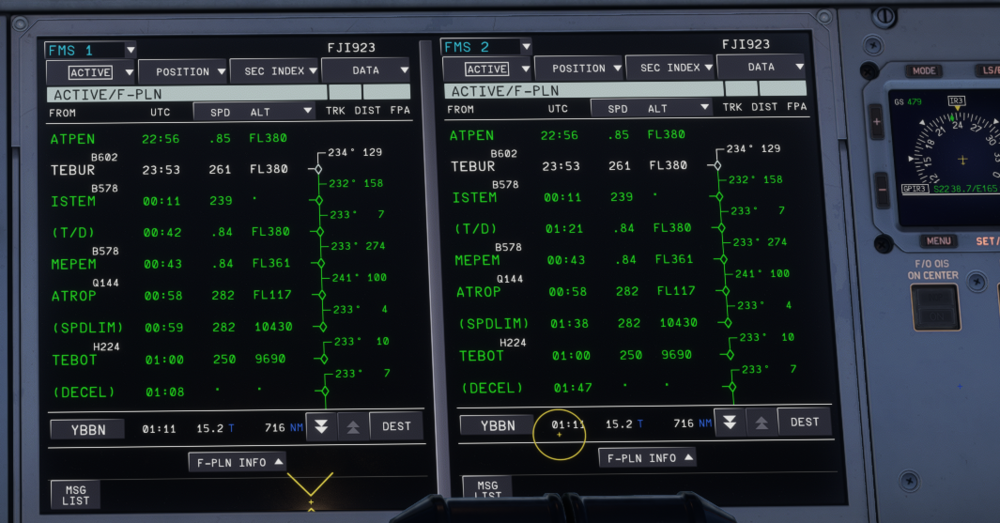
Further to this issue, please see screen shots below. An error seems to occur on FMS 2. Note the differences between T/D on FMS 1 vs FMS 2 for each picture. In addition, I often get 2 sequential T/D's on FMS 2 (not shown here). This either resolves itself or by user changing the screen some way, then reverting it. As I leave FMS 1 on PERF and FMS 2 on F-PLN for the trip, I always see the error on FMS 2. A way to solve it is to do as per above, but the point is the F-PLNs should be identical.

-
just search for Yorkshireman.....not with the 67


.png.c645510b2d49d519f9dae1f95c5b328d.png)


.JPG.2d6c8ba15b05348a5cd995ac19b6dd5a.JPG)

