




Flugkapitan
Member
-
Joined
-
Last visited
Everything posted by Flugkapitan
-
I had also posted about this on the Avsim forums. One of the people there found this work around on one of the Ini Discords: Simply setup the EFB to update Navigraph data, you can even initiate it, I did. It failed immediately tho that was expected. Now here is the trick. Exit your flight via “Main Menu”. After doing that respawn to a parking slot and now when you log off from Navigraph and log in again it will now offer the needed upgrade and you can verify with the check button. I tried it this morning before work, and I was able to get the Navigraph update.
-
I'm having the same problem since yesterday. I always load the aircraft cold and dark. I tried again a few moments ago without loading a Simbrief flight plan. There is not an update button available.
-
Hello, To be honest, I didn't look for it, so I don't know if the APU exhaust effect is there. The flight was fine - no issues. However, the enroute map still hasn't been completely fixed. The only map that displays is the Standard Map, and the route course is not displayed on it. Just the aircraft icon. Regards, Scott
-
Greetings! I am happy to report that update v1.0.10 fixed - at least for me - all of the problems with the GE variant I had posted about. I installed the update and then loaded the aircraft. Everything was as it should be. I will take it on a flight this evening. Thanks to everyone who helped with this! Regards, Scott
-
Thank, you Bruce! Sorry to hear that you and some others having the same issues. Nice to know that I'm not alone. Kinda thought I was the only one after I first posted and then put in a ticket with support. The person I have been in contact with via the ticket has stated he cannot reproduce the issue. I fully realize bugs such as this are very difficult to track down. However, before v1.0.9, this was not an issue. FWIW, I am currently on a flight EDDL - GMMN in the A300GE. After loading the aircraft and then changing the panel status to "On GPU", there hasn't been any issues. Regards, Scott
-
I renamed the Community Folder and created a new one. I copied the Inibuilds A300 aircraft folder into the new folder. Started MSFS 2024 and loaded the Inibuilds A300 GE in House Livery (only liveries available were the House and plain white - as it should have been). No change in results. Still the same issues I posted about earlier.
-
OK, thank you. This morning I loaded both the PW and GE Inibuilds House liveries and the results were the same as I have outlined above.
-
Here is some more info that I have discovered regarding this. The APU issue seems to be affecting the GE engined version. I loaded a PW engined version this morning and everything worked normally. After that, I uninstalled the 2020/20204 version and the Premier version. I restarted the computer and then installed only the Premier version. Rebooted the computer. Loaded the PW freighter and all was good. Loaded the GE pax version and the same issues were there. When the GE version is loaded, I observe the following: The sunscreen in front of the pilot is in the down position. On the overhead panel, the APU switch is in the "On" position as is the APU Bleed switch. The Emergency Lights switch is in the "On" position. After applying electrical power via the batteries and external power, all of the displays are totally dark - the lighting knobs have to be turned up so the displays can be seen. Attached is a picture of the GE version ECAM after the aircraft has power to it and the displays turned up.
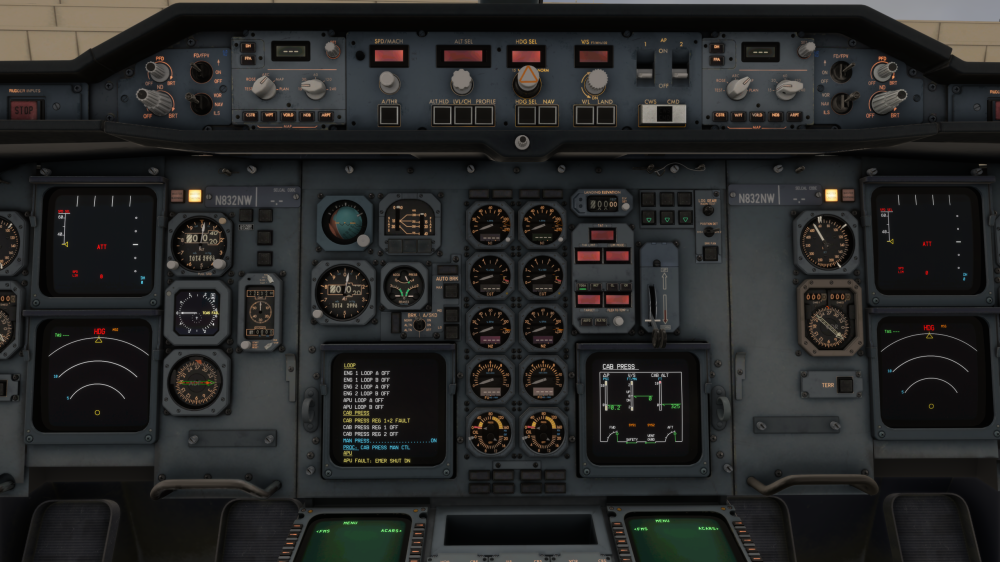
-
Hello, I have un-installed re-installed again. No difference. I also did notice the lower ECAM stays on the pressurization page when the APU switch is set to "On". It's been a while since I've flown the A300, but shouldn't that switch automatically to the APU page? I am not able to record. There really is nothing record, anyway. I'm on external power, have a fuel tank selected (I even tried it with all tanks selected), move the APU switch to the "On" position, wait a few seconds, then press the start button. Nothing happens.
-
Greetings, I just updated to the latest version of the A300 Premium for MSFS 2024. After the update, the APU will no longer start. Any suggestions?
-
Hi, last night I had another flight in the A343, but this time I had Simbrief do all planning based on KGS and adjusted the settings in the EFB accordingly. This time the EFB did indeed come up with takeoff performance figures. I'll just stick with KGS for now. I'll also try KGS with the A300 and see how that works. Regards, Scptt
-
I've been having the same issue as well in the A340. Had a flight recently in the A300 and encountered the same issue with that aircraft.
-
I'm having the same issue as well.
-
Thanks for the response! Operator error on my part. Default ATC works just fine.
-
Just tried out the A320Neov2 from Inibuilds. No default ATC in that aircraft as well.
-
I can confirm this as well. There are not any MSFS 2020 ATC voices (including ATIS), however, I am hearing the voices from the FS ATC Chatter add-on.
-
Good evening (at least it is evening where I'm at)! I'm happy to report I just flew a flight from VTBD- WSSS, left the DH windows empty, and did not encounter any A/P or A/T issues. Regards, Scott
-
Thanks for the reply! On my last 2 flights I did have an altitude in the Cpt's side DH window. This evening I'll try another flight leaving that window empty and report back with the results. Regards, Scott
-
This has also happened to me on my last 2 flights. Would be nice to know what causes it and how to avoid it.
-
Thanks for sharing that information!
-
OK, thanks!
-
Does anyone know when MS will be releasing the fix for the A310?
-
Hi, Thanks for the information! Hope they can implement it soon. Regards, Scott
-
Greetings! On the evening of December 26th I simming with the A310 when suddenly the power went out at my house (we were having a nasty ice storm in SE North Dakota). The next day I attempted to do the flight over again. When I loaded the A310 in MSFS, I noticed that none of the overhead buttons made their usual noises when pressed, and that the screens on the main panel did not power up after I selected external power. I tried using the tablet to change the state of the panel (I had it set by default to cold & dark), but that didn't help. Next, I uninstalled the A310 via the Content Manager, exited the sim, restarted the computer. After the computer was up and running I launched MSFS and loaded the A310. No luck - seems like the aircraft is not powering up. Any assistance will be appreciated! Regards, Scott
-
Greetings! I'm happy report the Manager is working fine now and your rendition of KLAX looks fantastic! Thanks for your help. Regards, Scott


