




nmahink
Member
-
Joined
-
Last visited
Everything posted by nmahink
-
It's broken again
-
Another update, it I checked gate n24 and it seems to work there, but the S gates don't seem to work at all.
-
Okay I uninstalled the jetway manager, I tried using the normal default jetway method and now that is broken, Hong Kong Airport is now unusable again, It was working amazingly well before this yet again bugged jetway manager feature, now I can't even have jetway animation like before, I did a yet again, a complete reinstall of VHHH, the GSX folder, and still the add on is broken again. Can you please fix this as soon as possible? I've now had to keep restarting flights with VHHH and still nothing.
-
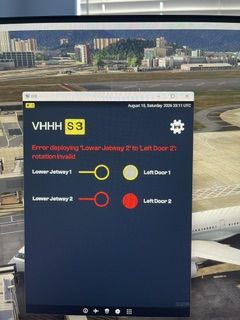
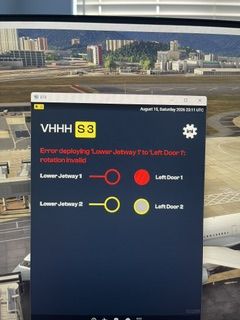
Here you go
-
Also, I keep getting error A350-1000, gate S3, "error deploying lower jetway 1 to door 1," "error deploying lower jetway 2 to door 2". I did a fresh reinstall of VHHH, A350, ini jetway tool. I removed the WASM folders after uninstall and still the same bug.
-
When spawning at gate it works, after doing a LHR-HKG it totally freezes
-
After completing flight with A35K, when docked at gate N7, I went to EFB in game to toggle the double jetway, and the sim completely froze, it would not even let me exit full screen
-
Out of all the airports on this planet, Hong Kong International Airport has always captivated me out of all of them on this world. The scenery looks absolutely gorgeous, I can't wait to visit my number 1 bucket list airport in the near future!
-
-
KJFK as an add on by itself with the plane performs great, however the New York area has been the most resource heavy area in all of flight simulation even back in the FSX days, throw in AI traffic and the JFK area will nearly cause the FPS to stutter into single digits
-
Was at ini JFK FS24, Su3, did the route ini uplink, then the plane froze.
-
The issue came back
-
Found the culprit, having the 'Venice pack poi' enabled was causing the conflict, disabling the 'Venice pack poi' solved the logo light conflict, any way this can get looked at or replicated?
-
When taxiing the around the airport the logo light flashes on and off when switching camera angles, here is a video. I have tested this same scenario at EGLL premium and the lighting works well. This happens only at KLAX, maybe there is an LOD issue? I have a video link. I am unable to attach file as the video filesize is too large. https://share.icloud.com/photos/0f3P8XcMgSMJznMyaKT6W9JLg
-
I have an update, I did a flight Newark-Singapore, 18 hours in one go, no freezes, no stutters. This was after a fresh start of everything.
-
With the newest update, and after clearing the WASM folders, I too am having the same issues, again.
-
I did a clean reinstall, I cleared the WASM folder, when I am loading the FMS, the plane is frozen again, literally nothing works, the autopilot panel knobs will not change, the FMS will not change. The only thing that works is the OIS, back to the hangar the plane goes. This very frustrating that I paid money for this aircraft and it will not work, this has been happening again again and again.
-
I did the following steps and still the same issue.
-
I too have similar issues, I did notice the POI models and static aircraft options were working.
-
-
It would be a nice to at the very least get an acknowledgement from the developers. I have been waiting for an update on this bug ever since the airport got released.
-
Give it some patience, considering all the new sceneries for 2024 it takes time to create, if the time permits I'm sure it will happen, but it is best to wait for the dev team to make an announcement on PHNL for 2024.
-
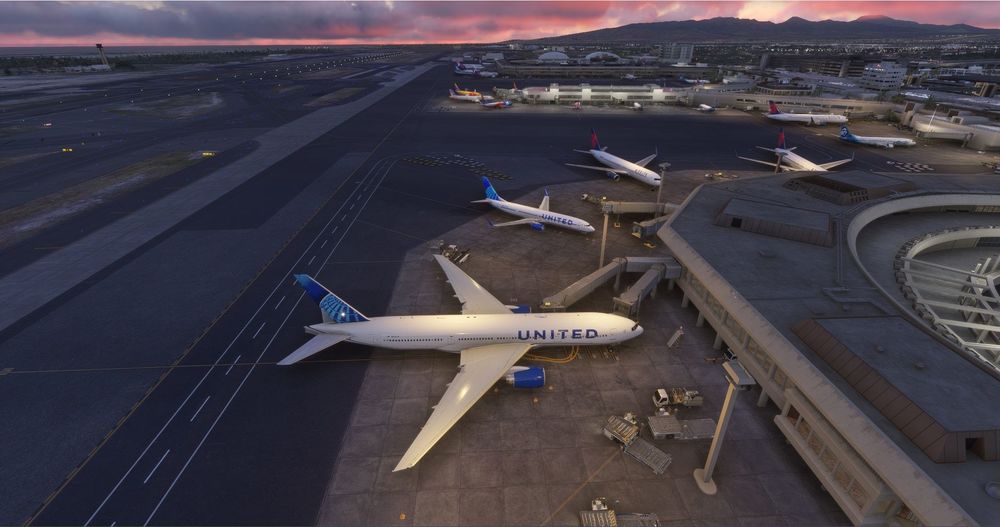
This was after completing a flight from LAX, the E and G gates are lit, but the C gates lights do not turn on at all.
-
I posted a topic on this issue a while back and got zero responses from the developers and it has been over a year waiting. When spawning at the airport, the terminal ramp lighting is not on at all except for the E gates, will this issue ever got looked at? It seems like any support for bugs in PHNL MSFS20 has fallen on deaf ears.
-
Can anyone who is on the SU3 beta confirm that the LOD bug is fixed or is the bug still present?


