




zbrainlezz
Member
-
Joined
-
Last visited
Everything posted by zbrainlezz
-
I very much hope so, as right now that's one of the last major issues that's preventing me from making a fully satisfactory flight with the TriStar. Thanks 👍
-
I previously reported it here: That topic was locked as a fix is supposedly already in progress. Hopefully the changelog for the next update will have a fix for this issue in it...
-
-
Good to know. What I meant by that second sentence in my original reply, though, is that turning the APU mode knob appears to have absolutely no effect at all. Yes, the knob can be moved, but it doesn't seem to actually trigger any change in the APU's operation. Therefore, I think iniBuilds should add the necessary code to make the knob actually change whatever APU parameters it's supposed to change before worrying about how the knob itself behaves, if that makes any sense.
-
Can confirm this is still an issue with v1.0.1.
-
Can confirm, the autopilot's action on the pitch trim is still too slow to properly hold speed constraints in the climb, among other things. With the recent update, I can also confirm it seems a bit underpowered at normal EPR for most of the climb, but then it feels like it might be able to climb too quickly when holding Mach above ~30k feet. Do note I have no clue how the real L1011 would've handled, but compared to other sim airliners I've flown (MD-11 my beloved), it seems like there's definitely still some improvement yet to be had. The 1.0.1 update still fixed/improved a lot though. Just a bit of autopilot and flight model work yet to be done before I feel I can add it to my regular rotation. One major suggestion for iniBuilds: if you haven't already, perhaps try bringing in some help from pilots who flew the real L1011-500 in terms of getting the flight dynamics right. I'm no developer, but I've seen from the results of other airliner projects that it helps a lot to have input from those who really know how the real thing flies.
-
-
So then, is it not possible to change the cruise Mach when in TM if needed? For example, if you're on VATSIM and given a cruise speed restriction? The ability to change the cruise Mach in this mode would be preferable to having to try to use IAS mode to hold a Mach.
-
What he's saying is that, in the APU section of the flight engineer's panel, the Max position on the APU mode switch knob should be momentary/spring-loaded, i.e. it should turn itself back to Norm when the user "lets go" of it / stops clicking it. I personally think this is a secondary concern though, as that knob doesn't seem to actually have any effect at the moment.
-
Flying the L1011 in the climb, with the autopilot in VNAV mode and holding 320 knots indicated, the transition to Mach happens too early - the AP switches to a target of Mach 0.82 at around 25,000ft, when the indicated Mach is still 0.75 or so, which causes the plane to speed up and come very close to exceeding the "never-exceed" airspeed in trying to capture the Mach target. Had this happen twice now, and I've double-checked that everything seems to be configured correctly in the PMS. The correct behavior should be that the AP holds 320 knots until the indicated Mach is 0.82, then transitions to Mach at that point and maintains 0.82 until reaching cruise altitude. On a semi-related note, the autopilot seems to change the stabilizer trim far too slowly, causing the plane to overshoot speed targets in the climb. I know this is a vintage plane, but I'd think it should still be able to capture and hold a target speed far better than it does.
-
-
Seconding this. I use SPAD with my Honeycomb Bravo and, among other things, I can't seem to make the reversers work with it. They only work with the in-game control bindings, specifically "hold throttle reverse thrust", and that doesn't work very well because "input repetition" needs to be turned on for them to work at all, which apparently causes the input to stutter and not allow the engines to give significant reverse thrust. Because of that, I'm basically forced to land without reverse thrust. I know that's not what the original post is about, but in my opinion, it's a noteworthy addition to the long list of bugs the TriStar has.
-
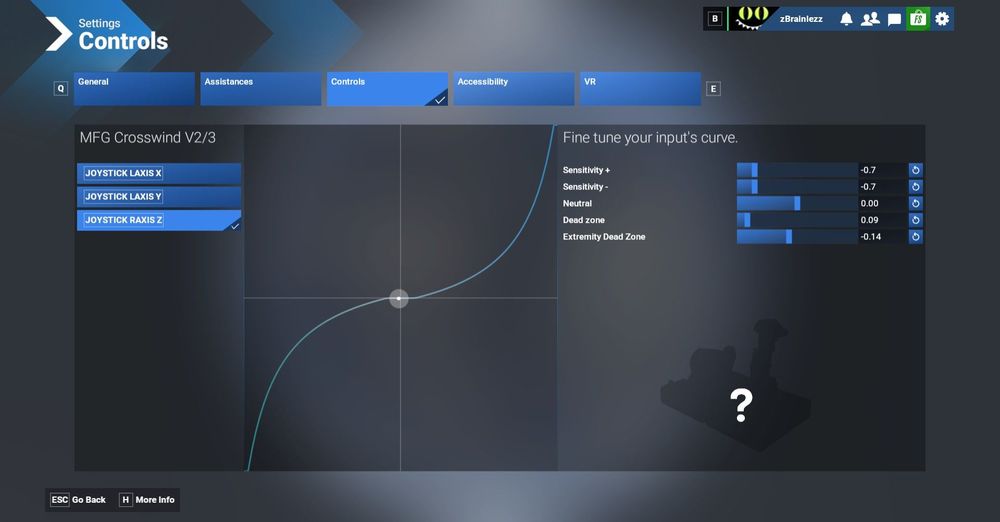
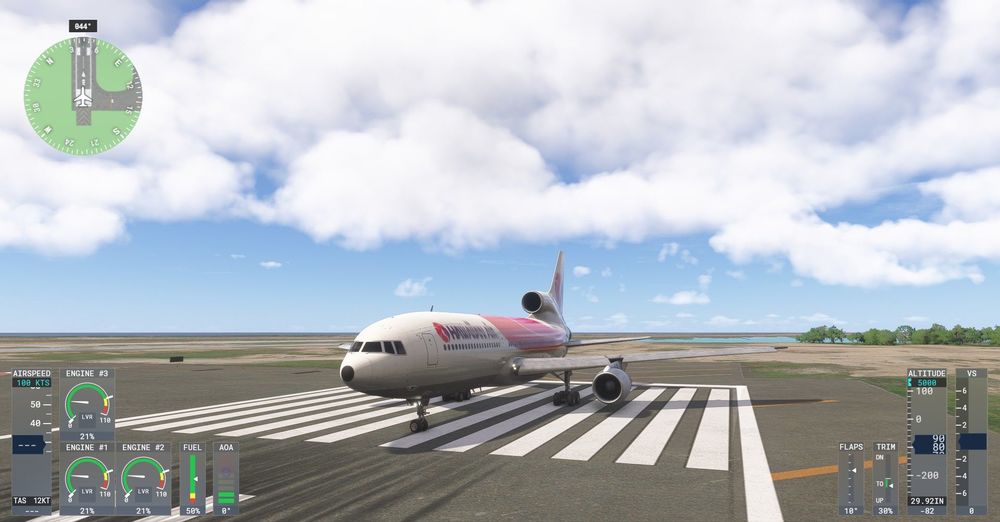
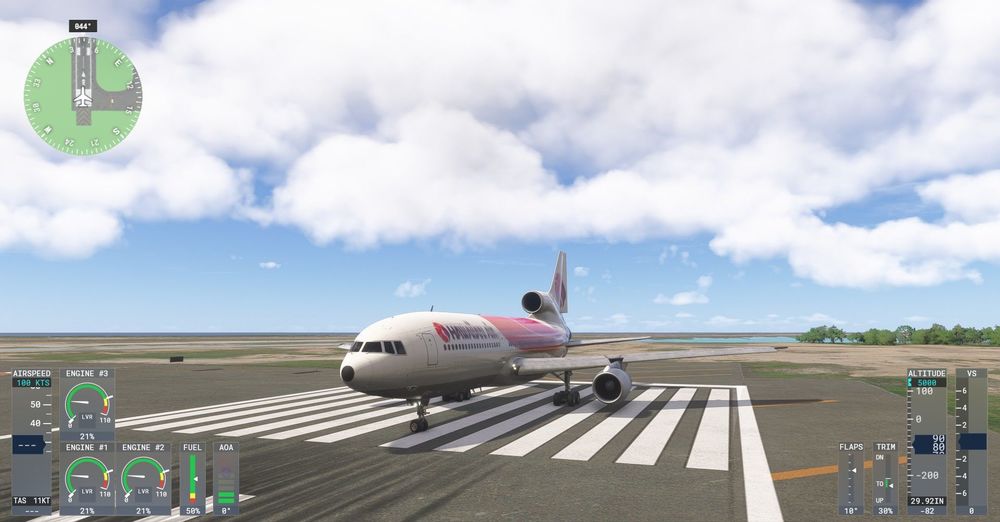
My stick and rudder hardware are a Turtle Beach VelocityOne flight stick and MFG Crosswind rudder pedals, and I have the stick's twist axis set up to run the nosewheel steering only. I use this same rudder input curve for all my planes and haven't had a problem with any aircraft apart from the L1011. Here's the nosewheel behavior at a stop with full left tiller input. Looks like what you'd expect. Now here's the nosewheel behavior at a stop with full left rudder input, no tiller at all. Based on the behavior of all other airliners I've flown, the nosewheel should not be able to turn nearly this much with only rudder input. This is what iniBuilds needs to correct. This shouldn't be taken as a hard fact, as obviously I don't know what the behavior on the real L1011 was, but for example, on the TFDi MD-11, the nosewheel only turns a maximum of roughly 10 degrees from center with rudder input only, and as far as I know, that's realistic. Now that I think about it, this probably should've been part of my initial post, and I apologize for that.
-
I had this problem on both of the two flights I've attempted with the TriStar so far, and it somehow never occurred to me to look at the F/O's HSI to see whether it was working - I just flew the rest of the flight using the GPS instead. I also noticed that, while this problem was occurring, the INS didn't seem to automatically sequence the waypoints, even though the selector was set to AUTO. Possibly related?
-
I may try doing that, but based on comparing the L1011's nosewheel steering behavior with that of other aircraft that I frequently fly, it's still an aircraft behavior issue that ultimately iniBuilds needs to fix, as it seems unrealistic at the very least. I find it hard to believe that the real L1011 would have allowed for the nosewheel to turn through nearly its full range of motion using only the rudder pedals and not the tiller.
-
I have a flight sim setup with separate controls for the rudder and nosewheel steering tiller, and in the L1011, I've noticed that the nosewheel steering turns much too far with rudder pedal input. If the L1011 is anything like other simulated airliners I've experienced, in setups like mine, rudder input should cause the nosewheel to turn a maximum of roughly 10 degrees in either direction, and the nosewheel steering sensitivity should dampen to zero (or nearly so) at higher speeds to make it easier to control during takeoff and landing. Instead, it turns through almost its full range of motion when the aircraft is moving at slow speeds, and doesn't sufficiently dampen when accelerating for takeoff or decelerating during landing, making it quite difficult to keep the aircraft on the centerline. I'm not sure whether fixing this issue would require a change in the plane's code somewhere, or the addition of a "separate rudder from tiller" toggle in the PFB, or both, but it needs to be fixed before I fly the L1011 any more, as it makes it frustrating to control during takeoff and landing. Real shame, because I like it so far otherwise. If this somehow turns out to be a setup issue or skill issue on my part, I do apologize, but I've all but ruled out that possibility because I have no such problems with any other airliner.


