




Silent Shark
Member
-
Joined
-
Last visited
-
-
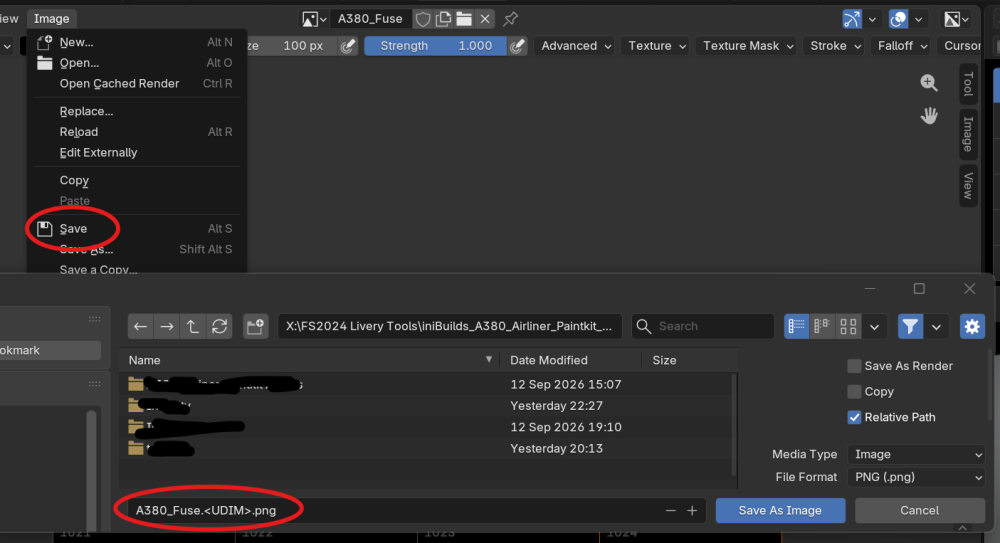
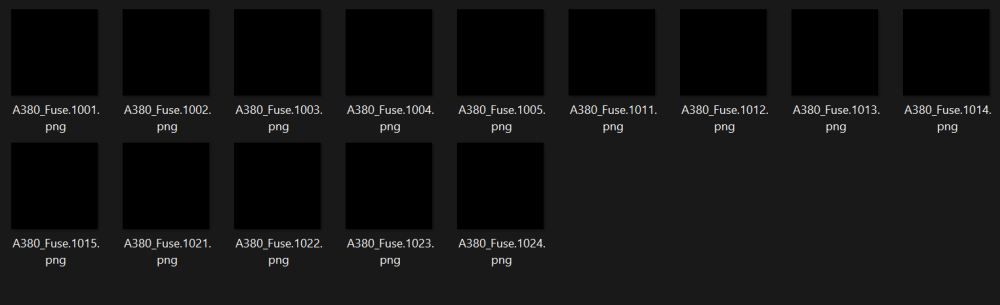
You won't get individual tiles in the save menu. Saving the Fuse_Main image will automatically create files for each tile, numbered in line with the UDIM. So you'd get: Fuse_Main_1001.PNG Fuse_Main_1002.PNG Fuse_Main_1003.PNG and so on. Just recreated it do demonstrate:
-
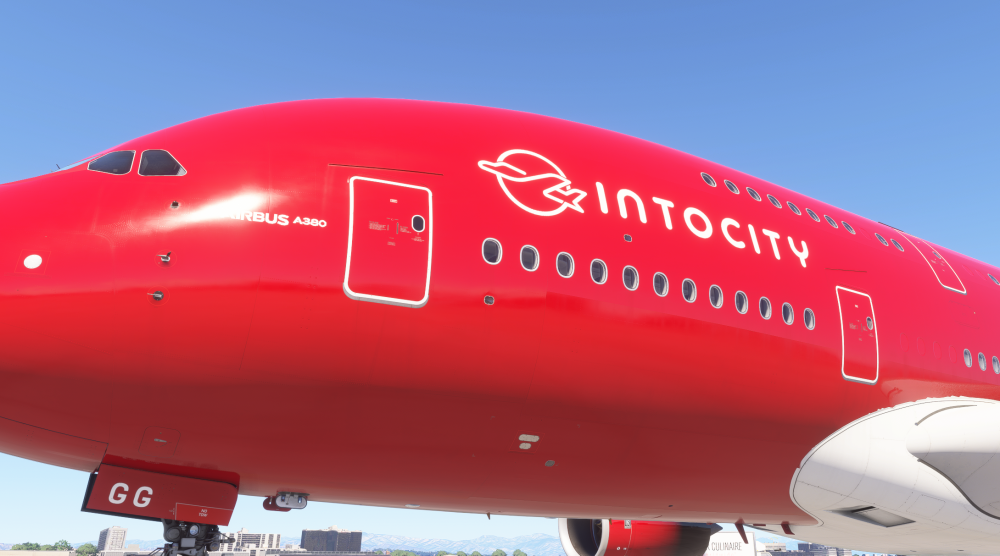
They get applied automatically, so I guess they're buried in the base files somewhere. I haven't painted the door lines myself, but they show up for me in sim:
-
In case someone stumbles upon this in future, and is doing the same madness that I am 😅, I've got a decent solution now. I used the fuselage models from the Korean Air livery, making a transparent texture for LIVERY_ALBD.TIF. This fixed the windows and gave me minimum plugged windows. I took the A380_PLUGS from that livery and repainted the ones I needed (which is a whole big job as there's 220 of them! But that's another story...). It's not perfect, but visually it works fine, and that's the main thing. I also used the RR models and LIVERY_RRs from the British Airways livery, because I wanted RR engines, and that gave me the badges 😊. And finally I managed to get door placards out of the base livery, so I've got those in too. I still think the paintkit could do with those improvements above, or similar, to make it much more accessible to the more 'amateur' painters amongst us.
-
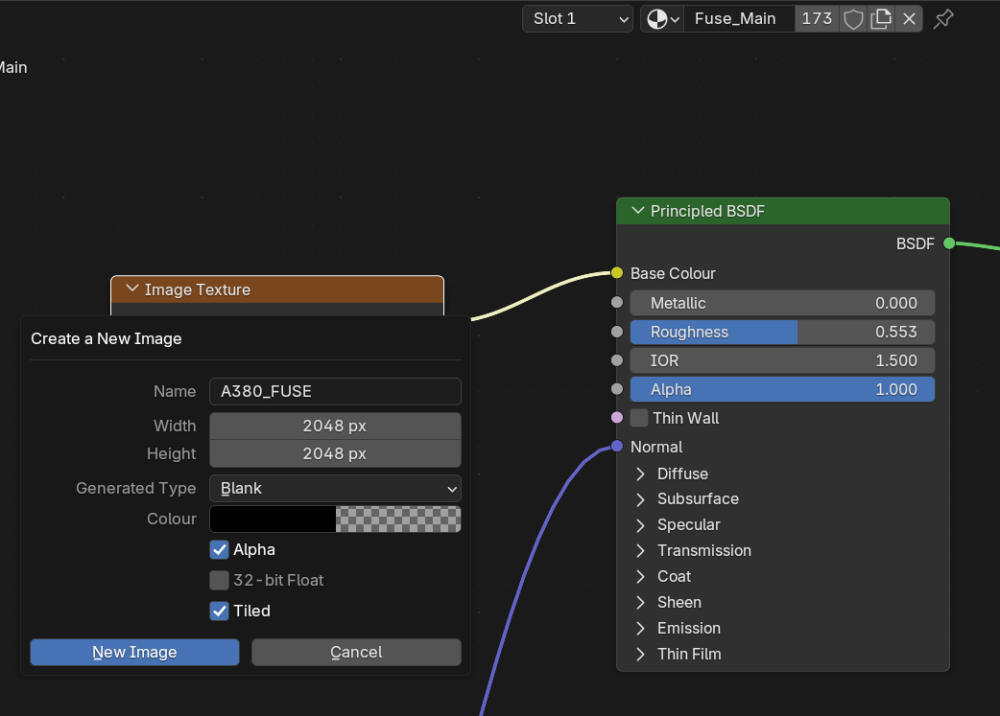
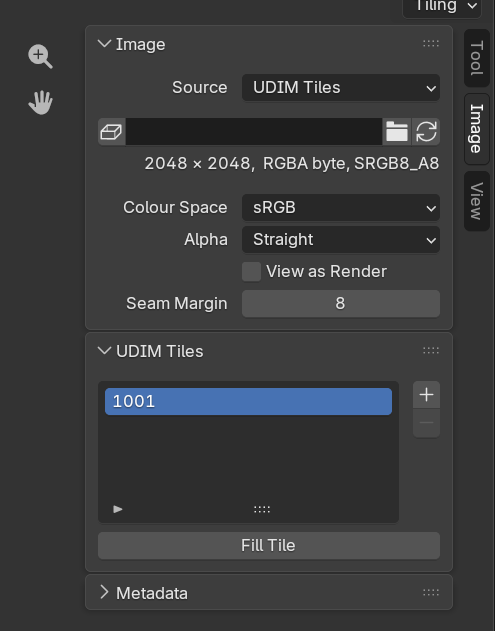
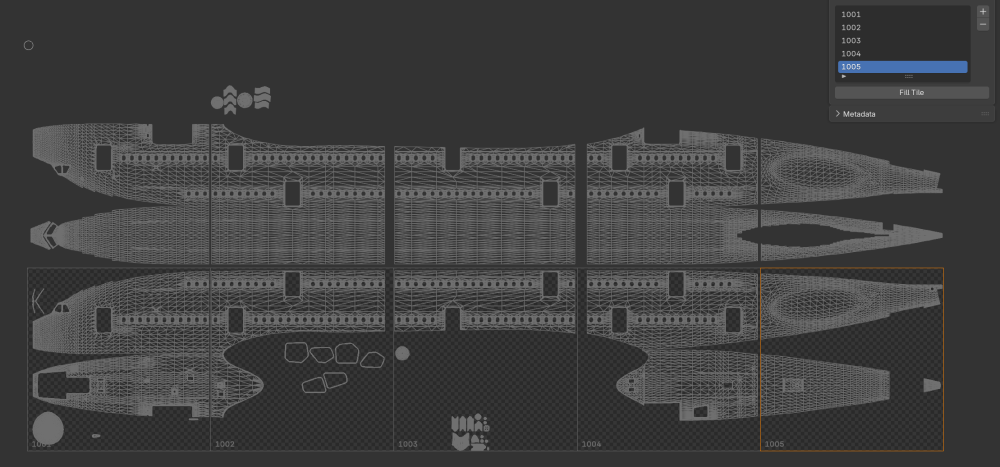
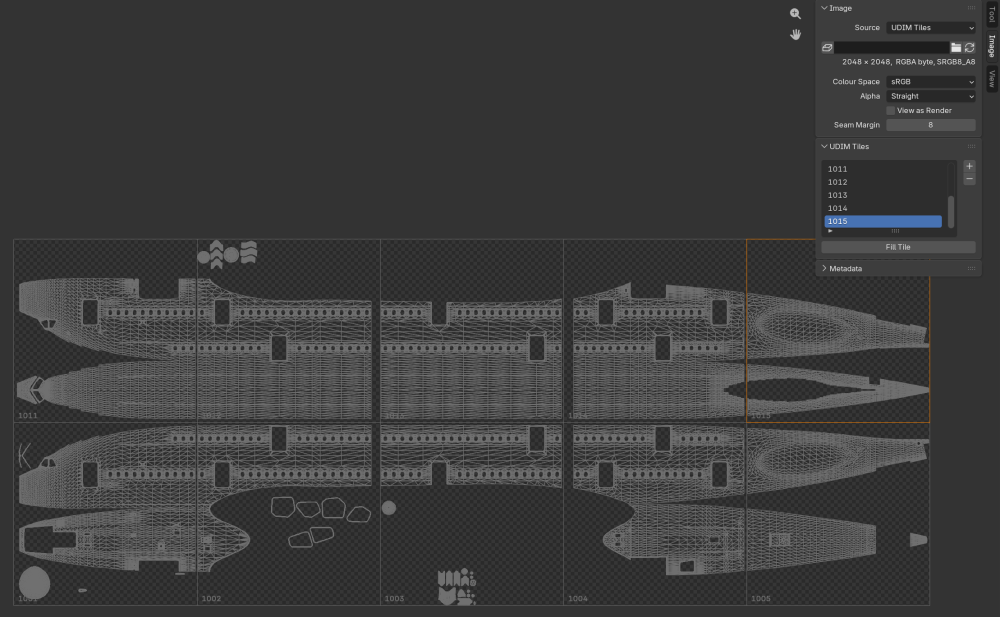
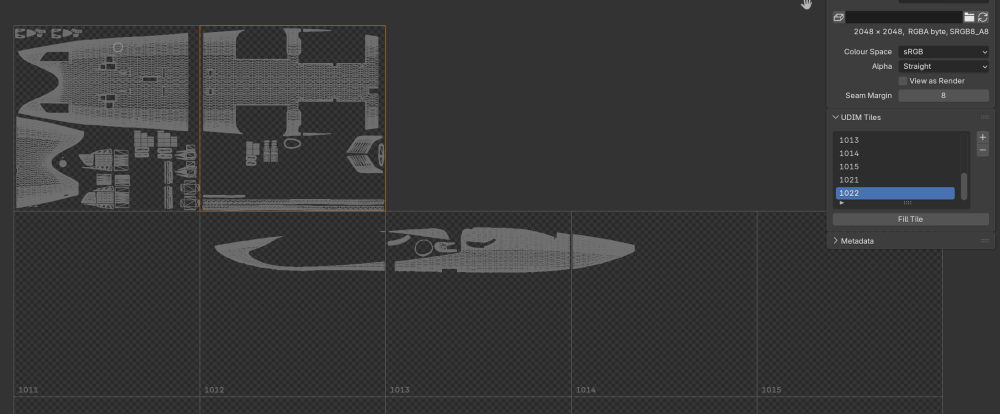
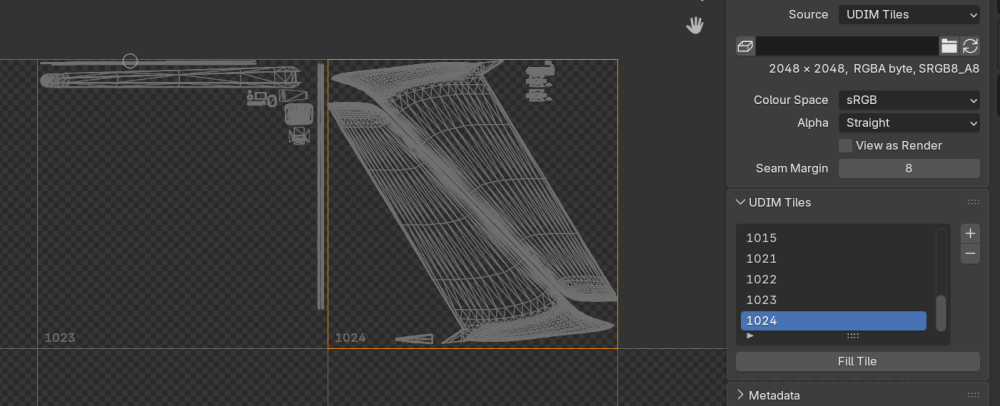
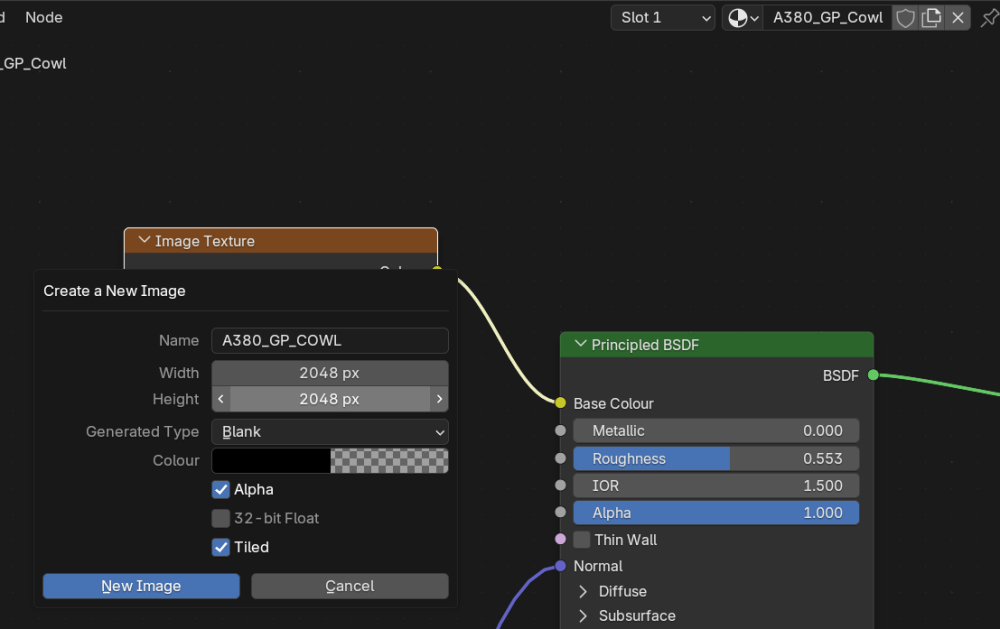
Sorry, didn't see your request until now. If you're still trying to work on this, I can try and show what I did: Import the FBX into Blender In Layout, select the fuselage Select the Shading tab, and in the bottom half, check the Fuse_Main material is selected, and add an Image Texture to the Principled BSDF - Base Colour In the Image Texture box, click New, name it "A380_FUSE" (not essential, but this will help with export), set the Width and Height to 2048, I like to set the Colour to have an Alpha of 0 so it's transparent initially, and the crucially, MAKE SURE you tick "Tiled" Go to Texture Paint mode, and focus on the 2D Paint side. In the Image menu at the top right, you need to focus on the UDIM Tiles section. You should have 1001 there. Click the plus. Set the Colour again if you want the alpha, and then Add. It will create 1002. Keep going until you have 1001-1005. Click the plus again, but now change the number manually to 1011. Add more up to 1015. (Optional Step) Go back to Layout mode, and select the underbelly of the plane, then go back to Texture Paint. This only aids visibility of what's going on, doesn't really affect what you need to do. Now add more UDIM tiles, 1021 and 1022. These cover the belly sections. (Optional Step) Go back to Layout mode, and select the tail, then go back to Texture Paint. This only aids visibility of what's going on, doesn't really affect what you need to do. Add 1023 and 1024 for the tail sections. For the Engines now, you go back to Layout, pick the engines you want (GP or RR), and we need to do a similar thing, albeit less complex. Go to Shading again, the Material for the engines should be selected hopefully. Add an Image Texture as before, same settings (named A380_RR_COWL or GP as needed). Go back to Texture Paint mode and add UDIM tiles up to 1004 That's it from what I recall! Now when you save those images, it will split them up for you with the right numbers to match what you need. You can paint every section of the fuselage, tail and engine cowls. Wingfences are just one file, so I haven't gone over that. Hopefully this helps you, or someone who stumbles upon it!
-
Hello, I'd like to request some additions to the paintkit, if it's possible? I'm far from an expert in painting and modelling for MSFS, but there's some things I've run into here that I can't find solutions to easily. As it stands, it doesn't seem possible to build a fresh livery without cannibalising some elements of existing liveries. For example, just making a livery using the texture files the PSDs, putting them into the folder etc., when you get into the sim, the window surrounds disappear: Not sure why the fallback model is missing these (assuming that's what it is). There's also the matter of the window plugs, something that isn't in the Paintkit, the FBX doesn't seem to mention them, so this was a bit of a surprise too. And then if you borrow models to fix the window frames, you get additional windows plugged, depending on the livery you borrowed from! There's an A380_PLUGS_ALBD file in some of the liveries, but there's 220 windows in there at my count, so determining which ones to paint is quite a faff! For 'fictional' liveries like the one I'm making, I think the 'White' base would be fine to borrow these elements from, as it seems to be the most simple form of the plane, no extra plugs, everything is straightforward. But as it's part of the marketplace plane and not a Community download, thus encrypted, I can't find a way to get at the files to finish off my design. When the iniManager release arrives, I could probably do it, but that's a while away... Requests: Would you be able to include the model files for the standard 'White' livery? Could you include a plugs texture, so we can paint these as needed? Could you also include the various placard/decal files? I'd like to be able to change the text colour in places so it's not red on red! I'd love to get flying this beast as soon as I can get myself sorted! Any help would be appreciated (even if it's to tell me that I'm doing it all wrong!).
-
Found a wall and some fuel tanks covering the taxiway V7 near the International Terminal and 22L. I don't think it should be there as there wouldn't be a way to get to a bunch of gates. It's the only way to get to them so it seems like a bug. No other scenery installed that should conflict. I needed to disable the default scenery. I didn't know this was a necessary step (though it makes sense), I just assumed your scenery would remove it, but I gather now as it's technically 'add-on' premium and not 'default', that's why.
-
I managed to get it to work with Blender. I'm an absolute beginner when it comes to texturing and Blender, not an expert with it whatsoever, so what I say may not be completely accurate. What I did was to add the Image Texture to the Fuselage material as Tiled, and then added UDIM tiles to get up to 1005. Then I added more, skipping to 1011 and going up to 1015. To get up to the tail, I had to skip to 1021 and go from there. Everything is covered though. If that doesn't make sense and you don't get anywhere with Substance, I can try and take some screenshots to illustrate what I mean.
-
Hello, I'm making a livery for the A220 using the paintkit, and have got almost everything sorted! After loading the project and building it, I see it applies placards to the fuselage and engines. That's great, but as my plane is a darker shade of blue, I'd like them to be in white, as I can see they are on the ITA Airways livery for example. Is there a way to 'select' this as an alternative somewhere, or can the placards in white be provided as additional files in the paintkit, so they can be added if we need them? I'm not too familiar with the project structures and how they work, so I don't know if this is already possible with the tools I have. Thanks!
-
Just spotted in the paintkit, that the synaptic-a220-airliner-Livery.xml file says: Name="inibuilds-a380-_-"
-
I've been really keen to fly the A350 in the built-in career mode for months now, having seen the v1.1.0 update say it has been integrated, I was just waiting for Microsoft/Asobo to enable heavy certification and we'd be good to go. When the Heavy cert was pulled out last minute from SU4, I was disappointed, but decided to go ahead and purchase the A350 on the Marketplace, so it was ready to go. With any luck, it might even work already, given the wording of the v1.1.0 update says "Our full FS24 career mode is now live" so I hoped it would be available like the A330 was. Alas no. It also, doesn't appear for purchase in the list, so if Heavy planes got unlocked tomorrow, it wouldn't be available... The default 747 and 787 are there, but locked out. The A350 isn't listed at all. Would I be able to get any confirmation that it will be made available for the career mode when possible? If it's not coming, I'd have much rather bought it direct... And would I be able to suggest (as this is the Suggestions section!), assuming it's still fully compatible as that update would imply, that it temporarily be flagged as not-heavy (like the A330), so it could be flyable now? I believe the A330 was let through because it was good to go (and I've been flying it a lot), so if the A350 is ready, any chance of that?


