




dectenor2
Member
-
Joined
-
Last visited
Everything posted by dectenor2
-
Oh yeah when it works I’ll fly there again. They’ve done an amazing job of upgrading it with the V2. But for now I’d rather fly to an airport where I can connect a GSX jetway. I’d prefer a single jetway to the A350/80 that works properly with GSX and passengers than having multiple ones that are just there for the visuals. But yeah, just my preference, and totally understand and respect that others may have a different preference. It’s one of the great things about this wonderful hobby, we’ve all got different preferences and views and that’s so great for variety!
-
I have no desire to use the multi jetway tool. It is a visual only thing as far as I’m aware, no passengers can be boarded via the jetways. I don’t want to be downloading and running extra stuff, there is already so much extra software to be utilised in flight sim and I would rather not to add to this list. GSX is the standard ground operations add-on that so many people use. I have never ever before come across an airport that doesn’t allow GSX to connect jetways. I think it’s very poor form that an airport scenery has been specifically designed where one can’t use GSX, and I’ve no desire to support something like that, I would rather just fly somewhere else.
-
Really we cant use GSX to connect jetways here? I was going to do a long haul to Dubai at the weekend but will have to scrap that plan now.
-
-
-
same can't download
-
-
Yes it has had a lot of updates, but it’s still full of bugs and lots of systems errors which is really disappointing for how much we paid for the aircraft and how it was marketed to us. It’s not complaining. Some of us have spent an absolute tonne load of our own time reporting stuff to try and help the aircraft be better, and that will benefit all users. It’s great that there is a v2 in the works, and it will be interesting to see if this stuff that has been reported since release will be finally fixed.
-
Many thanks for sharing that.
-
Would be interested to see what was in here!
-
Thanks swisspilot. I really hope that we can finally begin to see some fixes for the still quite a lot of bugs that are outstanding. And my hope is that they will be able to easily transfer the same fixes to all the Airbus aircraft. It will really just lift the standard of the iniBuilds airbuses so that people interested in more than just the nice modelling and textures can enjoy them.
-
Weirdly I was able to go back and edit and it worked, feel free to delete these messages regarding the photos!
-
PS I don't know why two of the screenshots have just appeared as links rather than and embedded photos. I have always uploaded images in this exact way, and for some reason these two are just not showing but you should still be able to access them...
-
Hi all, Here are a few more bugs to add to my list of ones still present in 1.2.6 here: https://forum.inibuilds.com/topic/36783-bugs-that-still-are-not-fixed-in-v126/ Sound The sound during flap/slat extension from the cockpit can only be heard with the camera right at the front of the flight deck really close to the glareshield. You can see and hear on this video as I move the camera back and forth the sound is cutting in and out. https://youtu.be/q2BkI9-sLvM Systems From the F-PLN page, if you click on a speed prediction to take you to where you would enter a restriction, clicking on the RETURN button does not take you back to the F-PLN page. Obviously in this video you cannot tell if I am clicking, but when I am clicking the button (and you can see my mouse over it) but it is not returning to the F-PLN page. https://youtu.be/pEruRkfEk4M CMS (Constant Mach Segment) is not working. In this video you can see that I am entering a value for a CMS but nothing changes when it creates a temporary flight plan, and then nothing changes when inserting this. You can see I tried to enter a CMS by doing it directly from a waypoint and also from the CRZ PERF page. You should be able to enter a value here, and then it will use that speed for the rest of the waypoints until it reaches the end waypoint of the CMS (which I should select from a prompt after selecting the starting waypoint for the CMS). https://youtu.be/Pq30jzQf6Sk PERF Pages: The formatting of the speeds on the PERF pages is incorrect. Firstly on the CLB page, in the image below there should be no MACH value in the MANAGED line, the aircraft is just targeting 250KT(as under 10000ft) this will never be converted to MACH as at 10000ft the aircraft will accelerate to the ECON climb speed on 313KT, which it will then hold until that equals .84 MACH at which point it will target that. When it does this, the value for 313KT should not be shown on the CLB page as the aircraft is simply targeting .84. It should also state if this speed target is due to a SPD LIM or Constraint. (As shown on the DES page in reference photo below) On the DES page: The aircraft is now targeting a SPD (as shown on the FCU - although the logic for when the aircraft is showing SPD or MACH is bugged - see my previous reports), and this can also be seen on the PFD, the aircraft is targeting 325KT which is currently equal to .764M so clearly the aircraft has descended through the Mach to SPD transition. On the DES page therefore, the .84 should not appear and should be dashed out (as in the reference images at the bottom) The .84 is irrelevant as the aircraft will simply target 313KT until it decelerates for the 250@10000 SPD LIM. Whilst on this page, a reminder that the logic for SPD LIM shown on this page is bugged. At the moment the aircraft shows the final constraint rather than the next one. (In the case above it is correct by accident as the there were no further constraints and so the final one was also the next one if that makes sense.... Furthermore, whilst on speed restrictions, for some reason, as can be seen below, the aircraft decided to target 295KT, there is no reason for this, there is no constraint, as can be seen on the F-PLN page, and on the DES page it is still showing 325KT (and erroneously 0.84, as this should be dashed out as previously discussed. There is also a lack of a SPD LIM waypoint on the F-PLN page, the aircraft targeted this spurious 295KT until reaching exactly 10000ft when it changed to target 250KT. This is incorrect as it should begin the deceleration earlier. The point at which is does this should be shown by a SPDLIM pseudo waypoint on the F-PLN page, sequenced at, and indicating the altitude at which it will begin the deceleration. Here, once the aircraft is targeting 250KT (as below 10000ft), again the .84 should not be shown and it should simply show 250KT. And again, in the box where it says managed it should also show SPD LIM to indicate that this target is a SPD LIM not an ECON speed. Below is a reference image showing the MACH dashed out where not applicable, and the SPD LIM in the box with managed indicating that this speed is a SPD LIM rather than an ECON speed. Many thanks for your continued work!
-
Great thanks. I’ll get a video tonight. Also found an issue with a return ‘button’ on the MCDU not working so I’ll get that as well.
-
Pretty self-explanatory - the CMS still does not work. Hopefully we can see a fix for this and the other outstanding bugs soon. It will be especially sad if the A380 is released whilst all these issues are still present. That will be the A340, Tristar, (A220), and A380 all released whilst there are still so many bugs outstanding on the A350. Best
-
-
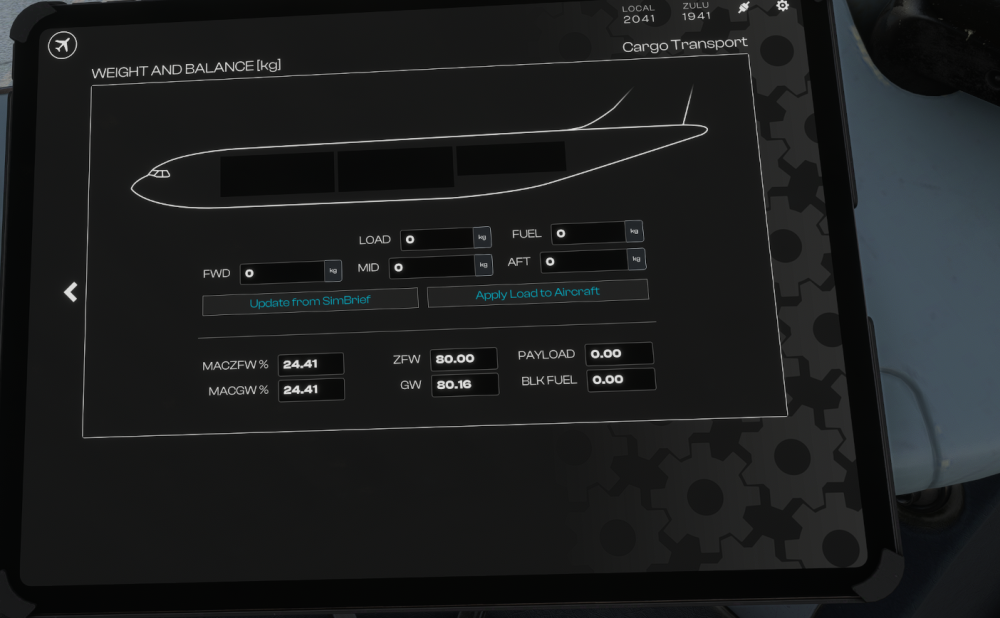
Sorry, yet another thing. I have set the aircraft to be completely empty. There is no payload and no fuel. So surely the ZFW and the GW should be exactly the same as GW = ZFW plus fuel. Here there is an extra 160kg somehow. This is messing up the aircraft weight calculations, and also at odds with simbrief, because the profile gives the empty weight as 80000, but the actual empty weight is 80161.7kg. Maybe it is including two pilots in this 80.16 GW, but the pilots should be factored in to the OEW and thus the ZFW. So if you want to simulate the weight of the pilots, the OEW and thus ZFW with no payload needs to be 80.16 and then the simbrief profile will need updating. At the moment we are always getting a 160kg discrepancy. You can see the actual ZFW and GW using Any2GSX, so you can tell that the aircraft itself is reading the ZFW incorrectly. Hope this makes sense. Thanks

-
In addition. Here there is a SPD Limit of 180 at EMA9 But the aircraft is then trying to accelerate afterwards to 210 at IEM82, where there is no SPD restriction (but even if there was, it would stay at 180, as 180 still satisfies MAX 210. You can also see that the (SPD)(LIM) waypoint is in the wrong place. The aircraft does not need to slow to 250 for 10000ft at all because there is a waypoint VELAG with a speed restriction of 250kts at FL123, so the aircraft will already be at 250 for 10000ft. Therefore no deceleration required. So the (SPD)(LIM) pseudo waypoint should not even be there at all. If the aircraft does need to slow to 250kts at 10000ft (because there is no waypoint with a restriction of 250kts that the aircraft will be at before it reaches 10000ft) then the (SPD)(LIM) waypoint should be at the point in the flight plan when the aircraft will begin to decelerate. This altitude will depend on the calculated econ descent speed before it needs to decelerate but generally around FL120-FL105. So the (SPD)(LIM) waypoint should be sequenced in the flight plan between the two waypoints that have a predicted altitude immediately above and below the altitude at which it will begin the deceleration. (Sorry that is quite hard to explain in words, much easier when you can speak it and point to the F-PLN page)! Thanks.
-
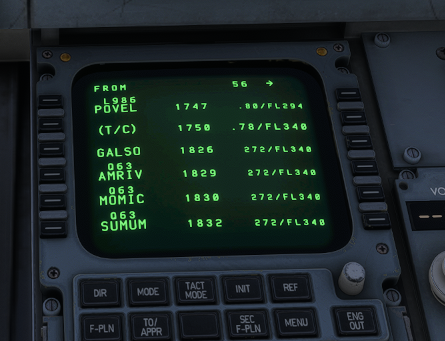
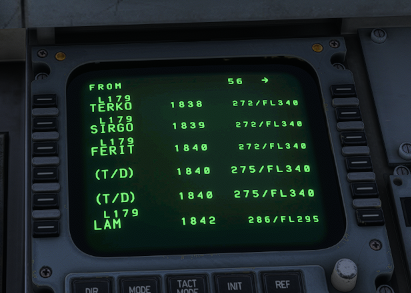
There are still numerous issues with the F-PLN page that have been reported for a long time. The predicted speed for waypoints in cruise are still given in IAS rather than MACH. There are duplicate (T/D) pseudo waypoints. 3 way switches still have inconsistent scroll wheel behaviour. For example compare the BRK A/SKD or the LDG Light switches with the FD/FPV and CONSOLE FLOOD LT switches. For the first two if you scroll up the switch moves up, but with the last two, if you scroll up the switch moves down. It is really annoying. The level-off arrow and the banana on the ND also need work just like all the other airbus aircraft in your fleet. Clicking on the LSK to Auto Populate the ZFWCG does not work. Below is a video showing that. https://www.youtube.com/watch?v=_k8hp714E_U Many thanks for your continued work on this aircraft. I must say it hand flies very nicely, the best flight model of your aircraft by far I think in terms of hand flying!
-
Yeah have noticed this. I just use the onscreen keyboard on the OIS that you can pop up to avoid any conflicts.
-
Excellent many thanks for this! Many of these that are not a350 specific things are also present in the a340. I.e. the constraint stuff, level off arrow, PERF page and f-pln page speed mismatch, f-pln page altitude predictions etc.
-
I’m not entirely sure how it works on the 350, but I imagine it’s the same as generic Airbus logic. FLS is a system which allows rnav approaches to b be flown with the same indications as ILS approaches. It’s often an option rather than default, and can only be used on rnav approaches with a straight approach. If you activate the LS push button and there is a straight in approach with FLS available, the final approach modes will be F-G/S and F-LOC. But for any rnav approach if you don’t activate LS you should get FINAL, APP NAV and then FINAL APP when both are captured. Similarly if you try to use LS but it’s a curved approach and FLS is not available it still should be FINAL, APP NAV, and then FINAL APP. But the a350 is currently treating all rnav approaches as FLS an it seems to be impossible to get the standard FINAL, APP NAV, and FINAL APP.
-
It is no problem, any time. Please don't hesitate to ask if you need further information on any of the points. I am happy to assist in anyway I can. I really don't want to come across as always moaning, I really do appreciate what you guys do for the sim. I just also can sense how close the iniBuilds aircraft are to really being top class addons for the sim, rather than looking and sounding awesome but frustrating to fly for those who like to look at the systems a little bit. Again nothing crazy deep, but just when one looks at things you can see there are quite a lot of issues. Honestly just a bit of work that could be applied to all the airbus aircraft and the upcoming A380 would be so transformative. I have definitely written enough today so will stop now, but please, as I mentioned above, just ask if you need anything more, I am more than willing to help in anyway possible.
-
Alt Prediction and Level Off Arrow Logic.pdf The following are some bugs that are still not fixed. It is quite disappointing to still be seeing so many so long after release, and especially disappointing that in the meantime, other aircraft have been released that also contain a lot of the same bugs. Please, please fix these, it is all basic functionality that should be correct in an aircraft of this price especially given how it is marketed. Many of these have been reported since release and whilst of course I appreciate the work that has gone into the aircraft, it seems little progress has been made in these basic things and its is most disheartening. These reports take hours and hours and hours to research and gather evidence and write up, please don't just ignore it. I have also attached a pdf explaining how the Altitude Predictions on the F-PLN page should work in the various lateral and vertical modes. @IniJamir these are the bugs I mentioned that you say are not occurring complete with evidence showing them in the form of videos and screenshots. iniBuilds A350 v1.2.6 – Ongoing Bugs Sounds 1. Parking Brake Sound Missing with Hardware Bindings No parking brake sound is played when operating the parking brake via hardware/key bindings (e.g. TCA Quadrant bindings). The sound only plays when interacting with the parking brake using the mouse You can see this on the video linked below. First, I operate the parking brake handle with the mouse and there is sound. I then use the parking brake handle on my Thrustmaster TCA, and there is no sound. https://youtu.be/wgcNu1fsWac?si=eXp2v6pksGxinRVt 2. No Sound for CLB Detent when coming from Lower Throttle Position No detent sound is played when moving the thrust levers into the CLB detent from a lower throttle position, i.e. the idle end of the throttle. The sound currently only occurs when entering CLB from a higher throttle position, i.e. the TOGA end of the throttle. You can see this on the video linked below. First I move the lever into CLB from below and there is no sound when the levers go into the CLB detent. I then move the levers into the CLB detent from above and there is sound. Finally, I go back to moving into the detent from below and again there is no sound. https://youtu.be/SO9YOLHIZsI?si=mlnllxzauzYckI22 Modelling 1. Display Unit Brightness Mismatch The various display units do not maintain equal brightness when set to the same brightness setting. Identical brightness knob positions can result in visibly different display brightnesses. This is very noticeable when using the DU Master Brightness Knob There also appears to be an issue affecting the lower MCDU displays and radio panels on the pedestal. At certain times of day, particularly dusk/dawn, these displays exhibit unusual brightness behaviour where the background does not appear fully black and instead has a weird glow to it. On the video linked below, you can clearly see that using the DU Master Brightness Knob, the display units are set to the same brightness setting, but the lower displays and the OIS are much brighter. https://youtu.be/pIFOp_wNAYI?si=OMSIUhowNbGRLN4r Systems 1. Altitude Predictions are Often Incorrect in Descent The altitude predictions on the F-PLN page are often not being calculated correctly in descent. In the screenshot linked below, you can see that the aircraft is at FL150 with 0.6nm to go until the waypoint HAZEL. Yet the F-PLN page is showing a prediction at that waypoint of FL130. This is incorrect, the aircraft is not going to lose 2,500 ft in 0.6nm and so the prediction is incorrect. https://i.postimg.cc/7ZB8K6fS/Flight-Simulator2024-2026-05-19-16-42-29-115.png 2. Constraint Indications (Amber v Magenta) are Incorrect and Inconsistent between the ND and the F-PLN page and the Altitude Predictions indication thereupon. The colour of the asterisks on the F-PLN page, and the circles around waypoints on the ND are inconsistent with each other, and the ones on the ND do not correspond with the Altitude Predictions on the F-PLN page In the screenshot below the circles around the waypoints HAZEL OCK and OCK/07 are in amber indicating the constraint will not be met. However, on the F-PLN page the corresponding asterisks are shown in Magenta, indicating, contrary to the ND, that the constraints will in fact be met. A constraint cannot be both met and not met. Therefore, one of them is wrong. Logic would lead to the F-PLN page being incorrect given the aircraft is above profile. This also again indicates that the altitude predictions on the F-PLN page are not being constantly recalculated based on where the aircraft currently is in terms of its vertical profile. The magenta asterisks do match the F-PLN predictions, but these predictions are incorrect. Somehow the ND is showing the correct colour indications around the waypoint, but where is it getting the data from to display the correct colour? It should come from the F-PLN page but in this case, it isn’t as clearly the F-PLN page is completely wrong. https://i.postimg.cc/7ZB8K6fS/Flight-Simulator2024-2026-05-19-16-42-29-115.png In addition the F-PLN page predictions and coloured asterisk indication are also bugged regarding the speed predictions. In the screenshot linked below, there is a message saying SPD ERROR AT LLS01. But where is this information coming from, the F-PLN page is predicting the aircraft will be at 250kts at LLS01 and is showing a magenta asterisk. Again, somehow the error message is correct, but the F-PLN page is incorrect. https://i.postimg.cc/xCKV9P1k/Flight-Simulator2024-2026-05-19-16-44-40-667.png I’m afraid the F-PLN is very poorly implemented, and this is unacceptable as it plays a very important role in descent management and planning to meet any ATC restrictions. It seems to work reasonably in climb, but in descent it is very poor. It is possible that it is simply not constantly recalculating the predictions. I have attached included a separate PDF indicating how the F-PLN page predictions and level-off arrow should function in the various lateral and vertical modes. 3. Managed Speed Targets Bugged and Flickering/Jumping/Jittering etc. Managed speed targets can become unstable and visually glitch. Speed targets may flicker or rapidly jump between values. This happens in all stages of flight, to both the target speed and the F, S, Green Dot reference speeds. In the first video linked below you can see the green dot reference speed flickering, and in the second, the magenta managed speed target jumps. https://youtu.be/61Wi-fSszI4 https://youtu.be/4GClDf9tg7M 4. MACH/SPD Indication is Incorrect on the FCU – and on the FMA on the PFD The SPD/MACH indication on the PFD and FCU is incorrect as it is currently implemented to change based purely at a certain altitude rather the correct behaviour which is to change depending on whether the aircraft is indeed targeting a SPD or MAH number. The display should only switch between SPD and MACH when the aircraft transitions between a speed target and a Mach target. Currently, the indication can change despite the aircraft still targeting the same mode. In the linked video below, the target climb speeds are 309 IAS and 0.85M. Meaning, the aircraft will climb at 309IAS until this becomes equal to 0.85M, at which point it will continue the climb at 0.85M. (These speeds can be seen on the CLB PERF page as shown. At the start of the video, the aircraft is climbing at 309 IAS and correctly the FCU shows SPD. However, when the aircraft reaches FL270, the FCU changes to MACH. This is incorrect behaviour. The aircraft is correctly still targeting a speed (309) as this speed is currently only equal to .766 and shown below the speed tape on the PFD. The magenta target on the speed tape is still on 309IAS and correctly remains there until 309 equals 0.85 at higher altitude. So, the aircraft is correctly targeting a speed, but the FCU is incorrectly indicating MACH. This bug is also present in reverse on the descent. In this case, in addition to the FCU indication being incorrect, should the aircraft be in a geometric descent segment rather than in IDLE descent, SPD or MACH should appear on the FMA. Again, here it is bugged and just showing MACH above FL270 irrespective of whether the aircraft is targeting a SPD in IAS or a MACH number. https://youtu.be/2OSJHZmKur8?si=LkVmCIikhcxcDrMx 5. Level-Off Arrow Behaviour. That same screenshot above also has the level-off arrow on the ND Missing. FL 70 is shown below the altitude tape on the PFD (as an aside this should be magenta because there is a FL070 constraint at OCK – it should only be cyan if the FCU selected altitude is above the next constraint in DES, or below it in CLB). The aircraft is in managed mode, and, therefore, if the F-PLN page is predicting the aircraft will be at FL070 at OCK then the level-off arrow should be on the ND at OCK. Here also the level-off arrow is missing, FL050 (transition level formatting error also here – see below) is shown below the altitude tape, so the level-off arrow should be shown in the ND indicating where the aircraft will reach this altitude. In this example it should be just before D283L – as the F-PLN page is predicting the aircraft will cross this waypoint at 4890, but it is totally missing. https://i.postimg.cc/vTZgJhrd/D283L-where-level-off-arrrow-alro-PFD-alt-format.png Yet again, where is the level-off arrow here indication when the aircraft will reach FL100? https://i.postimg.cc/pdddXr9G/No-Level-Off-arrow-but-it-preditcs-TLA13-at-097-so-arrow-should-be-before-that.png Again, see the separate document explaining the level-off arrow functionality. 6. DES PERF Page Constraint Display The DES PERF page currently displays the final descent constraint rather than the next active descent constraint. In the screenshot below the DES PERF page is showing the next speed constraint to be TLA/13 at 210kts. However, this is the final speed constraint on the flight plan, and this page should instead show 250 KT / ESKDO as this is the next speed constraint. https://i.postimg.cc/4xbLPNxm/SPD-LIMIT-waypoint-logic.png 7. Transition Altitude/Transition Level F-PLN page formatting errors. Altitude formatting on the F-PLN page does not always correctly respect Transition Altitude and Transition Level logic. In the linked screenshot below, you can see on the T.O PERF page that the transition altitude is 6000ft. However, on the F-PLN page FL060 is shown at UMLAT. This is incorrect. As you can see in the other screenshot, the charts correctly format this as 6000. 6100ft should be FL061, but 6000ft is still 6000ft. https://i.postimg.cc/4yQP5WJ3/TRANS-ALT-6000-F-PLN-FL060.png https://i.postimg.cc/s2GJ8jVv/TRANS-ALT-CHARTS.png 8. SPDLIM Pseudo-Waypoint Logic Incorrect The (SPDLIM) pseudo-waypoint behaviour does not correctly account for speed constraints affecting acceleration or deceleration logic. If a departure contains a speed constraint of 250 KT (or lower) above 10,000 ft, the (SPDLIM) waypoint and corresponding magenta speed change marker should not appear during climb, because the aircraft is never performing that specific acceleration from 250kts to ECON climb speed at FL100. The aircraft should continue respecting the speed constraint and accelerate to ECON climb speed once the constraint is cleared. Similarly in descent the reverse is true. In the example in the screenshot linked below, the (SPDLIM) waypoint should never be in the F-PLN. The aircraft is already decelerating to 250kts at ESKDO at FL170. So the aircraft never performs the deceleration to 250kts at FL100 because it has already slowed to this speed and so doesn’t need to do it. So the (SPDLIM) pseudo-waypoint representing the aircraft’s deceleration to 250kts at FL1000 should not be there. https://i.postimg.cc/4xbLPNxm/SPD-LIMIT-waypoint-logic.png 9. F-PLN Page and DES Page target speeds do not match. The target speeds on the F-PLN page and the PERF pages often do not tie up and match with each other. In the screenshot linked below, the CRZ PERF page shows the managed target cruise speed to be 0.85, yet the F-PLN page is showing 0.84 for every waypoint…. Again the F-PLN page is just incorrect, another example of how much of a mess this page is in. https://i.postimg.cc/T11SK8VD/perf-page-fpln-page-and-pfd-speeds-do-not-match.png This bug is present in all stages of flight, CLB, CRZ, and DES. 10. FCU Selected Altitude displayed below altitude tape on PFD logic. The display of the FCU selected altitude below the altitude tape on the PFD is not respecting intermediary constraints. (Constraints between the current altitude and the FCU selected altitude.) In the screenshot linked below, the aircraft’s current altitude is FL275 and the FCU selected altitude is set to 24000 and this is displayed below the SPD tape as FL240. However, this display is incorrect, there is a constraint at INPIP of FL260, and therefore if the FCU altitude is set to anything equal to, or lower than this constraint, it is irrelevant as far as the target altitude displayed below the speed tape is concerned. It should display FL260 in magenta. Thus the level-off arrow should also indicate the point on the ND at which the aircraft will reach FL260 and not FL240, this also should be in magenta. The FMA is incorrect here as well, it should be ALT in magenta not cyan, relating to the FL260 constraint, not the FL240 FCU selected. Of course, this is when the aircraft in in managed DES as it is. The behaviour shown on the screen would be correct for OP DES but not for DES, which is the mode the aircraft is in. https://i.postimg.cc/k5xDpzbq/Shouls-be-contraint-in-magenta-and-magenta-arrow.png 11. Cabin Vertical Speed Behaviour Incorrect in Cruise Cabin vertical speed remains at approximately +50 ft/min throughout cruise while cabin altitude remains stable. Minor short-duration fluctuations are expected occasionally, but cabin V/S should remain near 0 ft/min for the vast majority of cruise conditions. This one is hard to get a screenshot of as it is just a snapshot, or a video, as I cannot video the whole cruise for hours and hours. Sometimes it does this sometimes it doesn’t, but there are many flights I have had where the cabin VS stays at +50 the whole flight without changing the cabin altitude as described above. I am sorry I don’t have a video for this, as you can see I have spent a long time getting other evidence, I am not doing this to make up bugs that don’t exist, it really does happen. 12. HUD VS does not match PFD and FPV is not accurate The vertical speed indication displayed on the HUD does not always match the V/S indication shown on the PFD. This can be seen on the screenshot linked below. https://i.postimg.cc/LsqRQ6xY/HUD-PFD-VS-mismatch.png The FPV also does not actually indicate where the aircraft is going, i.e. if you place the FPV on the touchdown markers and keep it perfectly there during the approach, the aircraft actually ends up somewhere else entirely. Overall, the F-PLN page and PERF pages relating to vertical navigation are still quite poorly implemented, there are a multitude of bugs as can be seen above. To summarise: (i) The F-PLN altitude and speed predictions don’t seem to be being calculated properly on descent, it’s as if the predictions just show the ideal managed path, but then do not recalculate based on deviations from this as they should. But somehow the ND manages to do this, by displaying the amber circles around constraint waypoints. (ii) There are also discrepancies between the F-PLN page and the PERF pages when it comes to what the managed target speed should be in any given phase of flight. Flight Model 1. Fly-By-Wire Roll Behaviour Requires Refinement FBW roll behaviour does not appear consistent with expected Airbus handling characteristics. When using sidestick roll input to establish a bank angle and then releasing the stick, the aircraft may alter the established bank angle unexpectedly. The aircraft should instead maintain the commanded bank angle within protection limits after sidestick release. For example, setting a bank angle of 20 degrees, the aircraft will slowly roll back towards wings level instead of maintaining the bank angle. Additionally, after roll inputs, the aircraft can briefly snap back in the opposite direction when the sidestick is released. You can see in the video linked below, that when I roll the aircraft and then release the sidestick, the aircraft snaps back in the opposite direction. https://www.youtube.com/watch?v=55H7GsYv54Y 2. TO Pitch The aircraft lifts off from the runway at far too shallow a pitch. As can be seen in the video below, the aircraft lifts off at about 5 degrees of pitch, whereas it should be more like 10 degrees, so it really is lifting off significantly too early in the rotation. https://www.youtube.com/watch?v=j3pOCrMMTjg You can see the excerpt from the Flight Crew Techniques Manual saying that lift-off should occur at about 10 degrees here. https://i.postimg.cc/2jxpwZCt/fctm.png Again, many thanks for you work on the aircraft, I really hope you can fix these and also apply the ones that the A340 shares to that, and doubtless this A380 will have the same issues, so please apply them to that too. Best.


