




silentghostx
Member
-
Joined
-
Last visited
-
Hi team, As the title suggests after updating to v1.2.7 - I'm unable to change the Runway Condition from WET-5 which is now the default as per the change log, to anything else. I have tried to use the rotator nob above the A/BRK button, as well as on the ND PLAN mode with ANF zoomed up, LANDING TAB, there is no drop down from the WET-5 on the LDG PERF CODE. Cheers, Chen
-
Should also say - this applies to the A350 as well. Thanks for all your work. Cheers, Chen
-
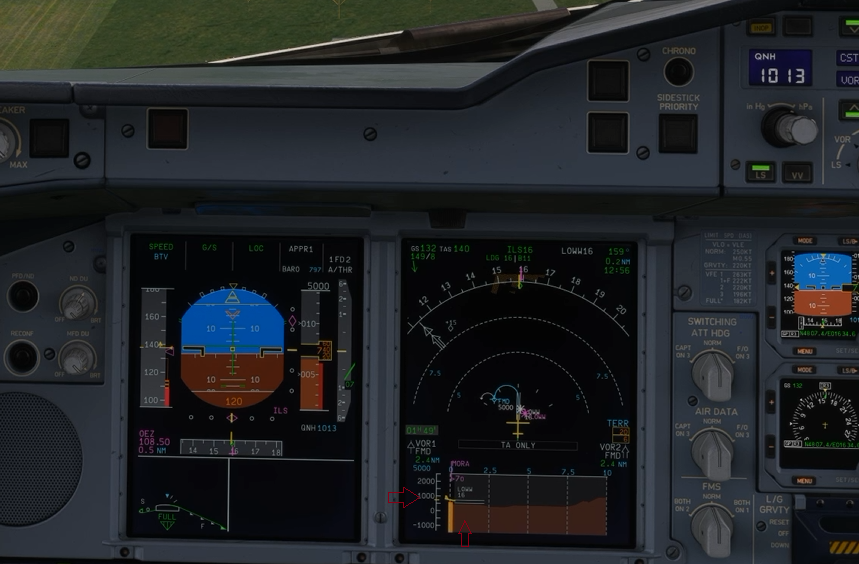
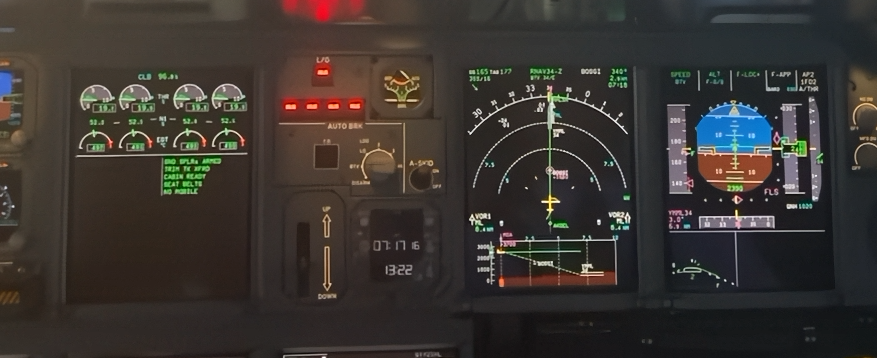
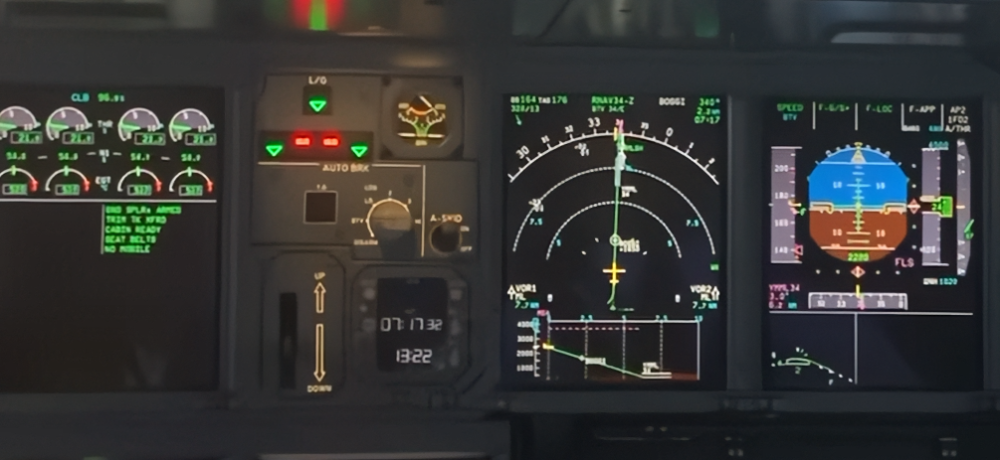
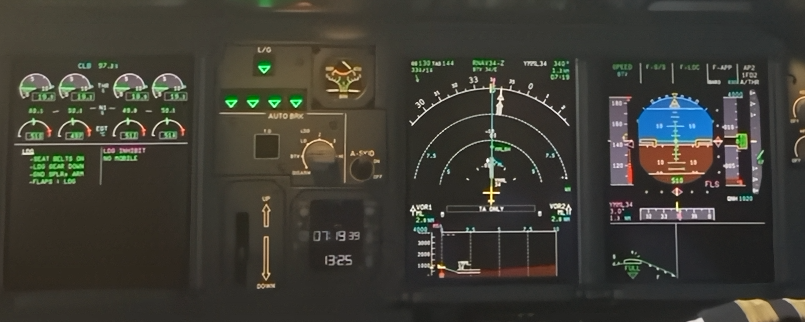
This one is related to VSD profile on landing Currently the ground rises up as the plane descends on approach and the aircraft symbol is pinned at the middle of the VSD (see the red arrows added in this shot), the vertical scale of VSD goes into -1000ft upwards to 2000-3000ft ai The real one in sequence on this video -> https://youtu.be/qcXQKQukxkI?si=ivNivgynFUgnU0cD Before capture of GLS/ILS After capture the plane goes to the middle of VSD scale The the yellow plane symbol moves down the vertical scale part of VSD and the ground remains at the bottom, instead of the ground rising up from below to meet the plane symbol at the middle.
-
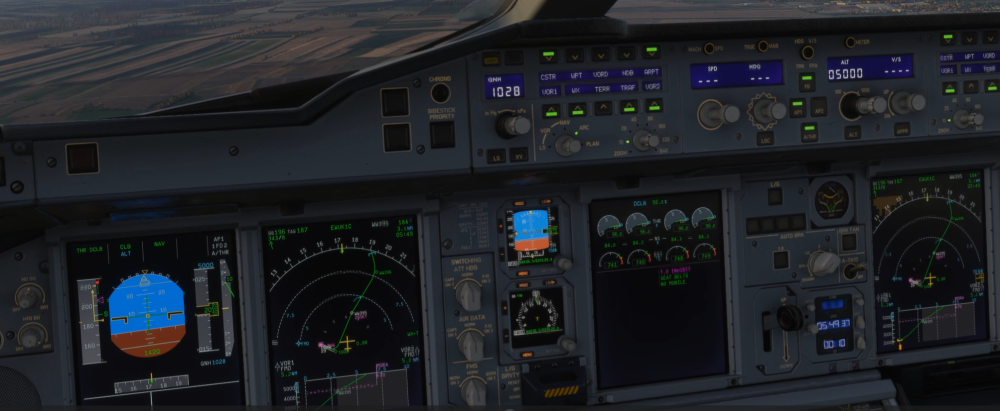
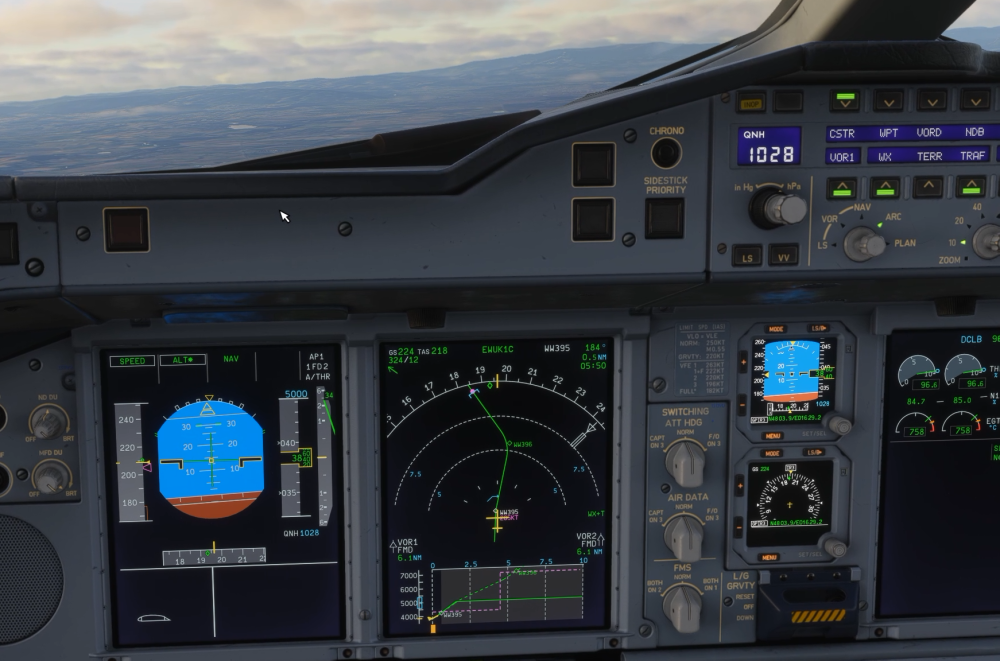
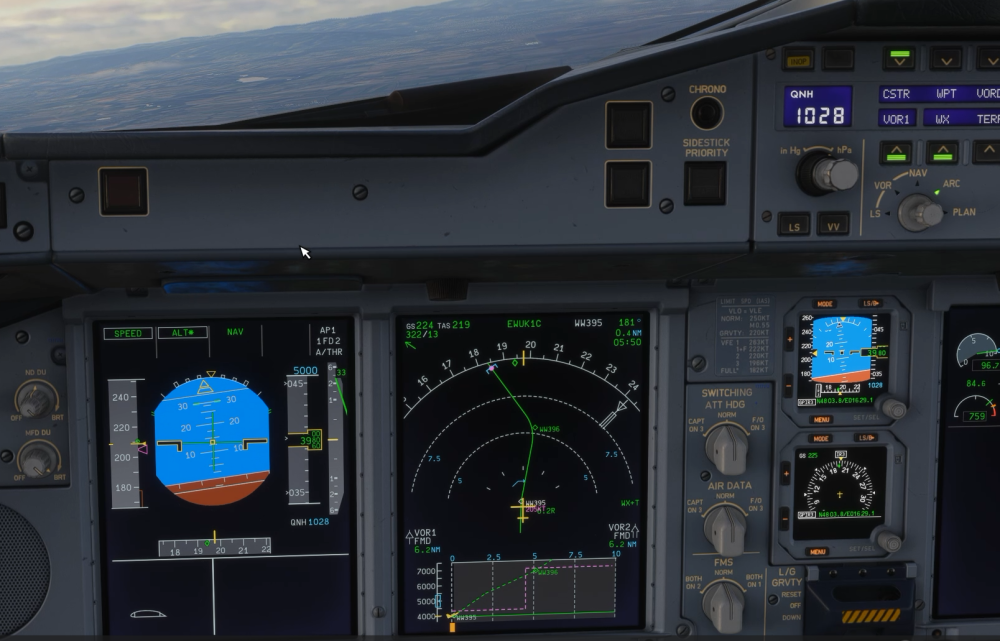
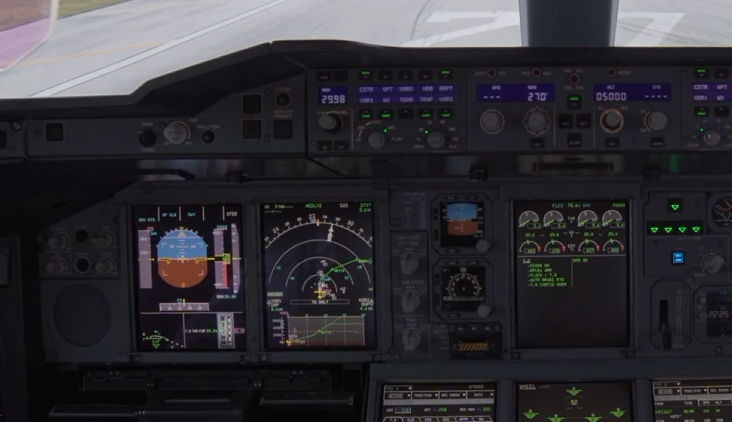
Thanks Kyle I'll separate the 2 issues with the VSD with separate posts. This one is related to VSD profile on climb only Initial selected altitude is 5000 on MCP, but currently there is no level off indication on VSD during initial take-off/climb out. When the plane first enters ALT* capture mode as it nears 5000, in this case passing through 3800, it briefly shows the correct indication - I believe this should be the way it shows it from the start of take off. And then very quickly - this is what it shows -> MCP altitude is 5000, plane is climbing through 3900, the level off horizontal profile is showing at 3900feet, and this goes up with the plane until the actual level off at 5000. Real video footage from this -> https://www.youtube.com/watch?v=pHui34_ODnc
-
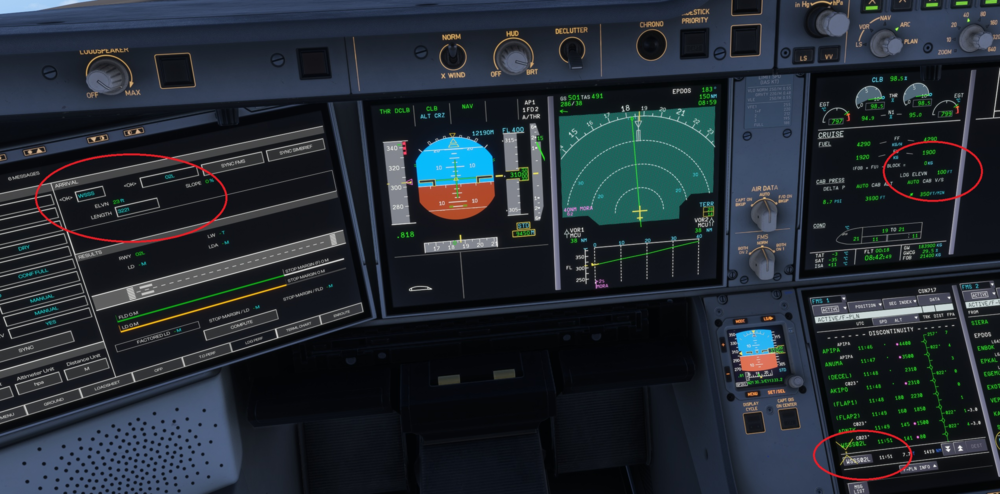
Hi iniBuilds team! Loving the A380. This is a very polished product that you all should be very proud of! I'm really happy with the hand flying, she feels heavy and the flight dynamics feel really awesome. I have noted several bugs over the last month of flying - some of which I'm not sure if it's just related to the systems of A380 that is different. This list is current as of V1.0.4 - I've just done a full test flight with it. 1) VSD During climb phase the selected altitude (eg. initial departure altitude) only becomes part of the VSD level of indication after the plane goes into ALT* mode near capture, rather than during climb phase itself During approach, the ground level where the runway is should not move - i.e. should be pinned to the bottom. At the moment the ground rises to the middle level of the VSD, and the altitude scale will go into -1000 to -2000 feet on the vertical scale on the left hand side. On the real plane I believe the aircraft symbol moves down the scale to meet the ground 2) Approach phase active / Decel point - appears to be very late during approach. Most of the times I will need to activate it manually on the APPR page, especially if there is a change in waypoint sequence/short cut using DIR TO 3) LANDING ELEVN on the CRUISE ECAM - this appears to have carried on from the A350... Should be rounded to the nearest 50ft, at the moment it is rounded up by 50ft... e.g. NZCH runway 20 elevation is 93ft on the chart, the ECAM currently shows 150ft, correct ECAM should show 100ft 4) HYD ELEC PUMP - should be showing on ECAM during opening/closing of cargo doors with associated HYDRAULIC page indications of electric pump being active 5) SPEED BRAKE EXT indication on ECAM - does this show on the A380? I'm not sure regarding real life on this Thanks for taking a look at this. Cheers, Chen
-
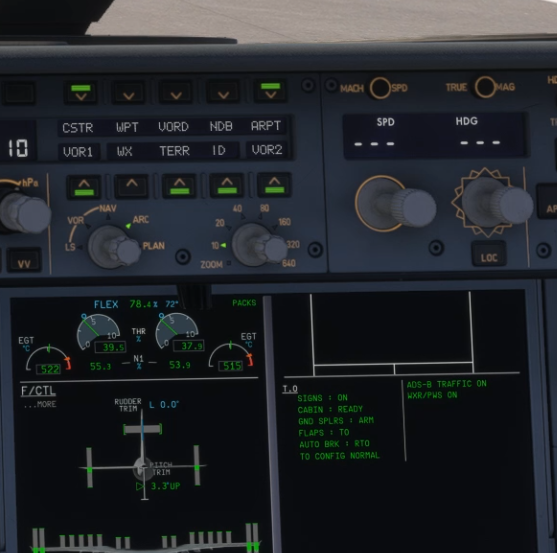
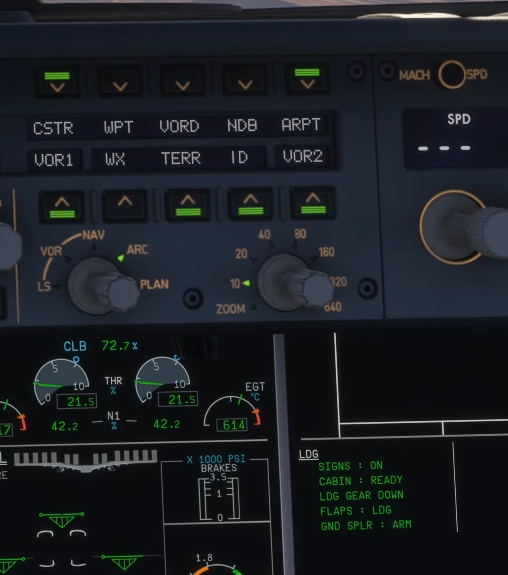
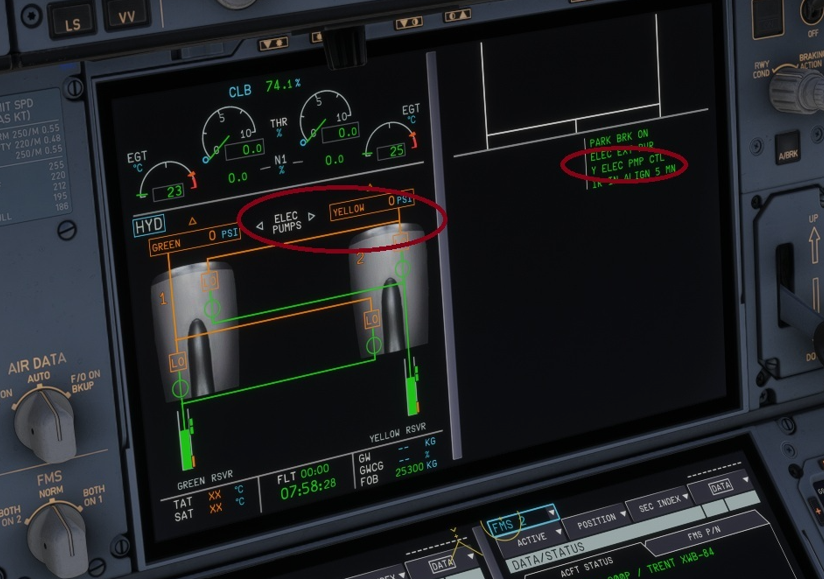
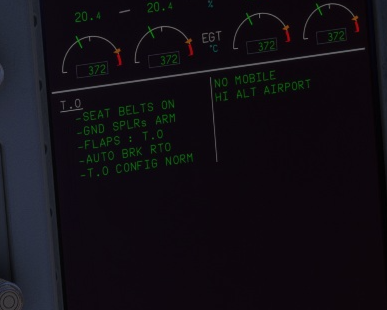
Hi team, While the overall A350 product is mature and can be very enjoyable, I'm writing this post in a sort of frustration. I believe most of these bugs are acknowledged in some form either here or on discord. However updates after updates - none has been resolved. I list them here for clarity. 1) CRUISE PAGE - LDG ELEVN - This should be rounded to the nearest 50ft based on the runway elevation. I.e. WSSS 02L Rwy is 22feet based on Navigraph charts - this gets rounded down to 0ft. At the moment the aircraft displays this as 100ft which is incorrect. - If it is 30ft and above - it gets rounded to 50ft. Like wise, if it is under 80ft it gets rounded down to 50ft, and so on. Above 80ft and up to 130ft, it gets rounded to 100ft. - The Landing Perf Page on the OIS shows 23ft so this data is obviously available somewhere, and just needs tweaking on how it is displayed on the CRUISE PAGE on the ECAM 2) HYD ELEC Pump on HYD Page - When the cargo doors are opening - the ELEC PUMPS on the HYD page do not reflect the current status that the pump is running and shows no PSI on the Yellow pump 3) Take off and Landing ECAMs - This NEEDs to be addressed. The A350 (like the A380) is different to the older airbuses. The formatting has been an issue that's there since the start, and has NOT been fixed despite multiple reports - T.O ECAM (See FBW A380 for reference) should be: SIGNS or SEAT BELTS ON GND SPLRs ARM <- currently the iniBuilds A350 still shows SPLRS (capital S) at the end on T.O ECAM Memo FLAPS : T.O <- iniBuilds A350 missing the "." between T.O AUTO BRK RTO T.O CONFIG NORM <- iniBuilds A350 again missing the "." between T.O - LDG ECAM Similar issues with GND SPLRs <- iniBuilds A350 does not even display the "s" just GND SPLR 4) HUD FPV issue - currently using community mod for this 5) VSD display on initial level off altitude not shown (see another topic since 1.2.1) / VSD does not display V/S profile when using V/S mode While issues 1, 2, 3 do not affect flying as much - some of these things are what makes an A350 an A350. The immersion factor is immediately lost or reduced as soon as you notice these things on a flight. These things are understandable if this aircraft was literally released today, however after 20+ updates and 14months since initial release, this is getting a bit ridiculous. Issues 4 and 5 might be harder to solve - at least for issue 4 we can use the community mod for the HUD. Thanks for your efforts in looking into these things. Cheers, Chen
-
Nope... still the same in 1.2.5
-
Just checking if this one should be fixed? It still persists in 1.2.4
-
Hi team, Just trialled the A350 v1.2.1. Re: VSD - glad to see some updates e.g. magenta area pre-departure. However have noted regression on the vertical profile no longer showing initial/non-cruise altitude level offs during climb phase or descends, with the predicted profile in dashed lines. V/S mode still not showing predicted profile - I believe this is known. See video of depature and climb - Thanks
-
I assume you’re using MobiFlight? I don’t have any checklist tick mapped for the A350. I used it in the A380 for the electronic checklist without issue though
-
This happened to me on a go around the other day, not sure if it’s a one off weird thing. I’ve taken off on flaps 2 before without this issue though
-
Interesting! What hardware peripherals do you have? I’ve never heard of that specific binding before - I have the Winwing Stick, FCU, MCDU, and Thrustmaster Airbus throttle.
-
Hmmm not sure what’s going on there with your set up. I tried the same ABN checklist on my side, forgot to record at the first few items but here’s mine - seems to be working ok.
-
Haven’t had or seen this issue before… have you checked hardware binding? Possibly an issue with a key or a component that’s doing the automatic tick off..?
-
To be fair, 1.1.9 has been a fairly stable release thus far, well done iniBuilds team! Sounds have improved. No major showstoppers except the known ones already. VSD a lot more stable and has improved in display, especially on approach. My only wishes are to have improvements to the formatting of T.O and landing ECAM messages, fix the landing elevation rounding for the Cruise page, and HUD fixes so that FPV is showing where the plane is going.


