




MITCH1988
Member
-
Joined
-
Last visited
Everything posted by MITCH1988
-
I have the same issue. I'm going to be harsh here but this current build is like 10 steps backwards for consoles. It's sucks. I love flying the A350 when it was working. I tried flying with the fan blade bug but it just ruin things for me. The constant WASM crashes on flights longer than 4 hours. It just sucks. I was hoping this update would make it flyable again and it's hasn't. On-top of pmdg 777 not being able to update NAV data at all. I have no modern long hauls. I love the A340 but routes are few and far between. I like flying realistic routes. Like I said it kind sucks for long hauls right now. Short hops are getting boring. I need my longer the 9 hour flight fix. Please inibuilds...do a hot fix or something for consoles. Work your magic with asobo or Microsoft.
-
I was just wondering when we were going to expect to be able to purchase liveries for the A300 premium on console. This version has been out for ages and we still have no liveries. I have been wanting to fly it but I am a huge stickler for flying planes with actual liveries and following real life ops the best I can.
-
I have had this exact same issue and i am on the Xbox Series X as well. Unfortunately it usually ends in a CTD after a couple ours. So correct me if I am wrong. Is it potentially the auto step climb Insert that's the issue or causing issues? Should i start manually inputting them? I am also assuming you still suffer from the engine fans not turning when the engines are running. I haven't done a flight in the A350 since I cleared the reserve space to try and fix the WASM issues i had been having.
-
I hope someone can help me with this. As you can see, I have a pink texture issue. First is the ramp at OMDB and the second in the entire airport of OTHH. I am on XBOX series X. MSFS 2024. I have done an uninstall of both sceneries. I also cleared my reserve space and practically started from scratch. Now I do have the Orbx Dubai city scenery installed obviously for the Dubai area and I have the Doha city towers scenery from Inibuilds install for the Doha area. Might there be a conflict with the city packs? or is there something else? Any help or solutions to a fix would be wonderful. I love flying in these parts and it is a bummer to have this at both Inibuilds sceneries. I also want to know if anyone else is experiencing this. Thank you for any help you or anyone might be able to provide.
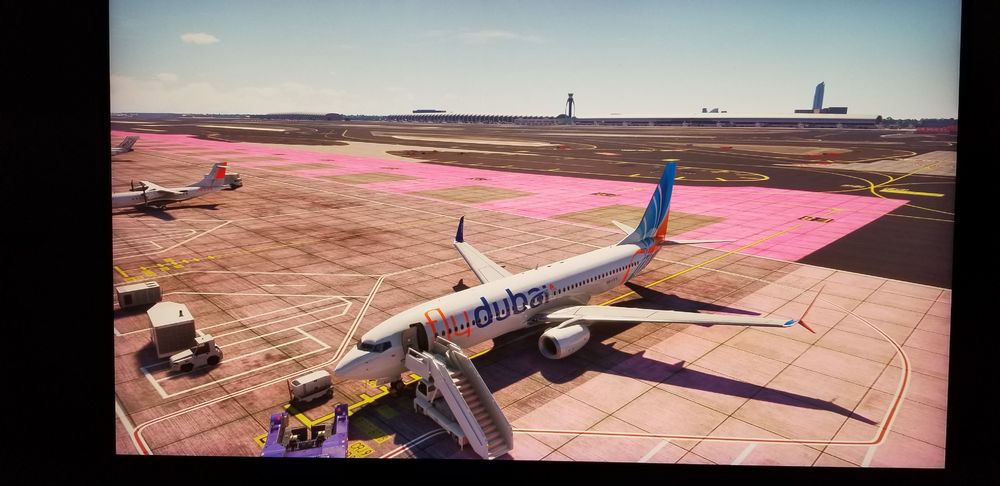
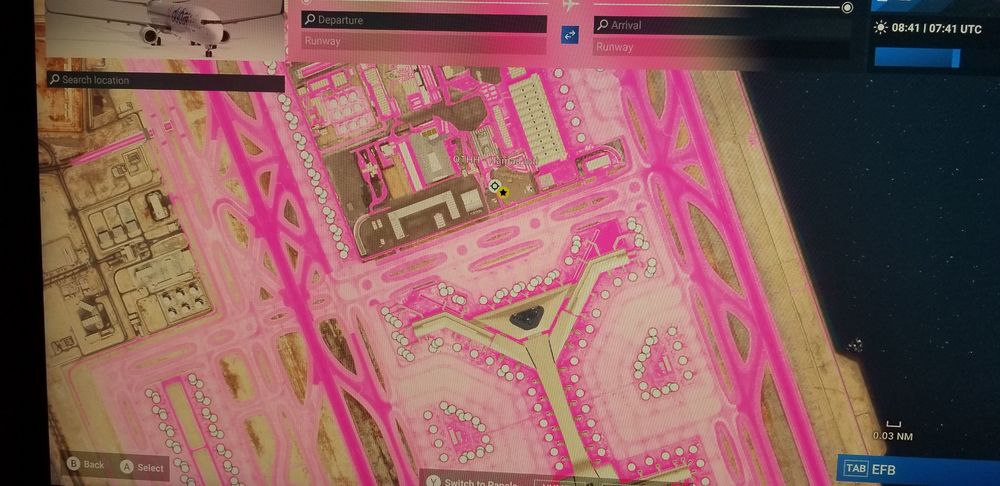
-
If i am being honest. I don't think this is an Inibuilds issue. I actually think this is on Navigraphs end. I am having the same issues with the PMDG aircraft where the navdata is not updating. I actually have to log out of Navigraph in the airplanes and then sign back in and then everything is updated. It's weird. I never had that issue until the last AIRAC update over New Years.
-
I am on xbox. I get this same issue in the -1000 and only in the -1000. I know i am going to have this issue because I notice on the flt pln page that the eta times at the bottom go all weird. They bug out and don't give me an ETA. Plus the Nav data on arrivals goes all weird as well and has some waypoints 6000nm away from actual flight plan. I have had to delete waypoints and manually add them and their specific restrictions. Plus the engine fans not spinning when the engine is running but that in itself is a console issue. The A350 in general was running fine until the 1.9.0 update. Since it has been hit and miss. Nav data not updating properly. Fan blades not spinning. Constantly having to download terrain data that doesn't save ever. it went from 1 of my best performing aircraft to the worst overnight. Such a shame because I absolutely loved flying it.
-
Check to make sure your noise cancelling option in sim or aircraft is turned off. Some 3rd party aircraft have click points or options for noise cancelling. PMDG for example if you click the headset thats just behind the seat to the left, it will dapen the noise. When it comes to the cabin announcements, make your on your radio panel that you have PA on and turned up. That has to be on to hear the cabin announcements.
-
I'll be honest, I'd like to see an A320 CEO made for the console community. I do a lot of North American flying and the NEO isn't that big over here yet. Having a CEO to fill that gap would be awesome. Even if its a new default aircraft.
-
Us xbox users need more liveries than what we actually have. I'll gladly pay for them. Please please please, we need more liveries. I would the new 100 year Lufthansa livery. Starlux, China Airlines. Heck, I'd pay even more for a Special livery pack.
-
I asked this exact question about a month about and got a response of they don't l know why it's taking so long to be approved and they would be looking into.
-
I was just wondering where the liveries are for the console version of A300 for msfs 2024.


