




Rob Ainscough
Member
-
Joined
-
Last visited
Everything posted by Rob Ainscough
-
Pong was my first … late 70’s … it set my career path … something so simple 🙂 yeah, getting sick of having to accommodate thieves pretending to be Robin Hood’s … they’re just some pathetic excuse of a human using limited resources and air which could be put to better use for people that actually care …
-
Agree, BUT ... A LOT of "not a big deals" add up to a lot of wasted time and research ... so it's never really just one single issue. It's the bigger picture with a slew of other issues that accumulate ... not necessarily specific to MarketPlace or iniBuilds marketing decisions, just overall with flight simulation. For example (current wasted weekend ... like I said, the older one gets the more valuable time becomes): After a few hours of trying to make PMDG 737-700 work with my WinCTRL FMC and MPC only to discover they will not work until WinCTRL provide an update ... there are other solutions with involve different tools and downloads and ... Another issue with the latest Flight Panels PMDG 737 3.0 updates ... the Ground Power switch only turns OFF GRD PWR never ON. And we move on to Orbx EBCI purchase and try to install and get into an endless progress bar and never completes. Contact Orbx and told "it's me not them" which is false because Contrails, iniManager, SimMarket, etc. all work fine with downloads and installs and the repeated issues are always with Orbx purchase/installs in Central. The missing landing gear in MSFS official forums, provide, video, screenshots and even show they where MSFS 2024 intro video demonstrates the missing landing ... yet I know this is going to go nowhere as "by design". It's to the point where after a couple of purchases, I spend 2 days just reporting bugs (here and elsewhere) and another week or two of what feels like "negotiations" that the bug/issue is real as I provide volumes of evidence (which gets ignored because they working on a pile of other bugs that are higher priority) ... it's the software engineer in me that says ... good grief ... the bar just keeps getting lower and lower on acceptable issues/bugs. And a long long list of other issues that sometimes get resolved, sometimes find a work around, sometimes never get addressed. It just keeps piling up ... to the point where I lose enthusiasm for this hobby that's supposed to be fun and entertaining. I can't tell you how many emails I've received and comments on my YouTube channels from people that have walked away from the hobby because of the numerous issues. Not singling out iniBuilds as on the technical side of this specific is an Asobo/Steam integration problem ... BUT in the same token, iniBuilds must be well aware of how bad the Marketplace is for most users (there is a lot of data that supports users dislike of the Marketplace). I guess after 40+ years of software engineering I can either be viewed as a "grumpy old man" or "an experienced developer/user that sees the problem and recognizes the need for change as this path is ultimately not sustainable" ... can't just keep lowing the threshold of acceptable bugs/issues and poor UI design choices with zero or no support for error processing (no a log file is NOT the soluiton). Rob.
-
Based on that info of unknown future date, then I’m guessing it’s not a contractual agreement and based on sales natural tailoring off of sales. My personal feedback, I’ll not buy anymore products from Marketplace … too many issues and horrible user interface. FYI, I will however buy at a higher price in iniManager store to avoid whatever revenue cut is deemed important by doing Marketplace exclusivity.
-
After spending a couple of days trying to buy the TriStar from MS MarketPlace that failed multiple times. A big thanks to a very helpful user, I was able to figure out that I need to the Steam Overlay enabled for purchase?? Weird (purchase and game overlay should be two entirely different constructs not related), but ok. So onto the next issue, there is no TriStar aircraft transfer option in iniManager? So how can I transfer? Rob
-
Thank you! That was the issue ... for others: I enabled just so I can make the purchase, then disabled after done with purchase as I don't want any Steam overlay distraction in my games/sims. This is exactly why I don't want to use Marketplace and would rather use iniManager to purchase and "manage". I really hope iniBuilds reconsiders their decision for Marketplace exclusivity.
-
After restarting MSFS 2024, this error comes up: Tried again, same endless spinning wheel
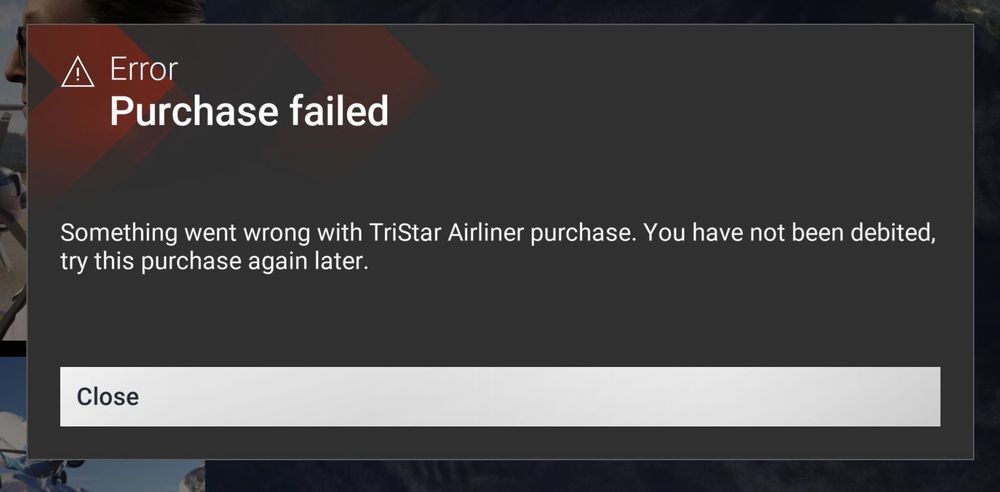
-
I have NO IDEA why you folks don’t just make it available via iniBuilds manager app? Microsoft’s Marketplace ALWAYS seems to have issues and why I avoid buying anything from the Marketplace whenever possible. Unfortunately you made it impossible for me to get the TriStar any other way. So, it’s been 20 minutes now with just a spinning please wait after I hit the Buy button. I can’t do anything … no Esc, no Cancel, nothing. So my only option now is to Task Manager and terminate MSFS 2024 … which means it will want to restart me in “Safe Mode”. Please, I love your products, but what is the point in making it difficult for users to purchase it? Is “no sale” really better than the 5% different the Marketplace takes of the sale? Rob.
-
Good to know. Anyone know the ETA for SU3 to go live on release channel rather than Beta?
-
I was mistaken, I didn't uncheck all options, I think I had but there is no save button so assume it's automatically saved and action performed on selection. I didn't want to give up and I think I've found a work around ... I disabled these 3 options: Three flights so far and no issues.
-
I unchecked all the optional features and still CTD. It is pretty heavy on VRAM, around 27GB used (on this PC I’m using 5090 32GB VRAM and 96GB RAM). So far an uninstall and using MSFS 2024 default is the only way I can fly in/out of KLAX.
-
Having the same issue, but not just at 25L. RAM and VRAM are fine. So far only solution is to disable/uninstall KLAX 1.0.1 I'm removing some of the scenery options to see if that helps.
-
Here is the merged post: https://forums.flightsimulator.com/t/ground-textures-crazy-distortion-spikes-and-colors/719427
-
My post got merged into several other users with the exact same issue ... based on their posts, they all seem to be using nVidia GPUs. I added to the thread that it seems to be an nVidia driver issue and all good on AMD side.
-
Well, looks like it's an nVidia driver issue (not surprisingly given nVidia seem be all in on AI now and GPUs a distant past). Made a quick video on my other PC Same Ultra Settings with TLOD = 400 (no FSR): AMD 9950X3D X870E chipset 64GB RAM AMD 7900XTX (v25.6.1) I'll add this info to my post on MS/Asobo official forum.
-
I'll test this on my other PC with MSFS 2024 on it using an AMD 7900XTX 24GB ... see if it's GPU/driver related or just an issue with MS/Asobo. Good to know it's other locations at EGLL and good to know I'm not alone ... might give us a tad more leverage with MS/Asobo to fix.
-
So far EGLL "base" (no add-on) is the only airport (I have many airports installed) I've experienced this issue and seems to be specific to parking spot 581. I've reported the issue to MS/Asobo via their official bug reporting system. Hopefully addressed in SU3 when it goes final.
-
Yes, TLOD is at 400. Parking spot is 581. At first, I thought it was a conflict with another vendor ... and sure enough I had Gaya Simulations EGLL as I got the Aviator version of MSFS 2024. I uninstalled iniBuild's EGLL. I uninstalled Gaya Sim EGLL. Cleared/Reset my scenery cache. Loaded MSFS 2024, went to EGLL and got the same colored spikes. So it seems this issue is with MSFS 2024 base content. EDIT: not a VRAM issue, 5090 with 22GB our to 32GB being used.
-
Made a quick video here: Just purchased today from iniBuild's Store, 2024 version

