Der Michel
Member
-
Joined
-
Last visited
Everything posted by Der Michel
-
The last post was tagged with solved. But it is still a bug. That INIT-B is not avail after engine start is correct. But indication of NOT ALLOWED is just wrong! While at INIT-A pressing <- or -> with engine running, should call the FUEL PRED page automatically and not display NOT ALLOWED.
-
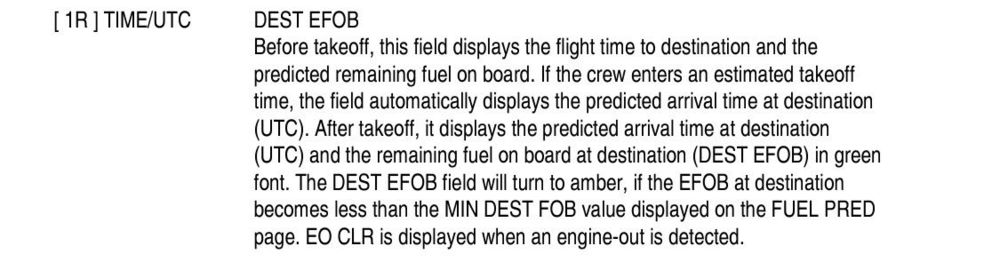
That is NOT a bug! PERF DES page indicates TIME DEST EFOB That’s the TIME and EFOB for the Destination.
-
To my knowledge, it’s on purpose for performance reasons. But yes, it’s fully useless if you want to use separate hardware displays. I doubt ini will change that.
-
As I have written, it's not just a upload by ini to the MS severs and all is done. MS has it's own processes in regards to testing, preparing, ensuring quality etc.... And there are a lot updates, new releases to marketplace, but only limited ressources by MS/Asobo. So it takes time.
-
With reaching the CRZ FL, the CRZ TEMP at INIT A has to be dashed, and reamains dashed during step climb. Just one bug I already mentioned long time ago, like many many other, we are still waiting to be fixed.
-
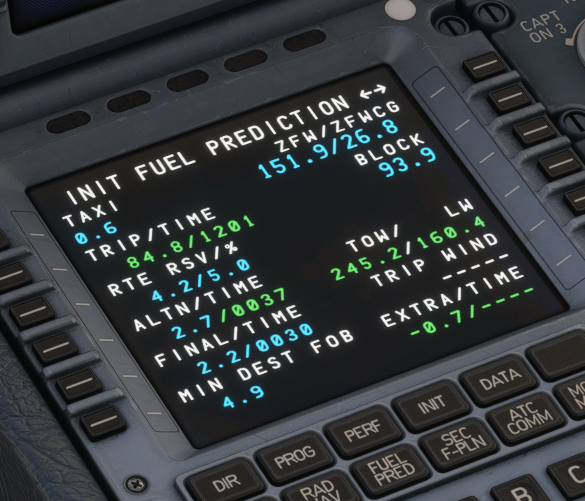
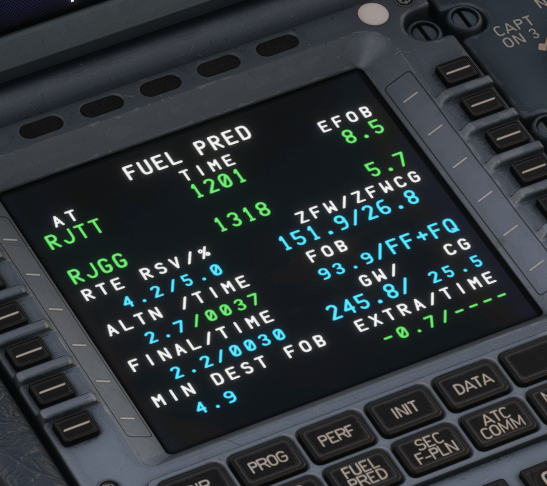
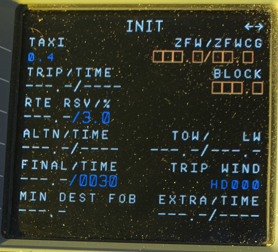
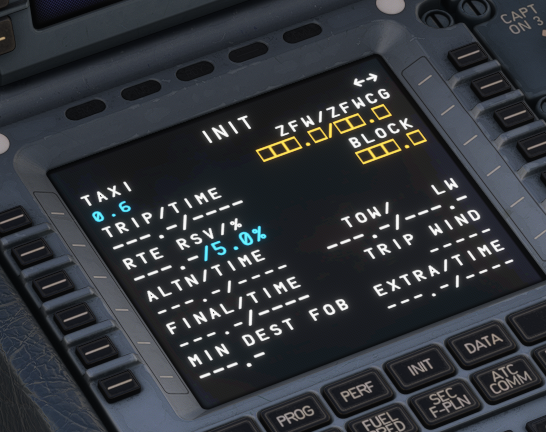
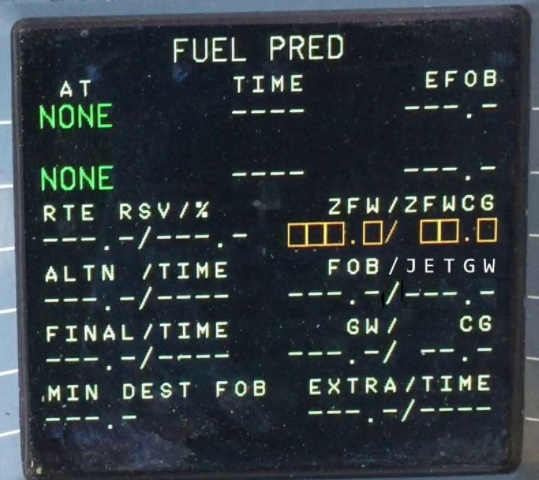
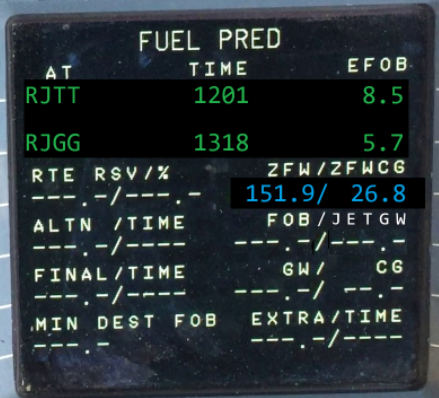
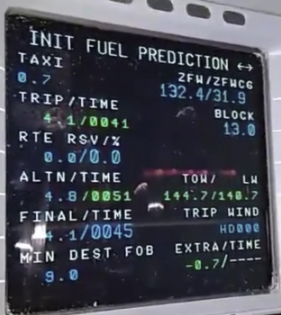
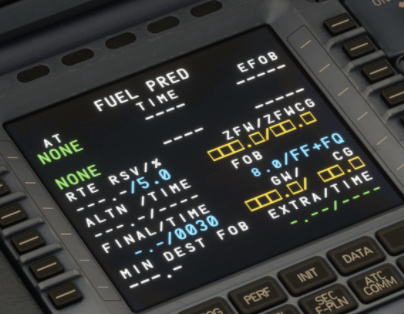
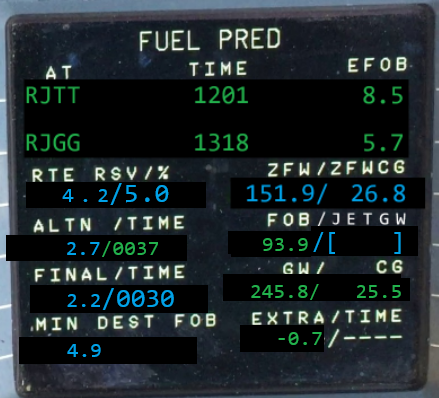
When I read the 1.09 changelog I found: "FIXED Format and calculation issues on INIT B and FUEL PRED pages" First I thought, hey finally they fixed the pages...but then I loaded the sim and ...disappointed...again. Why...left current/right expected ENGINES OFF / EMPTY FMS: - "/" for the dashed EXTRA TIME and ALTN TIME has to be large font - FINAL TIME value is missing - dashed TRIP WIND is fine, because ref photo was with already entered city/pair - dashes for ALTN TIME, FINAL TIME, EXTRA TIME and TRIP WIND have to be drawn in large font - with engines off, the most from line 2 to 6 has to be dashed ! - FF+FQ is only for the A320 family. Display JETGW if there is Jettison (at the OVHD) or just a blank field! - there are never blue or green dashes! - and also dashes are always large font! - ZFWCG boxes have to be one character right - FOB has to be one character right ENGINES OFF / FMS DATA ENTERED - RSV% value has to be large blue font - FINAL TIME value has to be large value - never green dashes - "/" at LSK4R has to be green...color is determined by folowing character color. - TRIP/TIME values have to be one character more left - keep most dashed!!!! - move ZFWCG value one column right ENGINES ON: - RSV% value has to be large blue font - FINAL TIME value has to be large value - never green dashes - replace FF+FQ by blue "[ ]" - GW and CG have to be green values, both small font - move ZFWCG value one column right - for A330/A340 FOB has to be green
-
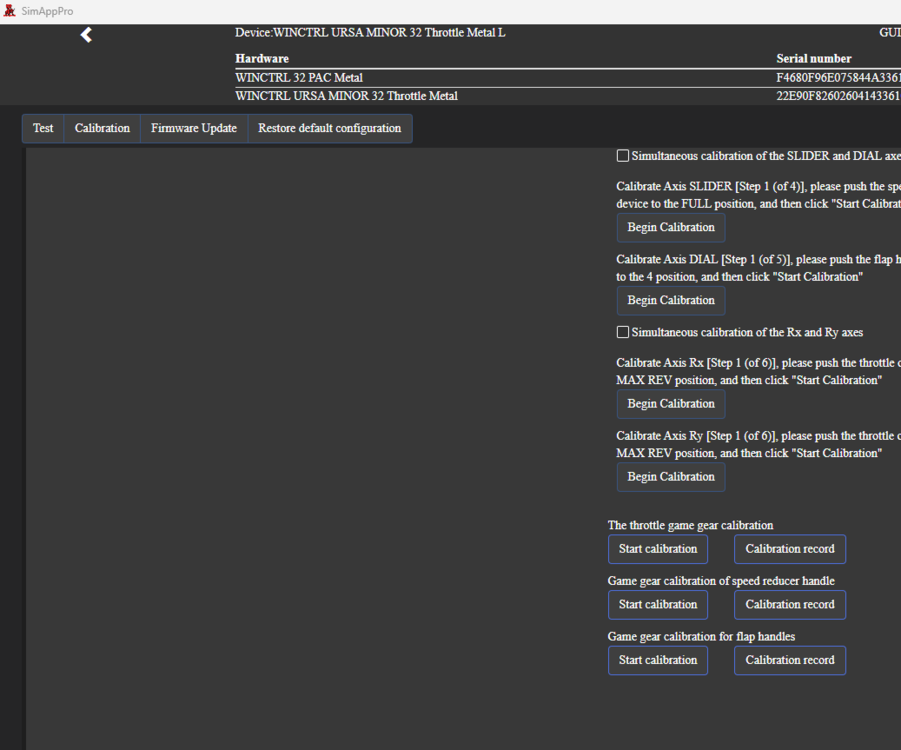
I had also a lot trouble with calibrating in aircrafts. What I did and fixed it for me, was to delete all game gear calibration records for all 3: throttle, speed, flap.
-
Oh, marketplace takes sometimes long to update, because of the MS internal processes. Best is to transfer your order to ini any use the inimanager. That’s the reason why I try to buy as less as possible in the marketplace.
-
Hi, what is the changelog for version 1.08? There was no announcement, but an update at marketplace.
-
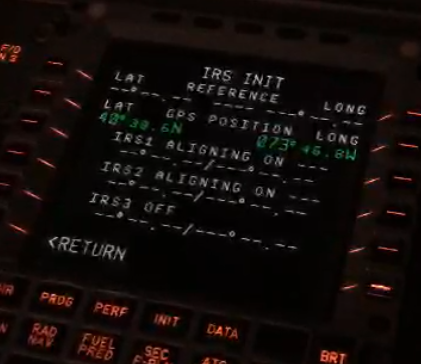
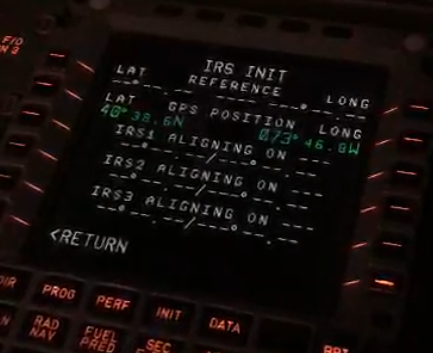
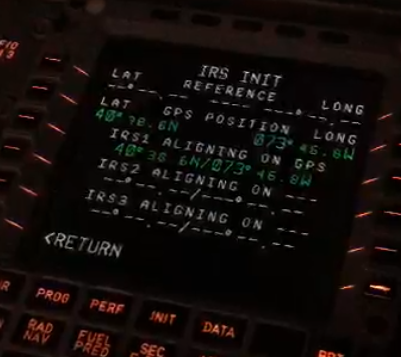
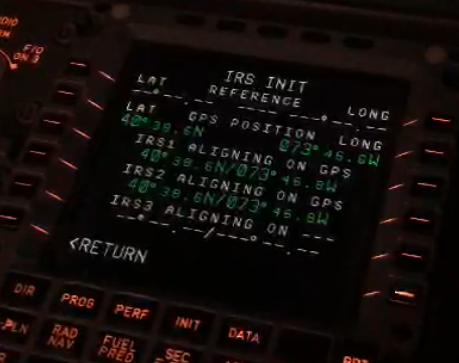
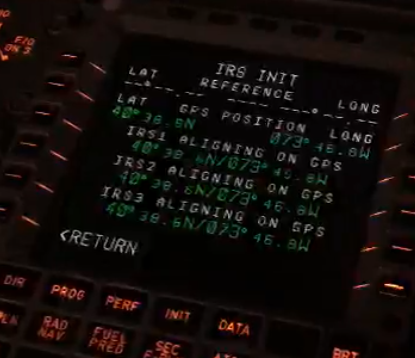
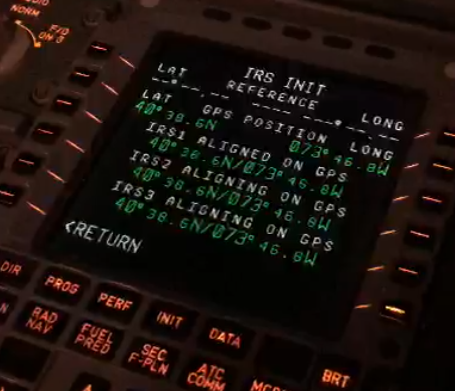
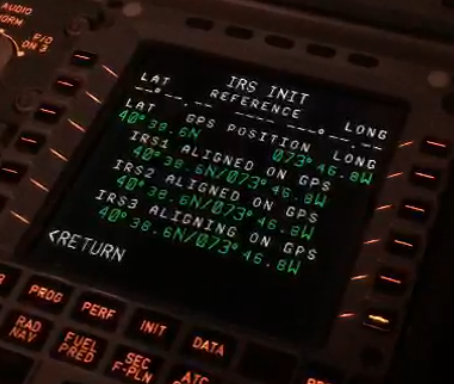
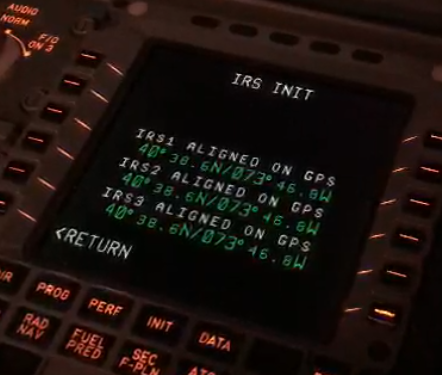
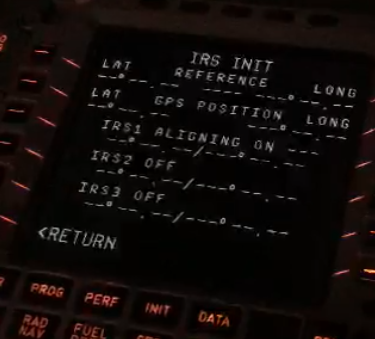
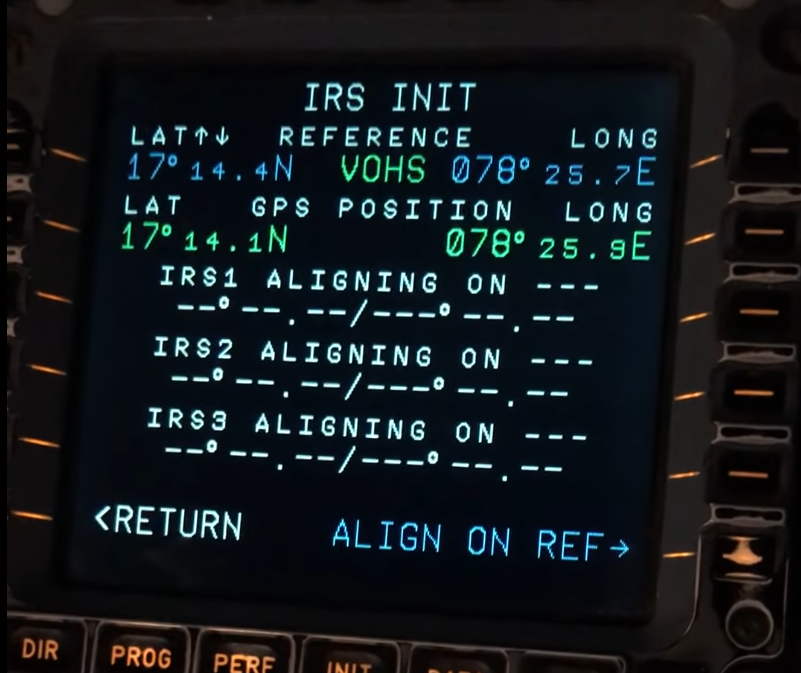
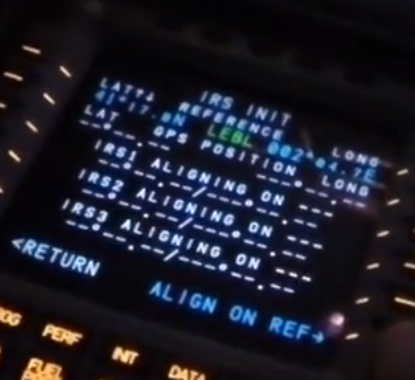
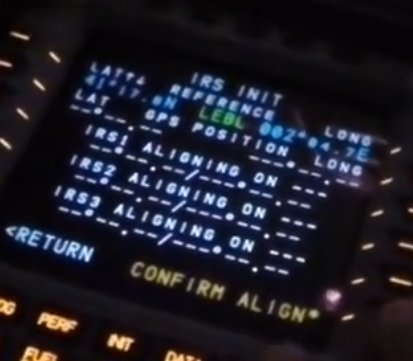
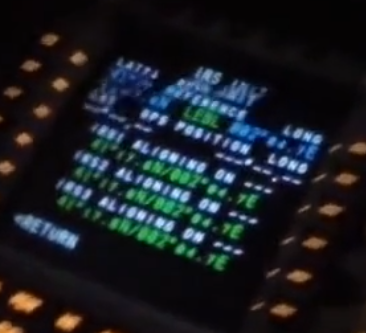
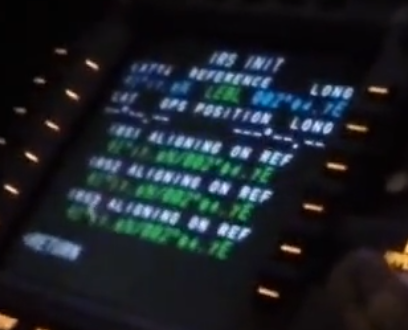
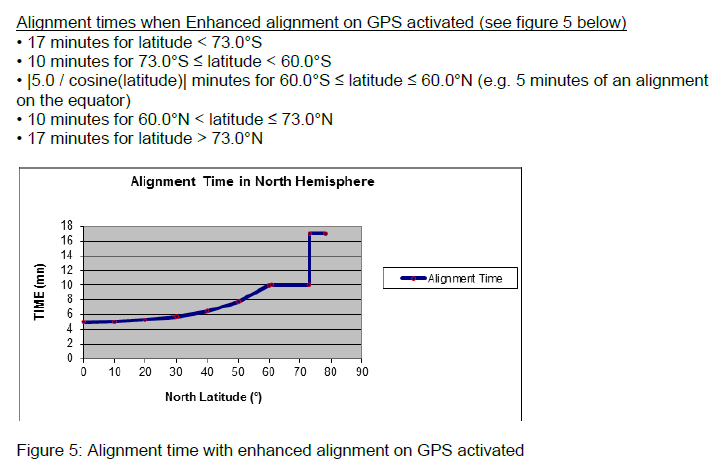
Since @iniSteven confirmed, that a P3 System is now no longer the target, this page is complete wrong! Attached some pictures: IRS are all 3 OFF: 1.0 second after IRS 1 is switched to NAV: 5.0 seconds after IRS 1 is switched to NAV: 1.0 second after IRS 2 is switched to NAV: 1.0 second after IRS 3 is switched to NAV: 15.0 second after IRS 1 is switched to NAV: 15.0 second after IRS 2 is switched to NAV: 15.0 second after IRS 3 is switched to NAV: IRS 1 aligned: IRS 2 aligned: IRS 3 aligned: This is now from an other video: If INIT A has an already entered FROM/TO, you get the option to align to refference: (Note: In this example it took 37 seconds form switching to NAV to provide the GPS position in line 2) The up/down arrows are default at LAT LSK1L and can be moved to LONG LSK1R by left/right arrow keys. Then the LAT/LONG can be adjusted with the up/down arrow keys. The ICAO ident is only displayed as long as the refference LAT/LONG ois matching the refference airport LAT/LONG. Now an exapmple with ALIGN ON REF: And some information regarding the ALIGNMENT time:
-
Yup, will that do. Thanks.
-
Steven thank you very much for your feedback. Yes I have documentation, what’s the mail address? So you are now doing a P4 (Release 1A) I assume. That’s the most usefull. Doing P5 would be too much (most current Release 2 with FLS etc.) At the End a P4 is less work for you as the most pages are currently P4. But a clear confirmation would be great. By the way, you missed an OFFSET page in P3, because there is none. The OFFSET is directly entered at the LATREV page, where you in a P4 have the access to the subpage. Just check my first post in this topic. The OFFSET is then described in the LATREV page section in the FCOM. But that is something every pilot should have been able to tell you. Also in the first post you see the pages you have now to change from P3 to P4 layout. After Christmas I will then update my topics regarding the page layouts, that reflect currently a P3 as target version.
-
Maybe, but that would be sad. When starting development you should now what you want and all the people who provide references should know what you are looking at, and also the the dev team should know what they want and should have an idea how the final product has to like like. If not all can be “correct” and results in what we currently have. That doesn’t speak well for the ini development Process. So we could be happy that they didn’t implement a Boeing FMS. P.S. But I still expect an official answer and will bump this topic regularly.
-
Hi iniTeam, @Eddie it’s irritating to see you and other moderators active in the forum, but no single reaction to my question. Now it’s eleven days since I rised my question. It would be really fair to get an answer. I postest a lot bug reports for the A340 and also the A350. For me it’s a pleasure to help to improve the airbus products. But to do that further on, some basic information is required. Currently I’m not happy, that you decided to just ignore this topic with the question. That’s not professional.
-
Hi iniTeam, I hope you had a chance to identify what FMGEC version you are implementing. It would be really helpful, if you could tell us the result.
-
Hi iniTeam, I would really appreciate it, if you could answer the question, what FMGEC System Version you are implementing in this addon. Shouldn't be to complicate to answer. THANK YOU! a) FMS2 HONEYWELL P2 b) FMS2 HONEYWELL P3 c) FMS2 HONEYWELL Release 1A P4 d) FMS2 HONEYWELL Release 2 P5A e) FMS2 THALES Rev 2+ T2 f) FMS2 THALES Release 1A T3 g) FMS2 THALES Release 1A T4 h) FMS2 THALES Release 1A T5B i) FMS2 THALES Release 2 T6A
-
Hello ini Team, @Eddie, @iniSteven, I have no idea what you are doing. Please, tell us what is the version of the FMS you try to implement? With 1.02 you downgraded the IRS INIT to HONEYWELL P3. Now you implement an OFFSET version of HONEYWELL P4. Some of my reports are based on the assumption you do P3, but if it’s now P4… So, what is it now? left P3 / right P4
-
It's an old FMS2 HONEYWELL P3 version. Not the FMS2 HONEYWELL Release 1A P4 or even newest FMS2 HONEYWELL Release 2 P5. So the answer is no.
-
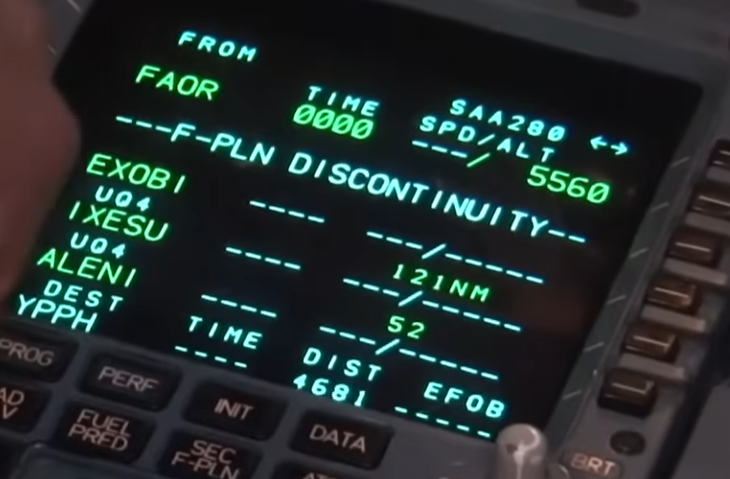
Found another refference for the case of LINE 2 has a DISCO: - NM is then in LINE 4, as leg distance between Line 3 and 4. - The current display of leg distance between line 1 and 3 in line 3 is wrong! - also line 3 shouldn't display a TRK
-
@Eddie this issue is also relevant for the A350 and all other Airbus ini has done so far. The last two pictures of my post clearly indicates the still long way ini has to go with its FMS.
-
Update: The Problem is the 4 character WPT. A 5 character WPT was working flawless.
-
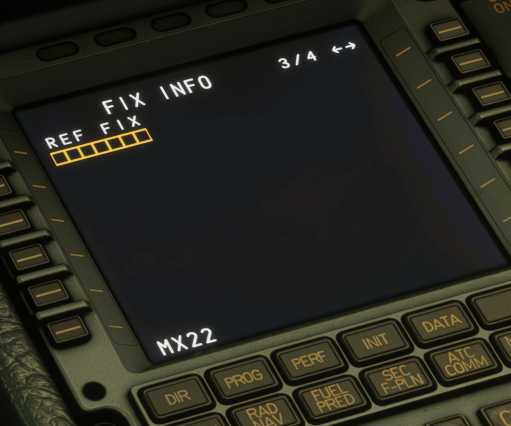
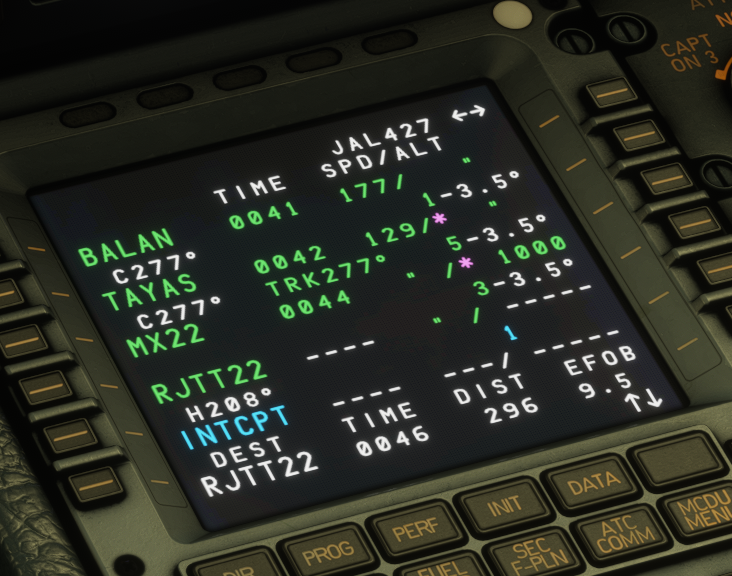
RJTT LDA22Y: MX22 is the hardcoded MAP of that approach. Now the systems displays several items wrong. 1. There is no RWY-Waypoint coded in the NAVDATABASE for that approach, because the MAP is prior the Runway. So DON'T display a RWY-Waypoint in the F-PLN !! 2. The blue track line has to start at MX22, because that's the MAP ! So the INTCPT Heading of 208° has to be drawn blue from MX22, resulting in a different INCTP position with the CF leg (178°) to UTIBO. 3. If the GA is not displayed, then there is just blank between MX22 and RWY. NO green line. 4. The WPT-name "INTCPT" has to be drawn green (also the diamond) on ND. 5. That is not related to LDA, but to all non Precission Approches with the MAP prior Rwy. 6. In the expected is the FIX INFO REF (green RJTT22 ) included, that is currently also not drawn (reported in other topic). 7. In the expexted is also a proper ALTN departure setting included (RJTT22 as departure), currently not possibel in iniAirbus, also reported. EXPECTED picture:
-
The RJBB24R SOVRI1 Departure is a RNAV SID. In the NAVDATABASE the complete SID has a hardcoded RNP of 0.1 NM. The currently indicated 1.00 is wrong. So you need to read what is in the DB and dispaly it. Please fix that!
-
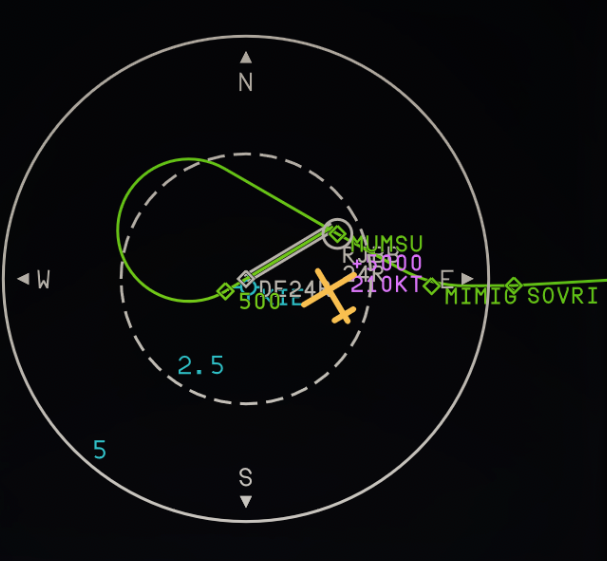
1. I expect a right turn at "500" and then to MUMSU - MIMIG - ... The DF leg between "500" and "MUMSU" is hardcoded as right turn in the NAVDATABASE....so you just need to drawwhat is coded. Please correct this ! RJBB24R - SOVRI1 2. You indicate the turn arrow in the F-PLN next to MUMSU. That's wrong! The Leg starts at "500" and the arrow indicate the pilot the turn direction he has to fly. So the arrow has to be displayed at 500 in the FPLN. Yes, the turn is coded in the DF leg and the F-PLN is representing that entry with the WPT MUMSU, but still the arrow has to be indicated next to 500 !! Bellow is a real world example (Yes, a modern Thales, but the same for the old Honeywell!). In the NAVDB the turn is there coded in the DF leg to GIMAL. But the arrow is indicated next to the "2000" of FA leg. 3. As already reported, don't show the magenta value of VA, CA and FA legs on F-PLN or ND !!! EXPECTED picture:
-
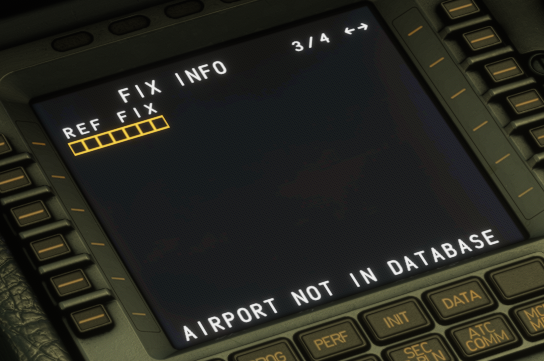
FIX Info doesn't accept a WPT entry. It looks like it just accepts Airports. That's wrong!