




YYZatcboy
Member
-
Joined
-
Last visited
-
Its coming up on a month that this has been out without the trerrain data being fixed. Please just bring this to inimanager so we can finally get updates...
-
I haven't had this issue. Have you been able to re-create it?
-
Its different than the A350 apparently. There are a few more steps. I wasn't getting it to show but when I clicked on the runway (above the green triangle) they showed up.
-
I use the one from the Synaptic website and it has the same issue since the latest update.
-
I'm aware of that. In previous posts Kyle has said that the Ini team sends these reports to them. If Synaptic was not going to use this forum for support, they would not have Ini host it on their forums or would have a post saying there is no tech support here.
-
I don't use Discord. That's why I post on what is supposed to be the official support forum.
-
I've got my SB defaulted to a flat 20 min taxi. This gives me 400lbs taxi fuel for the A220. I'm routinely overburning on my taxi (probably by about 2-300lbs). Is this an aircraft issue or can someone confirm this is a simbrief problem. I'm using the Simbrief profile provided by inibuilds via the forum.
-
I see a lot of posts here but no one seems to be reading them. Is this forum being monitored by the team/is INI passing these issues on to them?
-
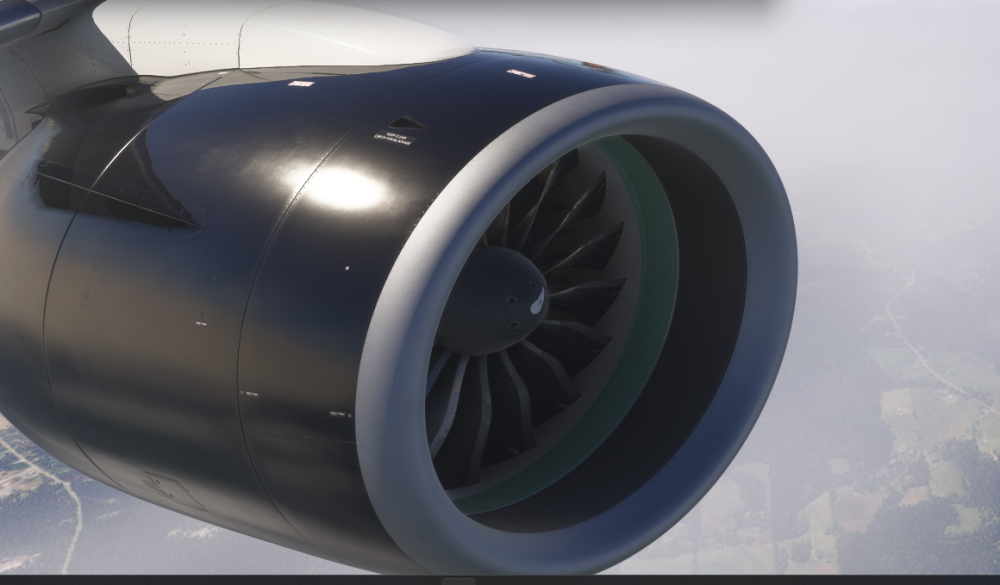
First time I've seen this but just took off out of YHZ and the engines aren't turning.
-
There seems to be an issue with the A220 not being read by FSUPIC/APL. You can see the aircraft moving but it appears the engine status doesn't transmit to APL properly, so you never leave pre-flight even if you're in the air.
-
-


