




Supera380
Member
-
Joined
-
Last visited
Everything posted by Supera380
-
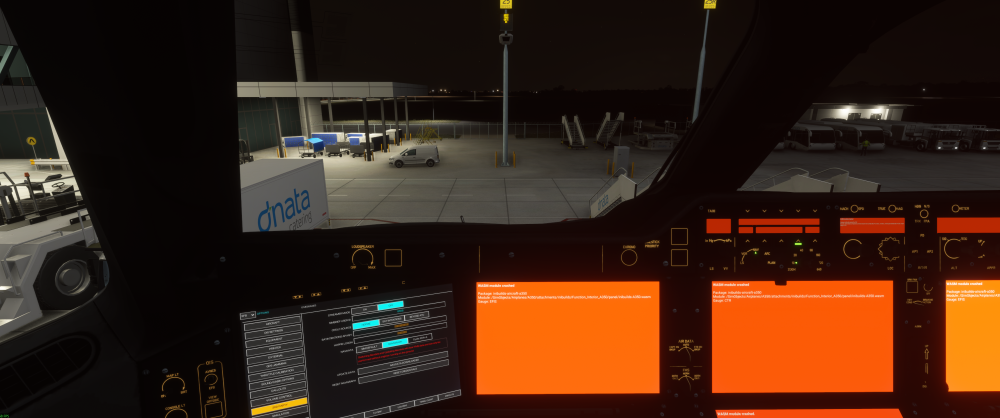
Hello team, I experienced a WASM crash today upon updating to v1.2.8. Aircraft: A350-900 (no cabin) Simulator: FS2024, PC Navdata Method: NAVIGRAPH OFP: None loaded WASM Error: WASM: Module vfs://inibuilds-aircraft-a350/SimObjects/Airplanes/A350/attachments/inibuilds/Function_Interior_A350/panel/inibuilds-A350.wasm gauge: EFIS Specs: i5 12600K, RTX 470 Super, 32gb DDR4 RAM, Windows 11 Autosave File: N/A Steps prior to crash: Performed update from v1.2.6 to v1.2.8 via IniManager. Launched MSFS2024 via Steam Selected Free Flight and selected YSWS as airport and Gate 25. Clicked Ready for Flight. From external view, used CTRL C to get to cockpit view. Used custom view key to select Overhead panel view Activated all 4 battery switches then Ground Power 2 and 1 then ADIRU switches 1, 3 and 2. Switched back to cockpit view then another key custom view key to display OIS panel. Went to Options and Navadata screen when OIS was live Clicked update for Navigraph data Download with progress bar showed its normal activity. When download of Nav data finished , immediate orange screen on almost all displays. OIS showed normal display. (Note general nav data update from Navigraph hub had not been performed yet)
-
Hi Kyle, No, did not fly anything else yet into YSWS, however I did raise the issue on the Navigraph forum and they did confirm the airport map does not exist yet. Jeppesen need to make it. No ETA on if or when they will do this. So I would expect the same issue with the A380 to appear. Cheers
-
Well that problem is what I had last week. Suggestion, try and select another airport by entering the icao code of a known airport like eddf, jkden etc (where the dashed lines are shown in the bottom display) and test that the moving map works for that airport. If so, I suspect the moving map database (which is separate from your Navigraph fms data) has no airport map data for the airport you were at. Post the issue on the Navigraph Charts forum and quote the problem airport. They will verify the issue for the problematic airport.. FWIW - had this exact issue 1 week ago flying into YSWS which is the new Sydney airport. FMS data from Navigraph is present but the separate airport map provided by Jeppesen is not available yet. Not much Navigraph can do as it relies on Jeppesen to create it. Best to be patient.
-
Hi, I need a bit of help. I have flown in to YSWS (the new Sydney airport) today and noticed that if I try and call up the airport map on the ND, the window is blank. I.e. ANF shows nothing. If i move the ND mode knob to Plan and then Zoom in and click the double arrow icon the table of airports are displayed. If i search for YSSY or NZAA for example when ICAO is selected, those airport charts do display on the ND, however if I try and enter the ICAO code "YSWS" in the airport selection field, the table with the ARPT SEL tab shows the following "Not in ICAO database". How can this be fixed or updated? I have a Navigraph subscription and the aircraft correctly shows the latest airac cycle in the MCDU. The OIS also shows the correct cycle loaded. I have also tried updating the Navigraph database and resetting Navigraph credentials but none of this fixes the missing airport chart. The flight was successful following STAR and ILS approach charts into this airport. Can you pls check to see if you see the same behavior for this airport and what can be done for it to be added to the database? Note: This is not the usual Airport Not Available error. I beleive that the airport entry is missing from the AMDB (please confirm) but I believe this is maintained by Navigraph and not Inibuilds. Thanks! Mark
-
Just to make a correction to the statement I made above , there is still a p/b button for the Probe Heat but it requires in normal circumstances no manual activation as its automatic. Just saw it this morning. For some reason I had in my mind a missing switch but must have been thinking about another aircraft.
-
Yeah, no idea why Airbus dropped the dot. I know they try and maintain commonality and that's certainly true when comparing say A330 with A340 but with the A350, you have think of it as a next gen, evolutionary step change, so not everything 100% correlates to the "older" aircraft families. Another nuance, there is no Probe Heat p/b any longer. Instead it's fully integrated into the systems so it's switched on as soon as an engine is running. OK, saving of a switch in the cockpit and related wiring is potentially a cost saving for Airbus and another simplification that pilots dont have to worry about. With the dot not showing on the FCU, that's a different story.🤔 Hopefully an Airbus avionics engineer can explain why they elected to stop displaying the dot?😉
-
The dot character that you mean is normally displayed on the FCU that indicates managed speed and altitude? If so, this is not available on the A350. This is a small change vs the A330/A320 family. You need to refer to the FMA guidance modes on the PFD to determine which lateral/vertical guidance has been engaged and selected.
-
Same problem. Simbrief shows 318 pax count. Go into inibuilds EFB and import OFP. ZFW and Block Fuel show correctly in Loadsheet but pax count shows 161. Re executed Simbrief import. No change. This is without starting GSX. Can someone from Inibuilds please confirm this behavior? Currently running MSFS2024 SU6. EDIT: Problem resolved. Pax now set to 324. A350-900ULR version was loaded. Changed to non ULR variant and max pax set to 324 in EFB.
-
I had this same problem in the A350-900 that the fuel load was initially imported from Simbrief, but in normal operations the captain would round the fuel load up to the nearest ton, so in the example above I wanted to set 46000 kg but pressing the 'Instant Fuel" button after the initial fuel has been loaded is not possible. You are presented with 2 options and the buttons are no longer clickable. FOB continues to remain at the initial value set and not consistent with what is later typed into the Fuel Load field of the EFB.
-
+1 same issue happening with latest inibuilds version. Aircraft moves forward when parking brake is released. Pretty much uncontrollable. The issue is when the chocks are removed. To workaround this, I removed the chocks and the GPU in the GSX step prior to requesting pushback. This seems to work.
-
Aircraft: A350-900 Nocabin v1.2.6 Simulator: FS2024 SU5.1 Navdata Method: NAVIGRAPH OFP: Not created or uploaded at this early stage WASM Error: Error FCU WASM crash info displayed. Only FCU panel was orange. Specs: i5-12600K, RTX 4070 Super, 12Gb VRAM , 32Gb RAM, Windows 11 Professional Autosave File: N/A Initial observation: First WASM crash observed with A350. Loaded sim, selected Free Flight then selected LEBL, Gate 217 (MK Studios scenery). No destination airport selected. Everything OK. Selected End Flight then selected EGCC, Gate 12 (Inibuilds scenery) as departure with no destination airport selected. Went into cockpit. Only FCU WASM crash observed. Other gauges all OK. Next steps: Exited sim. Restarted sim and selected EGCC, Gate 12 once more. No WASM crash. Console log.txt
-
Hi, Just reporting another issue this time in trying to fly from VABB to WMKK. MSFS2024, SU3. It's a 5 hour flight requiring 13.9 tons of fuel however if you try and enter the ZFW and Fuel load into the Inibuilds EFB, the ZFW loads correctly into the aircraft however the centre tank briefly loads with fuel as shown on the ECAM but is zeroed out again shortly afterwards (after 1-2 secs) meaning you can not fly with the full amount of fuel in the A320 NEO when trying to do more than 4hr flights (depending upon pax load of course)! Example: Enter the following values into the Inibuilds EFB then click Apply Load. ZFW=61284kg Fuel=13879kg Instead, the fuel is limited to only the wing tanks being filled in the actual aircraft and a max of 12,420kg of fuel is shown on the ECAM. On the ECAM, the centre tank initially shows a value briefly after loading, but after 1-2 secs, the centre tank shows 0 kg of fuel. Any value below 12.4 tons of total fuel works OK. Any value above this which relies upon centre tanks to be filled does not work. Please Inibuilds can you please fix this as this significantly impacts trying to do longer flights in the A320 NEO !!! Apparently this is being seen in SU4 too! Thanks, Mark
-
What version of the sim are you using? For MSFS 2024 SU3 it is "mostly" working.
-
Hi, I wanted to let you know that when syncing the Simbrief OFP with the MCDU using the inbuilt EFB, the values in the Payload screen shown within the EFB are correct however when the sync with the MCDU is made and you move to INIT B of the MCDU, the incorrect CG value is loaded. On my MSFS2024 sim PC this is 100% reproducible and can also be seen in another person's YT video of setting up the MCDU in the A320 NEO. Look specifically for the time events in the video: At 18:45 where the OFP from Simbrief is synced, instant payload is selected and the values of 28.4% for the GWCG and 27.4% for the ZFWCG are displayed. At 31:55 you will see the MCDU ZFW/ZFWCG values populate in the MCDU by clicking the RSK twice. Here you will notice the ZFWCG value populates with the GWCG value and not the ZFWCG value.i.e. the ZFWCG should populate with 27.4% but instead populates with 28.4% within the MCDU. Can someone else also reproduce these steps and if so, can this be fixed in a future update of the A320NEO? Thanks Mark


