Blaster254
Member
-
Joined
-
Last visited
Everything posted by Blaster254
-
Wipers get stuck when turned on. MSFS2024 A350
-
Thank you and apologies for delay in reply. Dome light issue sorted. User error (me). Not switching on the CTL switch first. Apologies. Works differently from other Airbus’s previously used. And thank you re the integ light. So just to confirm in the A340 all the centre isle panels remain lit basically all the time, accepting that you can turn the brightness down?
-
Welcome. I think the performance is largely related to the cabin. What I don’t get is that the A340 is silky smooth. It doesn’t make sense
-
It’s not fixed in the latest update 😭
-
I believe it’s either 1 or 2k. With the cabin added, performance is still rubbish
-
Little issue already reported via support. Another video to show the issue. when using the Integ lights control for night lighting on the flight deck, it also controls the lighting for the radio panels and clock. I've not seen this before in any Airbus addons including the A350 and not convinced its supposed to. Also no dim light for dome light. This is the updated version 1.0.1 The example https://youtu.be/iy98Fw8Msuk Ryan
-
It appears to be fixed in version 1.0.1
-
Same problem. I give up. Can’t even find the folders to delete. Checked the EFB. It’s 1.0.0
-
https://youtu.be/1IsuXb8UQ4U Think I've cracked it
-
Perfect. Will do tomorrow. Apologies for the pain
-
It appears only short clips can be saved as a GIF. Eddie is there any other way I can get the video to you?
-
The vid files are apparently too large. Even compressed in a zip file
-
Will try that. Apologies
-
Same here. When I looked it up, it appears other inibuilds aircraft as well. The repeated reminder from GSX is driving me nuts
-
Not sure if you can view this file. Recorded using MSFS2024. Maybe placing in in the MSFS2024 LocalState WASM folder and viewing it on the sim? If not will find another way savedFiles.json
-
-
Will try when I get a minute tomorrow. It’s so weird
-
Hi guys. I have reported this, but just wanted to see if anyone else has this. SU3 issue. With the beacon light on, when I turn the strobe lights on they do not work. I then turn the beacon light off and the strobe lights on and they start working. But then can’t get the beacon light to work 😂 (confused yet) I have to juggle to the switches a few times until finally both are on! Hope I’m not going nuts 🤪 Ryan
-
It’s disappointing to see that even after the latest update, there’s still issues with zooming out in flight deck and camera losing focus. Also maps when en route don’t work. The screen goes black. Only on the ground do the work or when near departure or landing airports. These have been reported some 3 updates ago
-
That's exactly what's happened. Its hard to criticise as the A350 is amazing! I did actually get a reply from the team. Fingers crossed there will be an update at some point. My last two flights have been issue free actually. There's an issue where if you do anything outside of the main flight, for example, during my last corrupted flight, I loaded the simbrief flight mid flight in to the MSFS flight planner. This caused the Autopilot to freeze. The other time was a go around. It didn't like it and froze the autopilot. Really strange
-
Amazing! It’s now the 18th March 2025. Look at the date of the first post. I’ve reported this via a ticket. They asked for a video showing it. Think they can poke that. Plenty of info on here. It’s not a sim issue. It’s an Inibuild A300 issue clearly. The plane is basically unusable. I would suggest an imminent fix or get your money back guys. This is not what you paid for Inibullds? Where’s the fix?
-
Think I’m having the same problem here. Switches are not animating or moving in flightdeck but are working. Not sure if during cruise or after pause at TOD. Defo a problem
-
The answer to my last is yes it does. Apologies I don’t know how I didn’t spot that. Still should not have auto disconnected. Bit embarrassed I didn’t spot that
-
Yes but wouldn’t reset. Also doesn’t explain the heading select and no heading select indicator on the primary flight display?
-
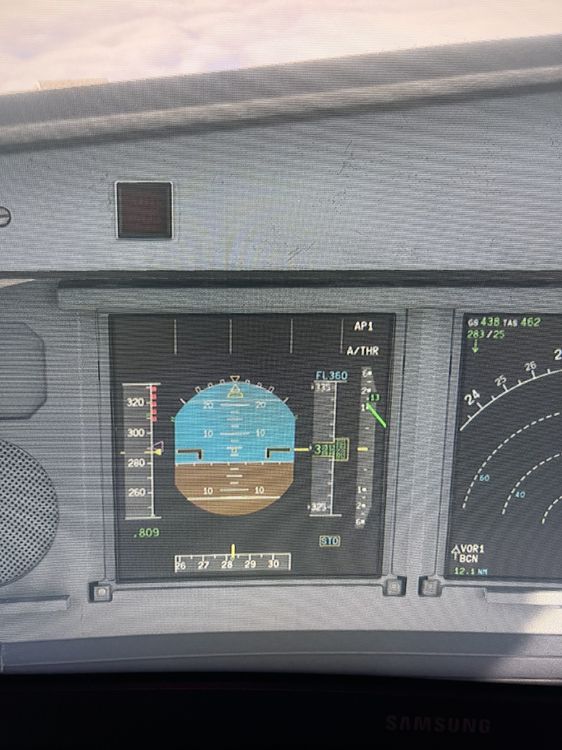
Today I took off from EGLL. Initial climb to fl240. Then I literally blinked. Speed nav etc disappeared from primary flight display. The only display at the top was AP1/2. All three other areas were blank. Also heading would not engage. There was no heading indicator on the PFD. Would not capture altitude. Only manual flight was permitted. I tried disengaging and re-engaging auto throttle and autopilot. To no avail. Help