




Rodrigo Martins
Member
-
Joined
-
Last visited
Everything posted by Rodrigo Martins
-
I guess no, if you see my video, you can note that the commands not response, and the plane fall in the vertical... like zero lift... but the engines continues works well... looks like a severe stall
-
PC Specs: Intel i7 12700KF GeForce RTX 4070Ti 32gb RAM 3200mhz Thrustmaster Office Pack Airbus Edition Thrustmaster T.Flight Rudder Pedals.
-
Hello guys, I have the problem recorded in a Live... and I flew the lag again and it's not happened... To @iniBuilds Team I have only the GSX addon installed, others plug-ins are airport scenery... I never had this problem with the others version of the aircraft... It's new for me... Follow the video:
-
Update v1.0.3 fixed the stutters problems! 😍👏
-
The last update v1.0.3 fixed the Stutters!! Thank you iniBuilds!!! Now it's working great and smooth!
-
And maybe it is some little detail... hard to find it 😅 because occurs only at night!
-
@Marcocessna84 My monitor is 1080p but I use 1440p for the SIM... I did a teste closing the FSRealistic, turn back the RES to 1080p and restart the simulator... but It didn't work... I guess it's some file on core of the aircraft that is conflictin with the DX12... because others third-party aircraft works fine...
-
Nice tip! In DX11 stutters didn't appeared, but I lost the Frame Generator... And fps drops from 100 to 52😵💫
-
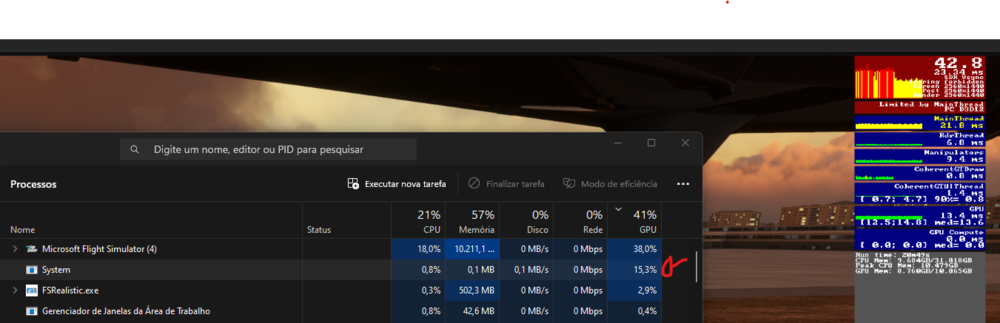
Stutters still present on V.1.0.2 😭 On task manager, always the stutter happens the process "System" up from 0% to ~14%
-
Hello @PotatoSalad I'll test now, do a short flight at dusk
-
Same issue here with i7 12th and RTX 4070Ti, but after downgrade the textures that helped, but after landing in a third party airport, the problem came again... The VRAM uses is too high... With third-party aircrafts it maintains about 6~8gb, but with the A300 stays on the limit! I've created a post in Suggestion, and shared videos, hope that helped the staff...
-
The VRAM is in the limit... I tried another aircraft but I did have to restart the msfs.. I've test on F. A320 with all systems and engine turn on, it maintains about 8gb VRAM, the MD82 stay about 6gb~7gb VRAM. Same airport, same position. Hope this helps.
-
!! But after I land it happened again... follow the video.. even not moving camera.. It not happens with another aircraft... 30s, 3 peaks of stutters
-
After the hotfix and downgrade liveries the MSFS looks stable... Not presents Stutters
-
-
Sorry, I've upload on YouTube... ***After the last hotfix launched, I downgrade the liveries and the perform improve... But my PC specs isn't low-end... I have an i7 12700kf, 32gb ram and RTX4070Ti, I guess that liveries resolution is not the problem...***
-
Same problem here!
-
As you could see, in 30s it happens 3 times...
-
I did it, but I couldn't upload here due size limit, could you try to see by this link? Microsoft Flight Simulator 2023-12-29 06-23-26.mp4 - VEED
-
Occasionally stutters happening every 10s, even not moving camera... I could record a video if need it.
-
I don't know if someone already reported it, but could you add in the future the function to Fix Charts and possibility to drag charts with mouse?


