




Paul Moore
Member
-
Joined
-
Last visited
Everything posted by Paul Moore
-
This has worked for me while IniBuilds work on a solution.
-
I'm experiencing this exact problem at EGLL, and also at EGKK (although at EGKK despite showing a 'rotation invalid' red error message the jetways did move to the aircraft). At EGLL not connecting to the aircraft. Have the latest GSX version and ran the 'Check' before spawning at the airport - not resolve for me.
-
Kyle - clicking "Check" seemed to fix it. Resolved. Thanks for your help and assistance.
-
GSX is latest.

-
Steps I took: Downloaded and extracted the IniBuilds A380 Airliner - GSX Profile.zip into %AppData%\Virtuali\Airplanes. Verification of files Inside the folder %AppData%\Virtuali\Airplanes there is a folder called inibuilds-a380. Inside the inibuilds-a380 folder are two sub-folders with the following files: (i) \_MACOSX\inibuilds-a380\800\._gsx.cfg; and (ii) \800\gsx.cfg
-
The manual download of the GSX profile hasn't resolved the issue at my end. Repeatedly attempted this fix but to no avail unfortunately.
-
Yes - latest version of GSX.
-
-
Hi Kyle - yes I can confirm no other A380 in GSX folder. There are no other A380 folders or profiles present.
-
-
I am experiencing this problem too. Try to reset calibration but is strangely also proving difficult - apart from TOGA, miniscule throttle movements (on the MTQ) produce large disproportionate movements in the axis making it extremely difficult to set FLEX, CLMB, IDLE, IDLE-R and MAX-R. I am using Moza MTQ.
-
I am experiencing a persistent GSX integration problem with the iniBuilds A380 in MSFS 2024. GSX reports: “SimBrief error: Can’t read aircraft type” I have undertaken the following troubleshooting without success: Installed the official iniBuilds A380 GSX profile manually. Confirmed the inibuilds-a380 folder is installed under %AppData%\Virtuali\Airplanes. Removed and reinstalled the profile 3 times. Installed the recommended iniBuilds A380 aircraft type and profile within SimBrief. Restarted MSFS 2024 several times.. Confirmed the GSX Remote Control Server is enabled. Confirmed the correct SimBrief User ID and Pilot ID are entered in both the A380 and GSX. Confirmed GSX is fully updated and connected. Restarted Couatl after the A380 was fully loaded at the gate. Checked and can confirm GSX is latest version. None of these interventions has resolved the problem. Given the specific wording of the error, I am concerned that GSX may not be correctly identifying the A380 as ICAO type A388, rather than this being a SimBrief authentication or profile issue? I am also aware that other users are currently reporting GSX integration problems with the A380. Could you please advise whether this is a known issue and whether there is a current workaround or update planned? I can confirm that no other aircraft demonstrates this issue, including the IniBuilds A350 which I also own.
-
Kyle - you are a genius! The default Asobo hand crafted OMDB was not disabled and was indeed the culprit. Thank you for pointing this out - extremely grateful. OMDB looks incredible now.
-
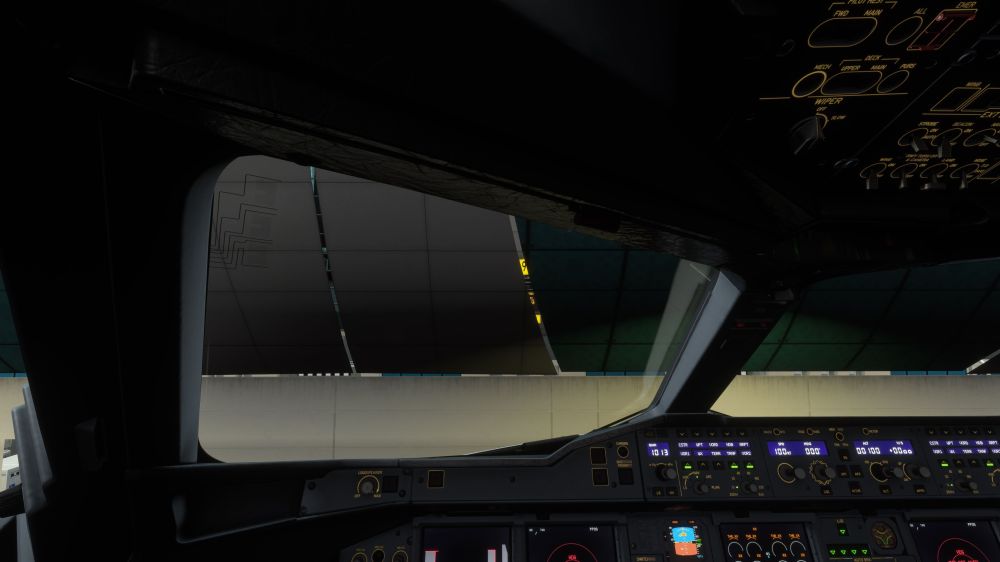
Kyle - I didn't notice this until just now, but the VGDS appears to be incorrectly positioned behind the glass of the Terminal (i.e. inside the terminal building). Take a screen shot to illustrate
-
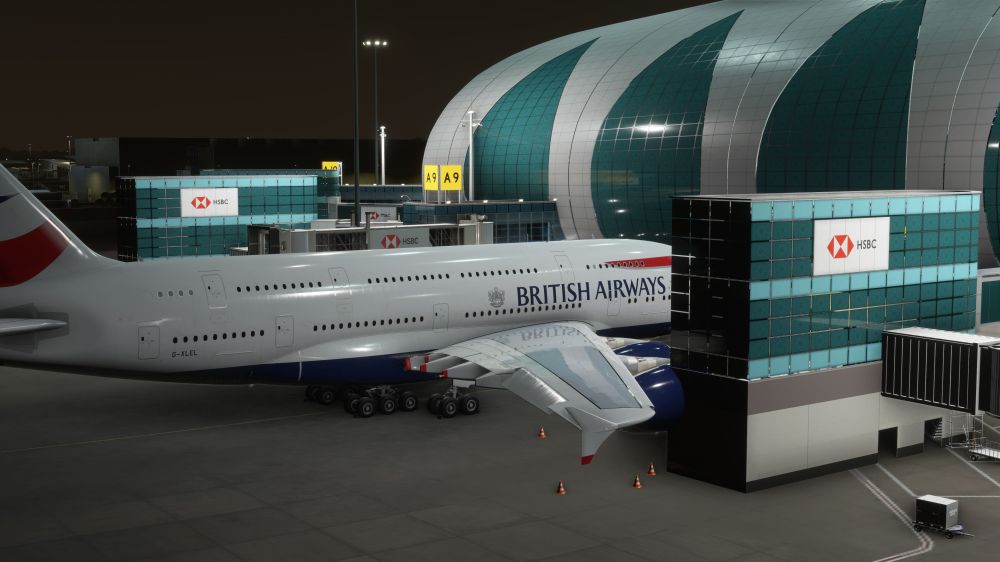
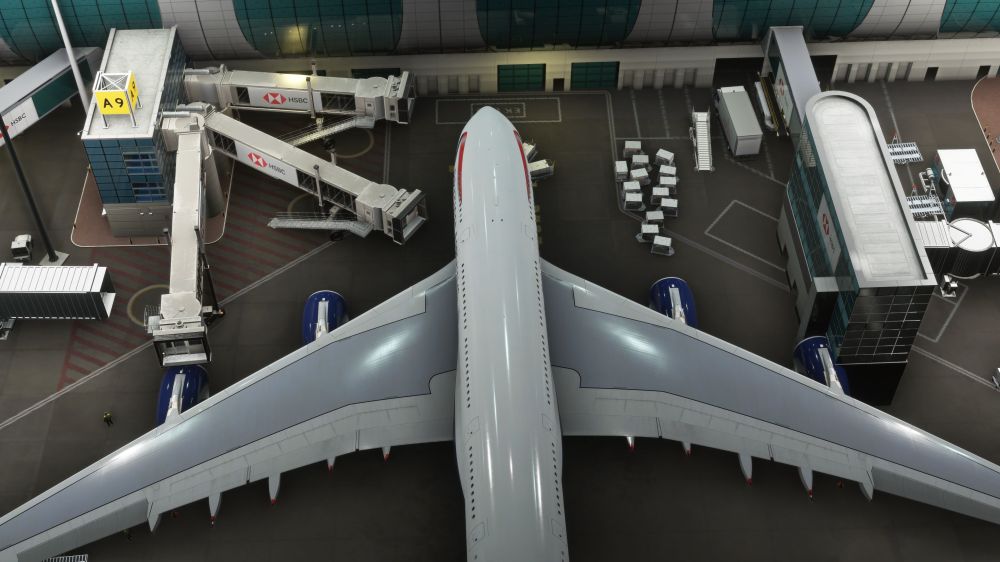
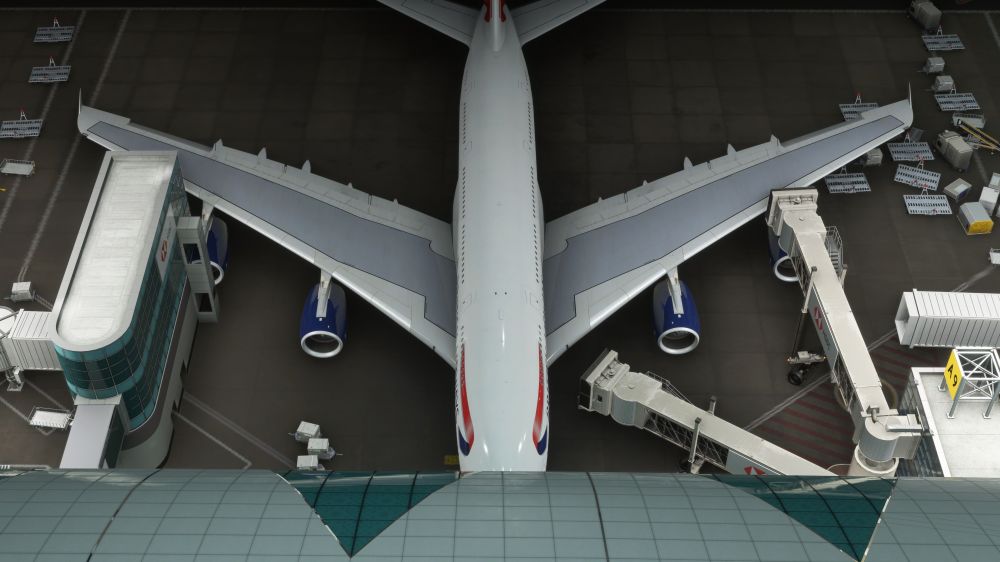
Thank you Kyle. Here are some screen shots which demonstrate the engine 4 problem at Gate A9 at OMDB.
-
Landed at OMDB in the new A380 and received instructions to taxi to Gate A9. I understand Gate A9 is one of the gates with the new multi jetways and equipped to take the A380. However engine 4 is super-imposed on the building supporting the jetways for gate A8. Tried to reposition using GSX at gate A9 - repositioned OK - but engine 4 once again cutting into the building. Gate F12 is superb - has the space for the A380 - but, interestingly, in the real world is not equipped for the A380! Can we have the gates equipped for the A380 large enough to take the plane?
-
Thank you. Yes, you're right not using Auto-FPS did remove the problem - but there was an associated performance hit on my PC.
-
I am experiencing a persistent cockpit interaction problem with the iniBuilds A380 in MSFS 2024 when flying in VR. During use, all of the cockpit interaction points illuminate blue and become highlighted simultaneously. All lights are illuminated for every switch/setting. At the same time, I lose the ability to operate cockpit controls using the mouse. Moving the mouse does not restore normal interaction and I am unable to click switches, buttons, displays, or other cockpit controls. Reverting to a previously saved auto-save point temporarily removes the problem but it reappears again within 5-10 minutes of flying. I also experience a floating knob in the pilot's main window. I have not experienced this issue when I deactivate VR, but when I reactive VR it recurs. The problem appears to be associated specifically with VR operation and makes the aircraft effectively unusable once it occurs. My VR headset is a Pimax Crystal Super. I would be grateful to know: Whether this is a known issue with the A380 in VR. Whether other users have reported the same behaviour. Whether there is a recommended workaround or change to the MSFS Cockpit Interaction System. Whether there are any A380 WASM, VR, or mouse interaction settings that should be reset or changed. I am happy to provide further system details, screenshots, video, or log files if these would assist investigation. Many thanks. Apologies in advance, I do not know hoe to take a screen shot in VR to illustrate the issue I am seeing.
-
Appears not to be an issue with the ini builds A350, but with MSFS as it's happening in other aircrafts too. Apologies.
-
The aircraft loads into MSFS2020 in cold and dark with the flap level in the full position. Pressing F5 or using the mouse moves it but it immediately springs back into the full position.
-
Yeah - in MSFS2020 retract flaps in bound to F5 (default). Pressing this key moves the level to zero but it immediately springs back to 'full' flaps. Same using the mouse. I can't seem to resolve this.
-
Updated to version v1.0.2 I am unable to move the flaps lever. The lever is stuck in 'Full' position and if moved immediately reverts to the 'Full' position. It won't move from the full position either using the mouse or via keyboard - both in MSFS2020 and MSFS2024. Aircraft is unusable. Any ideas?


